DisplayAlertDialogWithOptOut(string, string, string, DialogOptOutDecisionType, string, DialogIconType)
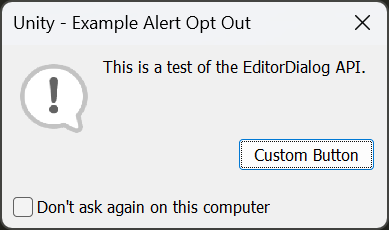
Displays a simple alert dialog box with a title, icon, message, a button, and an opt-out checkbox.
Read time 2 minutesLast updated a month ago
Definition
- Type: Method
- Namespace: UnityEditor
- Assembly: UnityEditor
public static void DisplayAlertDialogWithOptOut(string titleText, string messageText, string buttonText, DialogOptOutDecisionType optOutDecisionType, string optOutKey, DialogIconType iconType = DialogIconType.Warning)
Parameters
The title of the dialog box. If left null, defaults to "Unity".
The message to display in the dialog box.
The text to display on the button. If left null, defaults to "OK".
Where the result is stored if the user opts out of the dialog, which they can do if they enable Don't ask again in the dialog box.
The key to use to store the opt-out decision.
The icon to display in the dialog box. Defaults to DialogIconType.Warning.
Remarks
If is null or whitespace, an is thrown. If is longer than 512 characters, it is truncated and the full message is logged to the console in markdown format.
messageTextArgumentNullExceptionmessageTextIf is longer than 64 characters, an is thrown.
buttonTextArgumentExceptionIf is not a valid XML tag, or more than 127 characters long, an is thrown. Care should be taken to ensure that the key is unique to the dialog box being displayed to prevent conflicts. The API takes care of the stored decision, so you do not need to check the value of the key before displaying the dialog box. Users can reset the decision in Editor Preferences.
optOutKeyArgumentExceptionThe following example demonstrates how to display a simple alert dialog box with a warning icon, a title, a message, and an OK button.
using UnityEditor;using UnityEngine;namespace Examples{ public class DisplayAlertDialogWithOptOutExample : MonoBehaviour { [MenuItem("Window/EditorDialog Example/DisplayAlertDialogWithOptOut")] public static void DisplayAlertDialogExample() { EditorDialog.DisplayAlertDialogWithOptOut( "Unity - Example Alert Opt Out", "This is a test of the EditorDialog API.", "Custom Button", DialogOptOutDecisionType.ForThisUser, "ExampleAlertOptOut", DialogIconType.Info); } }}
Produces the following dialog box on Windows 11: