发起购买
从应用程序开始购买,让玩家选择如何使用 Purchase Options UI 付款。
阅读时间5 分钟最后更新于 1 个月前
玩家选择购买商品时,可使用 Unity 应用内购 (IAP) SDK 从应用程序开始购买。建议使用 Purchase Options UI,这是一个游戏内组件,向玩家提供他们有资格使用的付款选项,例如原生商店、付款提供商或您的网上商店。
Purchase Options UI 是直接到消费者 (D2C) 付款的默认集成路径。要显示此信息,请调用包含要出售的列表的单个方法,然后 UI 会显示您的路由规则 return for that player. You don't build the interface yourself. If a project hasn't configured a payment provider, its purchase behavior doesn't change.的付款选项
如果要展示自己的购买界面,可以构建自定义 UI 并直接使用路由输出。
先决条件
在通过 Purchase Options UI 发起购买之前,请完成以下步骤:
- 创建并获取 Remote Catalog。
- 初始化 IAP 服务并连接到商店。
- 要显示 D2C 选项,请至少连接一个支付提供商,并添加路由规则以适用于玩家。
从应用程序开始购买
要开始购买并显示购买选项 UI,请调用 以显示要出售的列表。该标识玩家购买的特定列表。如果您尚未为一个商品定义多个列表,则该与商品的 SKU 匹配。有关更多信息,请参阅产品和目录列表。
IPaymentOptionProvider``ShowPurchaseOptioncatalogListingIdcatalogListingIdcatalogListingId通过调用 从 获取,如果项目使用 UI 工具包,则调用 。
GetPaymentOptionProviderUGUI()IPaymentProvidersExtendedServiceIPaymentOptionProviderGetPaymentOptionProviderUITK()public async void BuyProduct(string catalogListingId){ // Show the Purchase Options UI with the payment options the player is eligible for. await m_PaymentOptionProvider.ShowPurchaseOption(catalogListingId);}
当玩家完成购买时,SDK 会调用 回调,以便您可以完成订单。有关如何执行和确认购买的信息,请参阅 Fulfill purchase through the SDK(通过 SDK 完成购买)。
OnPurchasePending在显示 UI 之前检查资格
Unity 在显示购买选项 UI 之前不会评估您的合规性或资格规则。如果向不符合 D2C 付款条件的玩家显示 UI,并且合规性检查稍后返回 ,则购买失败。
false为避免这种情况,请先在 上调用 。如果玩家不符合条件,请调用 通过原生商店处理购买,而不是显示 UI:
IPaymentProvidersExtendedServiceIsUserEligibleForPurchasePurchaseProductvar m_PaymentProviderStoreController = new StoreController(PaymentProvider.Name);var m_PaymentProviderStoreExtendedService = m_PaymentProviderStoreController.PaymentProviderStoreExtendedService;// Obtain the Payment Option Provider.如果您的项目使用 UI 工具包,请使用 GetPaymentOptionProviderUITK。var m_PaymentOptionProvider = m_PaymentProviderStoreExtendedService?.GetPaymentOptionProviderUGUI();public async void BuyProduct(string catalogListingId){ if (await m_PaymentProviderStoreExtendedService.IsUserEligibleForPurchase()) { // Show the Purchase Options UI with the eligible payment options. m_PaymentOptionProvider.ShowPurchaseOption(catalogListingId); } else { // The player isn't eligible for D2C payment options.直接处理原生购买。 m_PaymentProviderStoreController.PurchaseProduct(catalogListingId); }}
Purchase Options UI 呈现的内容
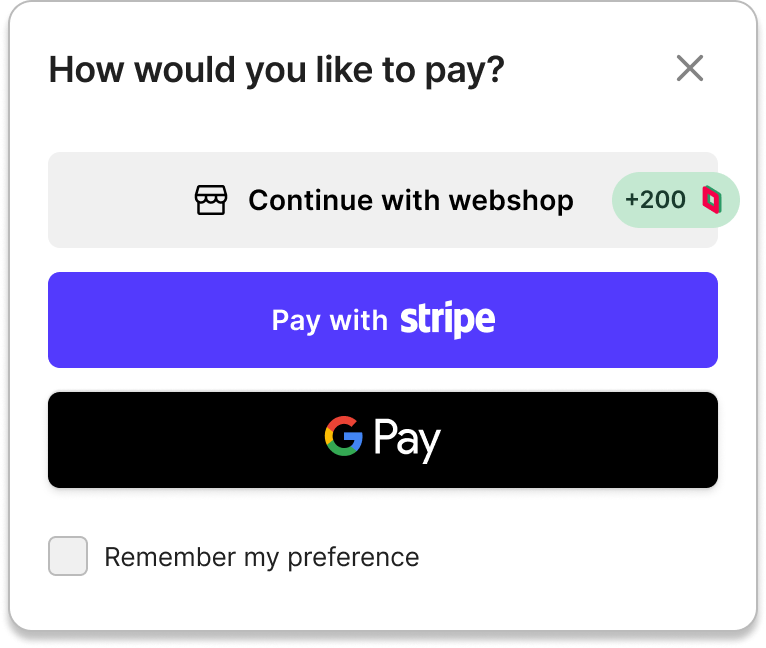
Purchase Options UI 一次显示两个到三个付款选项,这些选项由以下来源组成:
- 原生(Apple App Store 或 Google Play Store),始终存在。
- 通过您的路由规则显示的付款提供商。UI 显示最高优先级的合格提供程序;任何剩余的提供程序用作后备程序,不会显示。
- Webshop 入口点,当您的项目已配置 Unity Webshop 并且路由规则选择进入游戏内 Webshop 表面时显示。
UI 将完成当前购买的付款选项与商店入口点分开,提示玩家浏览更多商品。它支持光照和黑暗模式以及纵向和横向。
奖励
如果为付款提供商或网上商店选项配置奖励,例如奖励值、销售价格或限时优惠,则 Purchase Options UI 会显示该奖励。通过目录中的 SKU 字段配置奖励。如果相同的 SKU 同时出现在购买选项 UI 和网上商店中,则 UI 会使用一致的视觉处理方式,以便玩家将其识别为相同的奖励。
提供程序内存
玩家成功购买后,SDK 会记录他们在该设备中使用的提供商。在后续购买时,UI 将该提供商显示为默认操作,同时保持其他符合条件的提供商可用。玩家始终可以选择其他提供商。
禁用构建的 UI
即使调用 ,也可以在特定上下文中禁止购买选项 UI。当 UI 被抑制时,购买将回退到原生商店。要关闭特定构建的 UI,例如因为您自己的购买接口,请设置 SDK 配置选项将其禁用。在构建时禁用 UI 时,无论 Dashboard 设置如何,它都不会针对该构建执行。
ShowPurchaseOption构建您自己的购买 UI
Purchase Options UI 是可选的。要呈现自己的接口,请直接通过 SDK 使用路由输出并跳过默认 UI:
- 调用 以获取玩家有资格使用的提供商的有序列表。
IPaymentProvidersExtendedService.GetEligiblePaymentProviders() - 调用 强制指定购买提供商。
IPaymentProvidersExtendedPurchaseService.SetPaymentProviderOverride(string)
有关更多信息,请参阅代码中的覆盖路由。
地区可用性
Purchase Options UI 适用于平台程序允许原生和 D2C 付款选项并排显示的地区,例如美国和日本。在需要仅外部呈现的区域(例如欧盟和韩国),请禁用每个国家/地区的 UI,并自行处理呈现层。
后续步骤
本页面是使用 IAP 设置直接到消费者 (D2C) 付款提供商的工作流程的一部分。要继续此工作流程,请选择以下选项之一: