코드 연동
Implement Remote Config in your game code using the RemoteConfig API.
읽는 시간 6분최근 업데이트: 10달 전
RemoteConfigUnity.Services커스텀 속성 구현
Game Overrides 조건에 커스텀 속성을 제공하려면 게임 스크립트에 다음 변수를 구현합니다.
struct- 애플리케이션에서 전용 트래킹 방법을 사용하는 경우, 메서드를 사용하여 커스텀 플레이어 ID 속성을 제공하려면
SetCustomUserID구조체를 사용합니다. 개발자가 정의한 속성을 사용할 수 없으면 Remote Config는 ID를 자동으로 생성합니다.Delivery - 구조체를 사용하여 커스텀 사용자 카테고리 속성을 제공합니다.
userAttributes - 구조체를 사용하여 커스텀 앱 카테고리 속성을 제공합니다.
appAttributes - 구조체를 사용하여 커스텀 필터 카테고리 속성을 제공하면 페이로드를 줄일 수 있습니다.
filterAttributes
참고: 커스텀 속성은 전적으로 선택 사항입니다. 이러한 구조체 없이 Unity Remote Config를 구현하고 Game Overrides 조건에 사전 정의된 Unity 속성을 사용할 수 있습니다. 속성 카테고리에 관해 자세히 알아보려면 조건에 관한 기술 자료를 참고하십시오.
커스텀 속성을 구현하고 함수를 차단하는 스크립트용 프레임워크를 만드는 것부터 시작합니다.
using UnityEngine;using Unity.Services.RemoteConfig;using Unity.Services.Authentication;using Unity.Services.Core;using System.Threading.Tasks;public class RemoteConfigExample : MonoBehaviour { public struct userAttributes { // Optionally declare variables for any custom user attributes: public bool expansionFlag; } public struct appAttributes { // Optionally declare variables for any custom app attributes: public int level; public int score; public string appVersion; } public struct filterAttributes { // Optionally declare variables for attributes to filter on any of following parameters: public string[] key; public string[] type; public string[] schemaId; } // Optionally declare a unique assignmentId if you need it for tracking: public string assignmentId; // Declare any Settings variables you’ll want to configure remotely: public int enemyVolume; public float enemyHealth; public float enemyDamage; // The Remote Config package depends on Unity's authentication and core services. // These dependencies require a small amount of user code for proper configuration. async Task InitializeRemoteConfigAsync() { // initialize handlers for unity game services await UnityServices.InitializeAsync(); // options can be passed in the initializer, e.g if you want to set AnalyticsUserId or an EnvironmentName use the lines from below: // var options = new InitializationOptions() // .SetEnvironmentName("testing") // .SetAnalyticsUserId("test-user-id-12345"); // await UnityServices.InitializeAsync(options); // remote config requires authentication for managing environment information if (!AuthenticationService.Instance.IsSignedIn) { await AuthenticationService.Instance.SignInAnonymouslyAsync(); } } async Task Awake () { // In this example, you will fetch configuration settings on Awake. } // Create a function to set your variables to their keyed values: void ApplyRemoteConfig (ConfigResponse configResponse) { // You will implement this in the final step. }}
런타임 시 설정 가져오기 및 적용
다음으로 Remote Config 지원 함수를 구현하고 런타임 시 호출하여 서비스에서 키-값 쌍을 검색한 다음 적절한 변수에 매핑합니다.
Remote Config 서비스는 오브젝트를 반환하여 런타임 시 구성 설정을 가져오고 적용하는 작업을 처리합니다. 이 예시에서는 이를 사용하여 원격 서비스에서 키-값 쌍을 가져오고 검색에서 함수를 호출합니다. 는 가져오기 요청에 대한 응답을 나타내는 구조체를 취하고 메서드를 사용하여 설정을 적용합니다.
RemoteConfigService.InstanceApplyRemoteConfigApplyRemoteConfigConfigResponseRemoteConfigService.Instance.appConfig// Retrieve and apply the current key-value pairs from the service on Awake: async Task Awake () { // initialize Unity's authentication and core services, however check for internet connection // in order to fail gracefully without throwing exception if connection does not exist if (Utilities.CheckForInternetConnection()) { await InitializeRemoteConfigAsync(); } // Add a listener to apply settings when successfully retrieved: RemoteConfigService.Instance.FetchCompleted += ApplyRemoteConfig; // you can set the user’s unique ID: // RemoteConfigService.Instance.SetCustomUserID("some-user-id"); // you can set the environment ID: // RemoteConfigService.Instance.SetEnvironmentID("an-env-id"); // Fetch configuration settings from the remote service, they must be called with the attributes structs (empty or with custom attributes) to initiate the WebRequest. await RemoteConfigService.Instance.FetchConfigsAsync(new userAttributes(), new appAttributes()); // Example on how to fetch configuration settings using filter attributes: // var fAttributes = new filterAttributes(); // fAttributes.key = new string[] { "sword","cannon" }; // RemoteConfigService.Instance.FetchConfigs(new userAttributes(), new appAttributes(), fAttributes); // Example on how to fetch configuration settings if you have dedicated configType: // var configType = "specialConfigType"; // Fetch configs of that configType // RemoteConfigService.Instance.FetchConfigs(configType, new userAttributes(), new appAttributes()); // Configuration can be fetched with both configType and fAttributes passed // RemoteConfigService.Instance.FetchConfigs(configType, new userAttributes(), new appAttributes(), fAttributes); // All examples from above will also work asynchronously, returning Task<RuntimeConfig> // await RemoteConfigService.Instance.FetchConfigsAsync(new userAttributes(), new appAttributes()); // await RemoteConfigService.Instance.FetchConfigsAsync(new userAttributes(), new appAttributes(), fAttributes); // await RemoteConfigService.Instance.FetchConfigsAsync(configType, new userAttributes(), new appAttributes()); // await RemoteConfigService.Instance.FetchConfigsAsync(configType, new userAttributes(), new appAttributes(), fAttributes); } void ApplyRemoteConfig (ConfigResponse configResponse) { // Conditionally update settings, depending on the response's origin: switch (configResponse.requestOrigin) { case ConfigOrigin.Default: Debug.Log ("No settings loaded this session and no local cache file exists; using default values."); break; case ConfigOrigin.Cached: Debug.Log ("No settings loaded this session; using cached values from a previous session."); break; case ConfigOrigin.Remote: Debug.Log ("New settings loaded this session; update values accordingly."); break; } enemyVolume = RemoteConfigService.Instance.appConfig.GetInt("enemyVolume"); enemyHealth = RemoteConfigService.Instance.appConfig.GetInt("enemyHealth"); enemyDamage = RemoteConfigService.Instance.appConfig.GetFloat("enemyDamage"); assignmentId = RemoteConfigService.Instance.appConfig.assignmentId; // These calls could also be used with the 2nd optional arg to provide a default value, e.g: // enemyVolume = RemoteConfigService.Instance.appConfig.GetInt("enemyVolume", 100); }
특정 구성 유형이 포함된 구성에 액세스
해당 구성 유형에 포함된 모든 설정은 캐시에 정확하게 저장되며 다음과 같은 구성 유형을 전달하여 액세스할 수 있습니다.
RemoteConfigService.Instance.GetConfig("settings");RemoteConfigService.Instance.GetConfig("specialConfigType");
메타데이터 파라미터
요청이 있을 때마다 백엔드에 할당 이벤트가 생성됩니다.
해당 요청에 대한 응답 내에서 블록과 함께 블록이 응답의 일부로 반환되며, 다음 파라미터가 포함됩니다.
configsmetadata
- 는 각 할당 이벤트에서 생성되며 이벤트와 최종 사용자 세분화를 트래킹하는 데 사용됩니다.
assignmentId - 는 할당이 발생한 환경을 나타냅니다.
environmentId - 는 할당 시 생성되며 특정 할당의 고유한 서명을 나타냅니다.
configAssignmentHash
configAssignmentHashappConfigRemoteConfigService.Instance.appConfig.configAssignmentHash
사용하려는 를 알면 메서드를 사용하여 페이로드 내의 백엔드로 전달할 수 있습니다.
configAssignmentHashSetConfigAssignmentHash()RemoteConfigService.Instance.SetConfigAssignmentHash("4d1064c5198a26f073fe8301da3fc5ead35d20d1");
configAssignmentHashconfigAssignmentHashconfigAssignmentHashconfigAssignmentHash그 외 고려할 사항
오브젝트 덮어쓰기를 위해 JSON 유형 Settings 활용
코드에 다음과 같은 클래스가 있다고 예를 들어 봅니다.
CubeInfo[System.Serializable]public class CubeInfo{ public float rotateX = 10f; public float rotateY = 10f; public float rotateZ = 10f; public float rotSpeed = 1.0f; public Color color = Color.white;}
JSON 에디터 모달은 다음 유형의 JSON 변환을 지원합니다.
- 텍스트 에셋
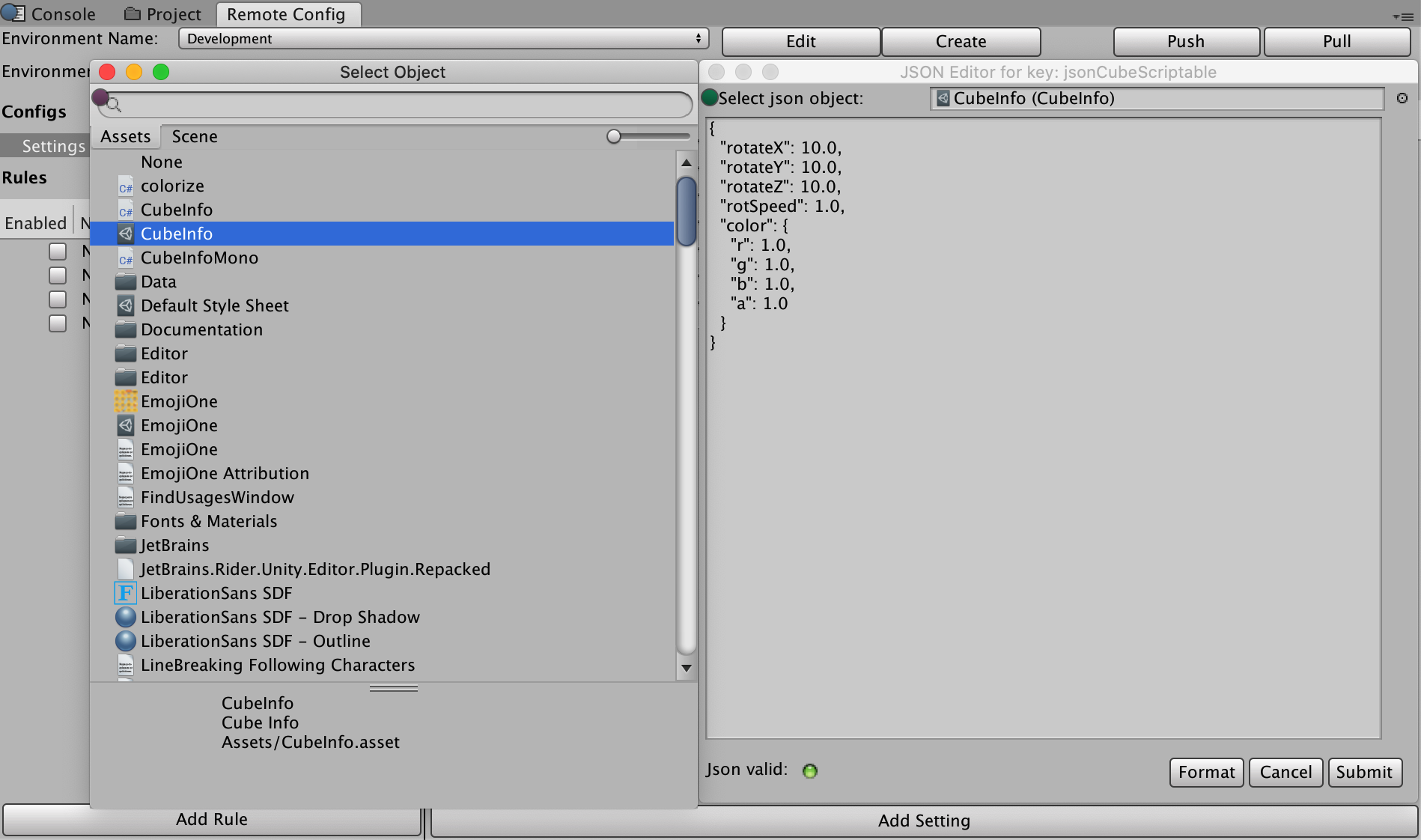
- 스크립트 가능한 오브젝트
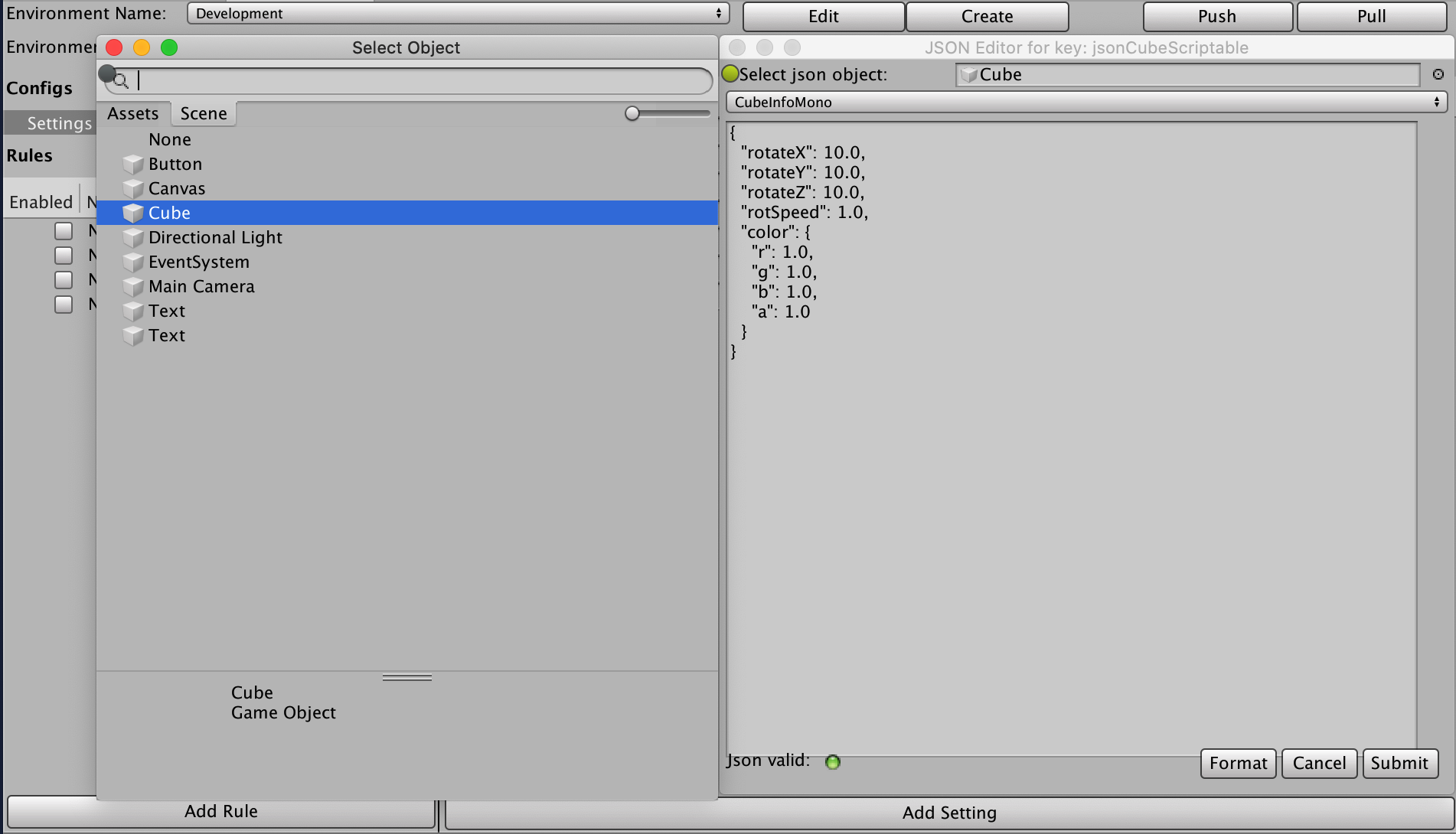
- 게임 오브젝트에 연결된 커스텀 스크립트
텍스트 에셋을 사용하려면 클래스와 구조적으로 일치하는 Settings를 설정합니다.
CubeInfo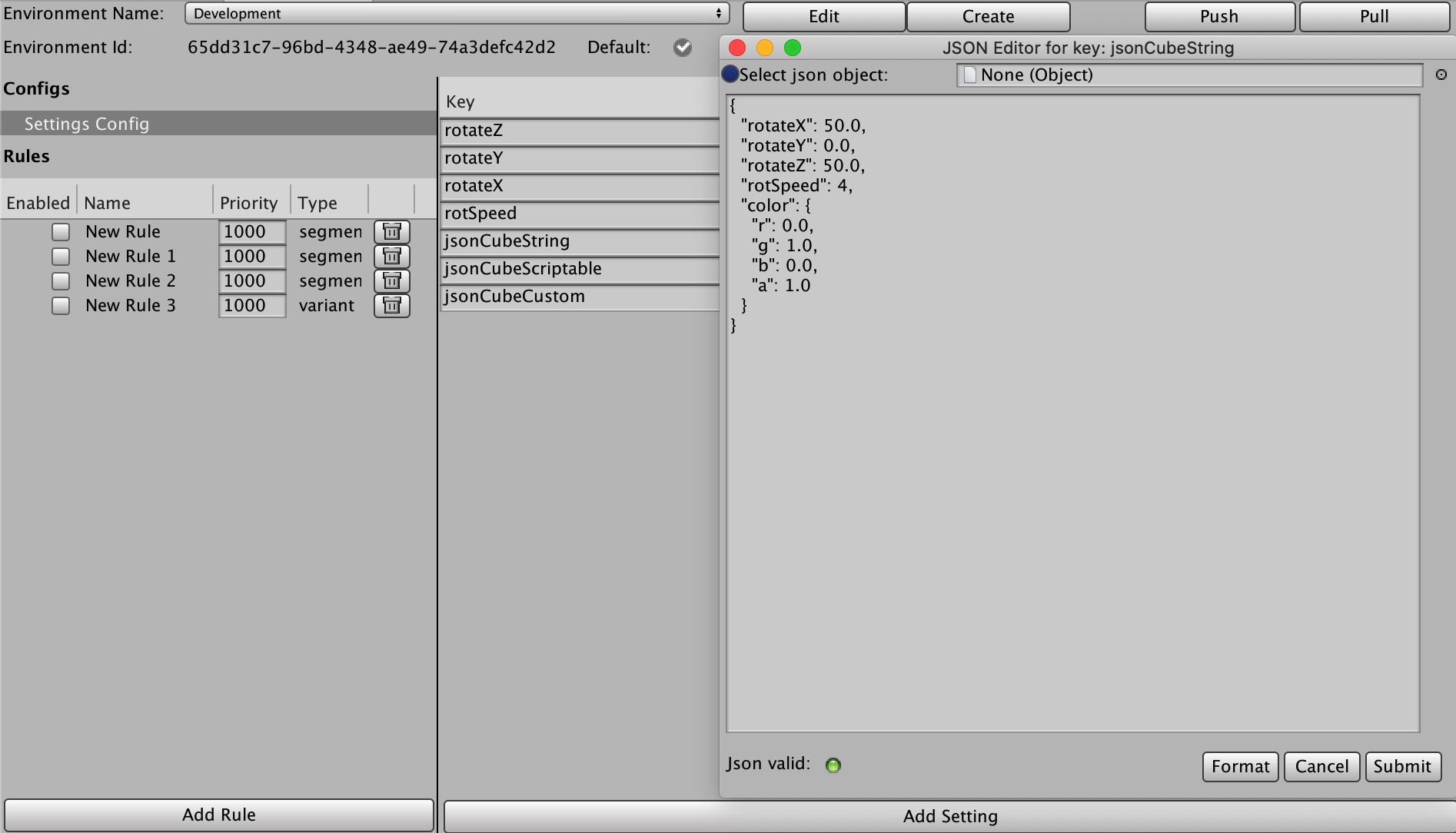
스크립트 가능한 오브젝트의 경우 선택 상자 옆의 오른쪽 상단에 있는 점을 클릭합니다. 스크립트 가능한 오브젝트를 선택하면 JSON으로 자동 변환됩니다.
씬에서 게임 오브젝트를 선택하면 표시되는 추가 드롭다운에서 해당 게임 오브젝트에 연결된 모든 Monobehavior 커스텀 스크립트를 볼 수 있습니다. 선택하는 항목은 JSON으로 변환됩니다.
런타임 시 이러한 설정을 CubeInfo 오브젝트에 적용하려면 해당 항목에 JsonUtility 클래스를 사용합니다.
case ConfigOrigin.Remote: var jsonCubeString = RemoteConfigService.Instance.appConfig.GetJson("jsonCubeString"); JsonUtility.FromJsonOverwrite(jsonCubeString, CubeInfo);
보안
유니티에서 Remote Config 데이터를 다운로드하는 웹 서비스는 읽기 전용이지만 안전하지 않습니다. 즉, 타사에서 Remote Config 데이터를 볼 수도 있습니다. 구성 설정 시 민감한 정보나 기밀 정보는 저장하면 안 됩니다. 마찬가지로 저장된 설정 파일은 최종 사용자가 읽고 수정할 수 있습니다. 그러나 Remote Config는 다음에 인터넷이 연결되어 세션이 시작되면 모든 수정 사항을 덮어씁니다.
플랫폼 지원
현재 버전의 Remote Config 런타임이 테스트 완료된 플랫폼은 다음과 같습니다.
데스크톱:
- Windows(PC)
- Mac
- Linux 스탠드얼론
모바일:
- iOS
- Android
Remote Config의 콘솔 지원에 대해 자세히 알아보려면 유니티 지원 팀으로 문의해 주십시오.