Learn about mediation waterfalls, and how to create and manage them in the Unity Monetization Dashboard to optimize ad network ranking, fill rate, and ad revenue performance.
Read time 1 minuteLast updated 11 hours ago
Note
Waterfall placements are being phased out. Starting July 23, 2026, you can no longer create new waterfall placements. Any placements not converted to bidding or archived by this date will no longer be editable, but will continue to serve ads.The recommended approach is to transition to in-app bidding placements before the deadline, as follows:
If you use Unity Ads as part of a mediation stack, set up Unity Ads as a bidder within your mediation platform. This method might require an app update depending on your mediation partner’s requirements for supporting Unity Ads bidding.
In both cases, update your placement IDs to support bidding in the Unity Monetization Dashboard and your mediation setup.
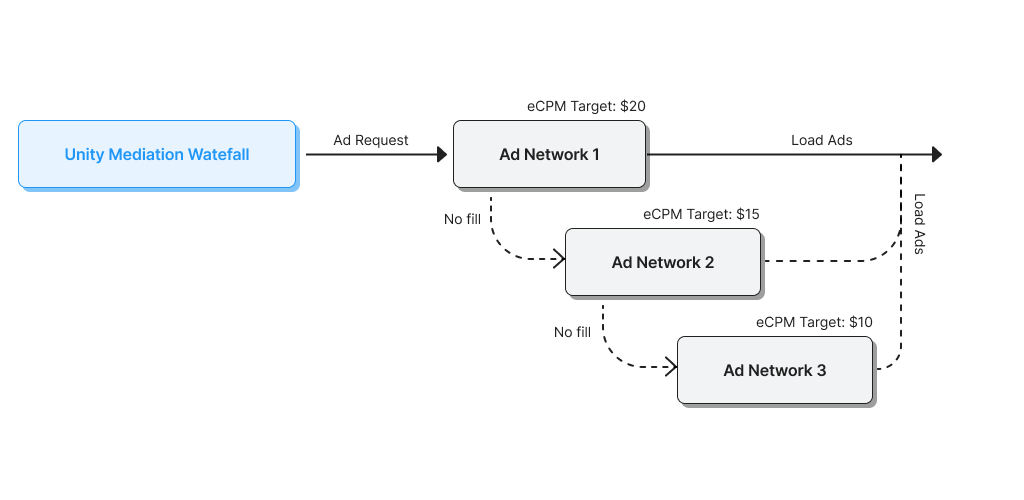
Use waterfalls to create ranked line items for ad networks, which can improve fill rate and revenue. When ad requests go unfilled from the top waterfall line item, they stream down to the next level until the request is filled. Each placement can target specific eCPM and geo targets, so publishers can meet revenue goals without sacrificing fill rate.
To create and manage waterfalls, on the Unity Monetization Dashboard, select Waterfalls in the secondary navigation menu.