Deep links
Implement deep linking to integrate the Web Offerwall into your website or mobile app.
Read time 4 minutesLast updated 3 months ago
Direct links provide a very simple method of linking your website to the offerwall. Wherever you want to show the offerwall, you can link to the following URL:
https://rewards.unity.com/owp/web/link/<SDK_KEY>/u/<USER_ID>
Required parameters
- SDK_KEY - SDK Key provided by Tapjoy
- USER_ID - User ID needs to be provided by you so we can properly reward users. For more information, refer to Self-managed currency.
Optional parameters
User privacy
User privacy can be implemented by adding query parameters to the URL. For more information about each flag, refer to User privacy.
https://rewards.unity.com/owp/web/link/<SDK_KEY>/u/<USER_ID>?gdpr=1&cgdpr=1&...
Option | Query Parameter Name | Default Value | Description |
|---|---|---|---|
| Is user subject to GDPR | | | Value must be |
| GDPR Consent | | | |
| Below Consent Age | | | |
| US Privacy | | | For value descriptions, refer to User privacy |
Event name
The parameter selects which placement to load in your website or mobile app. By loading a placement, Tapjoy renders the content card associated with that placement.
event_nameIf you omit , Tapjoy loads the standard offerwall by default.
event_nameUse the following deep link format to specify a placement with event_name.
https://rewards.unity.com/owp/web/link/<SDK_KEY>/u/<USER_ID>?event_name=<PLACEMENT_NAME>
User tags
Web offerwall supports segment targeting with User Tags. You can pass multiple user tags by using .
user_tags[]=https://rewards.unity.com/owp/web/link/<SDK_KEY>/u/<USER_ID>?user_tags[]=<TAG1>&user_tags[]=<TAG2>
Custom parameter
You can use the custom parameter to pass user-defined values to track specific details about clicks and conversion.
cphttps://rewards.unity.com/owp/web/link/<SDK_KEY>/u/<USER_ID>?cp=xxx
Embedding with iframe
When embedding the Web Offerwall in an iframe, it is critical to ensure the size of the iframe does not exceed the device's screen viewport. Otherwise, it results in the Instruction CTA Button appearing outside of the visible viewport and users need to scroll all the way down to access the button.
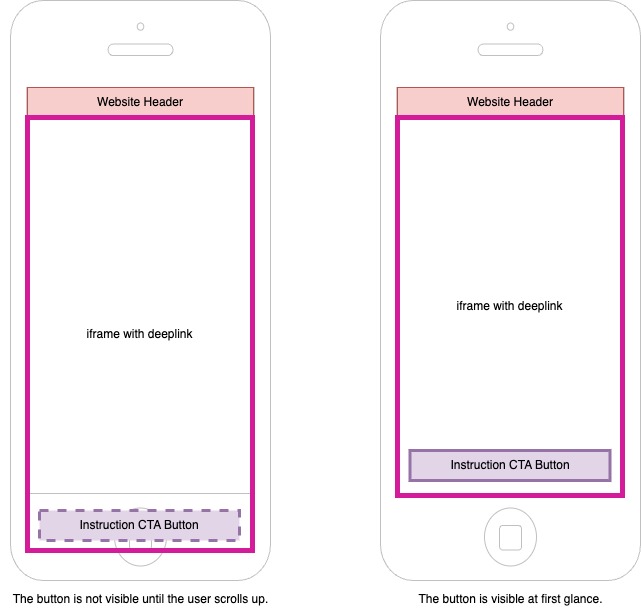
By following these guidelines, developers can maximize the usability and user engagement of the Web Offerwall product, ensuring important UI elements are readily accessible.
Web offerwall from mobile apps
Web Offerwall is also available in mobile apps by loading the link into the WebView.
Examples
Android
Because Web Offerwall does not yet fully handle the Android back button, it is recommended that you override the Android back button and implement your own UI to close the WebView. This prevents users from unintentionally closing the WebView and allows them to use the navigation UI within the OW instead.
void showWebOfferwall() { final WebView webView = new WebView(requireContext()); webView.getSettings().setJavaScriptEnabled(true); webView.getSettings().setDomStorageEnabled(true); webView.getSettings().setMediaPlaybackRequiresUserGesture(false); webView.setBackgroundColor(Color.TRANSPARENT); webView.loadUrl("https://rewards.unity.com/owp/web/link/sdk_key/u/user_id"); RelativeLayout.LayoutParams paramsWebView = new RelativeLayout.LayoutParams(RelativeLayout.LayoutParams.MATCH_PARENT, RelativeLayout.LayoutParams.MATCH_PARENT); Dialog dialog = new Dialog(requireContext(), android.R.style.Theme_Black_NoTitleBar_Fullscreen); dialog.addContentView(webView, paramsWebView); // Handle backbutton dialog.setOnKeyListener(new DialogInterface.OnKeyListener() { @Override public boolean onKey(DialogInterface dialogInterface, int keyCode, KeyEvent event) { if (keyCode == KeyEvent.KEYCODE_BACK && event.getAction() == KeyEvent.ACTION_UP) { if (webView.canGoBack()) { webView.goBack(); } } // return true to prevent closing the WebView return true; } }); dialog.show();}