Reporting API v1
Reporting API v1 reference — legacy version.
Read time 3 minutesLast updated 4 days ago
Authentication ID
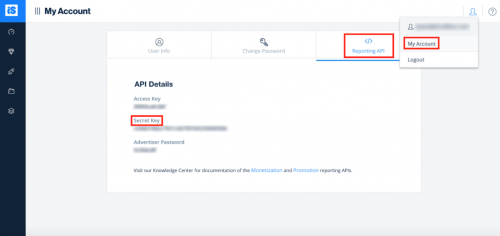
The authentication is done using an authentication ID. Follow the below steps to generate it:- Log in to the ironSource dashboard.
- Select your profile in the top right corner of the dashboard and select 'My Account'.
- Find your username under the 'User info' tab and your secret key under the 'Reporting API' tab.
- Encode the string in base64 format to retrieve your Authentication ID.
username:secret_key - In the header of each request add an header with the value
Authorization.Basic [my_authenticationID]
Advertisers Statistics
Description: Retrieves campaign metrics for an advertiser based on the requested breakdowns and filters. The data can be retrieved in JSON or CSV format.- Method:
GET - Endpoint:
https://api.ironsrc.com/advertisers/v1/reports
Parameters
Name | Mandatory | Data type | Description | Possible values |
|---|---|---|---|---|
| startDate | Yes | Date (YYYY-MM-DD) | Start date for report | |
| endDate | Yes | Date (YYYY-MM-DD) | End date for report | |
| metrics | Yes | Comma-separated list | A list of metrics to be included in the response. The default is none | impressions, clicks, completions, installs, spend |
| breakdowns | No | Comma-separated list | A list of breakdowns by which the response data is returned. The default is none | day, campaign, title, application, country, os, device_type, creative, ad_unit |
| format | No | String | The format of the response. The default is JSON | json, csv |
| count | No | Integer | The maximum number of records to return in the response. The default is 10000 | |
| campaign_id | No | Comma-separated integers | List of campaign IDs to filter | |
| bundle_id | No | Comma-separated strings | List of bundle IDs to filter | |
| creative_id | No | Comma-separated integers | List of creative IDs to filter | |
| country | No | Comma-separated strings (ISO 3166) | List of countries to filter | |
| os | No | String | Present data for this OS only | ios, android |
| device_type | No | String | Present data for this device type only | phone, tablet |
| ad_unit | No | String | Present data for chosen ad units only | rewardedVideo, interstitial, offerWall, banner |
Request example
https://api.ironsrc.com/advertisers/v1/reports?breakdowns=day,campaign,country,device_type&metrics=impressions,clicks,completions,spend&format=csv&count=100&startDate=2018-03-14&endDate=2018-04-07&country=US,CA,GB,FR&os=androidResponse
In case of additional data that exceeds the count parameter passed in the request, the response will contain a "next" link that will retrieve the next batch of records. In a JSON response, the "next" link is in the "paging" property of the response body object. In a CSV response, the "next" link is in the "Link" header of the response. In case of an empty response, in which no data exists for the requested filters, the JSON format will result in an empty "data" array and the CSV format will lead to a 204 response (no content).Response example – JSON format
{ "data": [ { "date": "2018-03-31T00:00:00.000Z", "campaign_id": 12345, "campaign_name": "campaign_a", "country": "US", "device_type": "phone", "impressions": 13016, "clicks": 3980, "completions": 3931, "spend": 5503.4 }, { "date": "2018-03-31T00:00:00.000Z", "campaign_id": 12367, "campaign_name": "campaign_b", "country": "US", "device_type": "phone", "impressions": 29600, "clicks": 6179, "completions": 6049, "spend": 4839.2 }, ...... ], "paging": { "next": "https://api.ironsrc.com/advertisers/v1/reports/advertiser?breakdowns=day,campaign,country,device_type&metrics=impressions,clicks,completions,spend&format=json&order=spend&direction=desc&count=50&startDate=2018-03-14&endDate=2018-04-14&country=US,CA,GB,FR&os=android&cursor=anVzdF9zb21lX2N1cnNvcl92YWx1ZQ%3D%3D" }}
Response example – CSV format
date,campaign_id,campaign_name,country,device_type,impressions,clicks,completions,spend2018-03-31T00:00:00.000Z,12345,campaign_a,US,phone,13016,3980,3931,5503.42018-03-31T00:00:00.000Z,12367,campaign_b,US,phone,29600,6179,6049,4839.22018-03-30T00:00:00.000Z,12345,campaign_a,US,tablet,10716,3173,3150,3868.42018-03-30T00:00:00.000Z,12367,campaign_b,CA,phone,24946,4773,4679,3743.22018-04-12T00:00:00.000Z,12345,campaign_a,US,phone,9731,2852,2833,3399.62018-04-11T00:00:00.000Z,12345,campaign_a,US,phone,10101,2854,2830,33962018-04-10T00:00:00.000Z,12345,campaign_a,US,phone,9882,2897,2829,3394.82018-04-09T00:00:00.000Z,12345,campaign_a,US,phone,9472,2905,2825,33902018-04-07T00:00:00.000Z,12345,campaign_a,US,phone,9251,2854,2824,3388.82018-04-14T00:00:00.000Z,12389,campaign_c,FR,phone,151867,14700,145376,2834.982018-04-06T00:00:00.000Z,12345,campaign_a,US,phone,7801,2341,2331,2797.22018-04-13T00:00:00.000Z,12389,campaign_c,US,phone,142157,11878,136282,2670.952018-04-08T00:00:00.000Z,12389,campaign_c,US,phone,131915,19833,126777,2486.972018-04-12T00:00:00.000Z,12389,campaign_c,US,phone,114311,10901,109254,2076.852018-03-27T00:00:00.000Z,12389,campaign_c,US,phone,123111,14014,117291,2066.892018-03-15T00:00:00.000Z,12367,campaign_b,US,phone,13716,3455,3366,2019.62018-03-14T00:00:00.000Z,12367,campaign_b,GB,phone,13310,3429,3350,20102018-04-05T00:00:00.000Z,12389,campaign_c,GB,phone,103550,14117,99435,1990.222018-03-26T00:00:00.000Z,12389,campaign_c,US,phone,116766,14671,110828,1988.142018-04-10T00:00:00.000Z,12389,campaign_c,US,phone,104353,13086,99996,1942.66