代码集成
Implement Remote Config in your game code using the RemoteConfig API.
阅读时间9 分钟最后更新于 10 个月前
RemoteConfigUnity.Services实现自定义属性
要为游戏覆盖条件提供自定义属性,请在游戏脚本中实现以下 变量:
struct- 如果您的应用程序使用自己的跟踪方法,则通过 方法使用
SetCustomUserID结构来提供自定义玩家 ID 属性。如果没有开发者定义的属性,Remote Config 将自动生成 ID。Delivery - 使用 结构来提供自定义用户类别属性。
userAttributes - 使用 结构来提供自定义应用类别属性。
appAttributes - 使用 结构来提供自定义过滤器类别属性,以减少有效负载。
filterAttributes
注意:自定义属性完全是可选的。您可以在没有这些结构的情况下实现 Unity Remote Config,并针对游戏覆盖条件使用预定义的 Unity 属性。有关属性类别的更多信息,请参阅关于条件的文档。
首先,为实现自定义属性和阻止函数的脚本创建框架:
using UnityEngine;using Unity.Services.RemoteConfig;using Unity.Services.Authentication;using Unity.Services.Core;using System.Threading.Tasks;public class RemoteConfigExample : MonoBehaviour { public struct userAttributes { // Optionally declare variables for any custom user attributes: public bool expansionFlag; } public struct appAttributes { // Optionally declare variables for any custom app attributes: public int level; public int score; public string appVersion; } public struct filterAttributes { // Optionally declare variables for attributes to filter on any of following parameters: public string[] key; public string[] type; public string[] schemaId; } // Optionally declare a unique assignmentId if you need it for tracking: public string assignmentId; // Declare any Settings variables you’ll want to configure remotely: public int enemyVolume; public float enemyHealth; public float enemyDamage; // The Remote Config package depends on Unity's authentication and core services. // These dependencies require a small amount of user code for proper configuration. async Task InitializeRemoteConfigAsync() { // initialize handlers for unity game services await UnityServices.InitializeAsync(); // options can be passed in the initializer, e.g if you want to set AnalyticsUserId or an EnvironmentName use the lines from below: // var options = new InitializationOptions() // .SetEnvironmentName("testing") // .SetAnalyticsUserId("test-user-id-12345"); // await UnityServices.InitializeAsync(options); // remote config requires authentication for managing environment information if (!AuthenticationService.Instance.IsSignedIn) { await AuthenticationService.Instance.SignInAnonymouslyAsync(); } } async Task Awake () { // In this example, you will fetch configuration settings on Awake. } // Create a function to set your variables to their keyed values: void ApplyRemoteConfig (ConfigResponse configResponse) { // You will implement this in the final step. }}
在运行时获取并应用设置
接下来,实现您的 Remote Config 支持函数并在运行时调用这些函数,以便从服务检索键值对,然后将它们映射到相应的变量。
Remote Config 服务返回 对象,用于在运行时获取并应用您的配置设置。在此示例中,您将使用它来从远程服务获取键值对,并在检索时调用您的 函数。 接收一个 结构,该结构表示对获取请求的响应,并使用 方法来应用设置。
RemoteConfigService.InstanceApplyRemoteConfigApplyRemoteConfigConfigResponseRemoteConfigService.Instance.appConfig// Retrieve and apply the current key-value pairs from the service on Awake: async Task Awake () { // initialize Unity's authentication and core services, however check for internet connection // in order to fail gracefully without throwing exception if connection does not exist if (Utilities.CheckForInternetConnection()) { await InitializeRemoteConfigAsync(); } // Add a listener to apply settings when successfully retrieved: RemoteConfigService.Instance.FetchCompleted += ApplyRemoteConfig; // you can set the user’s unique ID: // RemoteConfigService.Instance.SetCustomUserID("some-user-id"); // you can set the environment ID: // RemoteConfigService.Instance.SetEnvironmentID("an-env-id"); // Fetch configuration settings from the remote service, they must be called with the attributes structs (empty or with custom attributes) to initiate the WebRequest. await RemoteConfigService.Instance.FetchConfigsAsync(new userAttributes(), new appAttributes()); // Example on how to fetch configuration settings using filter attributes: // var fAttributes = new filterAttributes(); // fAttributes.key = new string[] { "sword","cannon" }; // RemoteConfigService.Instance.FetchConfigs(new userAttributes(), new appAttributes(), fAttributes); // Example on how to fetch configuration settings if you have dedicated configType: // var configType = "specialConfigType"; // Fetch configs of that configType // RemoteConfigService.Instance.FetchConfigs(configType, new userAttributes(), new appAttributes()); // Configuration can be fetched with both configType and fAttributes passed // RemoteConfigService.Instance.FetchConfigs(configType, new userAttributes(), new appAttributes(), fAttributes); // All examples from above will also work asynchronously, returning Task<RuntimeConfig> // await RemoteConfigService.Instance.FetchConfigsAsync(new userAttributes(), new appAttributes()); // await RemoteConfigService.Instance.FetchConfigsAsync(new userAttributes(), new appAttributes(), fAttributes); // await RemoteConfigService.Instance.FetchConfigsAsync(configType, new userAttributes(), new appAttributes()); // await RemoteConfigService.Instance.FetchConfigsAsync(configType, new userAttributes(), new appAttributes(), fAttributes); } void ApplyRemoteConfig (ConfigResponse configResponse) { // Conditionally update settings, depending on the response's origin: switch (configResponse.requestOrigin) { case ConfigOrigin.Default: Debug.Log ("No settings loaded this session and no local cache file exists; using default values."); break; case ConfigOrigin.Cached: Debug.Log ("No settings loaded this session; using cached values from a previous session."); break; case ConfigOrigin.Remote: Debug.Log ("New settings loaded this session; update values accordingly."); break; } enemyVolume = RemoteConfigService.Instance.appConfig.GetInt("enemyVolume"); enemyHealth = RemoteConfigService.Instance.appConfig.GetInt("enemyHealth"); enemyDamage = RemoteConfigService.Instance.appConfig.GetFloat("enemyDamage"); assignmentId = RemoteConfigService.Instance.appConfig.assignmentId; // These calls could also be used with the 2nd optional arg to provide a default value, e.g: // enemyVolume = RemoteConfigService.Instance.appConfig.GetInt("enemyVolume", 100); }
访问具有特定配置类型的配置
相应配置类型的所有设置都将正确地储存在缓存中。您可以通过传递配置类型来访问这些设置,例如:
RemoteConfigService.Instance.GetConfig("settings");RemoteConfigService.Instance.GetConfig("specialConfigType");
元数据参数
收到每个请求时,我们都会在后端创建一个分配事件。
在对请求的响应中,与 代码块一起返回一个 代码块,其中包括以下参数:
configsmetadata
- 每个分配事件都会创建 ,它用于跟踪事件和最终的用户细分
assignmentId - 表示发生分配的环境
environmentId - 在分配时创建,表示该特定分配的唯一签名
configAssignmentHash
configAssignmentHashappConfigRemoteConfigService.Instance.appConfig.configAssignmentHash
在确定要使用的 后,可以通过使用 方法来在有效负载中将其传递到后端:
configAssignmentHashSetConfigAssignmentHash()RemoteConfigService.Instance.SetConfigAssignmentHash("4d1064c5198a26f073fe8301da3fc5ead35d20d1");
如果将 传递到后端,后端将返回该特定 创建时存在的配置。
configAssignmentHashconfigAssignmentHashconfigAssignmentHashconfigAssignmentHash其他注意事项
利用 JSON 类型的 Settings 来覆盖对象
假设我们的代码中具有如下 类:
CubeInfo[System.Serializable]public class CubeInfo{ public float rotateX = 10f; public float rotateY = 10f; public float rotateZ = 10f; public float rotSpeed = 1.0f; public Color color = Color.white;}
JSON 编辑器模式窗口支持以下类型的 JSON 转换:
- 文本资源
- 脚本化对象
- 附加到游戏对象的自定义脚本
如果要使用文本资源,我们可以设置在结构上与 类匹配的 Settings:
CubeInfo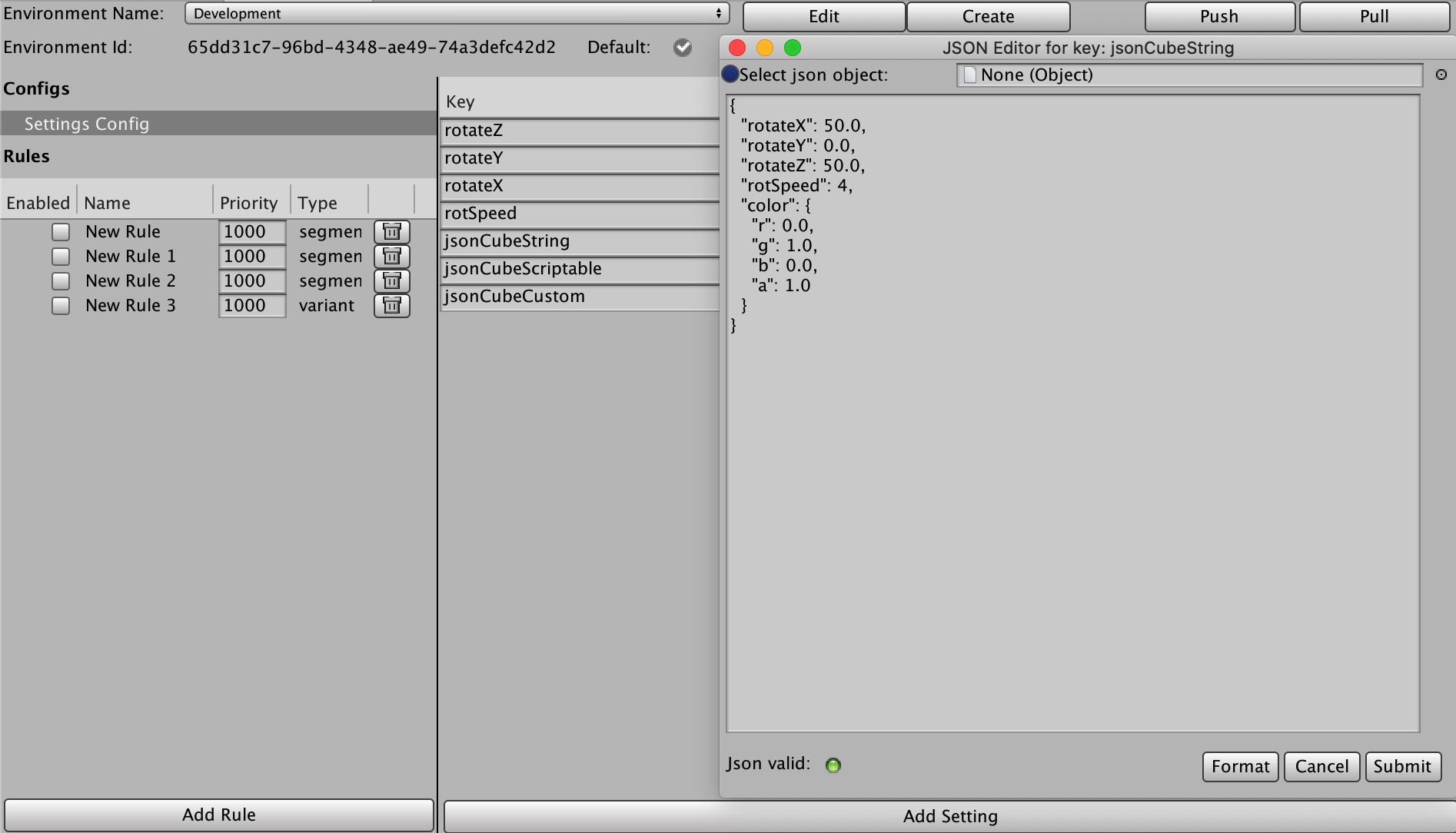
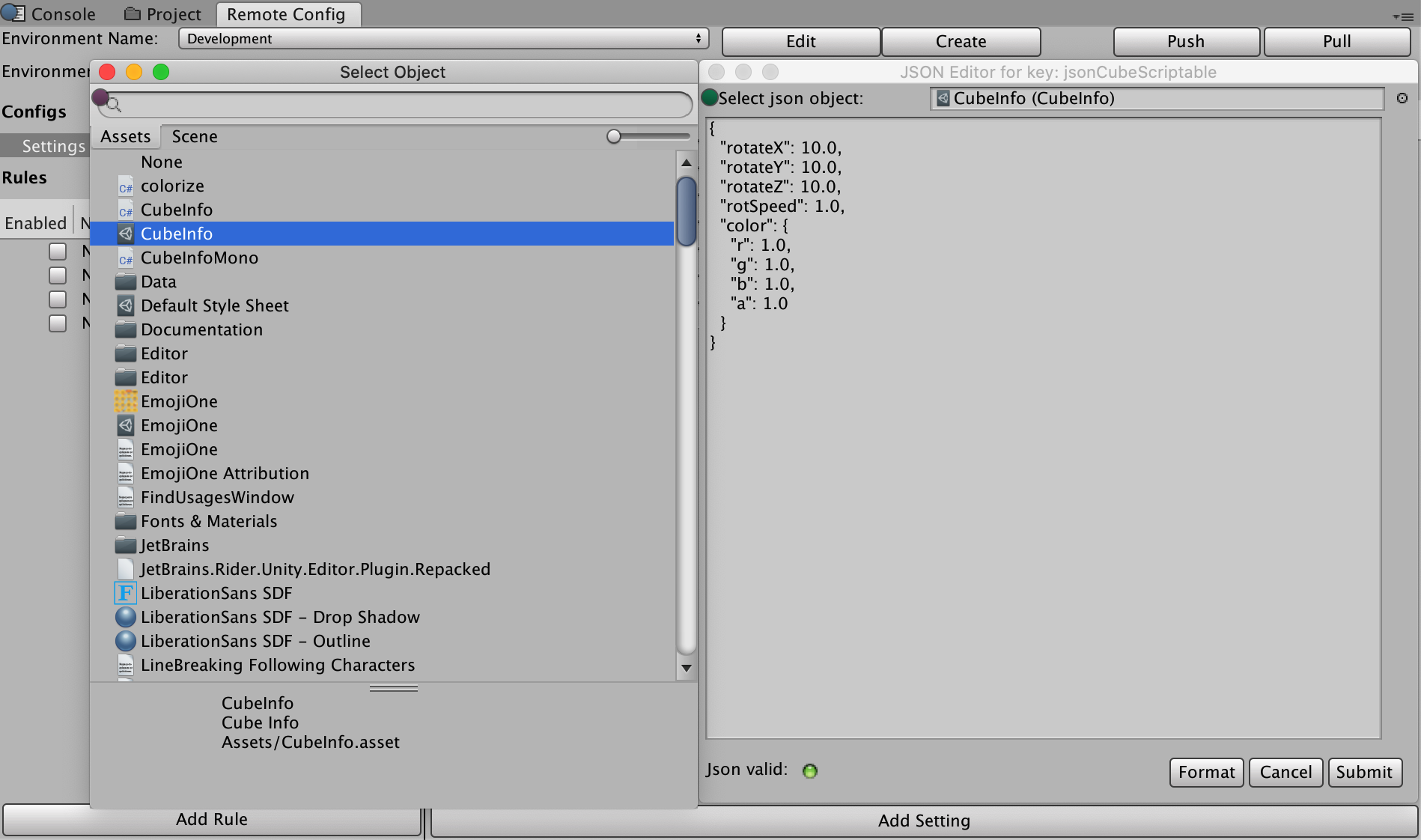
对于脚本化对象,单击选择框旁边的右上方圆点。选择一个脚本化对象后,该对象会自动转换为 json:
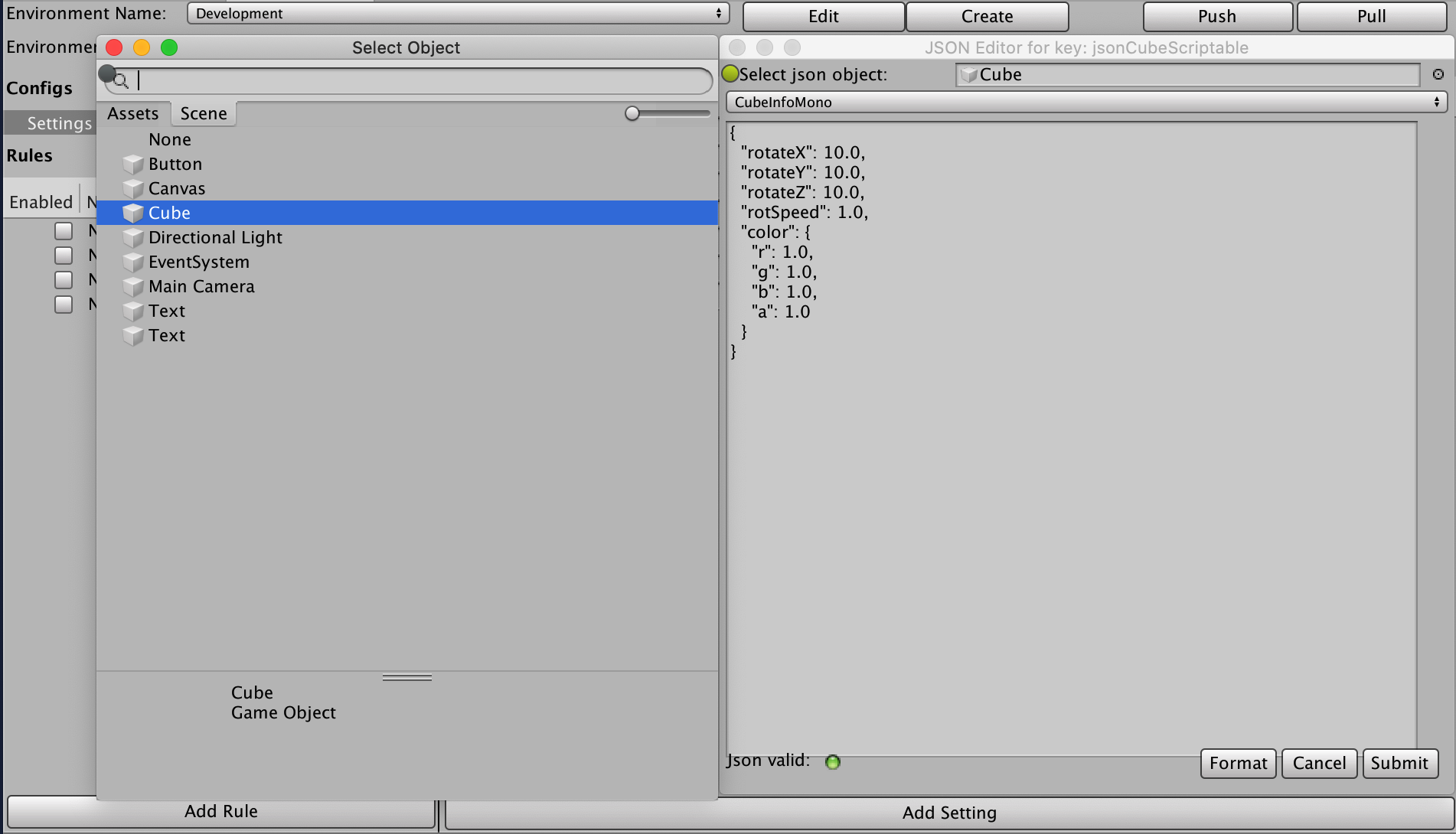
如果从场景中选择游戏对象,则将显示一个额外的下拉选单,其中包括附加到该游戏对象的所有 Monobehavior 自定义脚本。您选择的对象会转换为 JSON:
要在运行时将这些设置应用到 CubeInfo 对象,请使用 JsonUtility 类来完成该操作:
case ConfigOrigin.Remote: var jsonCubeString = RemoteConfigService.Instance.appConfig.GetJson("jsonCubeString"); JsonUtility.FromJsonOverwrite(jsonCubeString, CubeInfo);
安全
Unity 用来下载 Remote Config 数据的 Web 服务是只读的,但并不安全。这意味着第三方或许能够查看您的 Remote Config 数据。请勿将敏感或机密信息存储在您的配置设置中。同样,最终用户也可以读取和修改保存的设置文件(尽管在下次会话启动时,Remote Config 会在有可用的互联网连接时覆盖任何修改)。
平台支持
当前版本的 Remote Config Runtime 经过测试可以在以下平台上成功运行:
桌面:
- Windows (PC)
- Mac
- Linux 平台
移动:
- iOS
- Android
有关 Remote Config 的控制台支持的信息,请联系我们的支持团队。