기술 자료

​
​

Development

User Acquisition

Monetization

산업 분야

Unity Hub

Download Unity Hub

Unity Hub

이 페이지는 선택한 언어로 제공되지 않습니다.
​
​
Unity Hub
  • Introduction to Unity Hub
  • Install the Hub
  • Download and manage Unity Editor installations
    • Download and install the Unity Editor
    • Select a language in the Unity Hub and Unity Editor
    • Add modules to a Unity Editor installation
  • Projects overview
  • Templates overview
  • Command Line Interface overview
  • Manage licenses
  • Deeplinking support for local projects
  • Hub UI reference
  1. Unity Hub

Add modules to a Unity Editor installation

Modules are optional components you can use to tailor your Unity Editor installation; they contain build support for certain platforms, language packs, and developer tools.
읽는 시간 2분
최근 업데이트: 3달 전

You can select modules during a new Editor installation, or add modules to existing installs.
You can limit the file size of the Editor if you select only the modules that you require.

Add modules to a new install of an Editor

When you install a new Editor, you can choose to install modules as part of the Editor installation process. For more information, refer to Install the Editor.

Add modules to an existing Editor installation

To add modules to an existing Editor installation:
  1. Open the Hub.
  2. Select Installs in the left sidebar.
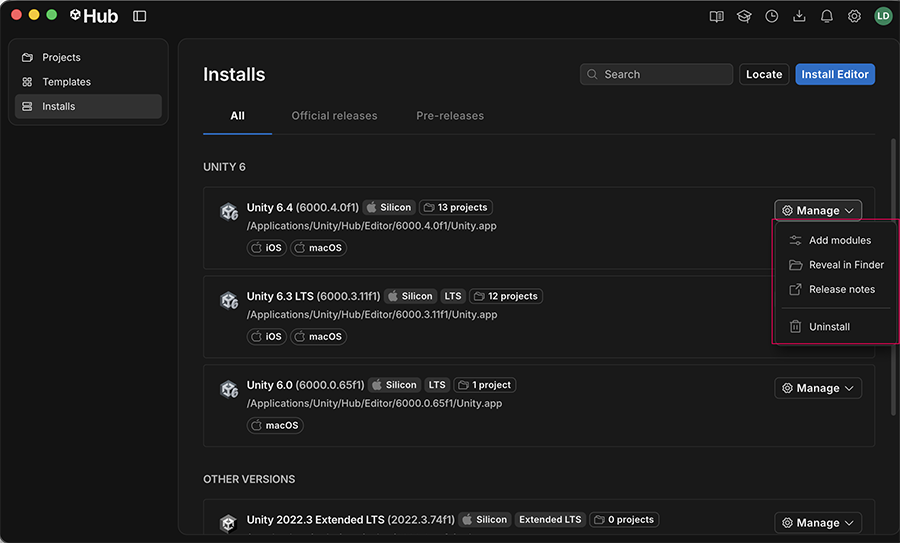
  3. Navigate to the Editor version you want to add modules to, and select Manage.
  4. Select Add modules.
  5. A window opens with all the available modules for the selected Editor. Choose the modules you want to install, and then select Install.
  6. The Hub starts downloading the modules, and you can view the progress in the Downloads window
The Add modules window

The Add modules window

중요
You can only add modules to Editor installations that were installed with the Hub. If the Add modules option is missing for an Editor installation, this usually means the Editor was installed without the Hub. To add modules to an Editor version that was installed without the Hub, you must uninstall the Editor and then reinstall it through the Hub. You can also install an Editor and modules with the Hub command line interface (CLI). For more information, refer to Use the Hub CLI.

Copyright © 2026 Unity Technologies
법률 정보개인정보 처리방침쿠키Documentation Terms of Use개인 정보 판매 또는 공유 금지개인정보 보호 선택(쿠키 설정)

'Unity', Unity 로고 및 기타 Unity 상표는 미국 및 기타 지역 내 Unity Technologies 또는 그 계열사의 상표 또는 등록상표입니다(자세한 내용은 여기에서 확인하세요). 기타 명칭 또는 브랜드는 해당 소유자의 상표입니다.

일부 페이지는 편의를 위해 기계 번역되었으며 부정확한 내용이 있을 수 있습니다. 정보가 상충되는 경우, 영어 버전을 우선으로 참조하세요.

  • 보고 있는 페이지
    • Add modules to a new install of an Editor

    • Add modules to an existing Editor installation

  • 추가 리소스
  • Install and uninstall Editor versions
  • Download assets and modules from the Unity Asset Store

이 페이지의 문제 보고