기술 자료

​
​

Development

User Acquisition

Monetization

산업 분야

Unity Hub

Download Unity Hub

Unity Hub

이 페이지는 선택한 언어로 제공되지 않습니다.
​
​
Unity Hub
  • Introduction to Unity Hub
  • Install the Hub
  • Download and manage Unity Editor installations
  • Projects overview
  • Templates overview
  • Command Line Interface overview
  • Manage licenses
  • Deeplinking support for local projects
  • Hub UI reference

Unity Hub

The Unity Hub is a standalone application that you can use to navigate, download, and manage your Unity projects and installations.
읽는 시간 1분
최근 업데이트: 한 달 전

팁
For information on how to create a game in Unity, refer to the documentation on the Unity User Manual website, or the tutorials on Unity Learn. After you download and install the Hub, you can also access tutorials in the Learn tab.
Use the Hub to:
  • Manage, download, and install modules and versions of the Unity Editor.
  • Create and manage your Unity projects.
  • Explore templates, sample projects, and learning material.
  • Manage your profile, settings, and Unity licenses.
  • Send feedback and get help from Unity.
Install the HubInstall Hub on a compatible Windows, macOS, or Linux device.
Manage Editor installationsManage Unity Editor installations along with their associated components and modules.
Manage projectsUse Hub to create new projects, manage your existing projects, and open projects in the Unity Editor.
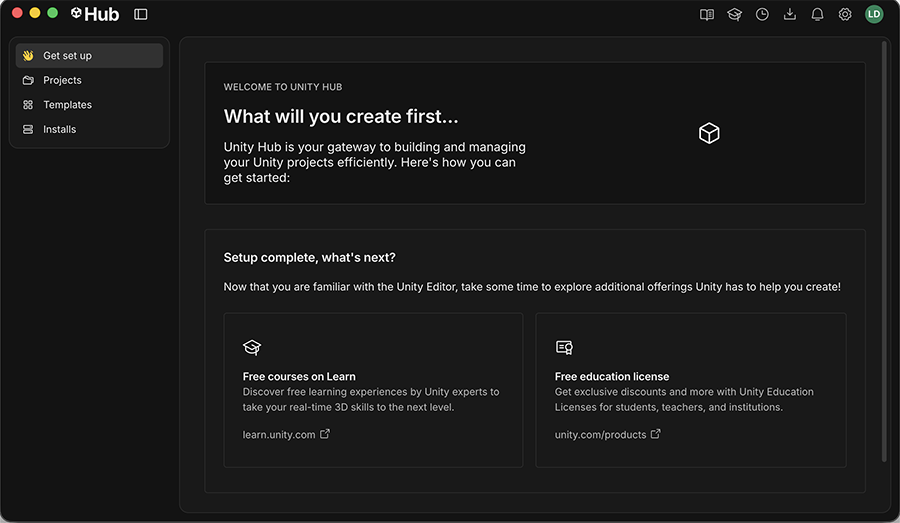
The Unity Hub window

The Unity Hub window


Copyright © 2026 Unity Technologies
법률 정보개인정보 처리방침쿠키Documentation Terms of Use개인 정보 판매 또는 공유 금지개인정보 보호 선택(쿠키 설정)

'Unity', Unity 로고 및 기타 Unity 상표는 미국 및 기타 지역 내 Unity Technologies 또는 그 계열사의 상표 또는 등록상표입니다(자세한 내용은 여기에서 확인하세요). 기타 명칭 또는 브랜드는 해당 소유자의 상표입니다.

일부 페이지는 편의를 위해 기계 번역되었으며 부정확한 내용이 있을 수 있습니다. 정보가 상충되는 경우, 영어 버전을 우선으로 참조하세요.

  • 추가 리소스
  • Unity for first-time users
  • Install and upgrade the Unity Editor
  • The Unity Essentials pathway
  • Unity Discussions
  • Unity Support and Services

이 페이지의 문제 보고