Creative best practices
Review the recommended best practices for User Acquisition creatives.
Read time 5 minutesLast updated 3 months ago
Refer to the following best practices as you configure your creatives.
Video best practices
Review the following best practices for video ads
Aim for authenticity
Give the user an idea of the real app experience instead of focusing on cutscenes or marketing assets (although a balanced mix of these can be very effective). It helps user retention if the app experience is what was expected after seeing the trailer.
Use eye-catching indicators
Adding hand interaction or touch indicators can help make the content more understandable. Experiment with different styles (live action hands, animated hands, hot spot indicator etc).
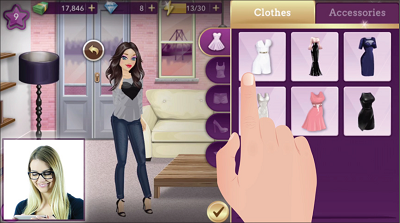
Draw attention with innovation
Make your video ad stand out by experimenting with different creatives. For example, showcase a real commentator in the ad or create a fictional character with a memorable and engaging storyline.
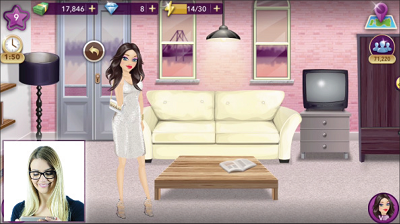
Show, don't tell
In general, the more you can show instead of tell, the better. However, using text elements can be a very powerful way to make your point quickly and highlight the unique features of your app.
Test different lengths
Shorter videos tend to drive higher engagement and video completion rates. The recommended best practice is to keep the length between 10 and 60 s. Front load your video with the best content to keep users engaged. To depict more complex gameplay, you might need longer videos, whereas casual apps can require shorter creatives.
The recommended best practice is to test different lengths because they can drive different metrics. For example, while one creative can drive higher video completion rates, the other can drive better lifetime value (LTV). Iterate on the creative that meets your campaign goals.
Create portrait and landscape versions
Try to provide a video for both landscape and portrait orientations for each campaign. Repurposing content from one orientation to the other can be tricky though. Do your best to keep the experience about the same in both orientations.
Consider showing a device
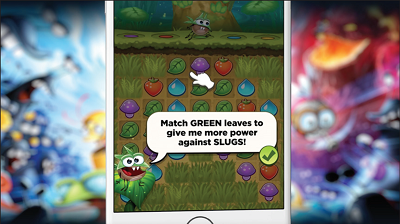
You can experiment with device images to display irregular content, such as including a device screen to display portrait footage in a landscape video. This lets you re-frame content so it engages the user. Embedded devices provide additional design options, while full-screen ads minimize distracting elements. Experiment with embedded devices to find the most effective way to showcase your app.
If you need to display portrait footage in a landscape video or vice versa, embedding the footage on a device screen can be a visually pleasing way to do it, and it also lets you re-frame content in a convincing way. Using devices definitely gives you more design options but sometimes all you need is some full-screen action without any distracting elements. Test to experiment with what works best to showcase your app.
Guide the player's eye
Know exactly what you want the user to focus on and animate accordingly.
Pace it for clarity and excitement
Keep the pacing exciting but make sure players have time to understand the content. Clarity is often the most important element. Focus on one message at a time, and use text elements to support the visuals. Don't mention something that's not currently happening on the screen.
Edit to the beat
Many users choose to watch trailers without sound but when they do, tightly cutting footage to music helps it hit harder. Use music from the app if possible. Add sound effects for emphasis, but keep them subtle, and preferably use sounds from the app too.
Match the soundtrack
Try to create a story with the soundtrack that has a beginning, a middle and an end. A cohesive soundtrack works better than just a random song that fades out. Use the soundtrack to set the length of the trailer.
Show your stars
If there are prominent characters or famous actors for example in your app, show them.
Localize your content
Reach users in their own language. Chinese and Russian are good languages to start experimenting with.
Promote special events
Consider creating new trailers showcasing special events, new levels, or seasonal events.
Custom app listing best practices
Use the following information to configure your custom app listing according to the recommended best practices.
Avoid duplicate creative content
When you use custom app listings, avoid using the same creative content in multiple campaigns with the same goal. When duplicate creatives run simultaneously in two or more of the same kind of campaign, the ads might compete for exposure.
To maintain fair delivery while using custom app listings, ensure the following:
- Live ads don't contain the same combination of creative content (for example, the same video and the same end card).
- Any ads with the same combination of creatives aren't placed in more than one campaign of the same type.
- Only one campaign containing a duplicate creative goes live at a time.
If you upload duplicate creatives or creative packs to campaigns using custom app listings, you'll receive an error message identifying the duplicate campaigns and creatives. Use the links in the error message to replace the duplicate content in one of the affected campaigns.
Test app listings with creative testing campaigns
If you want to test how different app listings perform compared to one another, you can test them with a creative testing campaign. Creative testing campaigns deliver all ads on an equal-opportunity basis. This equal opportunity exploration enables you to compare the performance of creatives directly.
Because of this unique function of creative testing campaigns, you can test your Product Pages with all combinations of creatives. Unlike in other campaigns, you can use duplicates to test how unique product pages affect your creative packs' effectiveness without the risk of competition for exposure.