Session Overview
View session details and listen to player audio recordings.
Read time 2 minutesLast updated 2 days ago
Session metrics
The information in session overview matches the information seen on the session results page:- Overall risk: A score of Low, Medium or High, depending on the overall risk level in the session.
- Toxicity: A score of Low, Medium or High depending on how much toxicity the session contains. This score only appears if the administrator has enabled it.
- Positive play: A score of Low, Medium or High depending on how much collaborative, and constructive behaviours the session contains. This score only appears if your administrator has enabled it.
- Custom Score (Optional): A score of Low, Medium or High depending on how content was detected corresponding to the custom scores’ policy given by your administrator. Your administrator will provide the name of the score alongside the scoring policy. This score only appears if an administrator has defined it.
- Players: Number of players that participated in the match.
- Player segments: The number of players belonging to any player segment that has been defined and enabled.
- Duration: Length of the session in minutes and seconds.

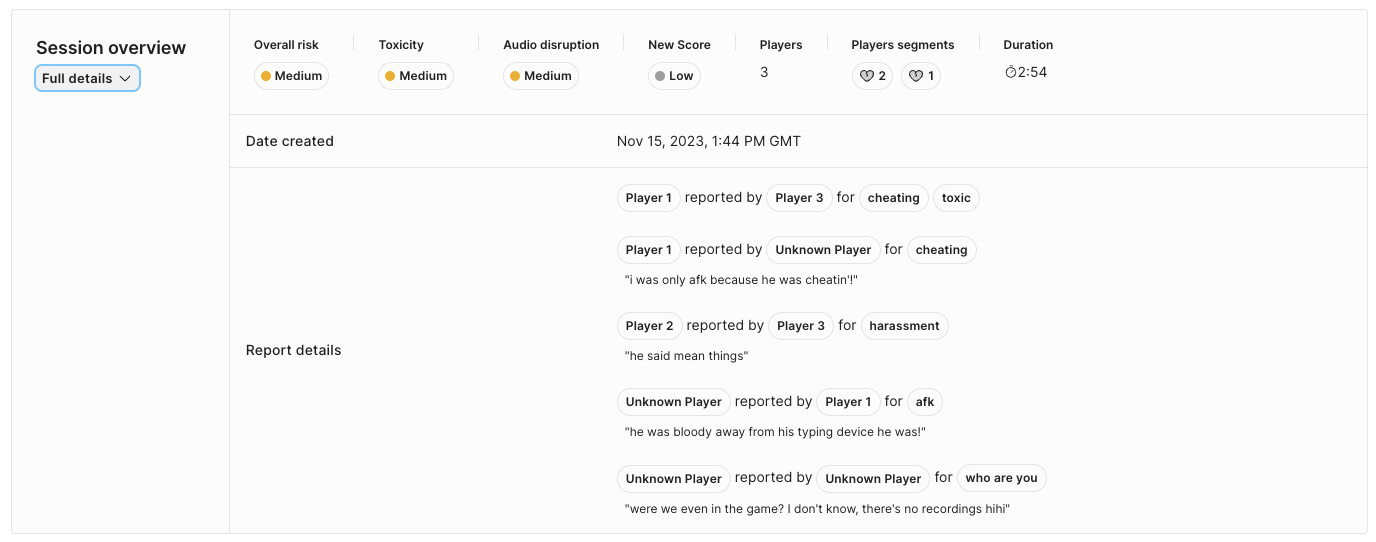
- Date created: The date and time this report was created.
- Report details: A summary of the players who were reported, who reported them, and the reasons why.
Players
The player details table shows the analysis results for each player:- Player: A player number specific to this session and is not indicative of the player order in the original game. The in-game player name is shown instead if provided. If the analysis request contains Player IDs, they are found in a tooltip when hovering over the Player number label. You can copy this Player ID with a click. If the player has a flag icon, they were reported by another player in this session. Hover over the player name to see detailed information.
- Characteristics: Hover over the values for a confidence score ranging from 0 to 1.
- Language: Shows the detected language(s) being spoken by the player. Hover over the values for a confidence score ranging from 0 to 1.
- Toxicity (Optional): A score based on the user's audio recording. This score only appears if your administrator has enabled it (see label definitions/glossary).
- Audio disruption (Optional): A score based on the user's audio recording. This score will appear if your administrator has enabled it.
- Positive play (Optional): A score based on the user's audio recording. This score will appear if your administrator has enabled it.
- Custom score (Optional): Custom score based on the user's audio recording. The name of the score will depend on that given by your administrator. This score only appears if defined and enabled (see label definitions for more details).
- Player segment: The segments this player belongs to.
- Top 3 moments: A list of the player's three most common moment types for the player.
Overlays
Overlays containing information can be toggled using the Overlays menu in the audio player.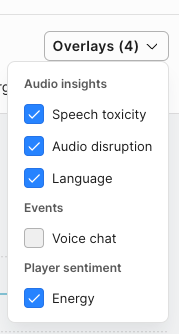
- Joined match - When a player entered the voice channel.
- Left match - When a player left the voice channel.
- Muted by [Player] - When a player was muted by another player.
- Unmuted by [Player] - When a player was unmuted by another player.