DisplayDialogComplex(string, string, string, string, string)
Displays a modal dialog with three buttons.
Read time 2 minutesLast updated 4 days ago
Definition
- Type: Method
- Namespace: UnityEditor
- Assembly: UnityEditor.CoreModule
public static int DisplayDialogComplex(string title, string message, string ok, string cancel, string alt)
Parameters
Returns
Type | Description |
|---|---|
| int | Returns the ID of a button. IDs are 0, 1, or 2 and they correspond to the |
Remarks
Use it for displaying message boxes in the Editor. If is null or whitespace, an is thrown. If is longer than 512 characters, it is truncated and the full message is logged to the console in markdown format.
messageArgumentNullExceptionmessageTextDisplayDialogComplex is similar to EditorUtility.DisplayDialog. This member shows a dialog with three buttons. These buttons represent , and . DisplayDialogComplex returns an integer 0, 1 or 2 corresponding to the , and buttons.
DisplayDialogComplexokcancelaltokcancelaltThe button is the default option, and can also be activated by pressing Enter.
okThe button is considered the "cancel" button and should usually not perform any action. On a PC, this can also be activated by pressing Escape or by clicking the dialog window close button. On a Mac, this can also be activated by pressing Escape, provided the button is called "Cancel".
cancelThe button allows you to provide the user with an alternative choice in addition to the and buttons. This button does not have a fixed keyboard shortcut.
altokcancelIf any button's text is longer than 64 characters, an is thrown.
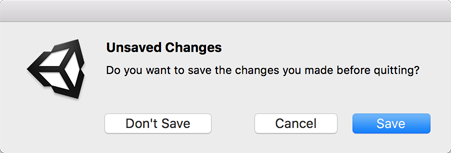
ArgumentExceptionOn macOS, the orientation of the buttons may be horizontal or vertical depending on the length of the message. Additionally, if the layout is horizontal, the button layout is different from Windows or Linux, with the default button on the right and the alternate button on the far left.
Note: and are kept for backwards compatibilty. For new code, it is strongly recommended to use one of the new EditorDialog methods.
EditorUtility.DisplayDialogEditorUtility.DisplayDialogComplexAdditional Resources:
- EditorDialog.DisplayAlertDialog
- EditorDialog.DisplayAlertDialogWithOptOut
- EditorDialog.DisplayDecisionDialog
- EditorDialog.DisplayDecisionDialogWithOptOut
- EditorDialog.DisplayComplexDecisionDialog
- EditorDialog.DisplayComplexDecisionDialogWithOptOut
// UPDATE
macOS display dialog buttons for the example below.
// UPDATE
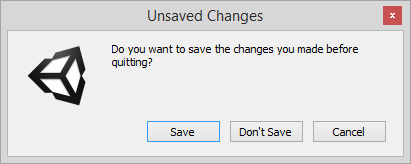
PC display dialog buttons for the example below.