RectField
Make an X, Y, W & H field for entering a Rect.
Read time 4 minutesLast updated a month ago
Definition
- Type: Method
- Namespace: UnityEditor
- Assembly: UnityEditor.CoreModule
RectField(Rect, GUILayoutOption[])
Make an X, Y, W & H field for entering a Rect.
public static Rect RectField(Rect value, params GUILayoutOption[] options)
Parameters
The value to edit.
An optional list of layout options that specify extra layout properties. Any values passed in here will override settings defined by the .
Additional Resources: GUILayout.Width, GUILayout.Height, GUILayout.MinWidth, GUILayout.MaxWidth, GUILayout.MinHeight, GUILayout.MaxHeight, GUILayout.ExpandWidth, GUILayout.ExpandHeight.
styleAdditional Resources: GUILayout.Width, GUILayout.Height, GUILayout.MinWidth, GUILayout.MaxWidth, GUILayout.MinHeight, GUILayout.MaxHeight, GUILayout.ExpandWidth, GUILayout.ExpandHeight.
Returns
Type | Description |
|---|---|
| Rect | The value entered by the user. |
Remarks
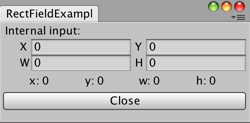
Capture the RectField sizes.
Examples
using UnityEditor;using UnityEngine;public class RectFieldExample : EditorWindow{ static Rect pos; [MenuItem("Examples/RectField Example")] static void rectFieldExample() { RectFieldExample window = EditorWindow.GetWindowWithRect<RectFieldExample>(new Rect(0, 0, 250, 100)); window.Show(); } void OnGUI() { EditorGUILayout.BeginVertical(); pos = EditorGUILayout.RectField("Internal input:", pos); EditorGUILayout.BeginHorizontal(); GUILayout.FlexibleSpace(); GUILayout.Label("x: " + (pos.x).ToString()); GUILayout.FlexibleSpace(); GUILayout.Label("y: " + (pos.y).ToString()); GUILayout.FlexibleSpace(); GUILayout.Label("w: " + (pos.width).ToString()); GUILayout.FlexibleSpace(); GUILayout.Label("h: " + (pos.height).ToString()); GUILayout.FlexibleSpace(); EditorGUILayout.EndHorizontal(); EditorGUILayout.EndVertical(); if (GUILayout.Button("Close")) { this.Close(); } }}
RectField(string, Rect, GUILayoutOption[])
Make an X, Y, W & H field for entering a Rect.
public static Rect RectField(string label, Rect value, params GUILayoutOption[] options)
Parameters
Label to display above the field.
The value to edit.
An optional list of layout options that specify extra layout properties. Any values passed in here will override settings defined by the .
Additional Resources: GUILayout.Width, GUILayout.Height, GUILayout.MinWidth, GUILayout.MaxWidth, GUILayout.MinHeight, GUILayout.MaxHeight, GUILayout.ExpandWidth, GUILayout.ExpandHeight.
styleAdditional Resources: GUILayout.Width, GUILayout.Height, GUILayout.MinWidth, GUILayout.MaxWidth, GUILayout.MinHeight, GUILayout.MaxHeight, GUILayout.ExpandWidth, GUILayout.ExpandHeight.
Returns
Type | Description |
|---|---|
| Rect | The value entered by the user. |
Remarks
Capture the RectField sizes.
Examples
using UnityEditor;using UnityEngine;public class RectFieldExample : EditorWindow{ static Rect pos; [MenuItem("Examples/RectField Example")] static void rectFieldExample() { RectFieldExample window = EditorWindow.GetWindowWithRect<RectFieldExample>(new Rect(0, 0, 250, 100)); window.Show(); } void OnGUI() { EditorGUILayout.BeginVertical(); pos = EditorGUILayout.RectField("Internal input:", pos); EditorGUILayout.BeginHorizontal(); GUILayout.FlexibleSpace(); GUILayout.Label("x: " + (pos.x).ToString()); GUILayout.FlexibleSpace(); GUILayout.Label("y: " + (pos.y).ToString()); GUILayout.FlexibleSpace(); GUILayout.Label("w: " + (pos.width).ToString()); GUILayout.FlexibleSpace(); GUILayout.Label("h: " + (pos.height).ToString()); GUILayout.FlexibleSpace(); EditorGUILayout.EndHorizontal(); EditorGUILayout.EndVertical(); if (GUILayout.Button("Close")) { this.Close(); } }}
RectField(GUIContent, Rect, GUILayoutOption[])
Make an X, Y, W & H field for entering a Rect.
public static Rect RectField(GUIContent label, Rect value, params GUILayoutOption[] options)
Parameters
Label to display above the field.
The value to edit.
An optional list of layout options that specify extra layout properties. Any values passed in here will override settings defined by the .
Additional Resources: GUILayout.Width, GUILayout.Height, GUILayout.MinWidth, GUILayout.MaxWidth, GUILayout.MinHeight, GUILayout.MaxHeight, GUILayout.ExpandWidth, GUILayout.ExpandHeight.
styleAdditional Resources: GUILayout.Width, GUILayout.Height, GUILayout.MinWidth, GUILayout.MaxWidth, GUILayout.MinHeight, GUILayout.MaxHeight, GUILayout.ExpandWidth, GUILayout.ExpandHeight.
Returns
Type | Description |
|---|---|
| Rect | The value entered by the user. |
Remarks
Capture the RectField sizes.
Examples
using UnityEditor;using UnityEngine;public class RectFieldExample : EditorWindow{ static Rect pos; [MenuItem("Examples/RectField Example")] static void rectFieldExample() { RectFieldExample window = EditorWindow.GetWindowWithRect<RectFieldExample>(new Rect(0, 0, 250, 100)); window.Show(); } void OnGUI() { EditorGUILayout.BeginVertical(); pos = EditorGUILayout.RectField("Internal input:", pos); EditorGUILayout.BeginHorizontal(); GUILayout.FlexibleSpace(); GUILayout.Label("x: " + (pos.x).ToString()); GUILayout.FlexibleSpace(); GUILayout.Label("y: " + (pos.y).ToString()); GUILayout.FlexibleSpace(); GUILayout.Label("w: " + (pos.width).ToString()); GUILayout.FlexibleSpace(); GUILayout.Label("h: " + (pos.height).ToString()); GUILayout.FlexibleSpace(); EditorGUILayout.EndHorizontal(); EditorGUILayout.EndVertical(); if (GUILayout.Button("Close")) { this.Close(); } }}