Documentation

​
​

Development

User Acquisition

Monetization

Industry

Asset Transformer SDK

2025.7

Supported
​

User Manual

Python API

C# API

Changelog

Discussions

Asset Transformer SDK

2025.7

Supported
​

​
​
Get started
  • System requirements
  • Licensing
  • Setup
  • Migrate from Scenario Processor
Framework
  • Framework
  • Preferences
Input/output files
  • Supported formats
  • Import files
  • Export files
  • Export textures
  • CAD vs Mesh
Scene
  • Product structure
  • Occurrence
  • Component
  • Material
Algorithms
  • CAD
  • Healing
  • Optimization
  • Combine and bake
  • Reconstruction
  • UVs
Viewer
  • Viewer
Pixyz UI
  • Setup
  • Overview
  • Create a custom UI
Guidelines
  • Data preparation
  • Process point clouds
Debug and diagnose
  • Log files
  • Debug best practices
Other
  • Samples
  • Glossary
  1. Asset Transformer SDK (ex Pixyz)

Sample Folder Watcher

Expands the previous script and enables a "batch processing" of 3D assets into a folder watcher configuration. Any compatible 3D files copied into an "input" folder will automatically be transformed according to a specific optimization scenario.
Read time 1 minute
Last updated 9 months ago

Sample #2 - Folder Watcher

GitHub
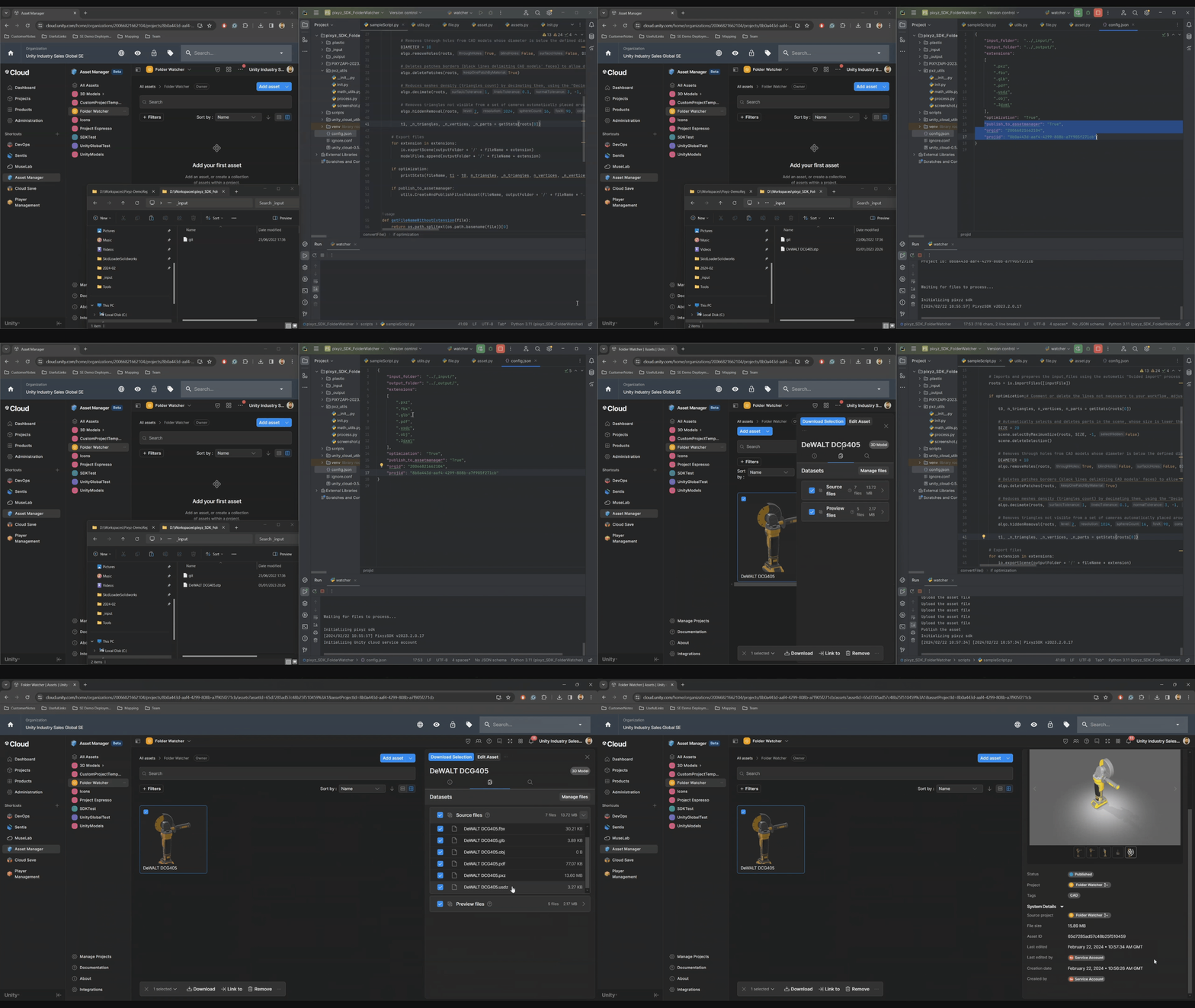
That second sample expands the previous script and enables a "batch processing" of 3D assets into a folder watcher configuration. Any compatible 3D files copied into an "input" folder will automatically be transformed according to a specific optimization scenario.
Folder watcher demo with Pixyz and Asset Manager

What to do?

Simply configure your Pixyz Python environment and download the GitHub sample folder on your machine.
Then execute the
python/Windows/FolderWatcher/watcher.py

script:
Tip
Don't forget to check and update the ```config.json`` file according to your own setup for Pixyz SDK, folder configuration and Asset Manager credentials.

What it does?

That sample script will:
  • configure and initialize your Pixyz SDK python instance
  • connect to an existing Pixyz Flexlm license server (IP adress/hostname and port must be set as per your existing licensing setup)
  • monitor an
    inputFolder
    as per the config.json configuration.
  • load and process any native CAD or un-processed 3D model available in the folder and supported by Pixyz
  • export locally in the
    outputFolder
    all processed models
  • UNITY CLOUD ONLY Assuming proper configuration of your Unity Cloud and Asset Manager information: upload all transformed assets onto the Asset Manager.

Copyright © 2026 Unity Technologies
LegalPrivacy PolicyCookiesDocumentation Terms of UseDo Not Sell or Share My Personal InformationYour Privacy Choices (Cookie Settings)

"Unity", Unity logos, and other Unity trademarks are trademarks or registered trademarks of Unity Technologies or its affiliates in the U.S and elsewhere (more info here). Other names or brands are trademarks of their respective owners.

Some pages are machine-translated for convenience, and may contain inaccuracies. In the event of conflicting information, the English version is authoritative.

  • On this page
    • Sample #2 - Folder Watcher

      • What to do?

      • What it does?


Report a problem with this page