文档

​
​

Development

User Acquisition

Monetization

工业

Unity Hub

Download Unity Hub

Unity Hub

此页面不支持所选语言。
​
​
Unity Hub
  • Introduction to Unity Hub
  • Install the Hub
  • Download and manage Unity Editor installations
    • Download and install the Unity Editor
    • Select a language in the Unity Hub and Unity Editor
    • Add modules to a Unity Editor installation
  • Projects overview
  • Templates overview
  • Command Line Interface overview
  • Manage licenses
  • Deeplinking support for local projects
  • Hub UI reference
  1. Unity Hub

Add modules to a Unity Editor installation

Modules are optional components you can use to tailor your Unity Editor installation; they contain build support for certain platforms, language packs, and developer tools.
阅读时间2 分钟
最后更新于 3 个月前

You can select modules during a new Editor installation, or add modules to existing installs.
You can limit the file size of the Editor if you select only the modules that you require.

Add modules to a new install of an Editor

When you install a new Editor, you can choose to install modules as part of the Editor installation process. For more information, refer to Install the Editor.

Add modules to an existing Editor installation

To add modules to an existing Editor installation:
  1. Open the Hub.
  2. Select Installs in the left sidebar.
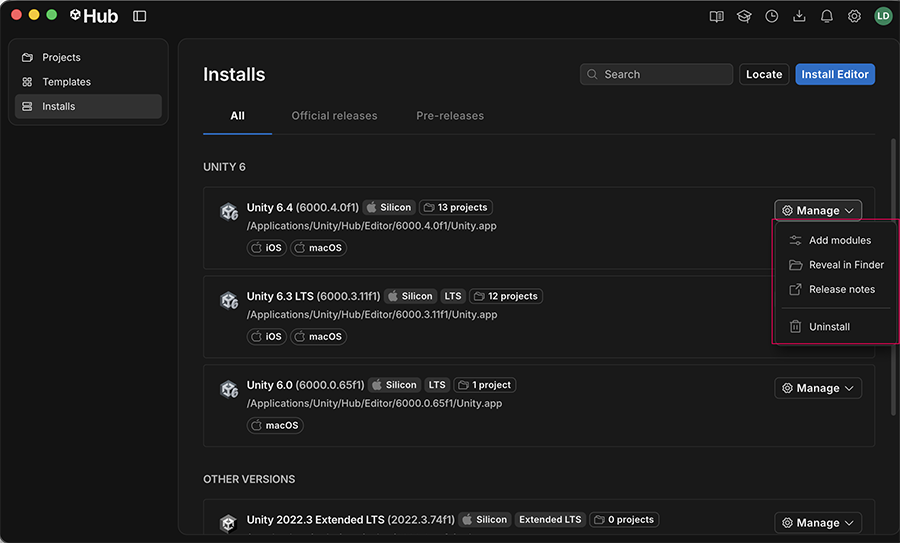
  3. Navigate to the Editor version you want to add modules to, and select Manage.
  4. Select Add modules.
  5. A window opens with all the available modules for the selected Editor. Choose the modules you want to install, and then select Install.
  6. The Hub starts downloading the modules, and you can view the progress in the Downloads window
The Add modules window

The Add modules window

重要
You can only add modules to Editor installations that were installed with the Hub. If the Add modules option is missing for an Editor installation, this usually means the Editor was installed without the Hub. To add modules to an Editor version that was installed without the Hub, you must uninstall the Editor and then reinstall it through the Hub. You can also install an Editor and modules with the Hub command line interface (CLI). For more information, refer to Use the Hub CLI.

Copyright © 2026 Unity Technologies
法律信息隐私政策CookiesDocumentation Terms of Use请勿出售或分享我的个人信息您的隐私选择(Cookie 设置)

“Unity”、Unity 徽标及其他 Unity 商标是 Unity Technologies 或其附属公司在美国和其他地方的商标或注册商标(此处查看更多信息)。其他名称或品牌是其各自所有者的商标。

为方便起见,一些页面是机器翻译的,可能包含不准确的内容。如有信息不一致的情况,以英文版本为准。

  • 在本页上
    • Add modules to a new install of an Editor

    • Add modules to an existing Editor installation

  • 其他资源
  • Install and uninstall Editor versions
  • Download assets and modules from the Unity Asset Store

报告此页面的问题