Ad Quality Unity 插件
集成 Ad Quality 插件以监控和控制用户看到的广告内容,确保内容与应用的目标保持一致并增强用户体验。
阅读时间1 分钟最后更新于 8 个月前
Ad Quality 有助于监控和控制用户看到的广告内容,确保内容与应用程序的目标保持一致并增强用户体验。在投放吸引受众的相关广告的同时,最大限度发挥收入潜力。
先决条件
按照我们的分步指南,在 LevelPlay 平台中配置应用程序
步骤 1:导入 Ad Quality 插件
- 下载 Ad Quality Unity 插件
- 确保打开 Unity 项目。
- 选择提取的文件并将其导入 Unity 项目。
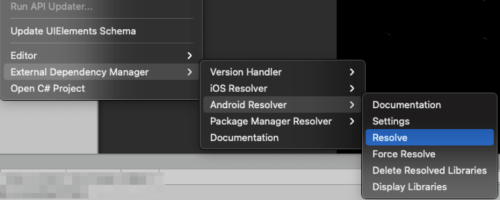
转到 Assets(资源)> Mobile Dependency Manager > Android Resolver(Android 解析器)> Resolve(解析)
步骤 2:初始化 SDK
使用可在 LevelPlay 帐户中找到的应用程序密钥,初始化 Ad Quality。
将以下代码添加到第一个场景的 Awake 方法中:
void Awake (){ // Initialize IronSourceAdQuality.Initialize(appKey);}
在您的应用达到我们的广告阈值后,您将能够在 LevelPlay 平台上观察数据。
(可选)步骤 3:设置您的用户 ID
将用户 ID 传递给 Ad Quality 可以提高用户广告旅程的可见性。
请遵循其他配置部分中的集成指南。