Game Overrides 与 CCD 集成
Use Remote Config and badges to integrate Game Overrides with Cloud Content Delivery so you can target content to specific audiences.
阅读时间8 分钟最后更新于 8 个月前
通过 Game Overrides,您可以针对特定受众定向投放内容,例如,通过运行 A/B 测试以及根据地理位置和特定时间段定制内容。通过标示来标识预期的内容后,Remote Config 会在不影响实时玩家的情况下测试该内容,同时还会将标示的内容分发给特定玩家。
要集成 Game Overrides,请完成以下步骤:
- 安装 Remote Config 包
- 关联您的 Project ID
- 创建一个覆盖以使用 CCD 标示来定向投放内容
- 将 Remote Config 集成到您的游戏代码中
- 从 CCD 获取相应的资源
安装 Remote Config 包
如需了解如何安装包,请参阅 Package Manager(包管理器)。
- 在 Unity 编辑器中,选择 Window(窗口)> Package Manager(包管理器)。
- 在 Packages(包)列表视图中,选择 Remote Config。
- 在包的具体详细信息视图中,选择并安装需要导入到项目中的 Remote Config 包版本。
关联您的 Project ID
如果尚未将您的 Unity 项目关联到 Project ID,必须执行此操作。
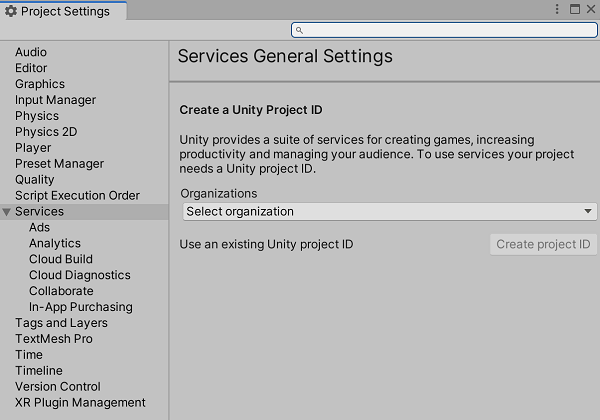
要在 Unity 编辑器中关联您的项目,请执行以下操作:
- 打开 Services(服务)窗口(选择 Window(窗口)> General(常规)> Services(服务))。
- 选择 General settings(常规设置)。
- 在 Project Settings(项目设置)菜单的 Services(服务)部分,从下拉选单中选择您的组织。必须登录到 Unity Hub 才能查看关联组织的列表。
- 选择 Use an existing Unity project ID(使用现有 Unity Project ID) 将项目关联到先前在开发者控制面板 (Developer Dashboard) 上创建的 ID,或选择 Create project ID(创建 Project ID) 将项目关联到新 ID。
创建覆盖
您可以在 Unity Dashboard(Unity 后台)上通过 Game Overrides 服务或 Cloud Content Delivery 服务来创建覆盖。请参阅创建覆盖。
-
通过以下方式找到 Game Overrides 服务:在导航栏中选择 LiveOps,然后在二级导航栏中选择 Game Overrides > Overrides(覆盖)。
或者,也可以在 Cloud Content Delivery 服务本身的存储桶的 Targeting(定向投放)选项卡中选择 Create Override(创建覆盖) 来导航到 Overview(概览)页面。 -
选择 Create Override(创建覆盖)。
-
为您的覆盖命名,然后选择 Next(下一步)。
-
指定 JEXL 条件来选择要定向投放到的玩家,然后指定要定向投放到的这些玩家的百分比。选择 Next(下一步)。
-
选择 + Choose content type(+ 选择内容类型),然后选择 Cloud Content Delivery > Badge(标示)。选择 Done(完成)。
-
选择 Choose a bucket(选择存储桶),然后选择要使用的存储桶。
-
选择 Choose your badge(选择标示),然后选择要使用的标示。选择 Choose(选择),然后选择 Next(下一步)。
-
选择运行覆盖的 Start Date(开始日期) 和 End Date(结束日期)。选择 Finish(完成)。
-
选择 Enable(启用) 以激活您的覆盖。
将 Remote Config 集成到您的游戏代码中
RemoteConfigUnity.ServicesRemote Config 服务有一个可访问的 实例用于在运行时获取并应用您的配置。在以下示例中,您将使用这个实例来获取由覆盖定义的 CCD 配置的键/值对。此键/值对中的键是静态字符串 。然后,当获取成功时,您将调用 函数。 接受一个 结构,这个结构表示对获取请求的响应。
RemoteConfigServiceCCD_CONFIG_KEYApplyCcdConfigApplyCcdConfigConfigResponseC#
public struct userAttributes {}public struct appAttributes {} async Task InitializeRemoteConfigAsync(){ // initialize handlers for unity game services await UnityServices.InitializeAsync(); // remote config requires authentication for managing environment information if (!AuthenticationService.Instance.IsSignedIn) { await AuthenticationService.Instance.SignInAnonymouslyAsync(); }} async void Start(){ if (Utilities.CheckForInternetConnection()) { await InitializeRemoteConfigAsync(); } RemoteConfigService.Instance.appConfig = RemoteConfigService.Instance.GetConfig("ccd"); RemoteConfigService.Instance.FetchCompleted += ApplyCcdConfig; RemoteConfigService.Instance.FetchConfigs("ccd", new userAttributes(), new appAttributes());} void ApplyCcdConfig(ConfigResponse configResponse){ switch (configResponse.requestOrigin) { case ConfigOrigin.Default: Debug.Log("Default values will be returned"); break; case ConfigOrigin.Cached: Debug.Log("Cached values loaded"); break; case ConfigOrigin.Remote: Debug.Log("Remote Values changed"); if (RemoteConfigService.Instance.appConfig.HasKey("CCD_CONFIG_KEY")) { // get the correct key-value pair for CCD (the key will always be "CCD_CONFIG_KEY") string jsonValue = RemoteConfigService.Instance.appConfig.GetJson("CCD_CONFIG_KEY"); // you will use jsonValue in the next step } break; }}
从 CCD 获取相应的资源
成功获取 CCD 配置后,您可以提取存储桶信息和标示名称,进而从 CCD 获取相应的资源。
首先定义一个 类。
CcdConfigC#
public class CcdConfig{ public string bucketId; public string bucketName; public string badgeName;}
在 函数中,您可以从获取的 CCD 配置中提取这些值,并使用这些值从 CCD 获取相应的资源。
ApplyCcdConfigC#
// extract the config values that you have defined when creating your OverrideCcdConfig ccdConfig = JsonUtility.FromJson<CcdConfig>(jsonValue); // the bucketId and badgeName are required to fetch the appropriate assetsvar bucketId = ccdConfig.bucketId;var badgeName = ccdConfig.badgeName; // fetch the entry from CCD// Note that for a dynamic file path, a config override can be used in order to fetch// the correct file path for your assetJObject entry = CcdManager.Instance.GetEntry(bucketId, badgeName, "ENTRY_PATH");// fetch the entry's content from CCDvar content = CcdManager.Instance.GetContent(bucketId, entry["entryid"].ToString()); // use your asset(s) as needed// YOUR CODE HERE
CCDManagerC#
using System.Collections;using System.Collections.Generic;using UnityEngine;using System.Threading.Tasks;using Unity.RemoteConfig; using System.Net;using System;using System.IO; public class CcdManager : MonoBehaviour{ private static string projectId = "YOUR_PROJECT_ID_HERE"; private static string ccdBaseUrl = $"https://{projectId}.client-api.unity3dusercontent.com/client_api/v1/"; private static CcdManager m_Instance; public static CcdManager Instance { get { return m_Instance; } } private void Awake() { if (m_Instance != null && m_Instance != this) { Destroy(this.gameObject); return; } m_Instance = this; DontDestroyOnLoad(this.gameObject); } public JObject GetEntry(string bucketId, string badgename, string entrypath) { var entryUrl = $"{ccdBaseUrl}/buckets/{bucketId}/release_by_badge/{badgename}/entry_by_path/?path={entrypath}"; HttpWebRequest request = (HttpWebRequest)WebRequest.Create(entryUrl); HttpWebResponse response = (HttpWebResponse)request.GetResponse(); StreamReader reader = new StreamReader(response.GetResponseStream()); string jsonResponse = reader.ReadToEnd(); JObject ccdEntry = JObject.Parse(jsonResponse); return ccdEntry; } public string GetContent(string bucketId, string entryid) { var contentUrl = $"{ccdBaseUrl}/buckets/{bucketId}/entries/{entryid}/content/"; HttpWebRequest request = (HttpWebRequest)WebRequest.Create(String.Format(contentUrl)); HttpWebResponse response = (HttpWebResponse)request.GetResponse(); StreamReader reader = new StreamReader(response.GetResponseStream()); string contentValue = reader.ReadToEnd(); return contentValue; }}
现在,您已成功获取由覆盖定义的资源。