文档

​
​

Development

User Acquisition

Monetization

工业

Asset Transformer SDK

2026.4

受支持
​

User Manual

Python API

C# API

Changelog

Discussions

Asset Transformer SDK

2026.4

受支持
​

此页面不支持所选语言。
​
​
Get started
  • System requirements
  • Licensing
  • Setup
    • Python SDK
    • C# SDK
    • Docker
  • Migrate from Scenario Processor
Framework
  • Framework
  • Preferences
Input/output files
  • Supported formats
  • Import files
  • Export files
  • Export textures
  • CAD vs Mesh
Scene
  • Product structure
  • Occurrence
  • Component
  • Material
  • Image
Algorithms
  • CAD
  • Healing
  • Optimization
  • Combine and bake
  • Reconstruction
  • UVs
Viewer
  • Viewer
Pixyz UI
  • Setup
  • Overview
  • Create a custom UI
Guidelines
  • Data preparation
  • Process point clouds
Debug and diagnose
  • Log files
  • Debug best practices
Other
  • Samples
  • Glossary
  1. Asset Transformer SDK (ex Pixyz)

Python SDK

This guide provides step-by-step instructions for installing and setting up the Pixyz Python SDK, including prerequisites, pip installation, and running your first script.
阅读时间2 分钟
最后更新于 3 个月前

Prerequisites

  • Compatible system
  • Python 3.1 minimum. 3.10 or newer recommended
  • A valid Pixyz SDK license on your Pixyz license portal

Setup

Setup using pip (recommended)

  1. Run
    pip install pxz --extra-index-url https://unity3ddist.jfrog.io/artifactory/api/pypi/pixyz-pypi-prod-local/simple
  2. Setup your license
  3. Run your first script

SDK without UI frontend

In this case, you will only have access to the Python API/SDK and not the UI frontend.
  1. Run
    pip install pxz --no-deps --extra-index-url https://unity3ddist.jfrog.io/artifactory/api/pypi/pixyz-pypi-prod-local/simple
  2. Setup your license
  3. Run your first script
注意
The package is hosted at the following index location:
https://unity3ddist.jfrog.io/artifactory/api/pypi/pixyz-pypi-prod-local/simple
More information about installing from custom indexes.
重要
Windows only: be aware of warnings related to search paths such as
WARNING: The scripts PiXYZFinishInstall.exe, PiXYZGenerateActivationCode.exe and PiXYZInstallLicense.exe are installed in [...] which is not on PATH
.
If this happens, simply add missing paths to PYTHONPATH or add the base path prefix to the script.

Setup without pip

PyCharm

  1. Download SDK from archive
  2. Open project
  3. Locate your Pixyz SDK binaries folder on your machine or local dev environement
  4. Add Pixyz binaries folder to your interpreter path (check PyCharm documentation)
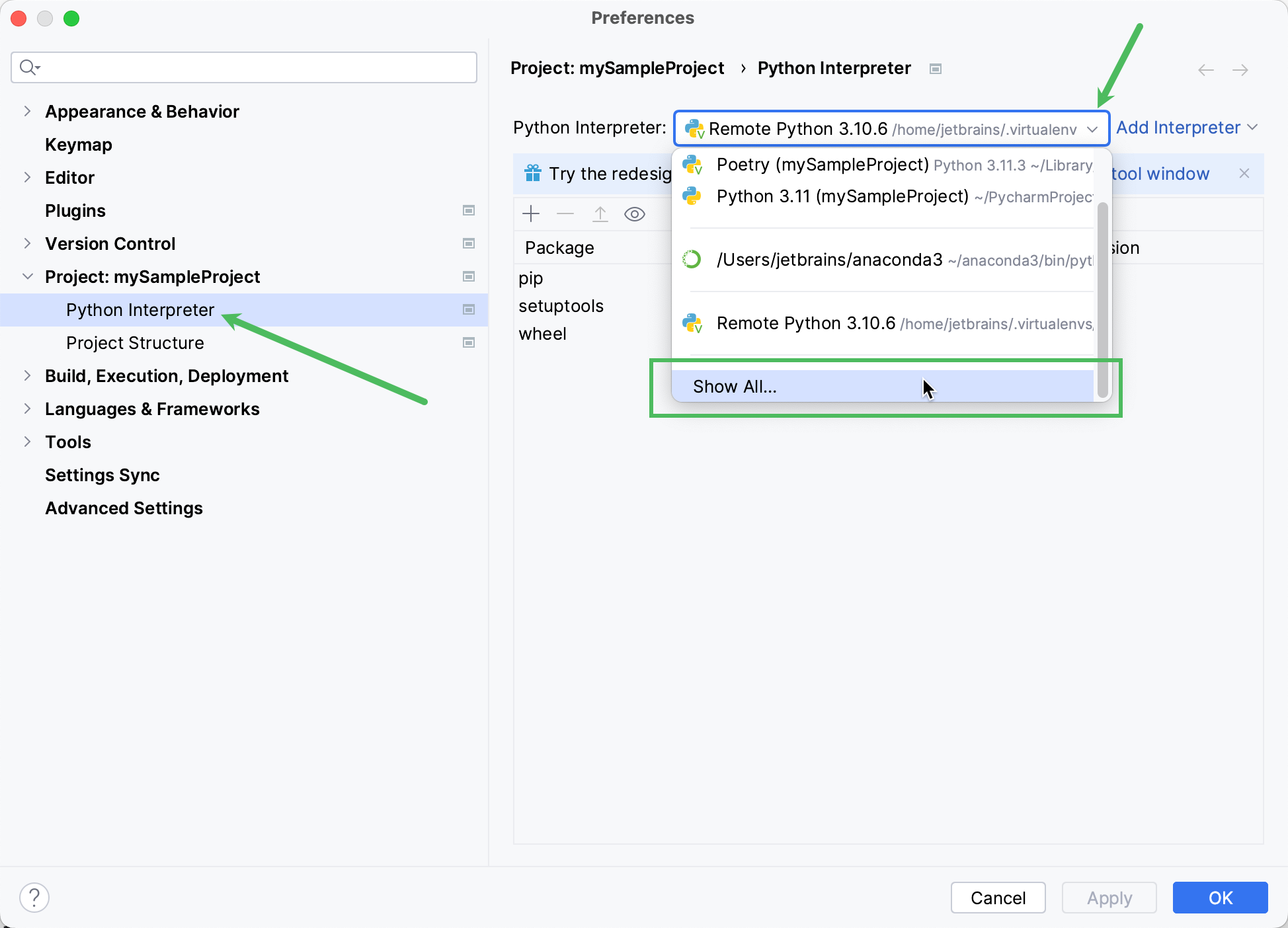
pycharm
  1. Setup your license server
  2. Run your first script

Visual Studio Code

  1. Download SDK from archive
  2. Open project
  3. Create a Python environment
  4. Set
    PYTHONPATH
    to the Pixyz binaries folder path (by adding an .env file to the project for example)
  5. Setup your license
  6. Run your first script

Run your first script

import pxzfrom pxz import core# init Pixyzpxz.initialize()# print Pixyz versionprint(core.getVersion())# set log level to INFO so you can see the logs in the consolecore.configureInterfaceLogger(True, True, True)core.addConsoleVerbose(core.Verbose.INFO)# if no license is found, try to configure a license serverif not core.checkLicense(): core.configureLicenseServer("company-server-hostname", 27000, True)# use io.importScene to import a file and enjoy :)

Copyright © 2026 Unity Technologies
法律信息隐私政策CookiesDocumentation Terms of Use请勿出售或分享我的个人信息您的隐私选择(Cookie 设置)

“Unity”、Unity 徽标及其他 Unity 商标是 Unity Technologies 或其附属公司在美国和其他地方的商标或注册商标(此处查看更多信息)。其他名称或品牌是其各自所有者的商标。

为方便起见,一些页面是机器翻译的,可能包含不准确的内容。如有信息不一致的情况,以英文版本为准。

  • 在本页上
    • Prerequisites

    • Setup

      • Setup using pip (recommended)

        • SDK without UI frontend

      • Setup without pip

        • PyCharm

        • Visual Studio Code

    • Run your first script


报告此页面的问题