OpenID Connect /OpenID Connect
Set up custom sign-in with OpenID Connect providers to enable players to authenticate with external identity systems.
読み終わるまでの所要時間 11 分最終更新 10ヶ月前
カスタムログインでは、プレイヤーからの入力 (例えば、E メールアドレスやパスワードなどのサインイン認証情報) を使用して、ゲームセッションの新規プレイヤーが作成され、プレイヤーがカスタム ID プロバイダーアカウントにリンクされます。カスタム ID プロバイダーを使用すると、ゲーム内で、既存の認証システム (PlayFab、Firebase、Epic Online Services など) のアカウントによるサインインを有効にできます。
プレイヤーがカスタム ID プロバイダーアカウントでサインインする場合には、プレイヤーを認証するか、新しいプレイヤーを作成するために、 API が呼び出されます。
SignInWith最小 SDK バージョン: 2.2.0
SDK のバージョンを確認してください。OIDC は 2.2.0 以降でサポートされています。
このセクションでは、OpenID Connect を使用したカスタム ID プロバイダーを使用してゲーム内でのプレイヤーの認証を設定するための以下のシナリオについて説明します。
- カスタム OpenID Connect ID サインインを設定する。
- 戻ってきたプレイヤーをサインインする、または新しいプレイヤーを作成する。
- 匿名ログインからカスタム ID プロバイダーを介したプラットフォームログインへとプレイヤーを更新する。
重要: ゲームのプレイヤーにカスタム ID プロバイダーサインインオプションを提供するには、カスタム ID プロバイダーの指示に従って、Unity ゲーム内で ID トークンを取得してください。
ノート: Unity Gaming Services ではインテグレーションは提供されていないため、OIDC/OAuth2 サーバーへのインテグレーションは自分で行う必要があります。
ノート: 以下のコード例は、Unity Dashboard でカスタム ID プロバイダーをすでに設定し、有効な ID プロバイダー名とプレイヤーの ID トークンを持っていることを前提としています。このインテグレーションは、サードパーティの IdP 認証情報を UGS プレイヤー ID にリンクするためのものであり、IdP のインテグレーション自体は自分でビルドする必要があります。
以下は、サードパーティ IdP、Unity Gaming Services、および Unity アプリケーション/ゲーム間の典型的なインテグレーションを示した UML シーケンス図です。
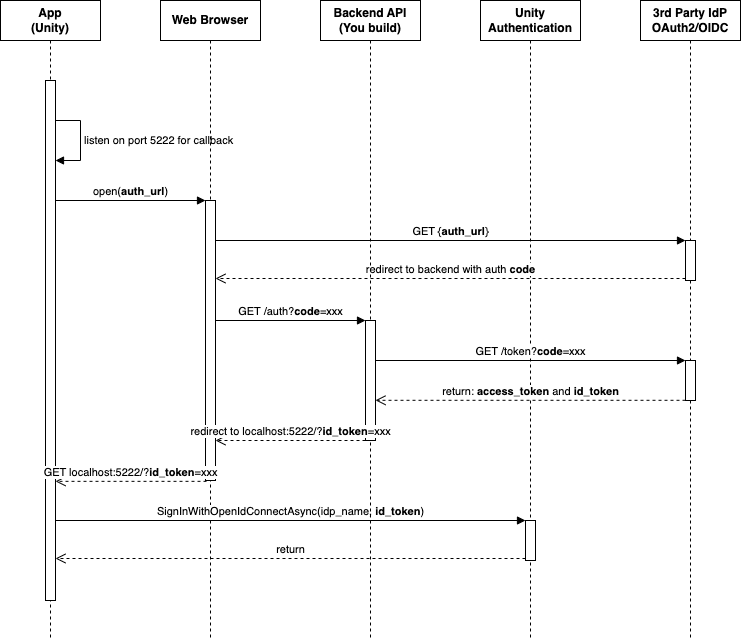
カスタム OpenID Connect ID サインインを設定する
OpenID は OAuth2.0 プロトコルの上に構築されたアイデンティティレイヤーです。承認サーバーによって行われた認証に基づいて、プレイヤーの情報を確認することができます。OpenID を使用すると、ウェブベース、JavaScript、およびモバイルクライアントなどのクライアントに接続し、エンドユーザーや認証セッションに関する情報を取得できます。
-
Unity Authentication 用に、OpenID Connect ID プロバイダーを設定します。
- Unity エディターメニューで、Edit (編集) > Project Settings... (プロジェクト設定...) を選択し、ナビゲーションメニューから Services (サービス) > Authentication を選択します。
- ID Providers (ID プロバイダー) を OpenID Connect に設定し、Add (追加) を選択します。
- Oidc Name テキストフィールドに ID プロバイダー名を入力します (ID プロバイダー名は、"oidc-" を含む 6 文字から 20 文字の任意のテキストです)。
- Issuer (URL) テキストフィールドに発行者の URL を入力します (https://) で始まる必要があります)。以下は ID プロバイダーの形式の例です。AWS Cognito: Keycloak:
https://cognito-idp.<Region>.amazonaws.com/<userPoolId>Firebase:https://<keycloak-domain>/realms/<realm>https://securetoken.google.com/<projectId> - Save (保存) を選択します。
戻ってきたプレイヤーをサインインする、または新しいプレイヤーを作成する
SignInWithOpenIdConnectAsync- Open ID Connect の認証情報を使用して新しい Unity Authentication プレイヤーを作成する。
- Open ID Connect の認証情報を使用して既存のプレイヤーをサインインする。
プロジェクト内の Unity Authentication プレイヤーが認証情報と関連付けられていない場合、 は新しいプレイヤーを作成します。プロジェクト内の Unity Authentication プレイヤーが認証情報と関連付けられている場合、 はそのプレイヤーのアカウントにサインインします。この関数ではキャッシュされたプレイヤーは考慮されません。 はキャッシュされたプレイヤーを置き換えます。
SignInWithOpenIdConnectAsyncSignInWithOpenIdConnectAsyncSignInWithOpenIdConnectAsyncasync Task SignInWithOpenIdConnectAsync(string idProviderName, string idToken){ try { await AuthenticationService.Instance.SignInWithOpenIdConnectAsync(idProviderName, idToken); Debug.Log("SignIn is successful."); } catch (AuthenticationException ex) { // Compare error code to AuthenticationErrorCodes // Notify the player with the proper error message Debug.LogException(ex); } catch (RequestFailedException ex) { // Compare error code to CommonErrorCodes // Notify the player with the proper error message Debug.LogException(ex); }}
プレイヤーを匿名から カスタム ID プロバイダーアカウントへと更新する
匿名認証を設定した後、プレイヤーは匿名からアップグレードしてカスタム ID プロバイダーアカウントを作成し、それを使用してサインインし、ID トークンを取得することができます。その後、 API を呼び出してプレイヤーをアカウントにリンクします。
LinkWithOpenIdConnectAsyncキャッシュされたプレイヤーが SDK に存在する場合は、キャッシュされたプレイヤーを Open ID Connect アカウントにリンクすることもできます。
- を使用して、キャッシュされたプレイヤーのアカウントにサインインします。
SignInAnonymouslyAsync - を使用して、キャッシュされたプレイヤーのアカウントを Open ID Connect アカウントにリンクします。
LinkWithOpenIdConnectAsync
async Task LinkWithOpenIdConnectAsync(string idProviderName, string idToken){ try { await AuthenticationService.Instance.LinkWithOpenIdConnectAsync(idProviderName, idToken); Debug.Log("Link is successful."); } catch (AuthenticationException ex) when (ex.ErrorCode == AuthenticationErrorCodes.AccountAlreadyLinked) { // Prompt the player with an error message. Debug.LogError("This player is already linked with another account. Log in instead."); } catch (AuthenticationException ex) { // Compare error code to AuthenticationErrorCodes // Notify the player with the proper error message Debug.LogException(ex); } catch (RequestFailedException ex) { // Compare error code to CommonErrorCodes // Notify the player with the proper error message Debug.LogException(ex); }}
プレイヤーが独自のカスタム ID プロバイダーで自分のアカウントを使用してサインインすることを希望する場合は、以下の API を呼び出してください。
async Task SignInWithOpenIdConnectAsync(string idProviderName, string idToken){ try { await AuthenticationService.Instance.SignInWithOpenIdConnectAsync(idProviderName, idToken); Debug.Log("SignIn is successful."); } catch (AuthenticationException ex) { // Compare error code to AuthenticationErrorCodes // Notify the player with the proper error message Debug.LogException(ex); } catch (RequestFailedException ex) { // Compare error code to CommonErrorCodes // Notify the player with the proper error message Debug.LogException(ex); }}
OpenID アカウントをリンク解除する
UnlinkOpenIdConnectAsyncasync Task UnlinkOpenIdConnectAsync(string idToken){ try { await AuthenticationService.Instance.UnlinkOpenIdConnectAsync(idToken); Debug.Log("Unlink is successful."); } catch (AuthenticationException ex) { // Compare error code to AuthenticationErrorCodes // Notify the player with the proper error message Debug.LogException(ex); } catch (RequestFailedException ex) { // Compare error code to CommonErrorCodes // Notify the player with the proper error message Debug.LogException(ex); }}