11.x release notes for 2024
Review the 2024 release notes for version 11 of Unity Version Control.
Read time 58 minutesLast updated 7 days ago
This page contains the Unity Version Control 11.x releases published in 2024, organized from newest to oldest. For other years, refer to 11.x release notes.
11.0.16.9080
Bug
All platforms - Command line client
All platforms - Command line client: Fix checkconnection failing for orgs
@unityFix when used with a organization.
cm checkconnection <repserverspec>@unityAll platforms - Gluon
All platforms - Gluon: Failed to checkin an applied shelve
The check-in operation failed when it was run after applying a shelve that contained a changed file in a Gluon workspace. This happened when the check-in was tried from the GUI or when specifying the paths to checkin from the command line. Now it's fixed.
All platforms - Desktop GUI/Gluon
All platforms - Desktop GUI/Gluon: Incoming changes notification panel wrongly updated
Switching between workspaces could lead to have the incoming changes notification of a workspace displayed into another workspace. Also, that we were checking for incoming changes for more than a workspace at the same time, wasting resources unnecessarily.
Now we ensure updates reflect the current workspace only, preventing incorrect data display after switching workspaces. Also that the current workspace is the only one checked.
11.0.16.9069
Bug
All platforms - Desktop GUI
All platforms - Desktop GUI: Improve progress for directory conflicts resolution.
The Merge & Incoming Changes views need to handle directory conflicts in some scenarios. The progress of the directory conflicts resolution was not properly updated with multiple selection plus the "Apply this action for next X conflicts" option enabled.
Moreover, the "Resolve directory conflict" button was not disabled during the directly conflicts resolution. So, if the button was clicked, it launched more concurrent conflicts resolutions for nothing.
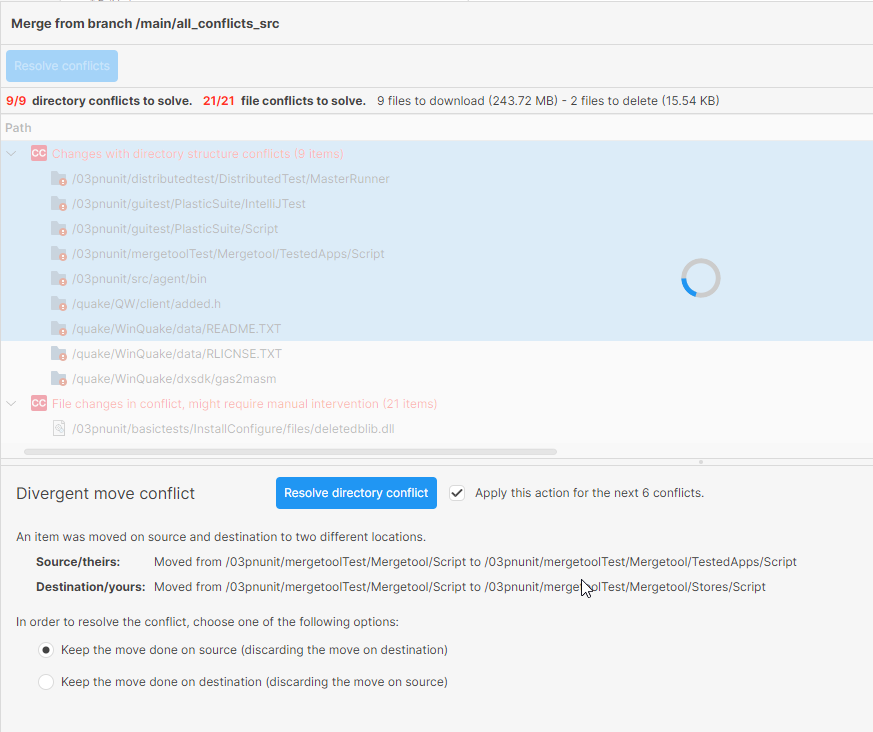
Screenshot
Now, the button is disabled and the progress properly updated during the directory conflicts resolution.
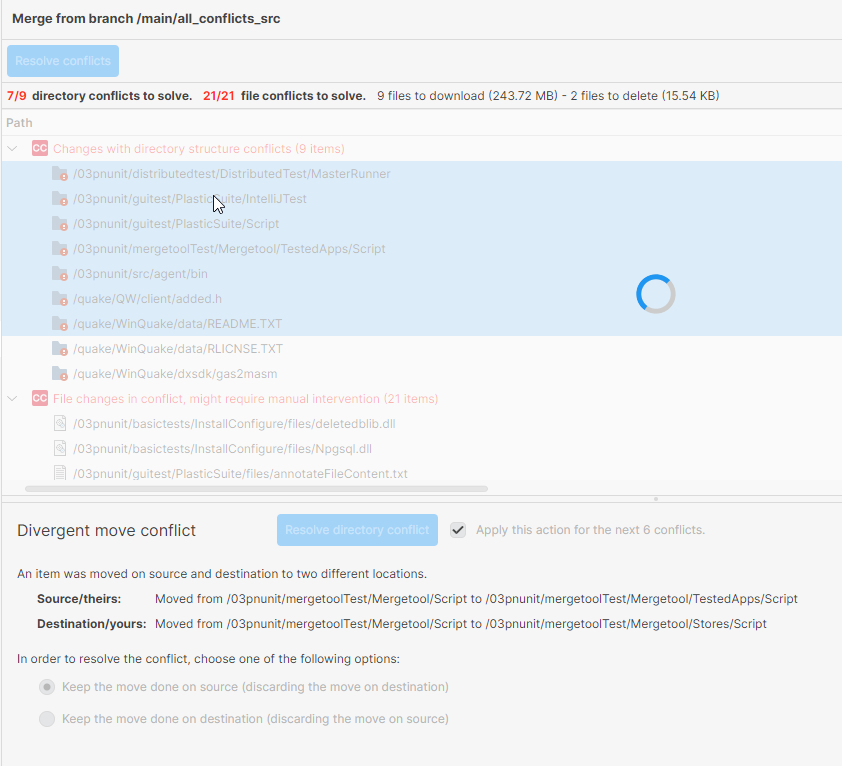
Screenshot
11.0.16.9055
New
All platforms - Command line client
All platforms - Command line client: checkconnection can now check a specific server.
cm checkconnection learned a new optional argument that is used to check the connection against a specified server instead of using the default one configured in the client.conf file.
<repserverspec>Bug
All platforms - Desktop GUI
All platforms - Desktop GUI: Fixed background color for dark theme in code review view
In last release we introduced a bug where the code review view in dark theme showed the comment text boxes in a light background color. We fixed this issue, and now the background color matches the selected theme.
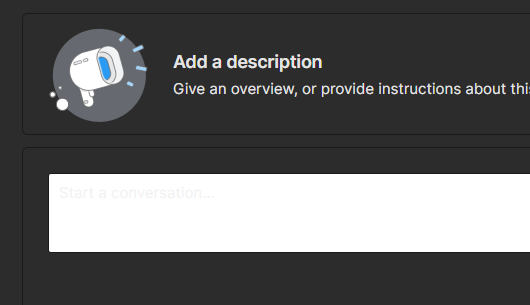
Screenshot
11.0.16.9039
New
All Platforms - Desktop GUI
All Platforms - Desktop GUI: Code Review Email notifications
Implemented several functionalities to enhance email notifications in the Desktop GUI.
Users can now subscribe or unsubscribe using a dedicated button, with a status text indicating their subscription state.
Additionally, email address autocompletion with profile pictures has been added for user convenience when typing .
@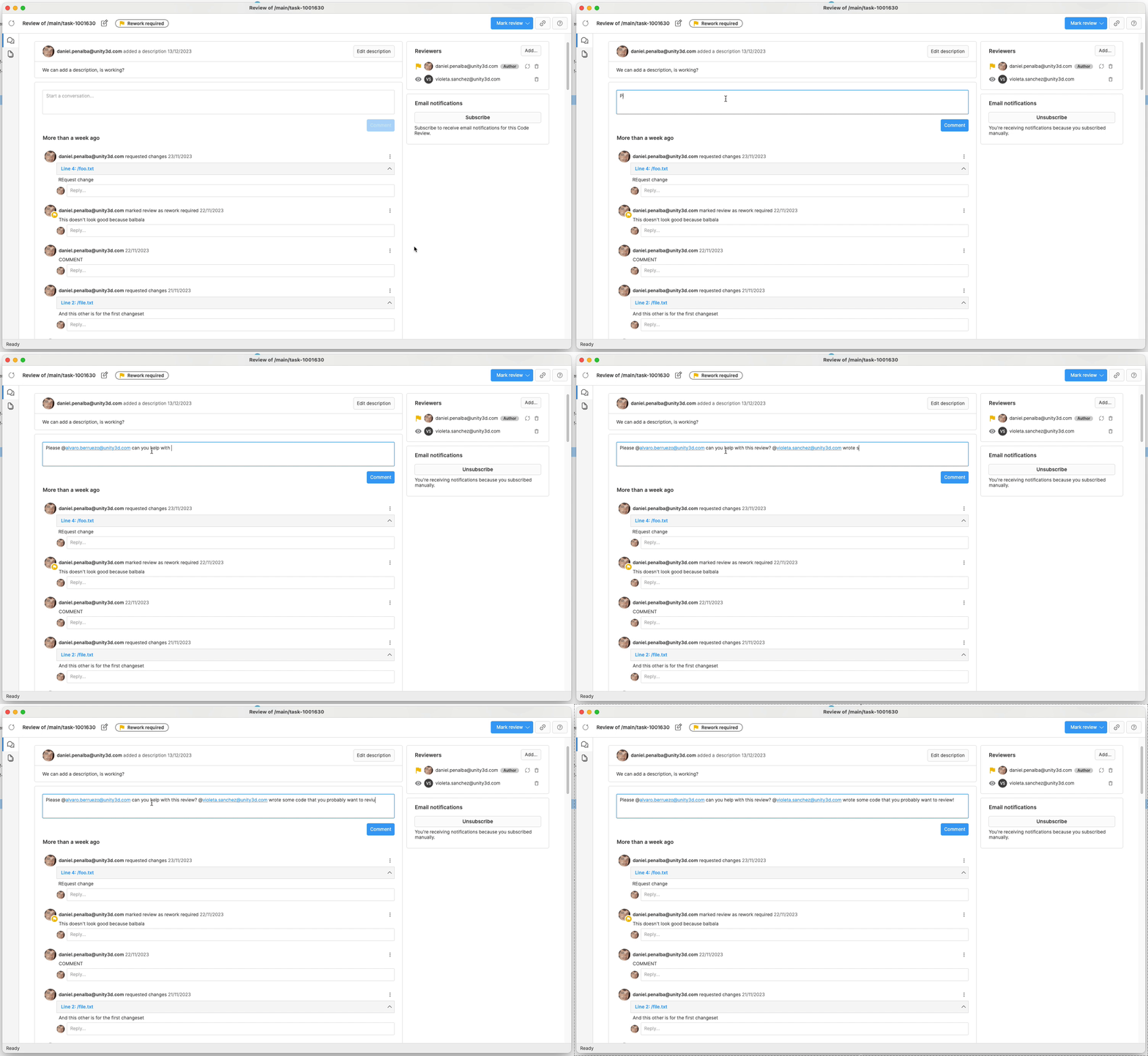
Screenshot
All platforms - Desktop GUI/Gluon
All platforms - Desktop GUI/Gluon: Update Avalonia version to 11.1.5
We've upgraded to Avalonia 11.1.5 for improved performance and stability. Additionally, AvaloniaEdit and AvaloniaEdit.TextMate have been updated to the latest versions. TextMateSharp is now at version 1.0.63. These updates ensure better functionality and a smoother user experience.
11.0.16.9009
New
All Platforms - Desktop GUI
All Platforms - Desktop GUI: Added version in the title bar
We have included the Plastic version in the title bar for both UVCS and Gluon windows. This enhancement simplifies version identification for users and especially for the support teams when they receive screenshots from customers.
All platforms - Command line client
All platforms - Command line client: Now you can see the internal seid from !
cm liThe command is able to print the raw user seid with the option. It can also sort the list of users by seid specifying the option.
cm li--printseid--sort=seidAll Platforms - Desktop GUI
All Platforms - Desktop GUI: Update branch icon orientation
The branch icon has been updated from a vertical to a horizontal orientation. This change is intended to improve visual clarity and align with user expectations through all our applications.
Bug
All Platforms - Desktop GUI
All Platforms - Desktop GUI: Pending Changes not displaying changes
The Pending Changes view did not update correctly after checking in or undoing all filtered changes, and clearing the filter required a manual refresh to display the remaining changes. This issue has now been resolved, ensuring that all changes are displayed automatically after the filter is cleared.
All Platforms - Desktop GUI
All Platforms - Desktop GUI: Fixed a memory leak in the Branch Explorer view
Fixed high memory usage when switching workspaces and loading large branch explorers with date filters set far back. Ensured memory is properly freed after switching workspaces.
Additionally, improved performance for calculating the layout in large Branch Explorers datasets, now making it approximately 30 times faster.
11.0.16.8988
New
All platforms - In order to see the applied attri…
All platforms - In order to see the applied attributes of a specific branch or changeset, you now only require the 'read' permission
Previously, a user needed the whole 'applyattr' permission, in order to see the applied attribute of an object (branch, change...).
Now, when users only need to view the object, they only need the 'read' permission granted on the attribute.
You can set the 'read' permission either using the GUI or the 'cm acl' command.
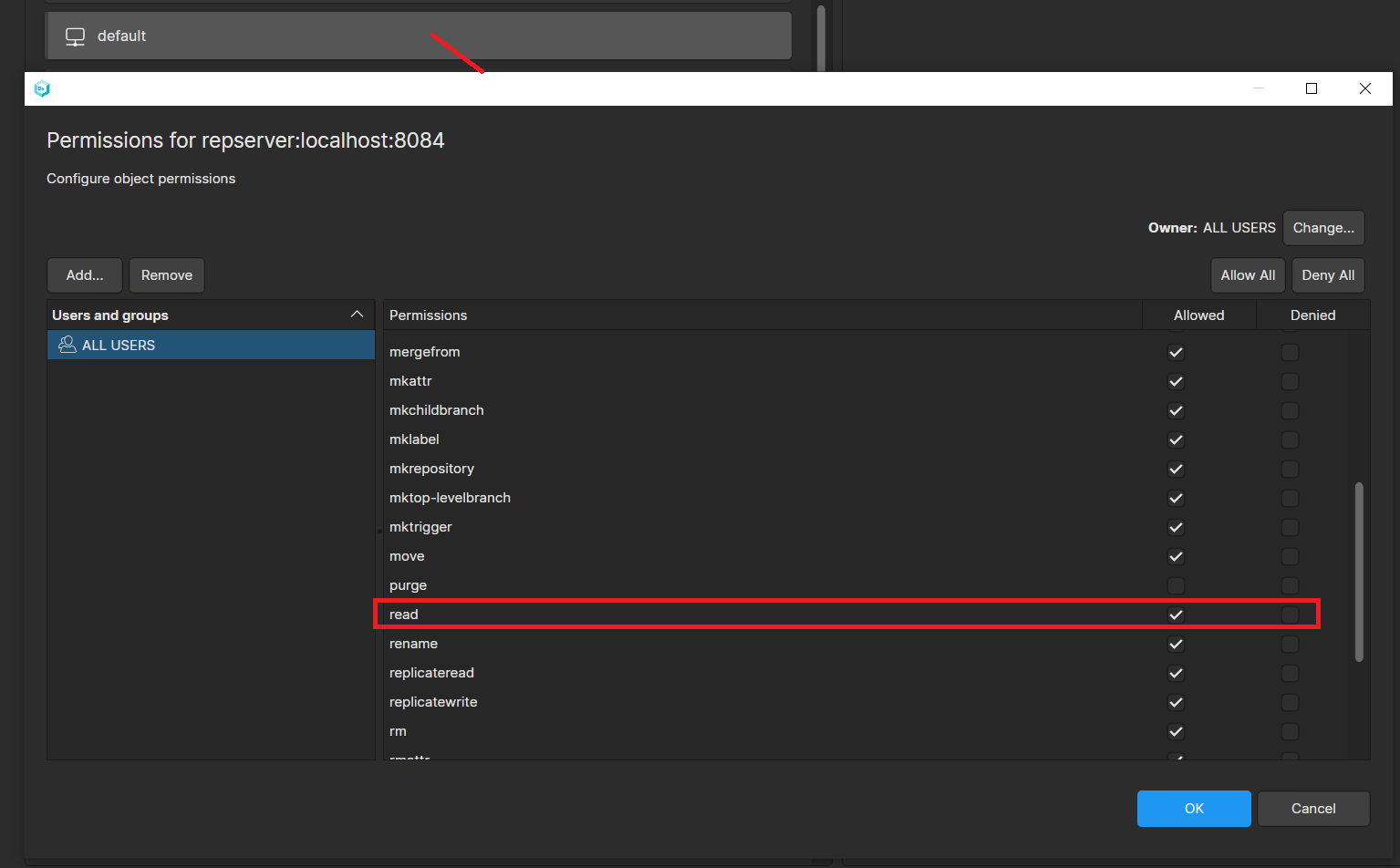
Screenshot
Bug
Windows - Installer
Windows - Installer: Cannot run installer on some windows machines.
When running the installer (no matter which flavor) on some Windows 10 & 11 machines, weird errors appeared, with messages such as "Unkown tag", "Could not create namespace 'substitution'", and many more.
We fixed this problem by building the installers in Windows-x64 mode only, and upgrading to the latest version of our install builder provider.
Polarion
Polarion: Server-side Polarion integration not loaded
The server-side Polarion integration was throwing an error while trying to configure a Plastic SCM repository.
Now it is fixed, and you can configure it as documented here
Remember the server-side polarion integration relies on the command line client: Make sure the command client is configured to work with a valid server and credentials,
cm.exeand the service account the Polarion server uses to run the service is able to access to the configuration file.
client.confThe best option is to configure the client by using the GUI application or command, and then, copy the file from to .
plasticcm configureclient.conf%LocalAppData%\plastic4PLASTIC_INSTALL_DIR\client11.0.16.8976
New
All Platforms - Desktop GUI
All Platforms - Desktop GUI: Support for opening file links
Desktop GUI now supports opening file links directly. There are three types of links:
-
File link: Focuses the specified file in the GUI, creating the workspace if it doesn't exist.
-
File link on branch: Switches to the specified branch, and focuses the specified file in the GUI, creating the workspace if it doesn't exist.
-
File link on changeset: Switches to the specified changeset, and focuses the specified file in the GUI, creating the workspace if it doesn't exist.
Users can now copy this kind of links from the Items view in the Desktop GUI from the context menu "Copy > Copy link", "Copy > Copy link (current branch)", or "Copy > Copy link (current changeset)."
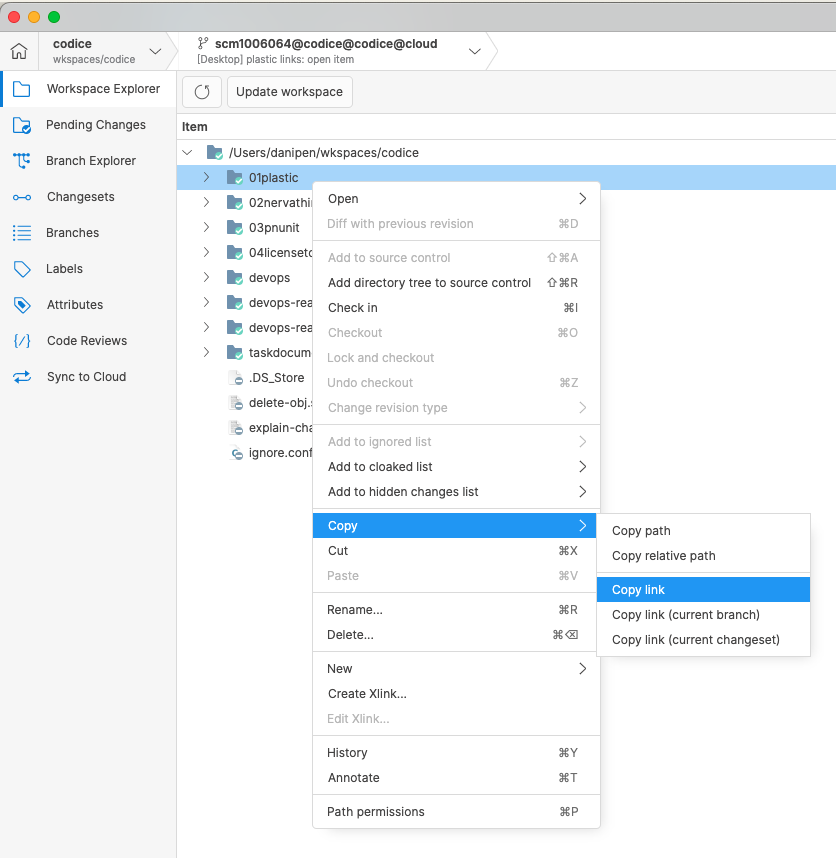
Screenshot
Bug
All Platforms - Desktop GUI
All Platforms - Desktop GUI: Fixed error when opening some Code Reviews
Fixed an issue that caused an error when opening code review comments in the desktop client. This error occurred because some comments had incorrect location information. Now, the system will skip problematic comments and handle empty or incorrect location details better, preventing the error from happening.
All platforms - GUI
All platforms - GUI: Fixed an error when contacting a Cloud org. from On-Prem for the first time
When logging in for the first time against a Cloud organization (for example, when adding a destination on a sync view), the GUI could throw a "Failed to resolve the cloud server for organization" error. This is now fixed.
All platforms - Desktop GUI
All platforms - Desktop GUI: Merge not working using a renamed repository
Using a workspace pointing to a renamed repository, the merge failed with the error . Now it's fixed
new_repository_name@cloud is not in a workspaceAll Platforms - Desktop GUI
All Platforms - Desktop GUI: Fixed view switching shortcuts
Attempting to press from the home view or login screen caused an unexpected error due to the Workspace view not being created yet. This issue has now been resolved.
Ctrl/Cmd + <number>Additionally, new shortcuts for displaying the Workspaces and Repositories views have been added:
-
Shift+Ctrl+1 for Repositories view (Windows and Linux)
-
Shift+Ctrl+2 for Workspaces view (Windows and Linux)
-
Shift+Cmd+1 for Repositories view (macOS)
-
Shift+Cmd+2 for Workspaces view (macOS)
11.0.16.8953
New
All Platforms - Desktop GUI
All Platforms - Desktop GUI: Deeplink of UVCS repositories
A new plastic link format has been introduced to open repositories hosted in Unity Version Control (Plastic).
Links like the following ones can now open the specified repository in the full client of Unity Version Control (Plastic) or its artist-friendly Gluon applications:
plastic://codice.cloud/repos/codiceplastic://codice.cloud/repos/codice?ui=gluon
If a workspace pointing to that repository is missing, a "create workspace" dialog will appears with pre-filled fields, allowing users to quickly set up and download the workspace.
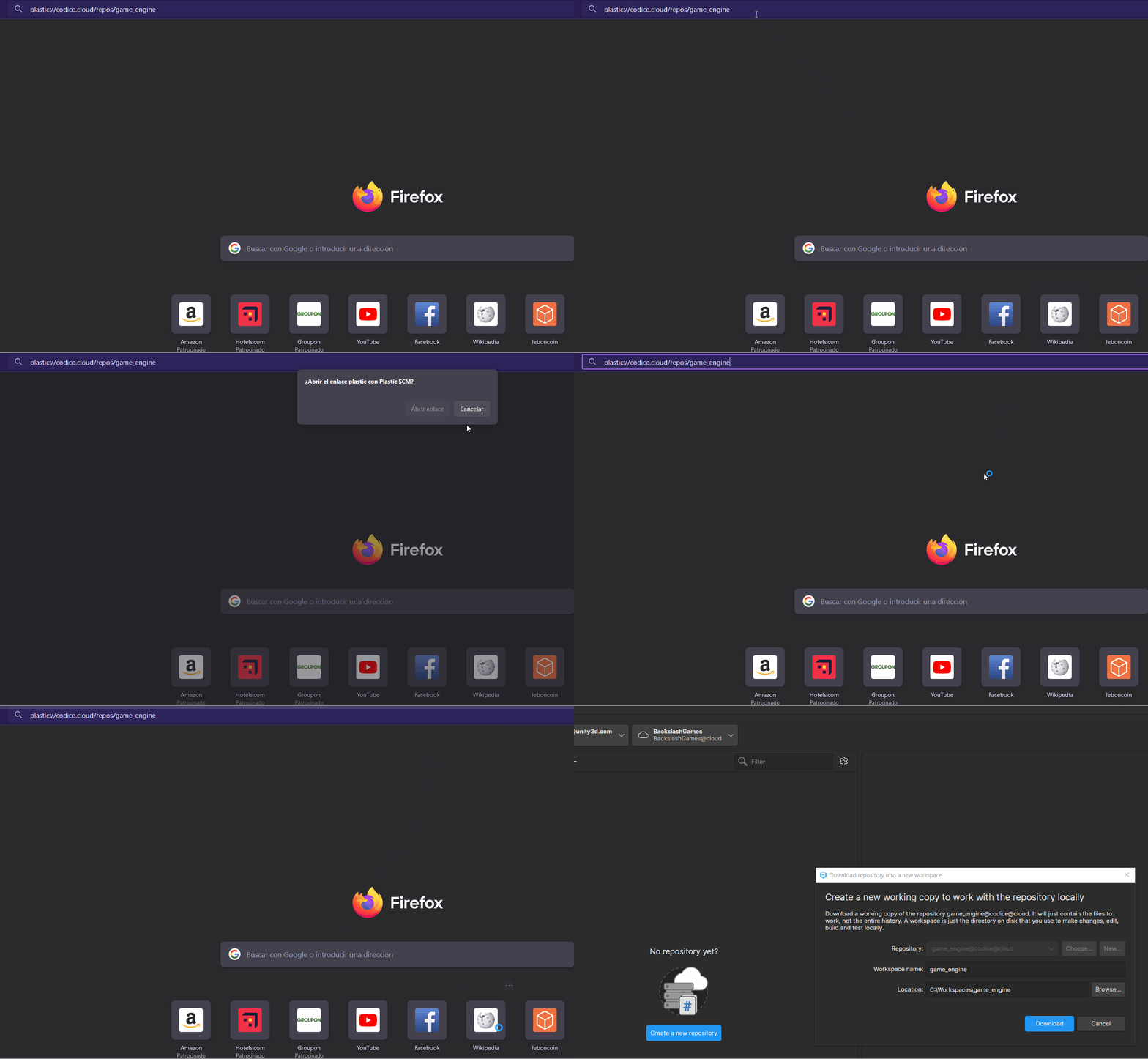
Screenshot
Note that you can choose the tool (full Unity Version Control client (Plastic) or Gluon) by adding to the link. Existing diff and file links continue to function as before.
?ui=gluonBug
All platforms - Desktop GUI
All platforms - Desktop GUI: Null exception when showing annotate from code review window
There was an exception when trying to show the annotate for a file from a code review window, when the code review was opened from a plastic link. In this scenario, there is no current workspace, and trying to access it was causing an error. We fixed it, and now you can see the annotate normally
All platforms
All platforms: GitSync doesn't push the .git folder anymore
GitSync doesn't push the .git folder (if it exists in the Unity VCS repo) to Git since some Git servers/providers could reject the push operation due to it.
All platforms
All platforms: Creating an attribute via API no longer fails if triggers are set
We detected that creating attributes using the REST API endpoint failed if the or triggers were set. We fixed that issue, so it shouldn't happen anymore.
before-mkattafter-mkattAll platforms - CLI
All platforms - CLI: Purge author could not unregister it
The author could not unregister the purge. The 'cm purge unregister' failed with the error 'You are not the purge author. Only the purge author is allowed to execute or unregister it.' (even when the user is the author). Now it's working.
11.0.16.8933
New
All Platforms - Desktop GUI
All Platforms - Desktop GUI: Improve Filtering in Code Reviews
Based on user feedback, we've enhanced the Code Review feature with better filtering and usability. A new "Reviewer's status" filter lets you filter reviews by the reviewer's status. When combined with the Reviewers filter, this allows for more accurate identification of reviews needing your attention.
We've also improved the tooltips to clearly display each reviewer's status.
Additionally, the comments tooltip now shows the count of comments and unresolved issues for added clarity.
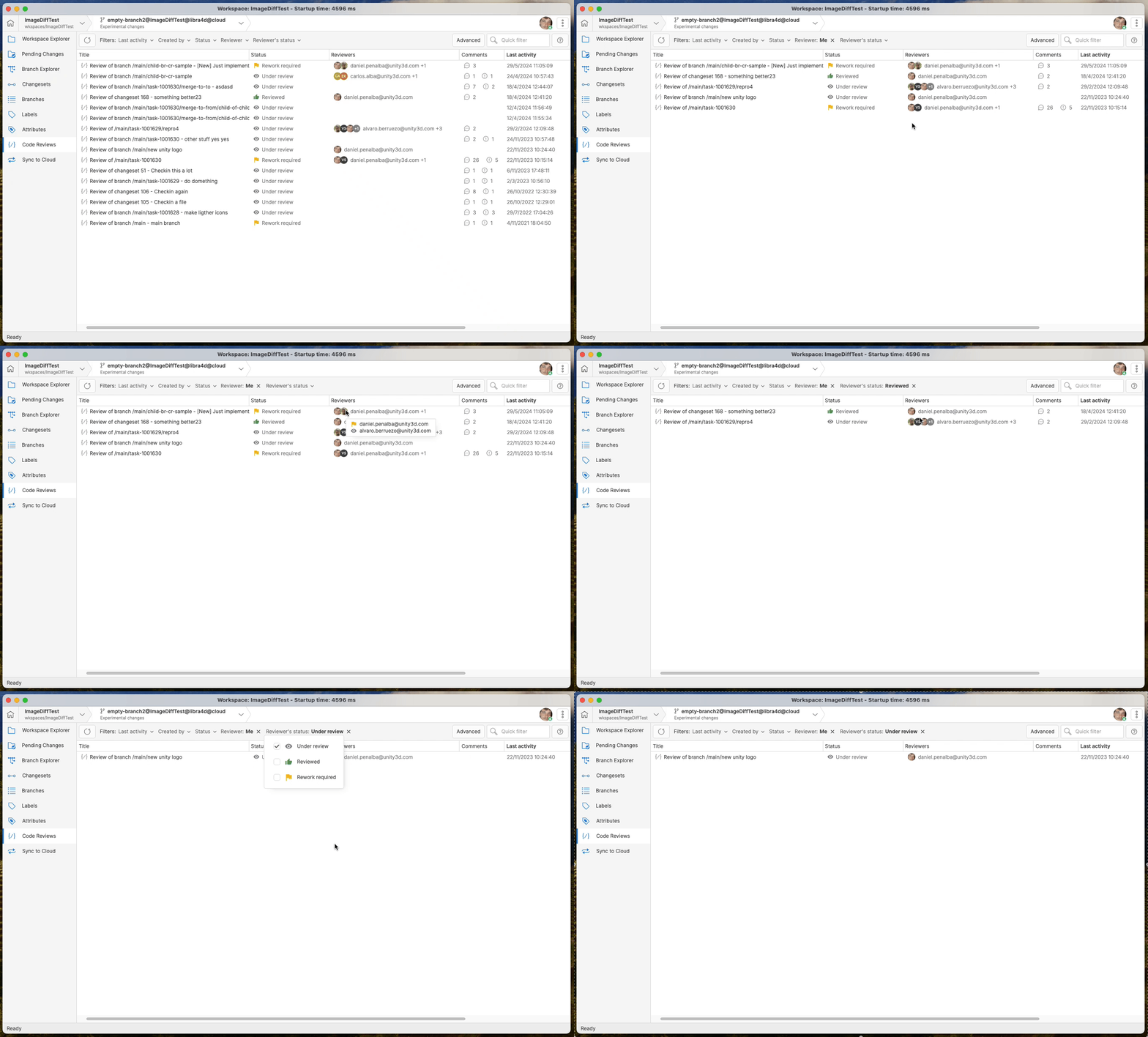
Screenshot
All Platforms - Desktop GUI
All Platforms - Desktop GUI: Make the default changelist always visible
Ensure that the default changelist remains visible even when empty in the GUI clients. This option helps users locate the default changelist for easier drag-and-drop operations between default and custom changelists.
Bug
All Platforms - Desktop GUI
All Platforms - Desktop GUI: Diff View intraline diff misalignment
The diff view in the Desktop GUI showed the highlighted code on the left side (for deleted content) skewed to the left. This misalignment was due to improper handling of tabs as indentation. Now it's fixed.
All Platforms - Desktop GUI
All Platforms - Desktop GUI: Cmd+A/Ctrl+A not always selecting all pending changes
Cmd+A/Ctrl+A failed to select all pending changes if an item started with "A". This has been fixed by handling the KeyDown event to properly process the SelectAllRows command, ensuring that all changes are highlighted as expected.
All Platforms - Desktop GUI
All Platforms - Desktop GUI: Drag and Drop error between changelists
Fixed an issue that caused an error when dragging files to custom changelists while the "Group changes by categories" option was disabled.
The problem was due to improper setting of the changes parent, which has now been corrected.
11.0.16.8906
New
All Platforms - Support for renamed repositories…
All Platforms - Support for renamed repositories on existing workspaces
Previously, when a repository was renamed, the workspaces pointing to the repository prior to the renaming stopped working. This happens because they kept using the old name, and the server can no longer find a repository named like that.
Now, workspaces can continue using the old repository name, even after the repository is renamed. The server will keep track of the old name for you after renaming a repository, so you don't need to change anything. Note however that this won't remain valid if the old name is claimed by another repository (i.e., if you rename an existing repository or if you create a new one named like that). In that case, the workspace would automatically connect to a different repository, forcing you to switch.
Bug
All Platforms - Desktop GUI
All Platforms - Desktop GUI: Wrong changeset selection in the diff window
When quickly moving through code-review changesets, users might review changes from the wrong changeset due to a concurrency issue. The earlier diff process wasn't properly stopped, causing old changes to display instead of the selected changeset. This issue is now resolved by ignoring outdated diffs when calculating differences for a newly selected changeset.
All Platforms - Desktop GUI
All Platforms - Desktop GUI: Use the right dir separator char when copy path
Fixed an issue in Windows where the relative path copied to the clipboard was incorrect. The path now uses the appropriate directory separator character for Windows, and the leading slash is removed.
This fix ensures the workspace relative path preserves the right directory structure across all views, including DiffTreeView, Items view, and Merge view in Plastic, as well as CheckinView, Incoming Changes view, and Workspace explorer in Gluon.
All Platforms - Desktop GUI
All Platforms - Desktop GUI: Drag & Drop error in Tree Mode
Fixed an issue with the new Drag & Drop feature between changelists. When using the Pending Changes view in tree mode, selecting a combination of files and directories caused an error message: "An error occurred processing your request."
This has been fixed by skipping structure nodes during the drag-drop operation.
All platforms - Desktop GUI
All platforms - Desktop GUI: Disabled "Create" button when creating a new repository
We fixed an issue that was introduced in the previous release, where the "Create" button in the "Create a new repository" dialog was permanently disabled when opened in the "All workspaces" panel.
Now the button is only disabled when the dialog is loading, and enabled the rest of the time.
11.0.16.8888
New
All Platforms - Desktop GUI
All Platforms - Desktop GUI: Add History and Annotate options
We have added "History" and "Annotate" options to the context menus of the Diff/Code Review and Merge views. These new features will allow users to view file history without leaving the current window.
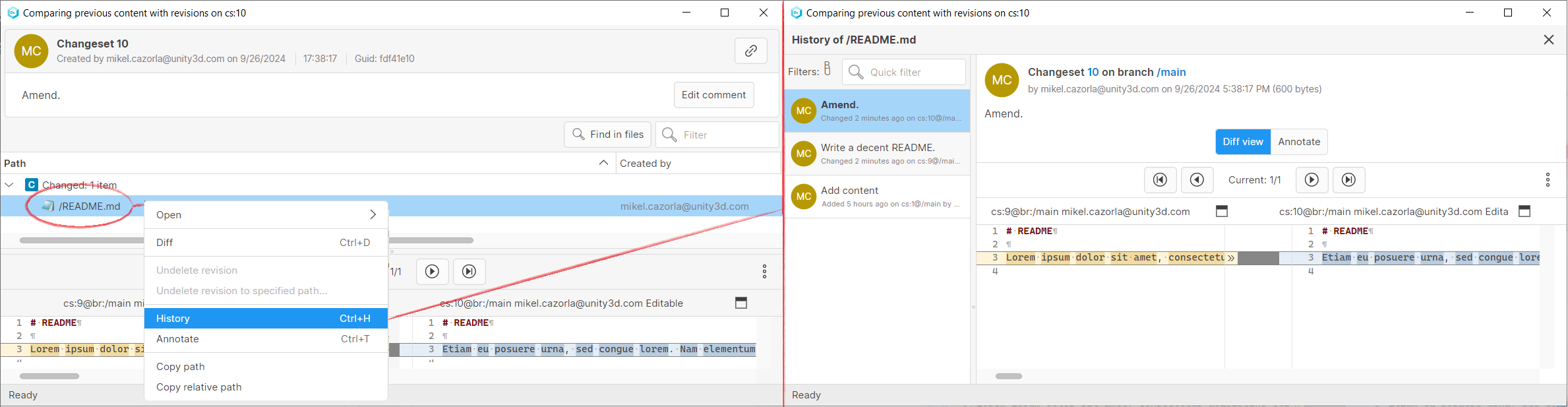
Screenshot
All Platforms - Desktop GUI
All Platforms - Desktop GUI: Add Copy File Path options
We have added "Copy file path" and "Copy relative file path" options to various context menus in both the Plastic and Gluon GUIs, including Items/Workspace Explorer, Pending Changes/Checkin Changes, Merge View/Incoming Changes and Diff/Code Review views. These new options will allow users to easily copy the path or the relative path of files, which could be needed in some scenarios.
-
"Copy path" copies the full file or folder path to the clipboard.
-
"Copy relative path" copies the file or folder path relative to the workspace to the clipboard.
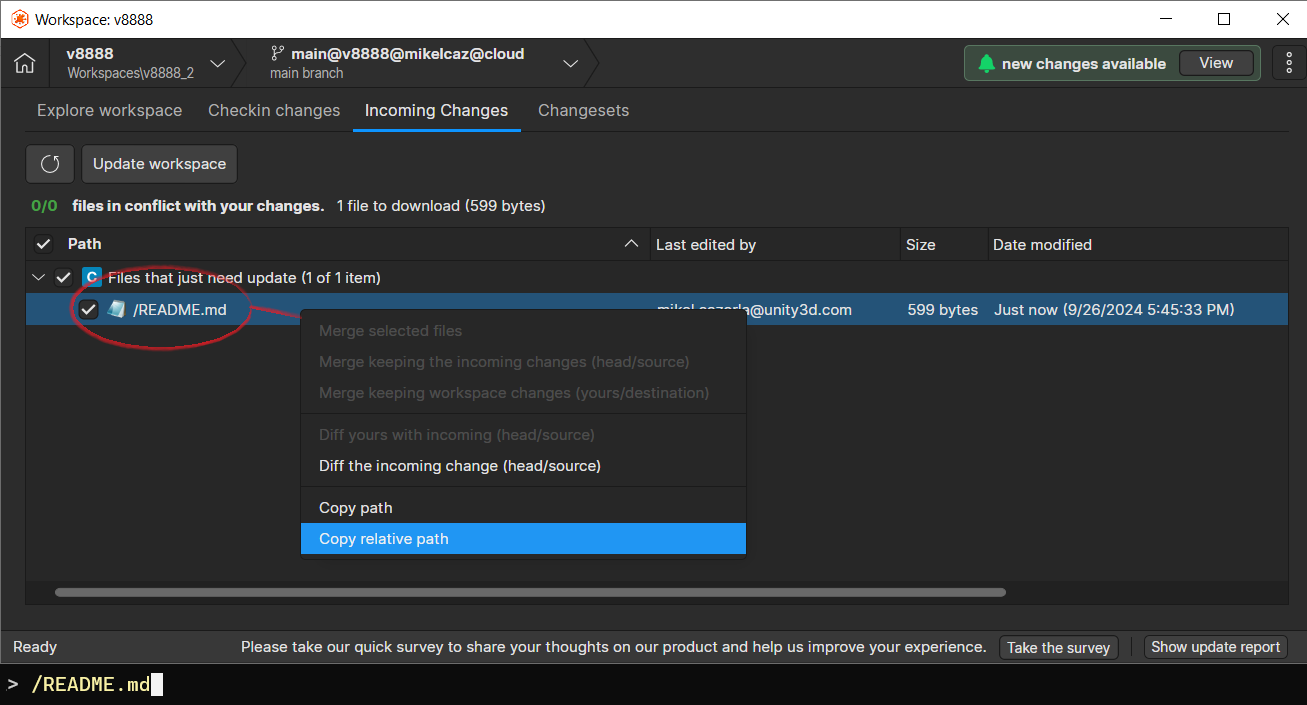
Screenshot
All Platforms - Desktop GUI
All Platforms - Desktop GUI: Drag & Drop files between changelists
Implemented Drag & Drop support for files within the 'Pending Changes' view when the option "Group changes in change lists" is enabled. Users can now easily move files between changelists, enhancing the workflow and improving ease of use.
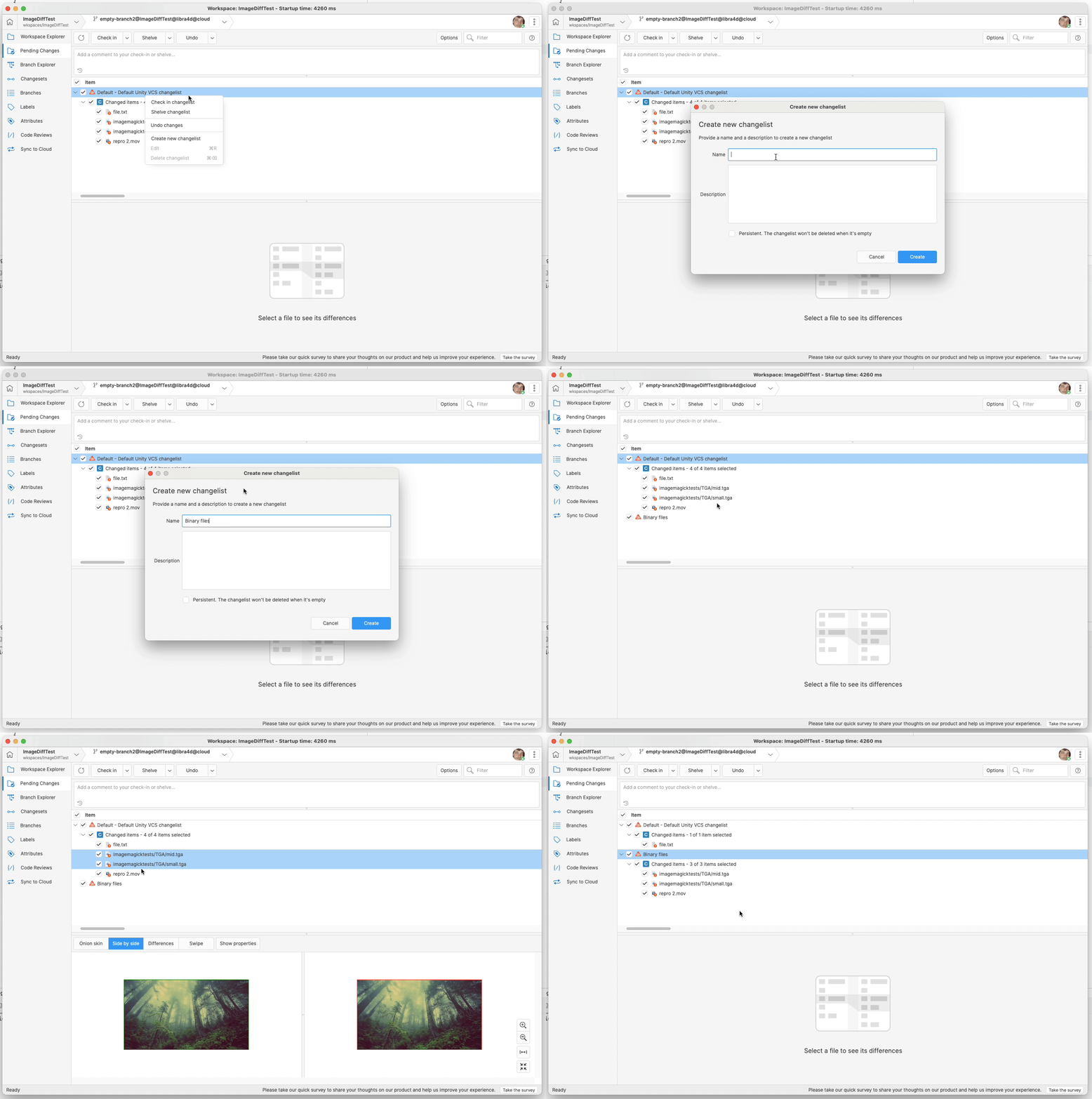
Screenshot
All Platforms - Gluon
All Platforms - Gluon: Improved Switch Experience
On September 5th, in version 11.0.16.8845, we introduced the new Shelve & Switch feature in the UVCS GUI, which allowed users to easily switch with pending changes.
This feature is now also available for Gluon, so you can switch between branches and changesets in partial workspaces without effort!
Bug
All platforms - Client and plugins
All platforms - Client and plugins: We fixed a problem where the client couldn't automatically renew user credentials when using Unity ID with a Cloud organization.
In some situations, client applications can use a token from one Cloud organization (A) with another Cloud organization (B). This let you access all your Cloud organizations with just one login, without needing to log into each one separately.
However, sometimes the client didn't update all the tokens correctly when renewing credentials. For example, it might update the token for organization B but not for organization A, which could lead to errors like: "Can't obtain a new token (Message: Invalid Refresh Token., Code: 132.104)."
This issue has now been resolved.
== WARNING ABOUT THIS VERSION ==
Two minor issues have been identified in this version. They will be addressed in the next release.
- The "Create" button in the "Create a new repository" dialog is permanently disabled when opened in the "All workspaces" panel. As a workaround to create new repositories, simply switch to the sibling "Repositories and workspaces" panel using the button at the top left corner of the GUI:
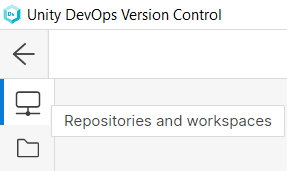
Screenshot
- When the Pending Changes view is in tree mode and the new Drag & Drop feature is used between changelists, selecting a combination of files and structural directories will show an error message stating that "An error occurred processing your request".
11.0.16.8860
New
All Platforms - Desktop GUI/Gluon
All Platforms - Desktop GUI/Gluon: Improve keyboard usage
Shortcuts have been added for each view (Ctrl+1/Cmd+1 for Workspace Explorer, Ctrl+2/Cmd+2 for Pending Changes, etc ...). Tooltips have also been implemented to help discover shortcuts.
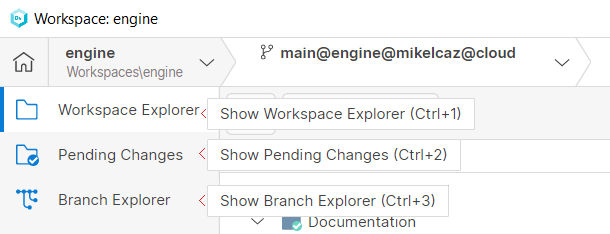
Screenshot
When a view is selected, now the focus will now shift to the right pane for smoother keyboard navigation.
Additionally, we fixed a bug when pressing Ctrl+F (Cmd+F on macOS) focused on the search textbox but wrongly displayed an "f" character. Now it's fixed.
Bug
All platforms - Desktop GUI/Gluon
All platforms - Desktop GUI/Gluon: The Branch Explorer date filter does not load in some corner cases
Setting some specific values in the date filter made it impossible to load on restart, leaving such filter in blank. The bug was fixed, and the new version can load the filter transparently.
11.0.16.8845
New
All platforms - Command-line client, Desktop GUI
All platforms - Command-line client, Desktop GUI: Improved Switch Experience with Pending Changes
Now you can seamlessly bring your pending changes with you when switching workspace configurations, both in the command line and in the Desktop GUI.
When using the Desktop GUI, a prompt will help you to enable this feature. You can also enable it within the Desktop GUI preferences dialog:
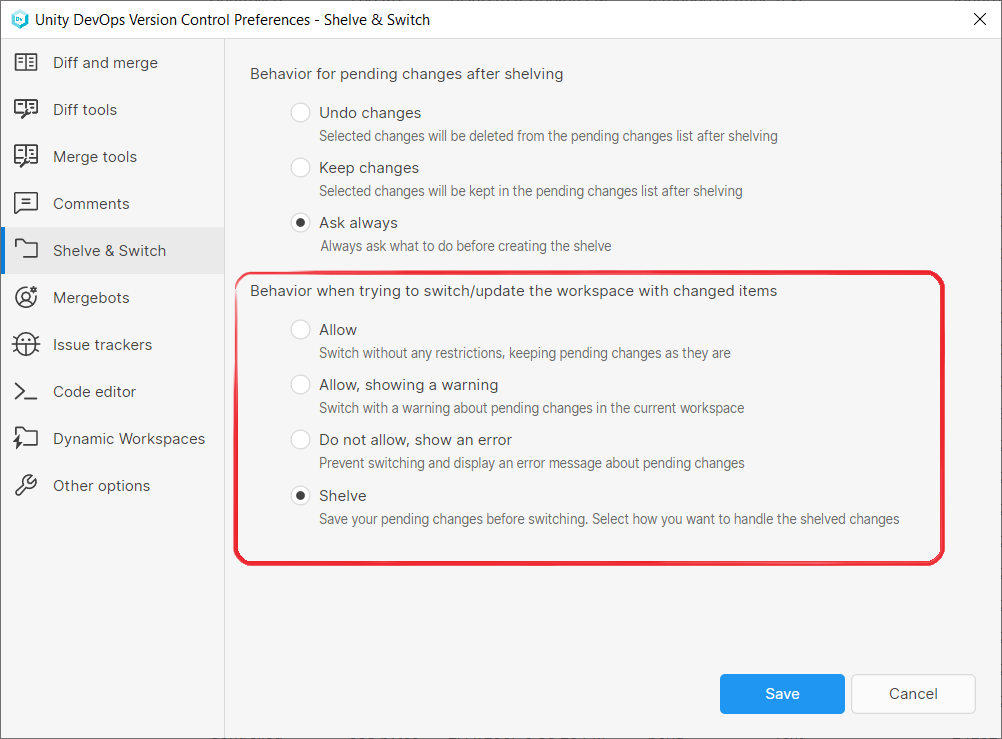
Screenshot
And also, by setting the following key and value in your configuration file:
client.conf<PendingChangesOnSwitchAction>Shelve</PendingChangesOnSwitchAction>
Bringing your changes works as follows: when switching your workspace configuration by either using the Desktop GUI or the and commands, your client will look for pending changes in your workspace. If it finds any, it will ask you what you want to do, and it will present you three options:
cm switchcm partial switch-
To shelve your pending changes and leave them on the source for future use.
-
To bring the changes with you, moving them seamlessly to the destination branch.
-
To cancel the operation.
If you choose to shelve your pending changes and leave them on the source, the client will create a shelveset with the changes, then switch your workspace configuration. You can apply the shelveset later on, whenever you want to. If you are using the Desktop GUI, the notifications it provides will indicate you that there are shelved changes and guide you through each step to apply them back, making the process smoother and more intuitive.
If you choose to bring your pending changes, the client will create a shelveset with the changes, then switch your workspace configuration, and finally will try to automatically apply the shelveset, effectively bringing your pending changes with you. If merge conflicts arise, you can choose whether to resolve them or to cancel the operation. Don't worry! If you cannot apply the shelveset, it won't be deleted either, so you can still apply it later on.
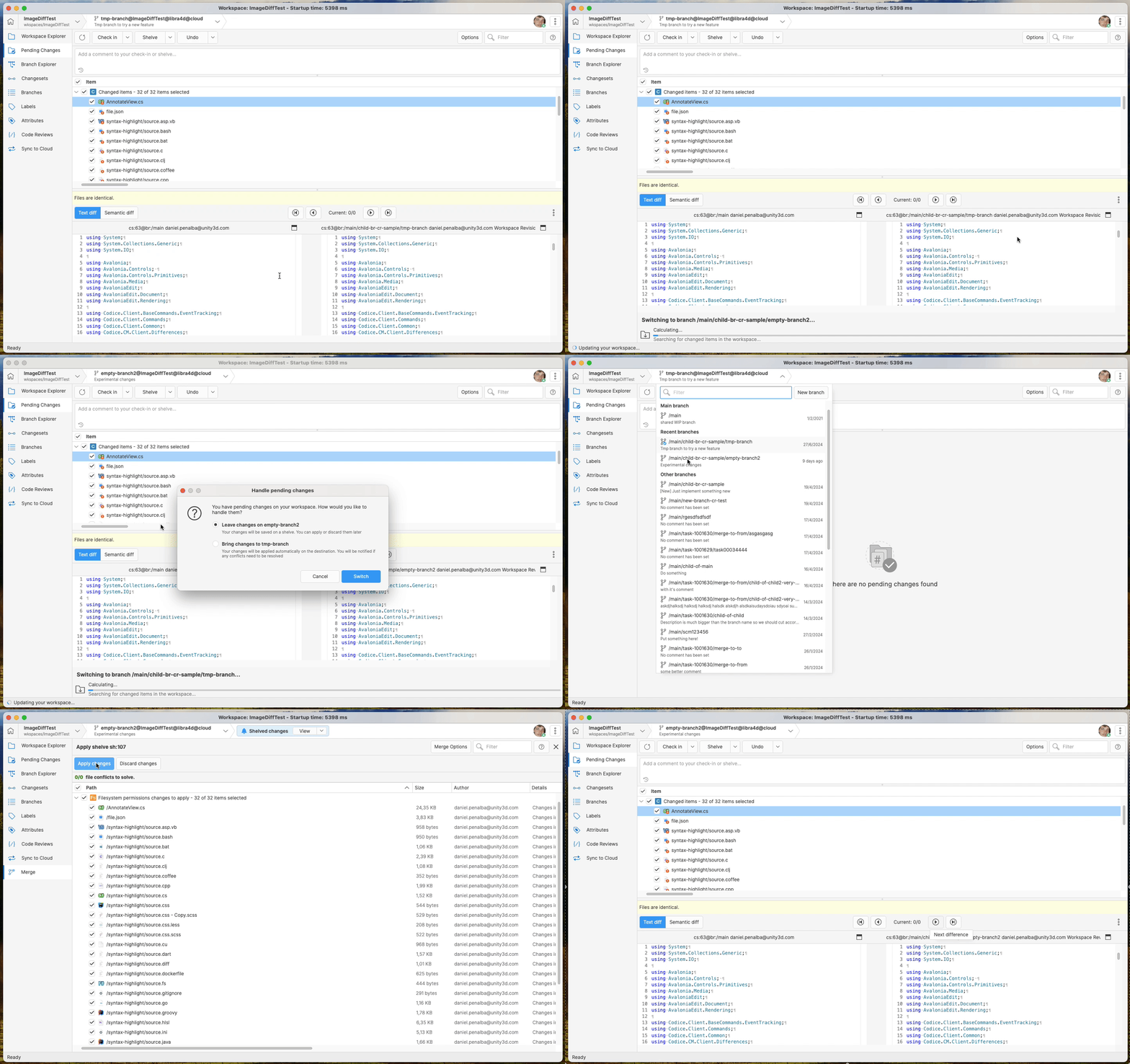
Screenshot
Because of output compatibility, this new behavior gets disabled in the command line when using flags such as and . If any of those flags are present, and PendingChangesOnSwitchAction is set to Shelve, the client will temporarily change the configuration value from Shelve to Fail, and you won't be able to change your workspace configuration with pending changes on your workspace. Bear in mind this if you have automated anything on top of the cm command-line client!
--machinereadable--xmlAll Platforms - Desktop GUI
All Platforms - Desktop GUI: Rename sync view's 'delete src/dst repo' buttons
Some users reported that the 'delete src/dst repo' buttons in the Sync Repositories view were confusing, as they thought it would delete the entire repository instead of just removing it from the sync view. To address this, the button was renamed to 'remove src/dst repo', and additional tooltips were added to clarify the action performed by the buttons.
Bug
Command-line client
Command-line client: Unhandled exception when creating an Xlink outside a workspace directory
Creating an Xlink outside a workspace directory triggered an unhandled exception, printing an unhelpful error message.
> cd .. # exit the workspace directory> cm xlink -w my_xlink / br:/main@my_repositoryError: Object reference not set to an instance of an object.
Now, the error is handled, and a more apt error message is shown instead:
> cm xlink -w my_xlink / br:/main@my_repositoryc:\(...)\my_xlink is not in a workspace.
All platforms - Command line client
All platforms - Command line client: Authentication parameters work again wihout a valid client.conf file in place
Back in version 11.0.16.8782, we broke the possibility of authenticating against a given server using command-line authentication parameters without a valid client.conf file in place. This is now fixed: parameters such as and work again when the client is not correctly configured:
--username--passwordcm repo list --username=sergio --password="t0p_secret!" --workingmode=LDAPWorkingMode --server="my-organization@cloud"
All Platforms - Desktop GUI
All Platforms - Desktop GUI: Expanded/collapsed branches info was lost
When the Branches view was in Tree View mode, performing certain operations caused all child branches to auto-expand, ignoring the user's setup. Now it's fixed.
All Platforms - Desktop GUI
All Platforms - Desktop GUI: UI hangs with big minified files
The application previously froze in the pending changes/Diff view when handling minified files (JSON/JavaScript). Now it's fixed. Users can now display and edit these files without causing the UI to hang.
All platforms - Gluon
All platforms - Gluon: Fixed external tool option
When having a custom external tool defined in externaltools.conf, you may define @object as an argument to pass to the tool, and it will be replaced with the path of the selected object.
On Gluon, this path was relative to the workspace, so the custom tool couldn't process the file.
We fixed this behavior to use the absolute path, and now the tool can read the file as expected
11.0.16.8798
New
All platforms - Gluon
All platforms - Gluon: configuration now handles the "full update" mode
After the workspace undergoes a full configuration, it enters a "full update" mode. In this mode, every new item will be downloaded without relying on the granular directory configuration.
Previously, the configuration did not handle the "full update" mode correctly. It failed to properly display the new items as items to load and did not download them. This issue has been fixed.
Bug
All Platforms - Desktop GUI
All Platforms - Desktop GUI: Outdated branches displayed when no connection
When switching to a workspace with no connection, the branches popup displayed outdated branches from the previous workspace. Now it's fixed, and a proper panel displaying the error is shown instead.
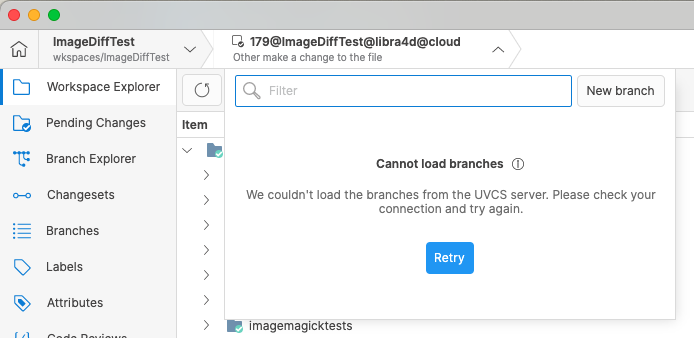
Screenshot
All Platforms - Desktop GUI
All Platforms - Desktop GUI: Syntax Highlight highlighted non-code files
When switching between different file types in the Content View (Diff viewer's single file viewer), the syntax highlight sometimes didn't update correctly. This caused non-code files to retain syntax highlighting from previously viewed code files, leading to confusion. Now it's fixed.
11.0.16.8786
New
All platforms - Installer
All platforms - Installer: Fresh OnPrem install now enables ssl channel by default
Now the ssl channel is enabled on Plastic SCM server on OnPrem new/fresh installations.
This way, users are able to use this secure channel, or configure their mergebot profiles out-of-the-box without requiring extra admin intervention.
Bug
All Platforms - Desktop GUI
All Platforms - Desktop GUI: Incorrect Encoding in diff view for big files
When displaying "big files" differences, and the default encoding in the merge and diff preferences is set to "Windows-1252" or "Western Windows," the diff view incorrectly formatted the files using the wrong encoding. Now it's fixed.
11.0.16.8752
New
All platforms - Desktop GUI
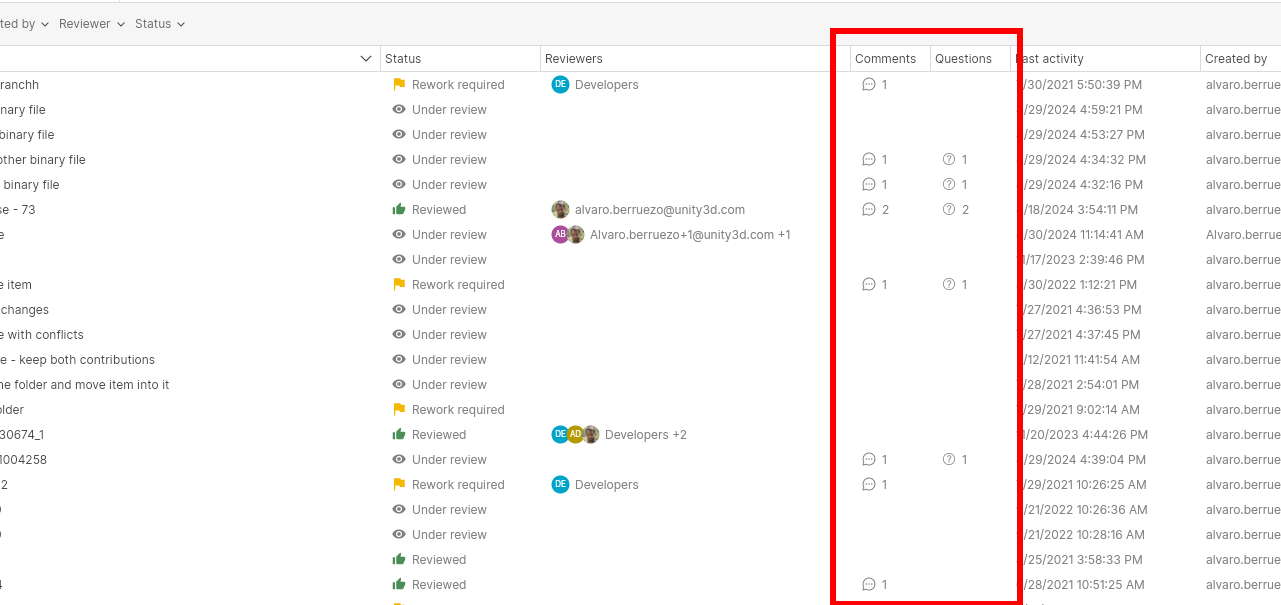
All platforms - Desktop GUI: Added comments and questions columns to code reviews view
We added two new columns to the code reviews view: the comments column, that shows the number of comments and replies, and the questions column, that shows the number of unanswered questions and unresolved change requests.
Screenshot
Bug
All platforms - Desktop GUI
All platforms - Desktop GUI: Code review comments navigation fixes
We found and fixed two different issues that happened when opening a code review and navigate to a comment for the first time.
- Navigating to a comment that was added in the "entire branch diff" mode, but showing the code review in "changeset by changeset diff" mode:
An error message "The item for this comment cannot be shown as it has been deleted" was shown. The error is not shown the second time you navigate to the comment.
- Navigating to a commend that was added in a given changeset in the "changeset by changeset diff" mode, and showing the code review in "changeset by changeset diff" mode in a different changeset:
The changeset was selected but the comment file was not selected. The second time the navigation works fine too.
Both issues have been fixed.
Command-line client
Command-line client: The cm fast-import command failed when importing files bigger than 2GB
The cm fast-import command failed if the export file contained a blob bigger than 2GB. This happened because the blobs size was handled as an int32 value. Fixed.
Windows - Installer
Windows - Installer: Fixed error installing on-prem edition over an existing cloud edition
An error window at the end of the install process was shown when installing on-prem edition over an existing cloud edition.
The error was shown when the installer ran command (this command is just for upgrading the config files if you're upgrading from a plastic version from 2021).
plasticd upgradeconf11.0.16.8729
New
All platforms - Desktop GUI
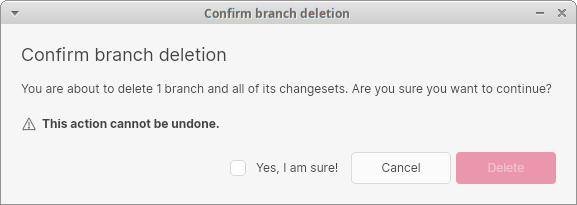
All platforms - Desktop GUI: Allow to remove branches with changesets
Before, if you wanted to delete a branch containing changesets, you had to delete the changesets first. Now all the data is deleted at once from the delete branch option.
Bear in mind that the operation is atomic. Either all of the changesets or none of them will be removed.
Plastic SCM will prevent removing the changesets in a branch under the following circumstances:
-
The changeset zero is included in the operation (that is, you are trying to delete the main branch).
-
One or more of the changesets have children outside of the branch (that is, the branch has child branches).
-
One or more of the changesets in the branch are the source of a merge, and the destination changeset of the merge falls outside of the branch.
-
One or more of the changesets in the branch are pointed to by a label.
-
There are one or more shelvesets created from a changeset in the branch.
Screenshot
All platforms - Desktop GUI
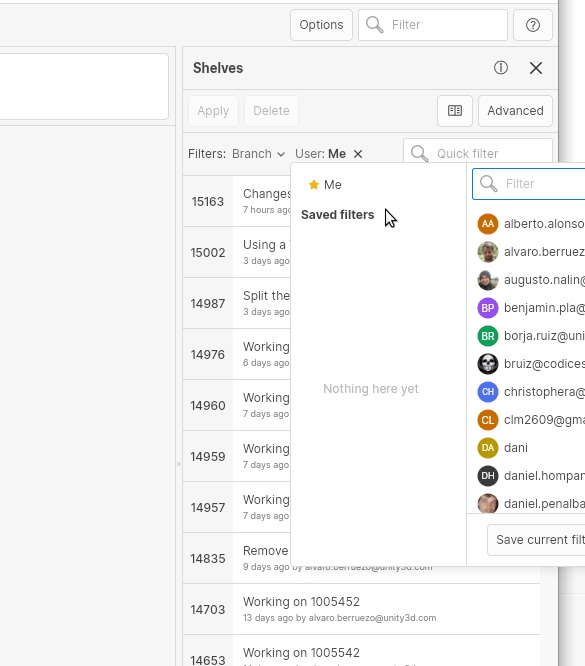
All platforms - Desktop GUI: Added advanced filters to the shelves view
The advanced filters that we are adding to several places in the GUI are now available in the shelves view. You can filter the shelves list by branch or user, using the same saved filters that you have for the rest of the views.
Screenshot
All platforms - Semanticmerge
All platforms - Semanticmerge: Updated semanticmerge to support C# 12
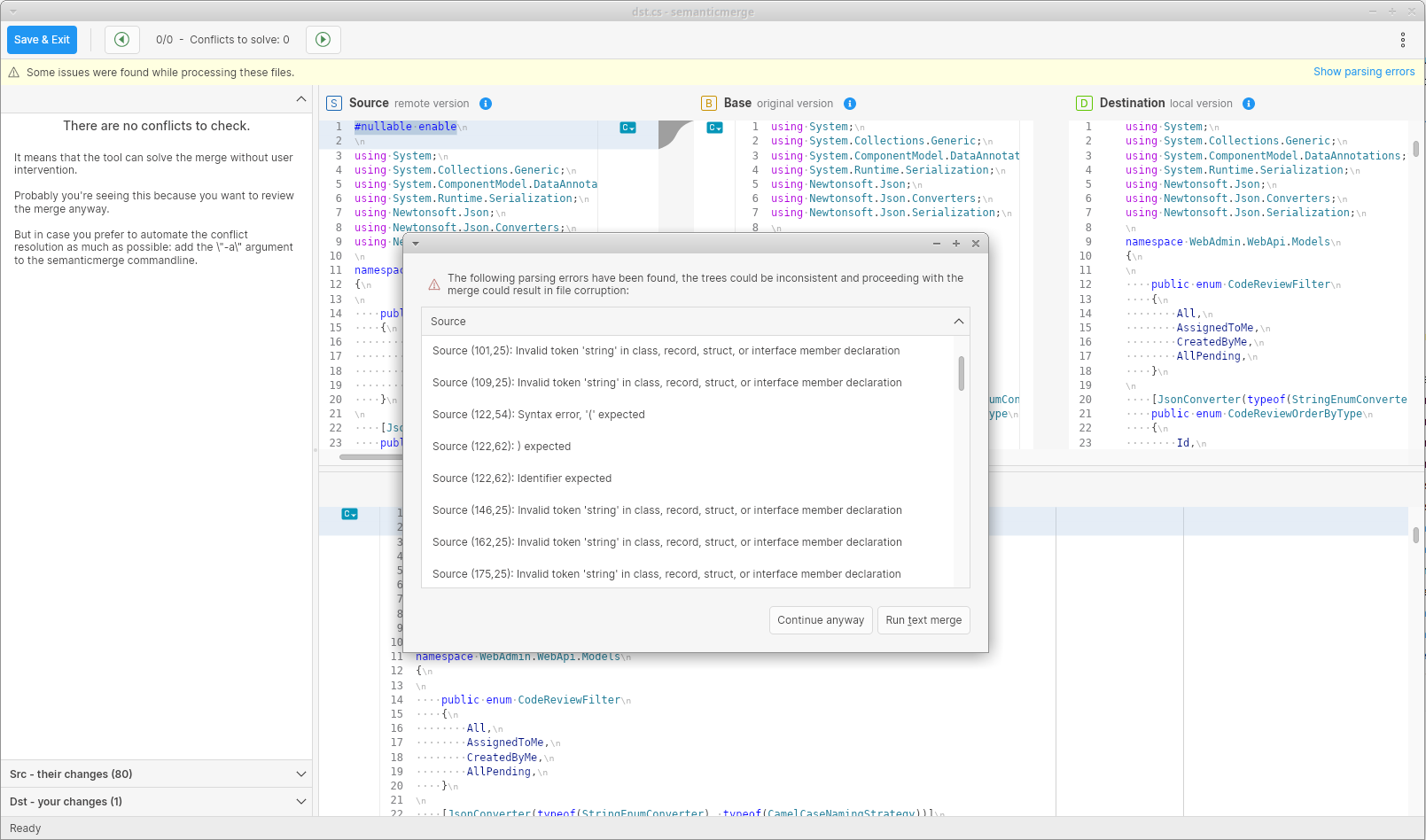
We updated the parser in semanticmerge to support the new features in C# 11 and C# 12. The syntax highlighting now also supports these new versions.
Also, when semanticmerge detects parsing errors, they are now shown automatically in a modal dialog, warning about possible file corruption if the user continues.
Screenshot
Bug
All Platforms - Server
All Platforms - Server: Changeset deletion can fail in partially replicated repositories
The changeset deletion of a replicated changeset failed if its parent was not replicated too. The error thrown was "Cannot show differences between changeset X and changeset Y. The source changeset X has not been replicated to this repository. Make sure that you replicated the branch containing this changeset".
Now, the changeset deletion succeeds regardless of whether the parent changeset was replicated or not.
All platforms - Desktop GUI, Gluon
All platforms - Desktop GUI, Gluon: Allow to specify multiple repositories in the advanced queries
For some of the query views, like the Branches or Code Reviews, if you used an advanced query that contained multiple repositories, an error was raised to the user. We fixed this error, and now you can specify multiple repositories in the query, and use it together with the new filters.
macOS - Desktop GUI
macOS - Desktop GUI: Crash when canceling undo changes dialog
The application crashed when the "Undo confirmation" dialog was closed by pressing the "Esc" key in the pending changes view.
Additionally, a fix was applied to prevent the TreeDataGrid component from incorrectly moving the selected item when Esc was pressed.
macOS - Desktop GUI
macOS - Desktop GUI: Fixed writing issue in merge-to dialog
When performing a server-side merge operation, the dialog that lets you write the checkin comment was not working properly on macOS, resulting in unexpected behavior after removing characters and writing them again. This issue is fixed, and now you can use the text area normally.
11.0.16.8673
New
All Platforms - Gluon/Desktop GUI
All Platforms - Gluon/Desktop GUI: New Workspaces View added to the home view
A workspace view option has been added to the home screen, providing an easier way to manage multiple workspaces. This is useful when a user belongs to several organizations or uses different servers. This new view includes the ability to:
-
Filter existing workspaces.
-
Interact with them (rename, delete, open, open in a new window, etc )
-
Create new workspaces.
-
"Reconnect" workspaces on disk that UVCS is not aware of. A new option has been created for this: "Add an existing workspace".
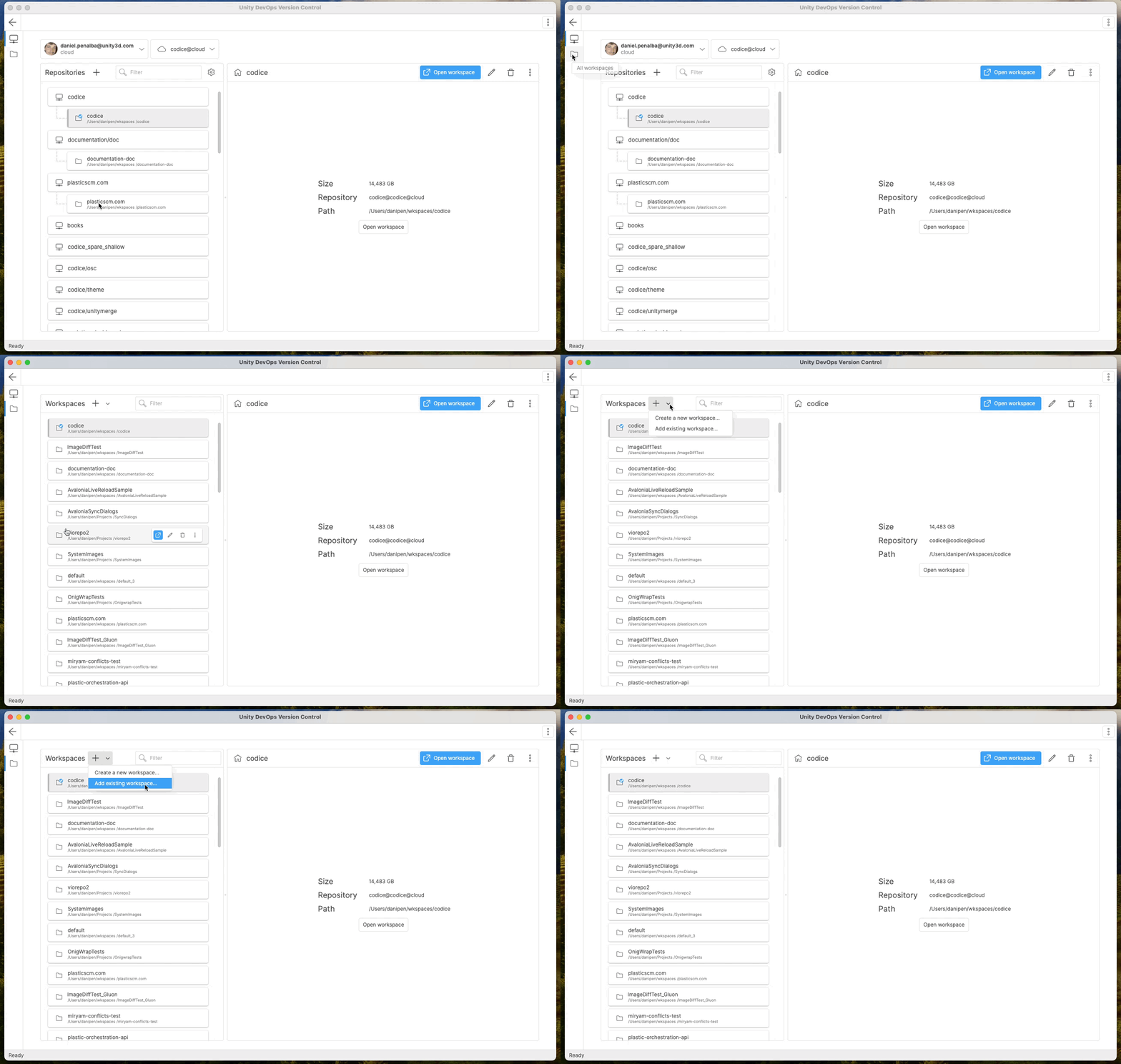
Screenshot
All Platforms - Gluon/Desktop GUI
All Platforms - Gluon/Desktop GUI: Improved Workspace Deletion Process
The process for deleting workspaces has been enhanced. Now, users can delete active workspaces (or repositories with active workspaces). Previously, workspaces that were opened (in the current window or a different window) couldn't be deleted. This change significantly reduces restrictions and improves overall usability.
macOS and Windows - Gluon/Desktop GUI
macOS and Windows - Gluon/Desktop GUI: Drag and Drop functionality for workspaces
A new drag-and-drop feature has been implemented in the workspace management system. This enables users to open or create workspaces (and reconnect existing workspaces), just by dragging a folder to the UVCS window, providing a faster and more intuitive user experience. The drag-and-drop feature is only available in macOS and Windows (the Linux platform is coming soon).
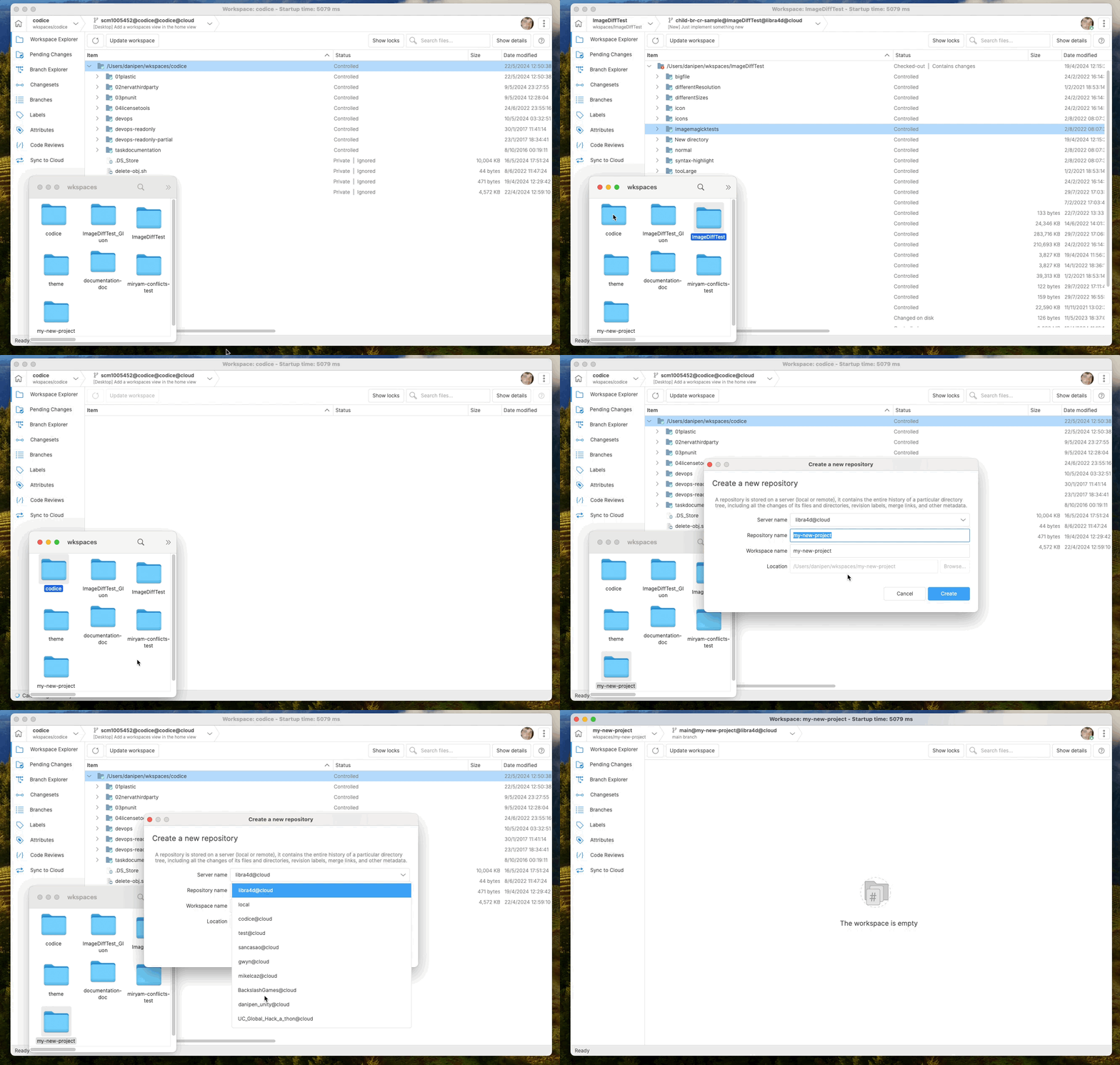
Screenshot
Bug
All platforms - Desktop GUI
All platforms - Desktop GUI: Fixed error loading branch explorer for old servers
When using a modern client connected to an on-premises server with an old version (+2 years ago) there was an error shown when trying to load the branch explorer.
We fixed this issue and now you can see the branch explorer diagram without errors regardless of the server version
11.0.16.8664
New
All platforms - Desktop GUI, Gluon
All platforms - Desktop GUI, Gluon: New options button in the content viewer
We added a new options button when showing the content of added/deleted files. Similar to the one we already had for the diffs, you can change the syntax highlight, encoding or editor options from this new button.
Also now, the code editor settings already configured, are applied in this editor (view whitespaces,...). You already had the code editor settings available from the Preferences window.
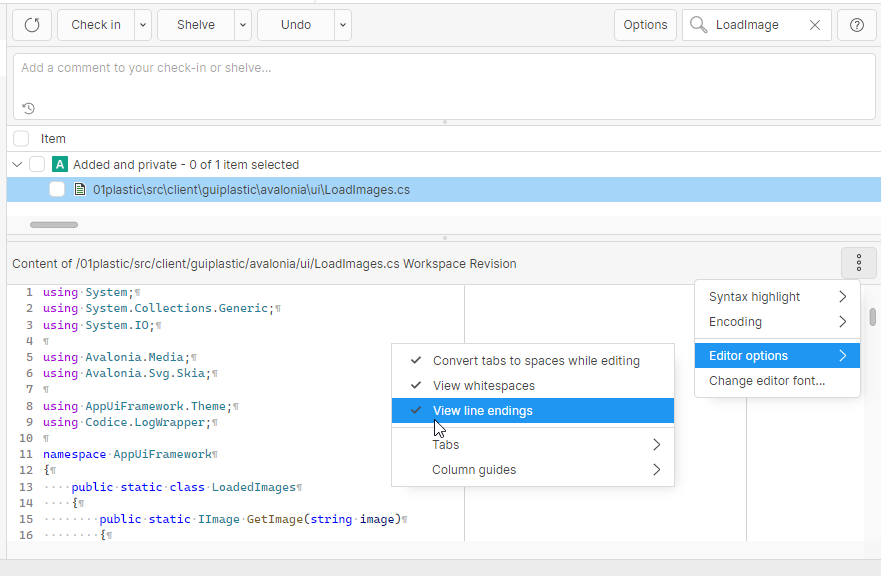
Screenshot
Linux - Command-line client
Linux - Command-line client: command line package size shrunk by 40%
The linux package has been reduced from 127MB to 72MB (more than 40%).
plasticscm-client-coreSome unnecessary assets were removed from the bundle, together with java-based plugins (you can still download them separately from "Plugins zip" installer in https://www.plasticscm.com/download/ page
Linux - Command-line client
Linux - Command-line client: Security issues addressed
Some vulnerabilities of package were addressed, as there were some outdated third-party libraries bundled, such as . Either they were updated to safe versions or removed from the package.
plasticscm-client-coreNewtonsoft.JsonAll platforms - Desktop GUI
All platforms - Desktop GUI: Advanced filters for code reviews
We added a new set of filters in the code reviews view, similar to the ones in other views like the branch explorer. You will be able to use the same saved filters you had in the other views for the date and user filters.
In addition, you can also filter reviews by the assigned reviewer and by status.
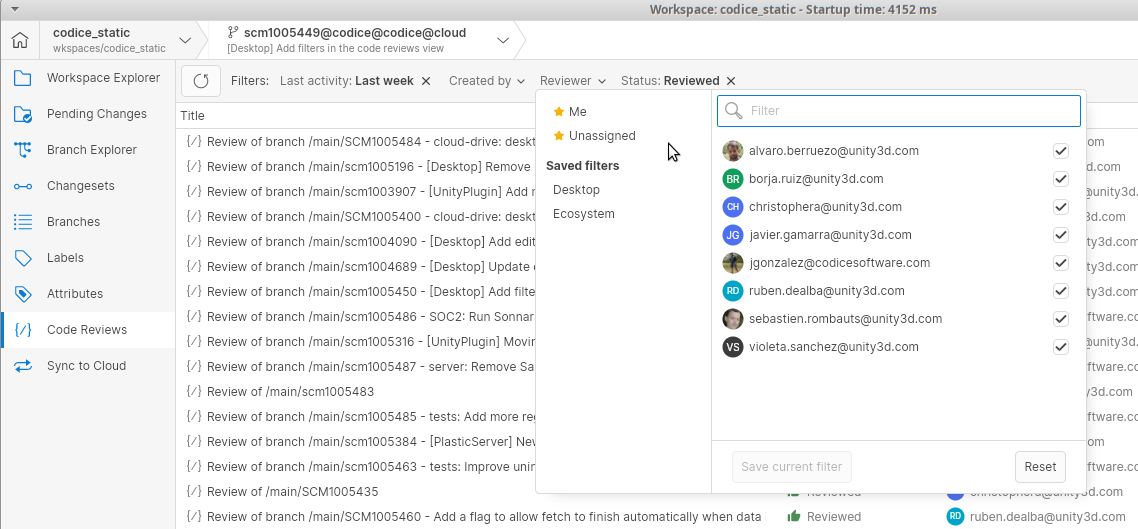
Screenshot
Command-line client
Command-line client: New variables in Review triggers.
Added new variables to the triggers related to Reviews:
-
: All the reviewers in format
PLASTIC_REVIEW_REVIEWERS. For example:user:status;user:status...john@company.com:Under review;karen@company.com:Rework required -
: Total number of comments.
PLASTIC_REVIEW_COMMENTS_COUNT -
: Total number of user-added comments.
PLASTIC_REVIEW_USER_COMMENTS_COUNT -
: Number of unresolved changes.
PLASTIC_REVIEW_UNRESOLVED_CHANGES_COUNT -
: Number of unanswered questions.
PLASTIC_REVIEW_UNANSWERED_QUESTIONS_COUNT
Bug
Linux - Installers
Linux - Installers: Cannot resolve libicu dependency on Ubuntu 24.04. Fixed.
Some Debian / Ubuntu distros were showing an error while installing telling that there is an unmet dependency of that cannot be resolved.
libicuNow it is fixed, since is now set as a valid alias for dependency.
libicu74libicuAll platforms - Desktop GUI
All platforms - Desktop GUI: Fixed locked workspace error when performing a merge
In some scenarios, when performing a merge operation and choosing to keep the changes on the destination, you could get an error saying that the workspace is locked due to the merge operation. We fixed this error so now you can perform the whole merge as usual
11.0.16.8622
New
All platforms - REST API
All platforms - REST API: Remove branches with changesets using the v2 REST API
Before, if you wanted to delete a branch, you had to manually delete its changesets first. Now you can delete all the data at once with the query parameter:
deleteChangesetscurl -X DELETE https://my-plasticscm-server:7178/api/v2/organizations/ORG_64_/repositories/Game2020/branches/1993?deleteChangesets=true \-H "Authorization: Bearer $ACCESS_TOKEN"
Bear in mind that the operation is atomic. Either all of the changesets or none of them will be removed.
Plastic SCM will prevent removing the changesets in a branch under the following circumstances:
-
The changeset zero is included in the operation (that is, you are trying to delete the main branch).
-
One or more of the changesets have children outside of the branch (this is, the branch has child branches).
-
One or more of the changesets in the branch are the source of a merge, and the destination changeset of the merge falls outside of the branch.
-
One or more of the changesets in the branch are pointed to by a label.
-
There are one or more shelvesets created from a changeset in the branch.
All platforms - Desktop GUI
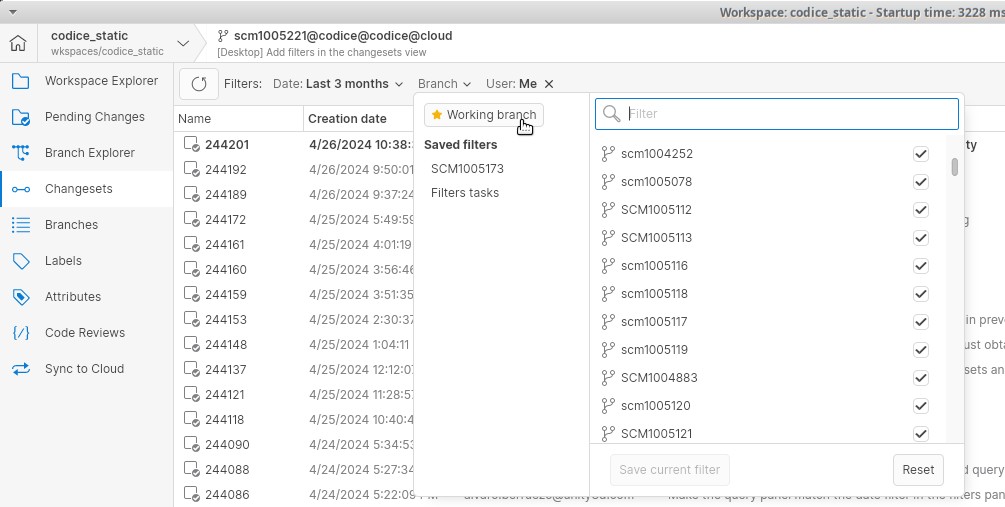
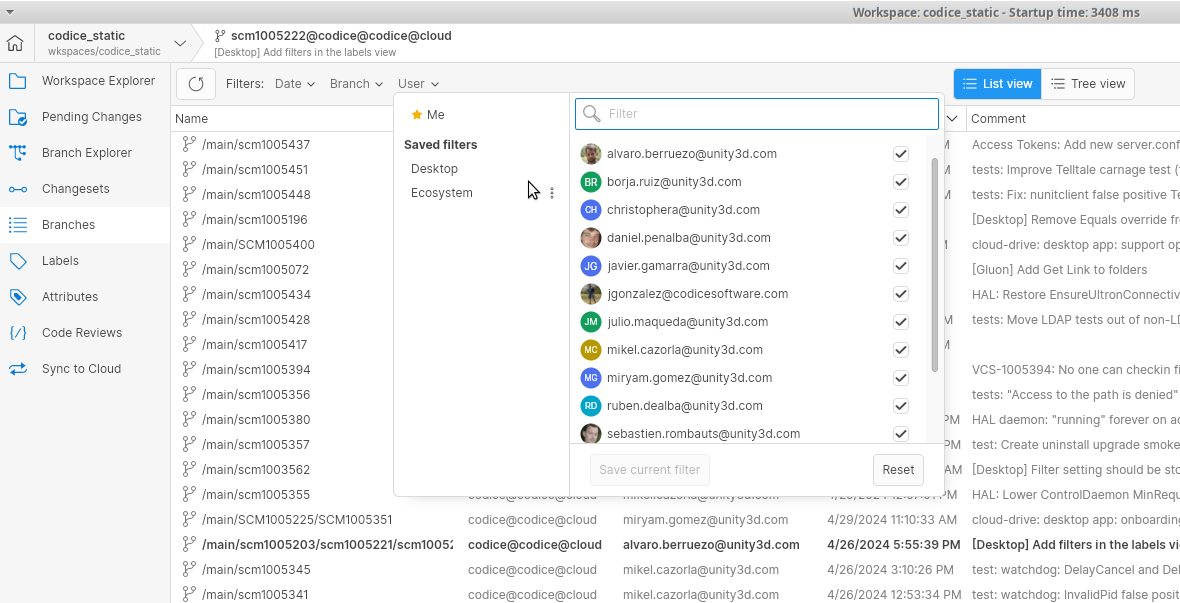
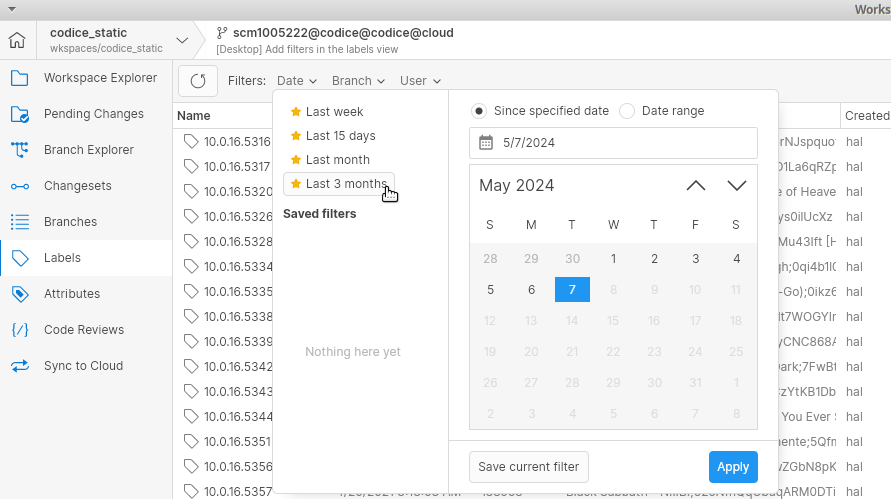
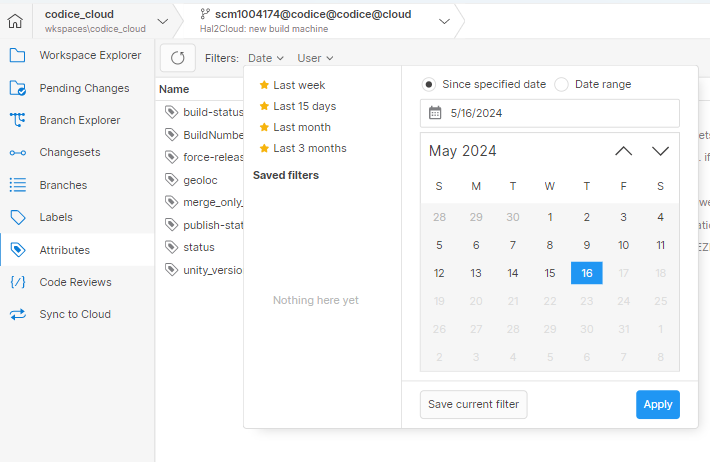
All platforms - Desktop GUI: Added advanced filters to multiple views
We added the filters panel that we already have for the branch explorer to the branches, changesets, labels and attributes views.
You can now easily filter all views by date, branch and user using the same saved filters that you had in the branch explorer.
You can also still use a custom query if you want more advanced filtering.
Screenshot
Screenshot
Screenshot
Screenshot
All platforms - Desktop GUI
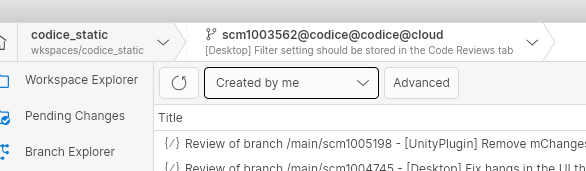
All platforms - Desktop GUI: Keep the code reviews filter preference after restarts
When you select a filter in the code reviews view, this filter was lost after closing the application, and you had to re-apply it the next time.
We modified the behavior so now the filter is kept across restarts.
Screenshot
All Platforms - Gluon
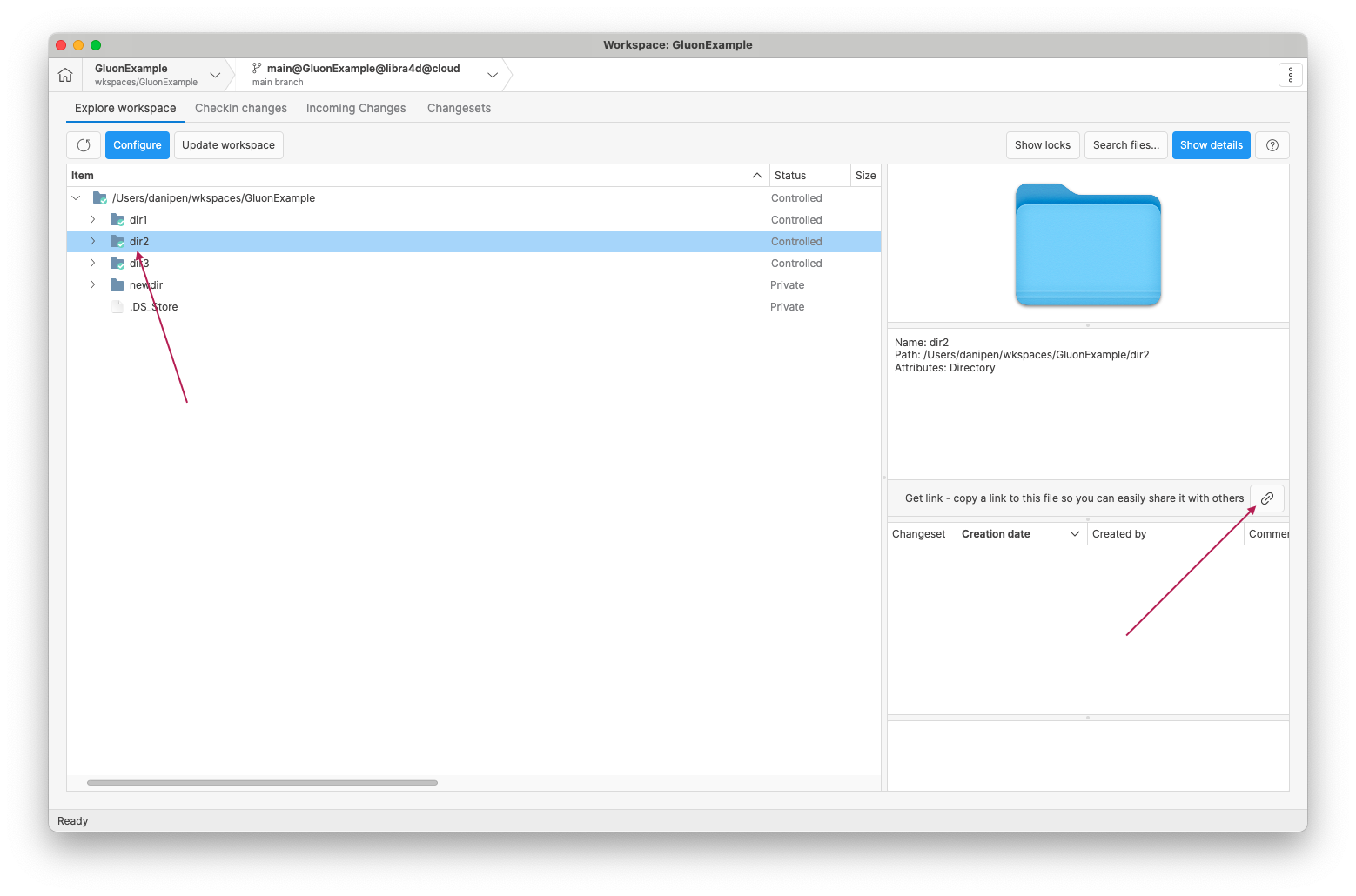
All Platforms - Gluon: Allow to share and open folder links
In Gluon, we've expanded the sharing functionality to include folders in addition to files. Previously, users could only copy links to files for sharing, but now they can also share links to directories. This enhancement improves collaboration by allowing users to easily share and open folder links with others.
Screenshot
Server
Server: SAML authentication is now enabled by default
Previously, the "SamlAuthenticationEnabled" feature flag had to be set in your server.conf in order to explicitly enable SAML authentication. Now the feature flag will be ignored. For more information on how to set up SAML authentication on your on-prem server, check the following technical documentation:
Bug
All platforms - Desktop GUI, Gluon
All platforms - Desktop GUI, Gluon: Consistent behavior adding comments to binary files in code reviews
We've made sure that adding comments to binary files in code reviews behaves consistently, whether the files are added or changed. Previously, there was a discrepancy where comments could be added for added binary files in the metadata lines, but not for changed binary files. Now, both scenarios behave the same way - comments are not allowed. In the near future, we plan to enable adding comments to entire binary files at the file level.
11.0.16.8577
New
All Platforms - Desktop GUI
All Platforms - Desktop GUI: Quick Branch Switching
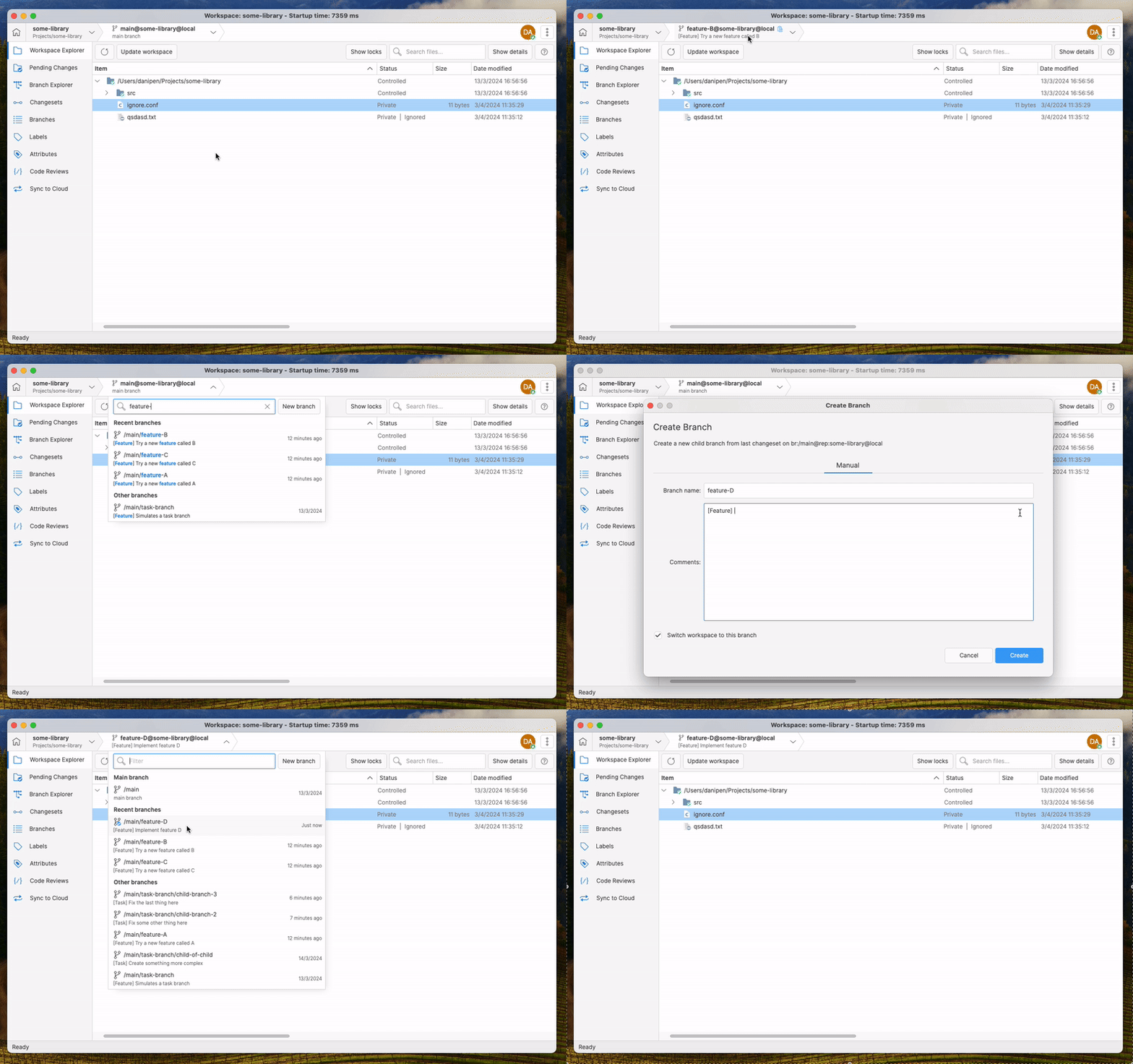
We've introduced a game-changing feature: Quick Branch Switching. We've added a new menu at the top that lets you easily jump between main, recent, and other branches, without losing context.
Features:
-
Branch popup: The top button now opens a menu with categories for main, recent, and other branches.
-
Better Organization: Branches are sorted into three groups to make finding them easier.
-
Filter: You can use a text filter to find branches quickly.
-
Create a New Branch: You can now create new branches right from the popup.
Check out it here!
Screenshot
All platforms - Desktop GUI
All platforms - Desktop GUI: Enhance refactor groups
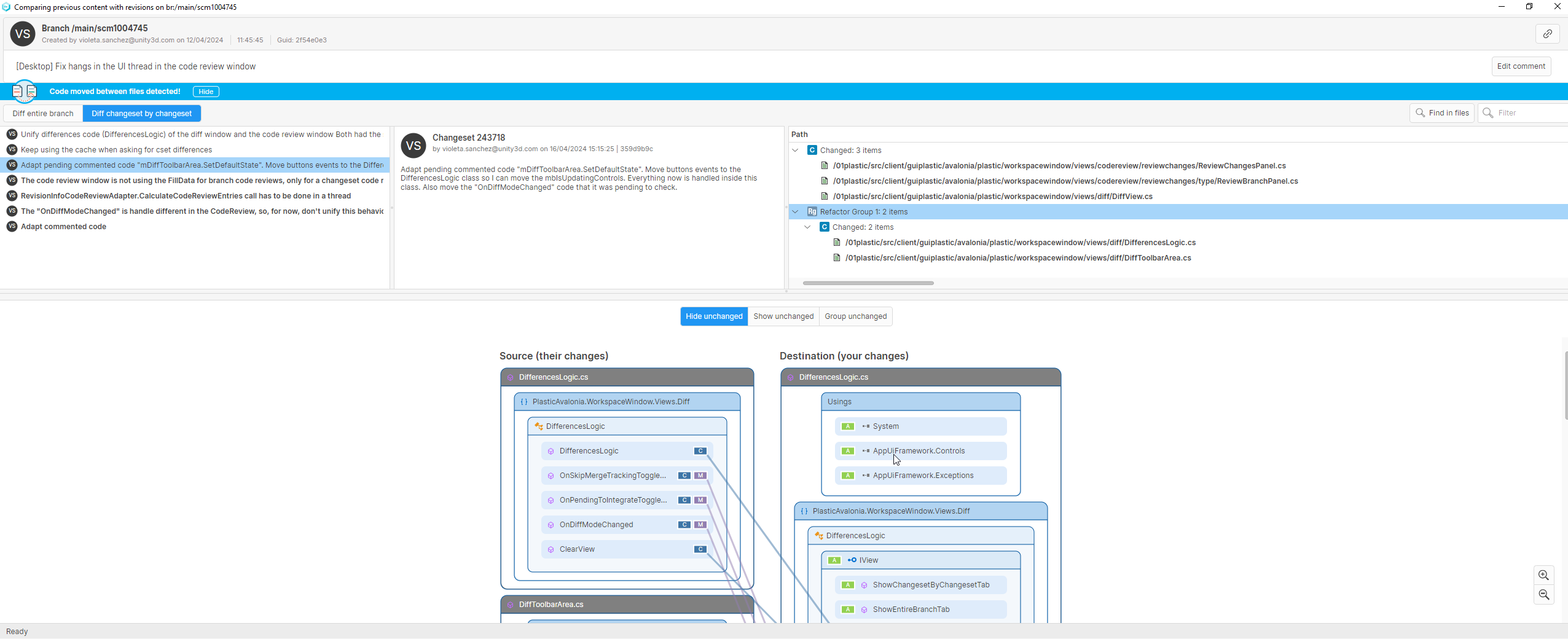
Analyze Refactors is a really powerful feature when reviewing the changes. The refactor groups were only calculated for the entire branch mode in the diff window. Now, they are also calculated when exploring the differences changeset by changeset. The next step will be to add them to the code review window too.
Screenshot
Apart from that, other quality improvements have been made when computing the differences. Before you could notice some "freezes" while loading them. They are fixed now too.
All Platforms - Desktop GUI
All Platforms - Desktop GUI: Auto-refresh Code Reviews View
We've enhanced the Code Reviews view by implementing auto-refresh functionality. Now, whenever certain actions are performed on a code review, such as editing the title, creating, editing, replying to, or deleting a comment, modifying reviewers, changing reviewer status, or applying/discarding a comment, the Code Reviews view will automatically refresh.
Command-line client
Command-line client: Branch deletion
You can now remove branches with changesets using the command line.
cmBefore, if you wanted to delete a branch with changesets, you first had to delete the changesets and then delete the branch. Now you can delete all the data at once with the flag:
--delete-changesets> cm branch delete br:/main/scm1001540 --delete-changesets
Bear in mind that the operation is atomic. Either all of the changesets get removed or none of them will.
Plastic SCM will prevent removing the changesets in a branch under the following circumstances:
-
The changeset zero is included in the operation (this is, you are trying to delete the main branch).
-
One or more of the changesets have children outside of the branch (that is, the branch has child branches).
-
One or more of the changesets in the branch are the source of a merge, and the destination changeset of the merge falls outside of the branch.
-
One or more of the changesets in the branch are pointed to by a label.
-
There are one or more shelvesets created from a changeset in the branch.
Command-line client
Command-line client: Branches can be specified by guid
We added a new branch spec that allows to use the branch guid to refer to a specific branch through the command line.
Examples:
cm switch br:brguid:68846cdd-6a46-458c-a47f-52454cc150d9@plastic@skull:9095cm find branch "where parent='brguid:68846cdd-6a46-458c-a47f-52454cc150d9'"
More info can be found in the 'cm objectspec' command.
Windows - Wwise plugin
Windows - Wwise plugin: Plugin upgraded to SDK 2023
The Wwise plugin was upgraded to use the latest version of the Wwise SDK (2023.1.3.8471). This new version will allow users to continue using our version control integration in Wwise 2023. You can find the new plugin under the installation path "client/plugins/wwise/PlasticSCMWwisePlugin2023.dll".
Please refer to our documentation about the plugins for more information (/unity-version-control/vcs-plugins/wwise-plugin).
11.0.16.8564
New
All platforms - Desktop GUI
All platforms - Desktop GUI: Improved history view filters
The history view has a filter that allows you to see only the revisions that belong to the specified branches.
In addition to this, we added a user filter that lets you specify the author of the revision.
These filters now have the same design as the ones in the branch explorer view.
On top of that, both views share the saved filters list, so you can create one filter from the branch explorer and use it from the history view.
All clients
All clients: Removed transformable workspaces support
Transformable workspaces support was added long time ago. However, they were actually never used or fully supported by the system (i.e. not supported by Partial workspaces or Incoming Changes operations). The feature was removed from the system.
Windows - Wwise plugin
Windows - Wwise plugin: Plugins moved under a common folder
From this release on, all versions of the Wwise plugin are moved under a common installation folder "client/plugins/wwise".
Bug
All Platforms - Server
All Platforms - Server: 'Collection was modified' error using LDAP
The Novell.Directory.Ldap version that the server used (3.4.0) had a bug related to a collection that was not thread safe. This issue was fixed in the version 3.6.0: https://github.com/dsbenghe/Novell.Directory.Ldap.NETStandard/commit/7f8f45e6df33c7ac4acafb0a481c9682cb0d1964
Now, the server uses the version 3.6.0, so the issue doesn't happen anymore.
All platforms - Desktop GUI
All platforms - Desktop GUI: Fixed exception in changeset code review
When creating a code review for a changeset, after refreshing the view we were showing an unexpected error message. This error is now fixed
11.0.16.8551
New
All platforms - Desktop GUI
All platforms - Desktop GUI: New option to group or not group pending changes by category
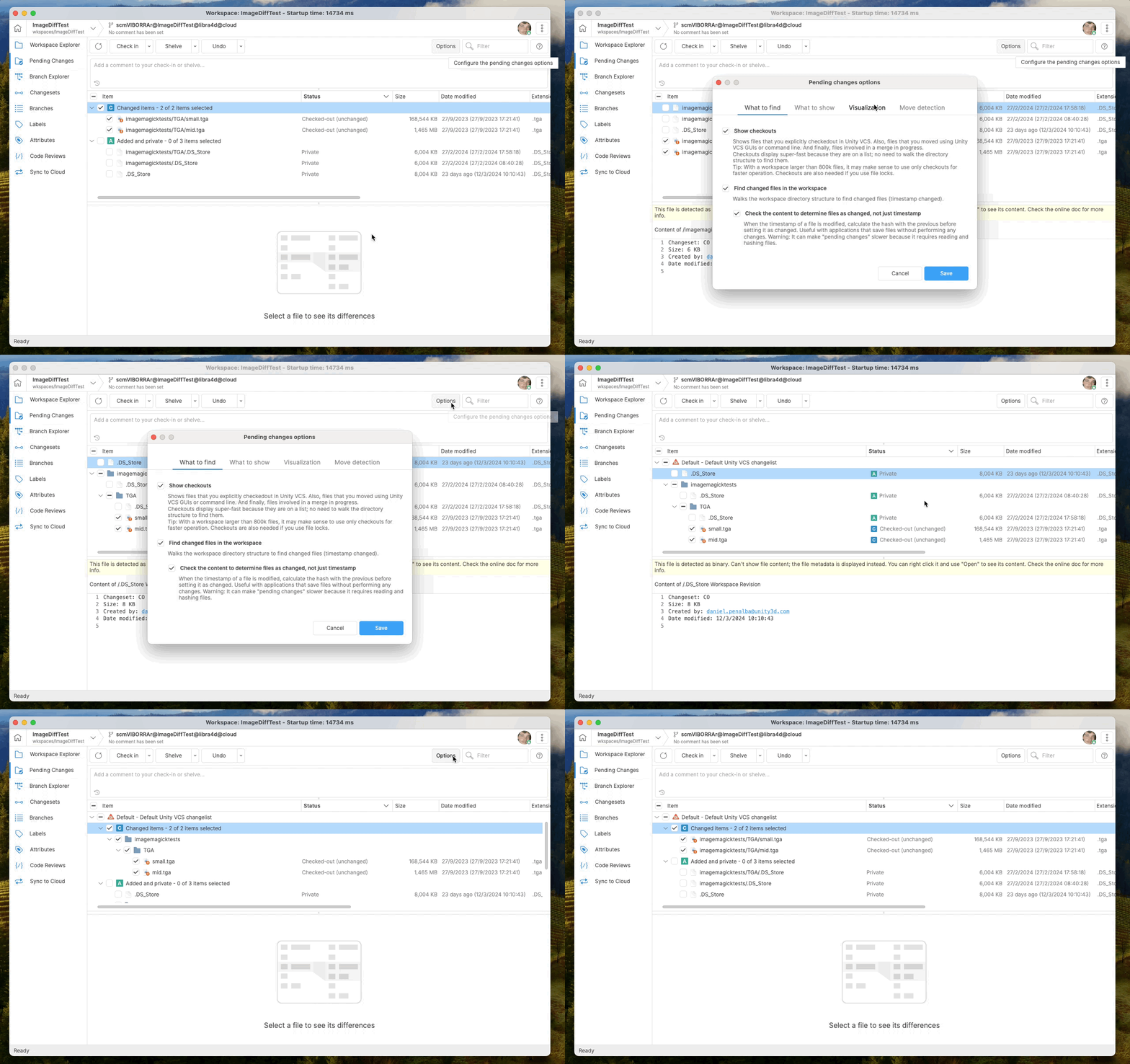
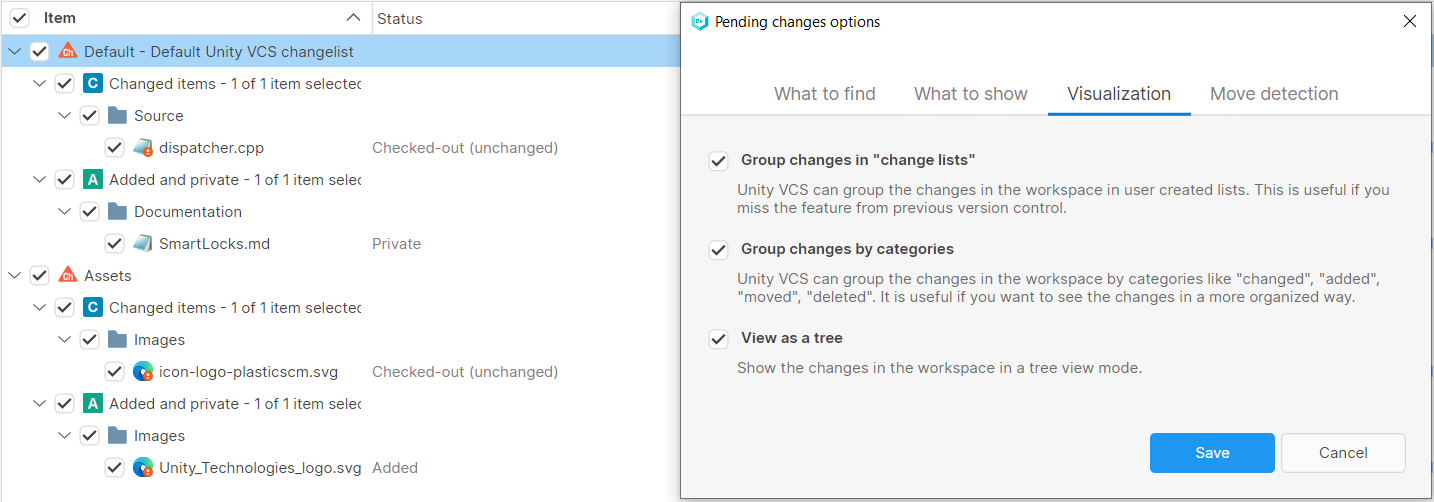
A new option has been introduced in the Pending Changes View to enhance user flexibility. Users can now toggle between displaying pending changes grouping or not-grouping categories (added/changed/moved/deleted).
The new option is available in a new tab called "Visualization" in the Pending Changes View options. Also moved the options "Group changes in change lists" and "View as a tree" to that new tab.
Note that when "Group changes by categories" is disabled, the category icon is displayed in the status column to help classify each change by category.
Screenshot
An example of the behavior for each of the three options is shown below.
Group changes in "change lists":
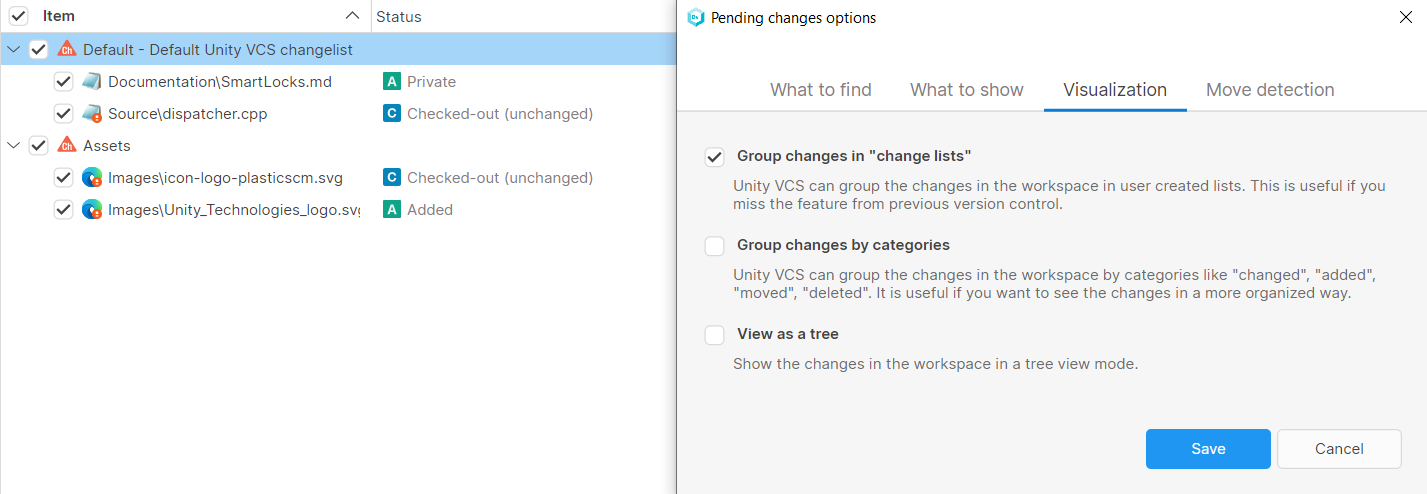
Screenshot
Group changes by categories:
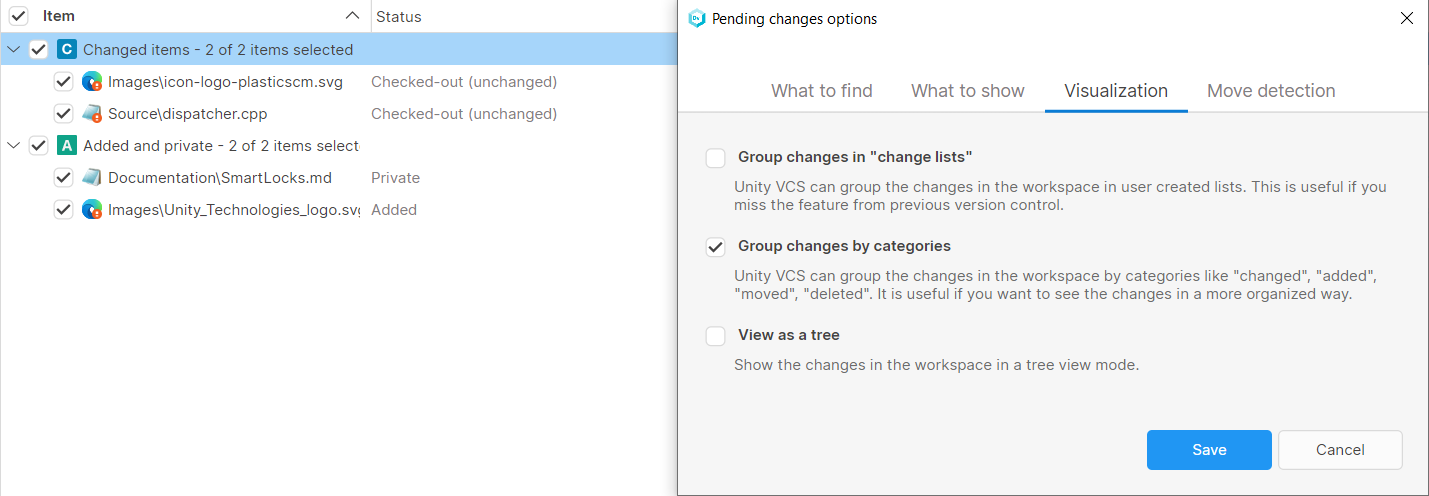
Screenshot
View as a tree:
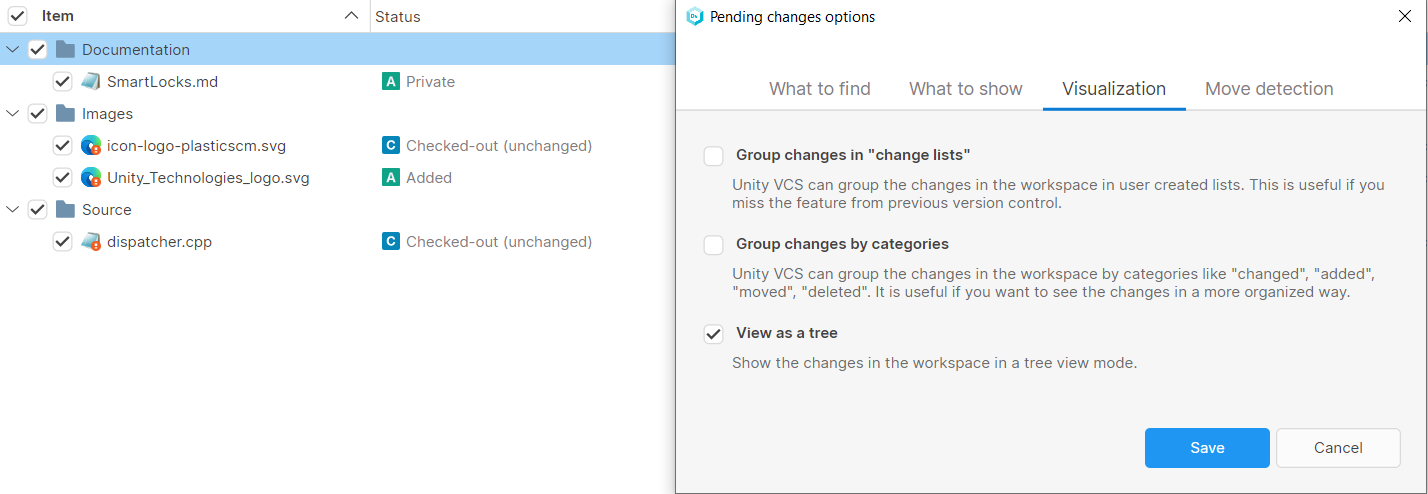
Screenshot
Note it is also possible to combine the options at will:
Screenshot
Bug
All platforms - Desktop GUI
All platforms - Desktop GUI: Fixed "Item with the same key already been added" error in the Pending Changes view
There was a way to end up with a path both "locally removed" and "removed" at the same time, inside the pending changes view. This caused an "Item with the same key has already been added" error.
The following sequence reproduced the error before the fix:
-
Remove 'foo.txt' from UVCS (as a result, you get 'foo.txt' as removed, controlled).
-
Create a new 'foo.txt' file using the same path.
-
Add the new 'foo.txt' to UVCS.
-
Delete from disk the foo.txt (as a result, you get 'foo.txt' as locally removed)
Some other operations, like the "incoming changes" also failed with the same error. It's now fixed for all of them.
11.0.16.8539
New
All Platforms - Desktop GUI
All Platforms - Desktop GUI: View branches as a tree hierarchy
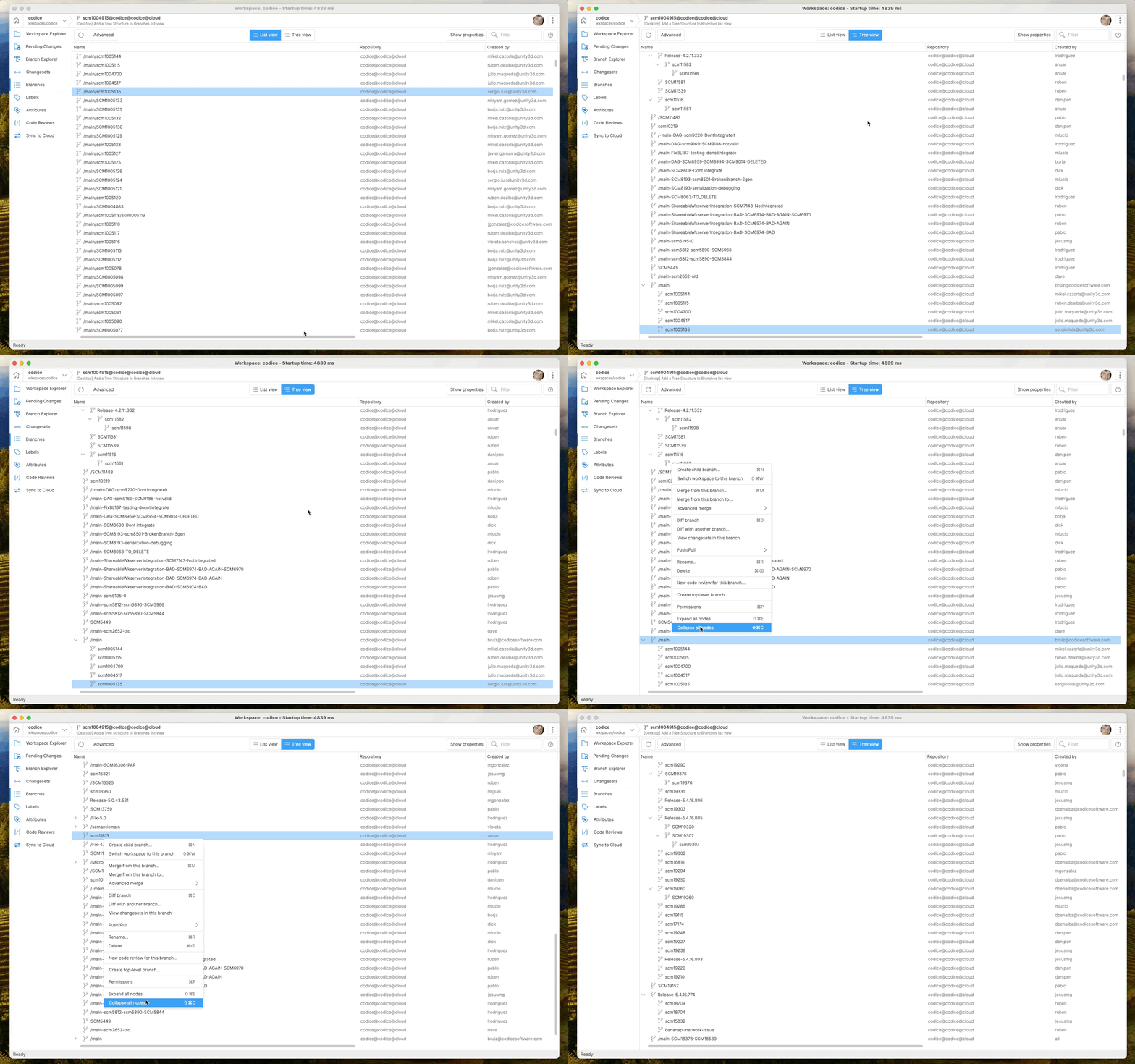
Now it is possible to switch between a flat (list) view and a hierarchical (tree) view of the branch list.
In the new mode (tree mode), each branch node is collapsible, allowing it to hide and show its children.
There are context menu options for collapsing all and expanding all branches in tree view mode.
Screenshot
All platforms - P4Sync
All platforms - P4Sync: Added support for branches with a ':' character.
The mappings between the UVCS branches and the P4 branches are stored in a text file.
The previous parsing of this file didn't support the character ':' in the P4 branch name, so it failed with the following error:
"The file 'reference.mapping.conf' is corrupt. The format of the line '12:3://depot/development/port:camera.' is wrong."
Now, it properly supports P4 branches that contain the character ':'.
All platforms
All platforms: Allow to disable the SSL certificate revocation list check
By default, the certificate revocation list (CRL) is checked during SSL authentication. This is an online check that could delay the establishment of a new connection due to a network restriction, a network configuration issue, or an issue with the certificate.
This delay on each connection heavily damages the user experience, especially when using the command line, where each command needs to create a new connection.
You can disable the SSL certificate revocation list check by adding the following setting to your client.conf:
<CheckSslCertificateRevocationList>no</CheckSslCertificateRevocationList>
Working distributed, the same issue could happen to the server when it needs to connect to the remote server, so you can disable check on the server too by adding the following setting to the server.conf:
<CheckSslCertificateRevocationList>false</CheckSslCertificateRevocationList>
All platforms - WebUI, GUI
All platforms - WebUI, GUI: Comments in code reviews are now sorted by creation date
Previously, code review comments were sorted by modification date. That moved comments to the top of the list after being edited, which was unintuitive. From now on, code review comments will keep their creation date, maintaining their original position in the list.
Bug
Cloud Server - Changed the internal sub repositor…
Cloud Server - Changed the internal sub repositories ID sequence to avoid collisions.
Before, when a new sub-repository was created, it used the first following available ID. Still, this mechanism did not consider the IDs already used by removed sub-repositories, leading to a collision at some operations.
Now, new sub-repositories will use a unique ID that has not been used before.
macOS - SemanticMerge failed to start as a standa…
macOS - SemanticMerge failed to start as a standalone application
An issue in the framework prevented SemanticMerge to start as a standalone application. It led to an immediate crash since version 11.0.16.8405. Now it's fixed.
Remember that you can run SemanticMerge independently using the "semanticmerge" argument.
All Platforms - Gluon
All Platforms - Gluon: Fix sorting items by size
When sorting the table by size, the sorting was incorrect. Instead of sorting directories followed by files based on size, the sorting appeared random, with sizes not matching any discernible order. Now it's fixed.
All platforms - Desktop GUI
All platforms - Desktop GUI: Re-request review for "Rework required"
We introduced the Re-request review feature back on version 11.0.16.8486, but it was only available for "Reviewed" status, not for "Rework required" status. Now it's fixed. The button is visible for both statuses.
Now, authors can really re-request reviews for certain users after making all requested changes, indicating readiness for review again.
11.0.16.8500
New
All platforms - Desktop GUI, Command-line client
All platforms - Desktop GUI, Command-line client: Improved the way to handle credentials for different servers
In some scenarios you may use the same credentials to authenticate on different cloud organizations. These credentials are stored independently, and can also expire at different times.
We improved the way we handle the authentication, so now when one of the credentials expire, we try to use the others instead of failing the authentication.
As a result, you will be less likely to be asked to re-enter credentials when trying to connect to a server that you haven't used for a while.
Bug
All platforms - Desktop GUI
All platforms - Desktop GUI: Fixed Index out of range error in Sync View
Users encountered an error when attempting to exclude branches in the Sync View. Right-clicking on a branch and selecting "Exclude Branch" resulted in an index out-of-range error. Now it's fixed.
All platforms - Desktop
All platforms - Desktop: Fixed branch explorer loading using the global config
In 11.0.16.8469 we added the new filters in the Branch Explorer view. It was causing issues loading the view when using the branch explorer global configuration. Now it's fixed.
11.0.16.8486
New
All platforms
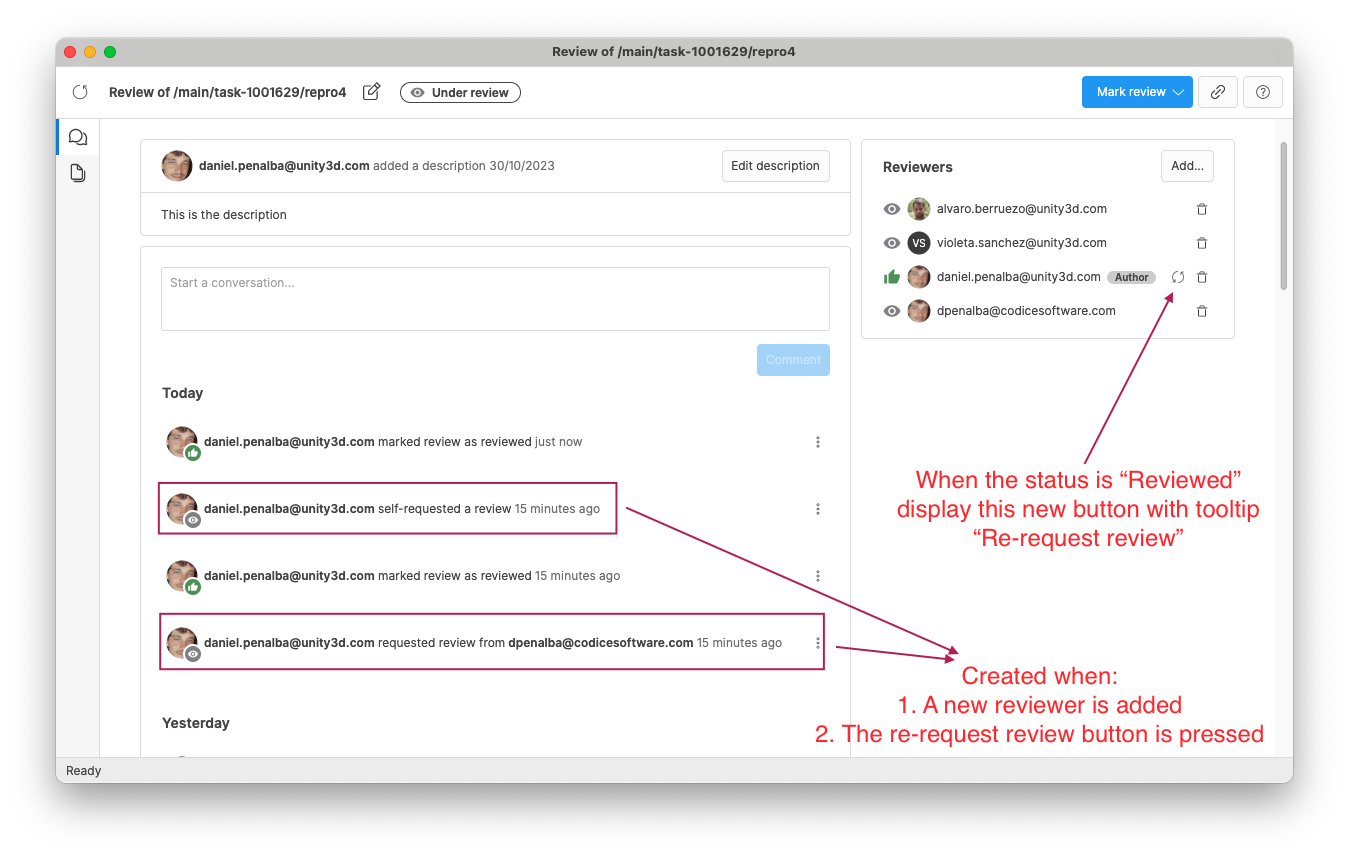
All platforms: Re-request review feature added
Previously, re-requesting a review was not possible, causing workflow challenges when creators needed to make changes.
Now, authors can re-request reviews for certain users after making all requested changes, indicating readiness for review again.
Screenshot
Bug
All platforms - Desktop
All platforms - Desktop: Fixed a tree performance issue for the workspace explorer view
In 11.0.16.8445 we modified the way to calculate the locks info in the workspace explorer view. This change caused the performance degraded on expanding nodes or the scrolling of the tree. Now it's fixed.
11.0.16.8469
New
All platforms - Desktop GUI
All platforms - Desktop GUI: Enhanced filters in Branch Explorer
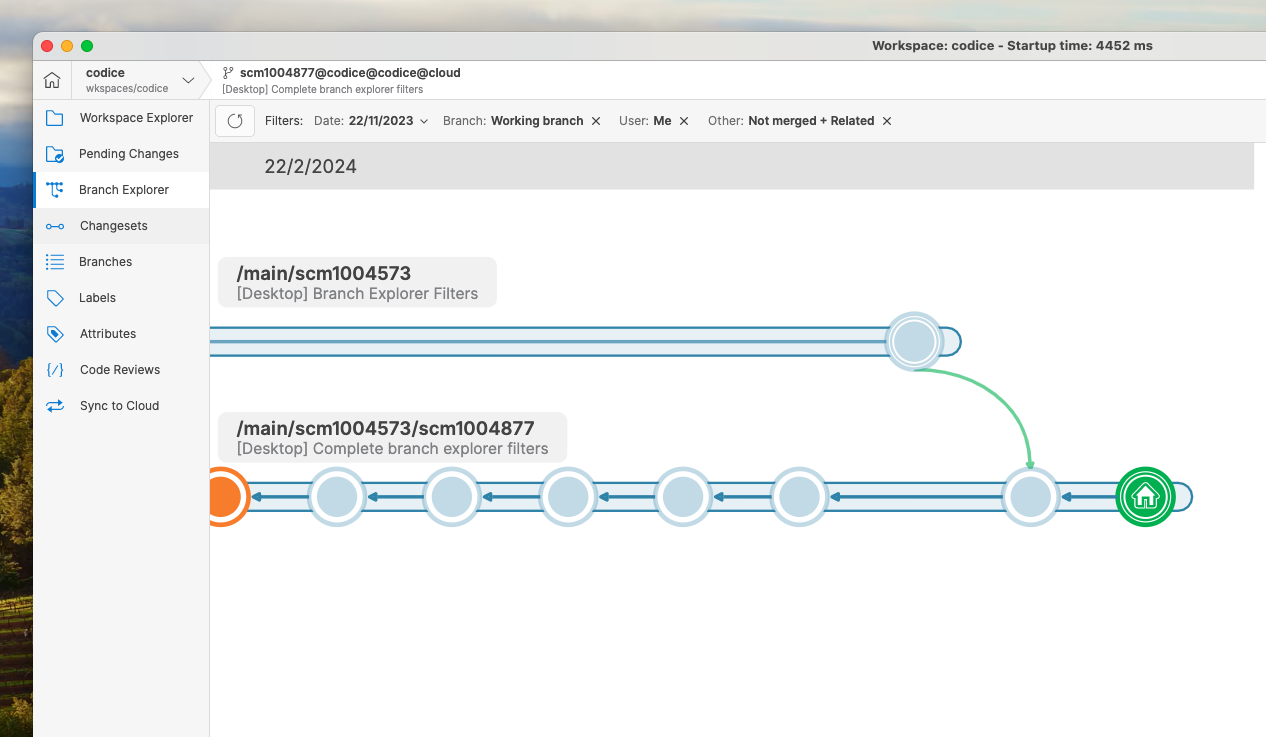
We are excited to introduce a powerful new feature in our Branch Explorer: Filters. These filters have been designed to streamline your workflow and enhance your user experience. Here's a breakdown of the key improvements and functionalities:
-
Date Filters Enhancement:
-
The interface for changing date filters has been revamped for simplicity and ease of use.
-
Users now can quickly select predefined date ranges such as last week, last 15 days, month, or 3 months.
-
Additionally, users can still manually select a specific date or date range from the calendar.
-
-
Automated Last Time Ago Calculation:
- A significant improvement is the automatic calculation of the last time ago based on the latest changes in the repository. This feature prevents empty diagrams by ensuring accurate data representation, even if the history is not up to date.
-
Branch Filters:
-
A new branch filter feature has been implemented to help users focus on specific branches without having a cluttered interface.
-
Users can easily filter branches based on their working preferences, select specific branches, and save filter configurations.
-
-
User Filters:
-
The user filter option simplifies the focus on individual work by highlighting the user's changes in orange.
-
Changes from other users are displayed with reduced opacity, allowing users to concentrate on their tasks effectively.
-
-
Save Filters Functionality:
- Users can now save date, branch, and user filters for future use, making accessing frequently used filter settings convenient.
-
Other Filters:
-
A new filter excludes already merged branches, enabling users to focus solely on pending work items.
-
Related Branches Option: The related branches feature enhances diagram comprehension by including parent, children, and merged connected branches in the view.
-
Screenshot
Bug
All Platforms - Server
All Platforms - Server: Changes in code reviews will update its modification date.
Before this task, due to the new code reviews window, there were several changes which were not affecting its last modification date, such as changes in the comments or the reviewers status, among others. Now, every change in a code review or other fields related to it, should update the last modification field to the current date.
All platforms - Desktop GUI
All platforms - Desktop GUI: Mirrored TGA files preview
-
Update ImageMagick Library: Upgraded ImageMagick library to version 13.6.0, resolving the issue of flipped images during preview generation.
-
Cache Invalidation: Incremented the preview datastore version to invalidate the preview disk cache, ensuring that previously incorrect previews are discarded.
11.0.16.8445
New
All platforms - Gluon
All platforms - Gluon: lock status info for legacy locks is not shown anymore
In 11.0.16.8101, we announced Smart Locks as the replacement for legacy locks, which allows users to work in sequence making changes, and knowing who has an asset locked at any time. This lets multiple users collaborate while retaining the lock on the task branch throughout development and protecting the file from parallel changes.
Legacy locks were still supported for a while. However, as of this version, Gluon will no longer show the status info related to the legacy locks in the explorer workspace view.
You can find more information about Smart Locks in the release notes and the official documentation:
Stay tuned because the multiple destination branches support is coming soon!
11.0.16.8434
Bug
All platforms - Desktop GUI
All platforms - Desktop GUI: Improved the way to handle errors when signing in
When there is an error during the sign in process, in some scenarios we were not displaying the error message to the user (e.g., due to the connection with the server or an issue saving the credentials on disk). This was not optimal because the only way to see what went wrong was checking the log files.
We improved this behavior, and now all errors are shown in the GUI.
11.0.16.8420
New
All platforms - Desktop GUI
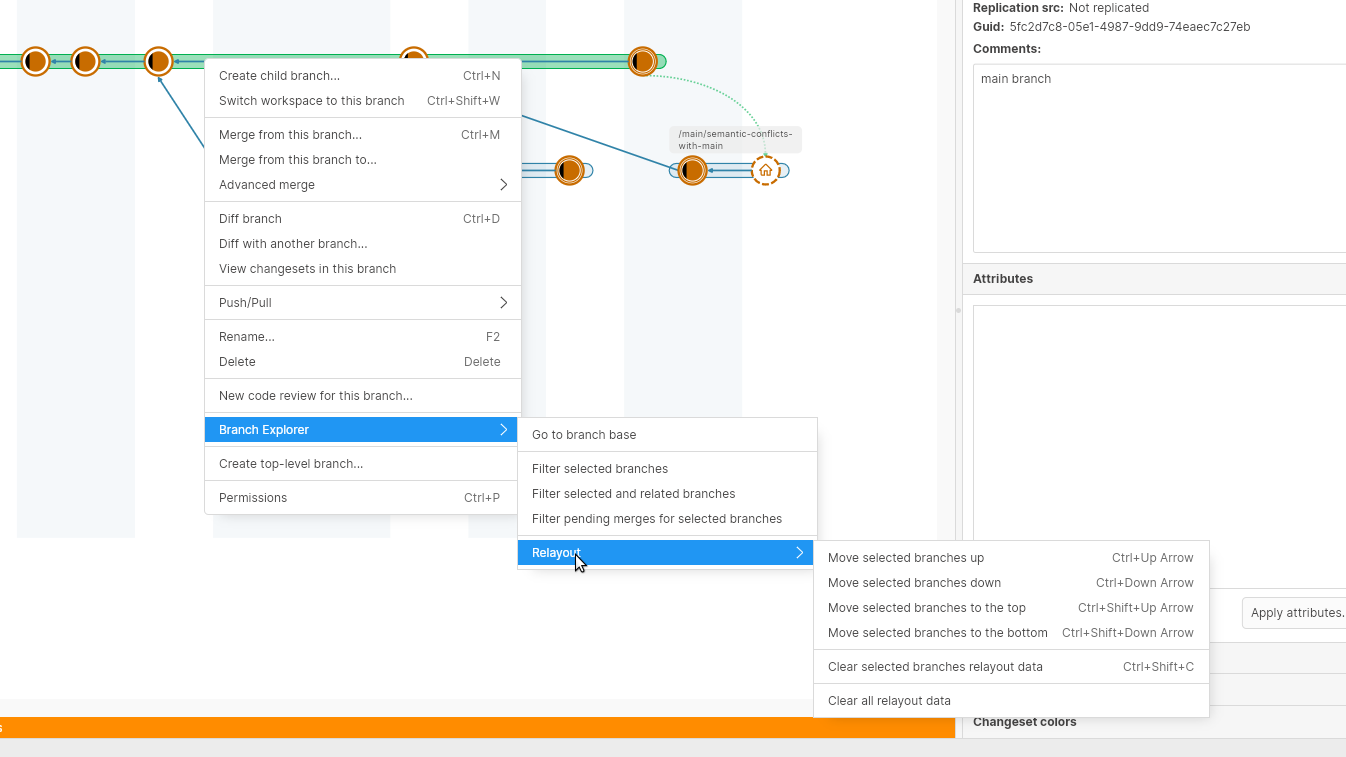
All platforms - Desktop GUI: Relayout branches in the branch explorer
We added a new option in the branch explorer that allows you to relayout branches at your wish, so you can manually move a branch up and down, instead of letting the branch explorer automatically find a spot for it. This features is available from the context menu when a branch is selected. You can also move multiple branches at a time, or clear all the relayout data if you are not satisfied with the result.
Screenshot
Additionally, some keyboard shortcuts are also provided (for Windows and Linux / for macOS):
-
Ctrl+Up Arrow / Cmd+Up Arrow: move selected branches up.
-
Ctrl+Down Arrow / Cmd+Down Arrow: move selected branches down.
-
Ctrl+Shift+Up Arrow / Cmd+Shift+Up Arrow: move selected branches to the top.
-
Ctrl+Shift+Down Arrow / Cmd+Shift+Down Arrow: move selected branches to the bottom.
-
Ctrl+Shift+C / Cmd+Shift+C: clear selected branches relayout data.
Bug
All Platforms - Desktop GUI
All Platforms - Desktop GUI: unexpected error refreshing code review window
When refreshing the code review window, if the selected difference was an xlink difference, an unexpected error appeared. Now it's fixed.
The code review window now is prepared to keep the selection for xlink differences too.
11.0.16.8411
New
All Platforms - Desktop GUI
All Platforms - Desktop GUI: Enhanced diff visibility in Dark theme
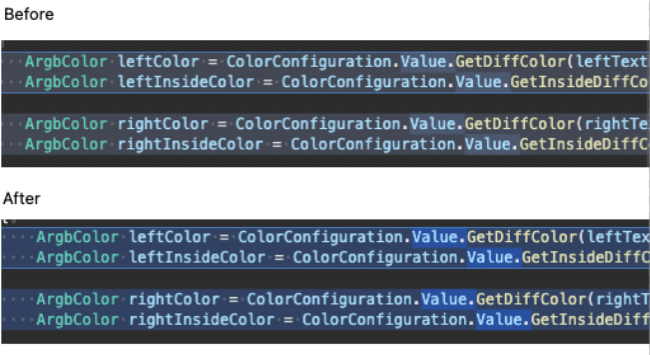
Users reported difficulty in seeing the new GUI diff colors in the dark theme. To address this concern, several changes have been applied to enhance visibility:
-
The base colors are now more solid and clear in the dark theme.
-
A slight decrease in the diff alpha value increases the contrast between diffColor and insideDiffColor.
-
The diff alpha value was also increased inside lines.
Screenshot
Windows - Desktop GUI, Gluon
Windows - Desktop GUI, Gluon: Improved ignored.conf for Unity projects
An ignore.conf file is automatically generated for the workspace when it contains a Unity project in order to set up the files that should be ignored.
Now, we have included a new rule to ignore some internal Unity files that are created and deleted constantly under certain circumstances.
Windows - Desktop GUI, Gluon
Windows - Desktop GUI, Gluon: Improved the auto-refresh for pending changes view
We improved the mechanism used to detect if there are new changes to check in the auto-refresh operation for the pending changes view.
Now, it's able to detect when there are only changes that affect ignored files, avoiding launching the auto-refresh operation in these cases.
Windows - Command-line client
Windows - Command-line client: diff and merge commands now uses the new merge tools
Previously, when you ran a diff from the CLI or a merge with conflicts, we were using the legacy GUI to show the diffs or merge conflicts. We updated this behavior to match macOS and Linux, and the new GUI is used.
Linux - Command-line client
Linux - Command-line client: Added support for lightweight platforms without libicu
Now you can run the command-line client () in minimal distros without a valid globalization support library () installed in the system.
cmlibicuTo do that, set the environment variable to in order to run the application.
DOTNET_SYSTEM_GLOBALIZATION_INVARIANT1cmMore info about the configuration options for globalization can be found here
All Platforms - Command-line client
All Platforms - Command-line client: Allow revspecs collections on getfile | cat command
Before, it was possible to download file revisions one by one using the getfile command along with the --file option to specify the destination. Now, it is also possible to download a bunch of files by defining a whitespace-separated list of semicolon-separated pairs of revspec and destination.
For example:
C:\wkspaces\default> cm find revision5 1/10/2024 1:35:11 PM dir all c:\wkspaces\default\#br:/main#016 1/10/2024 1:38:42 PM dir tester c:\wkspaces\default\#br:/main#115 1/10/2024 1:38:42 PM txt tester c:\wkspaces\default\file.txt#br:/main#120 1/10/2024 1:39:28 PM dir tester c:\wkspaces\default\#br:/main#219 1/10/2024 1:39:28 PM txt tester c:\wkspaces\default\fghnfg.txt#br:/main#225 1/10/2024 1:40:44 PM dir tester c:\wkspaces\default\#br:/main#324 1/10/2024 1:40:44 PM txt tester c:\wkspaces\default\fghnfg.txt#br:/main#3C:\wkspaces\default> cm getfile "revid:25@rep:default@repserver:localhost:8084;file_25.txt" "revid:16@rep:default@repserver:localhost:8084;file_16.txt"C:\wkspaces\default> ucat .\file_16.txtcontent1C:\wkspaces\default> ucat .\file_25.txtcontent1content2
Bug
All platforms - Desktop GUI
All platforms - Desktop GUI: Fix incorrect text in resolve conflicts button when doing a "merge-to"
When performing a "merge-to" operation that involves resolving manual conflicts, the button at the top incorrectly displays "Checkin merge!". The expected behavior is now restored: the button initially says "Resolve conflicts," allowing users to address conflicts. After resolving conflicts, the button appropriately changes to "Checkin merge!"
All Platforms - Desktop GUI
All Platforms - Desktop GUI: Fix crash when previewing JPEG images greater than 1024px.
A crash issue in Gluon occurred when attempting to preview JPEG images with a width or height exceeding 1024 pixels in width/height. On Mac, it led to an immediate crash, while on Windows, it resulted in freezing and then crashing after a few seconds. Now it's fixed.
All platforms - Desktop GUI, Gluon
All platforms - Desktop GUI, Gluon: Don't request the user to login when loading repositories
The Login dialog was shown when opening the Preferences window if an issue tracker was previously configured or creating a new workspace from the "Create Workspace" dialog.
11.0.16.8395
New
All Platforms - Desktop GUI
All Platforms - Desktop GUI: Enhanced Undo performance by 25%
Previously, undoing a large number of files (15k) in the GUI took longer compared to the cm undo command.
The GUI was sluggish because it sent all paths directly to the operation, triggering a platform path resolution for each. This process expanded and made paths canonical while resolving symlinks. On the other hand, the CLI combined and calculated paths after executing an unco operation. Since the GUI always uses pre-resolved platform paths, the path resolution step becomes unnecessary and can be skipped.
Following these adjustments, the undo operation is now 25% faster.
Before the change: 48 seconds for 10,000 paths on the Windows platform.
After the change: 36 seconds.
All platforms - Desktop GUI
All platforms - Desktop GUI: Enhancements for clearer Diff Viewer comparisons
We've addressed an issue in this release to ensure a more straightforward experience during comparisons. Here's what you need to know:
Problem Before:
Before this update, selecting 'Ignore Whitespaces' or 'Ignore EOLs' would retain the 'SkipFormatChange' setting. If 'SkipFormatChange' was set to "true," no format differences were displayed. This caused confusion as users expected differences when choosing these options.
Resolution:
We've modified the behavior to align 'Skip Format Changes' with 'Ignore EOLs and Whitespaces' in the x-merge.
Updated Usage:
-
'Recognize All': Disables 'Skip Format Changes'
-
'Ignore EOLs and Whitespaces': Enables 'Skip Format Changes'
-
'Ignore Whitespaces': Disables 'Skip Format Changes'
-
'Ignore EOLs': Disables 'Skip Format Changes'
This adjustment ensures a more intuitive experience during comparisons.
All platforms - Desktop GUI, Gluon
All platforms - Desktop GUI, Gluon: Tree mode in Pending Changes view
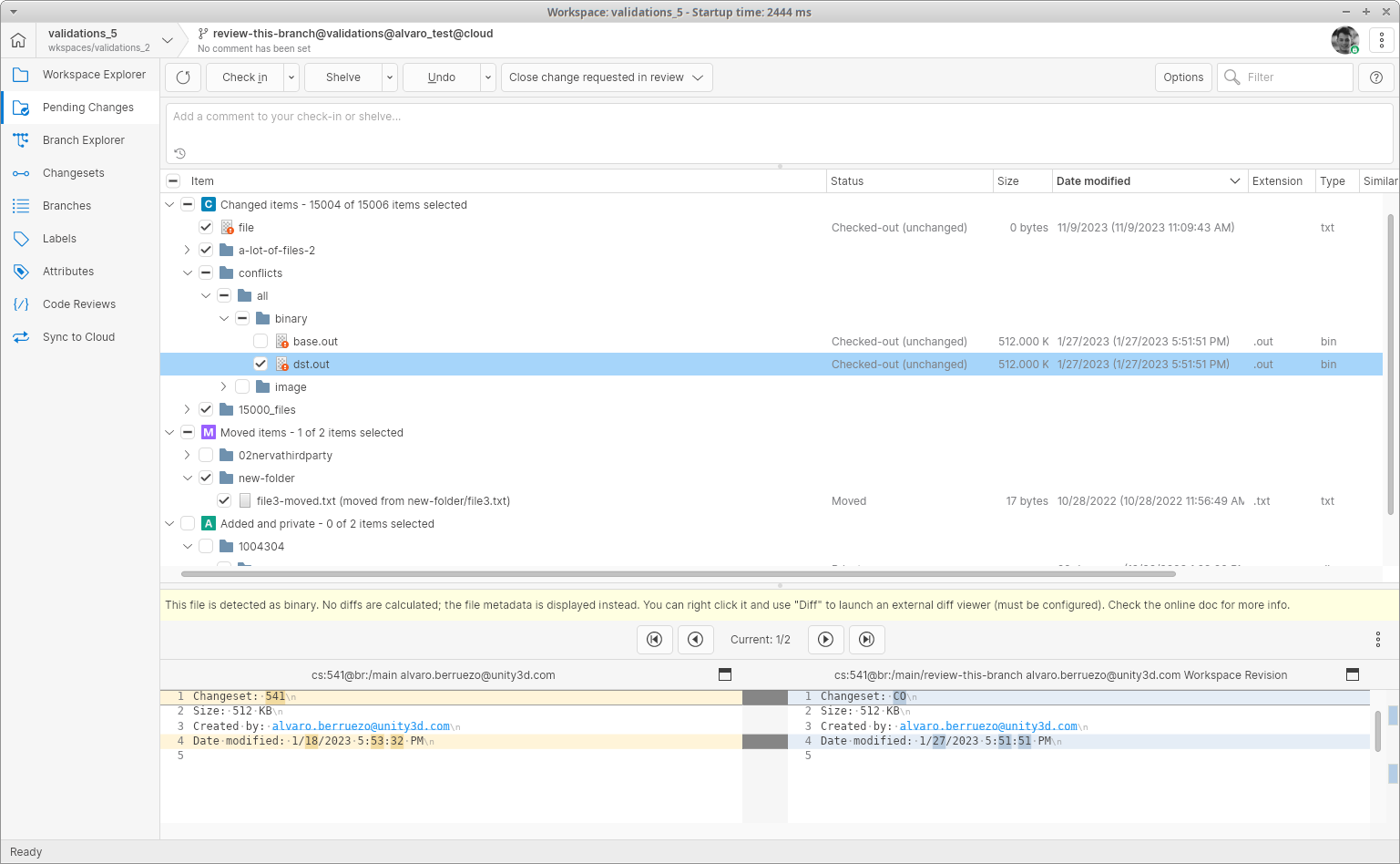
We added a new option in the Pending Changes view to visualize your changes as a directory tree instead of as a list.
This lets you see the changes organized by the directory structure and select all the changes under a directory with a single click.
Screenshot
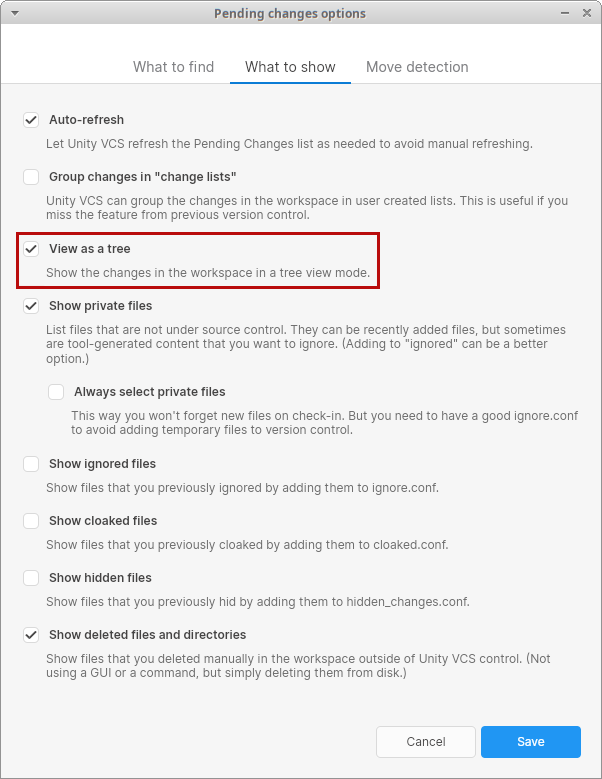
You can choose the way to visualize the changes in the Options dialog, under the "What to show" tab:
Screenshot
All platforms - Desktop GUI, Gluon
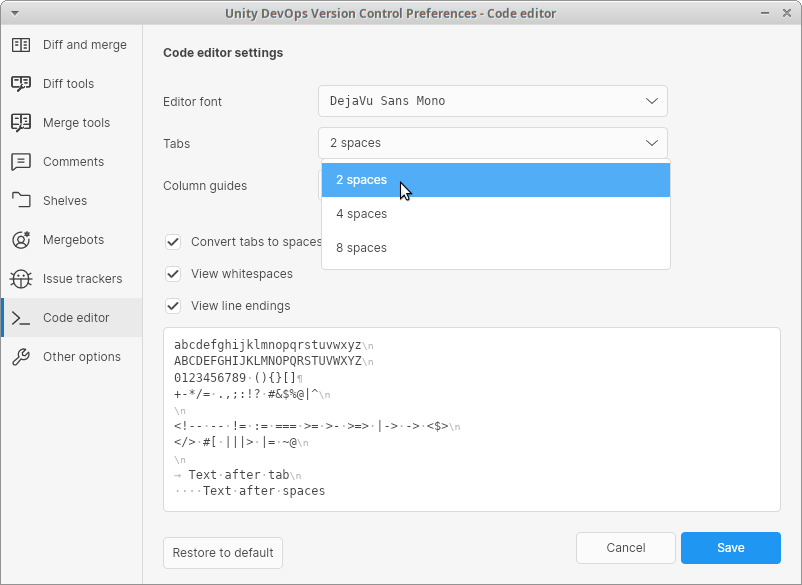
All platforms - Desktop GUI, Gluon: Added 2 spaces tab option
We added a new option in the Code Editor preferences that allows you to visualize tabs as 2 spaces
Screenshot
Bug
All-Platforms - Command-line client
All-Platforms - Command-line client: Unexpected standard output for machinereadable
When performing a checkin with update and machinereadable options enabled, there were some unexpected lines in the standard output which have been removed. Now every message displayed is properly formatted as expected.
For example:
On a workspace with the selector behind the head of the branch, (checkin would need to have option --update to succeed), perform some changes in any item and then run the following:
cm ci -m=message --startlineseparator=">>>" --endlineseparator="<<<" --fieldseparator="||" --machinereadable --update my-item.txt
Before you would get the following:
>>>CI_START<<<>>>STAGE||<<<Processing directory conflictsProcessing directory operationsProcessing directory operations (downloading revisions)Processing directory operations (updating workspace)Processing directory operations (applying filesystem protections)>>>STAGE||Validating checkin data<<<>>>STAGE||Uploading file data<<<>>>STAGE||Confirming checkin operation<<<>>>CO||/Users/user/wkspaces/mywk/my-item.txt<<<>>>CHANGESET||cs:999@br:/main@default@localhost:8084 (mount:'/')<<<
Expected result
Now all output messages follow the machine readable output specs with no standard output pollution.
>>>CI_START<<<>>>STAGE||<<<>>>STAGE||Validating checkin data<<<>>>STAGE||Uploading file data<<<>>>STAGE||Confirming checkin operation<<<>>>CO||/Users/user/wkspaces/mywk/my-item.txt<<<>>>CHANGESET||cs:999@br:/main@default@localhost:8084 (mount:'/')<<<
11.0.16.8376
Bug
All platforms - Desktop GUI
All platforms - Desktop GUI: Don't show the "Close review change" button when loading the Pending Changes view
The Pending Changes view has a "Close change requested in review" button to specify that the checkin is fixing a change requested in a code review. This button should only be visible when the current branch or changeset has a code review with pending changes, but we were always showing it when loading the Pending Changes view.
We fixed this behavior, and now the button is not shown by default and only appears when it's needed.
All platforms - Webadmin
All platforms - Webadmin: Now the period can be used as separator for the mergebots and plugins at the webadmin
Previously, having periods as separators in mergebots and plugin names led to an error when clicking on start/stop buttons, making them unusable. According to https://www.w3.org/TR/html4/types.html#type-name, now we support period separators in mergebots and plugin names.
All platforms - CLI
All platforms - CLI: Unexpected encoding for output in XML format
Some commands assumed an incorrect encoding for the XML output. Now, by default, "UTF-8" will be used in case no encoding has been specified when calling the command with the "--xml" option.
Linux - Server
Linux - Server: Authentication in NameWorkingMode works again in modern GNU/Linux distributions
For some time now, the authentication mode (which is the default one when installing Unity Version Control on-premise) did not work. This was because system call returned after retrieving the last entry, which is not documented () but that seems to be standard behavior in modern GNU/Linux distributions using systemd.
NameWorkingModegetpwentENOENTpasswman getpwentThis scenario is now contemplated and works again for out-of-the-box on-premise Unity Version Control setups!
NameWorkingMode11.0.16.8355
New
All platforms - WebUI, GUI
All platforms - WebUI, GUI: Avoid re-sorting code reviews comments after editing them
Previously, code review comments were sorted by modification date. That moved comments to the top of the list after being edited, which was unintuitive. Now, code review comments are sorted by creation date, maintaining their original position in the list.