11.x release notes for 2025
Review the 2025 release notes for version 11 of Unity Version Control.
Read time 62 minutesLast updated 7 days ago
This page contains the Unity Version Control 11.x releases published in 2025, organized from newest to oldest. For other years, refer to 11.x release notes.
11.0.16.9843
New
All platforms - Desktop GUI
All platforms - Desktop GUI: Deleting a branch shows branch name
The dialog to confirm the deletion of a branch wasn't showing the name of the branch to be deleted. We now show this information in the explanation to make the operation safer.
We also added this branch information to the text shown in other deletion dialogs across the application.

Screenshot
Bug
All Platforms - Desktop GUI
All Platforms - Desktop GUI: Fixed broken documentation link
Corrected an outdated reference to the smart locks documentation in the help pages.
Command-line
Command-line: Fixed 'No such user' error for code review creations and updates
Corrected an issue in the the command: the assignee validation was incorrectly performed against the default server configured in the , instead of the server associated with the code review. This caused an error if the user didn't exist in the default server. The system now resolves the assignee's SEID against the server associated with the code review. This prevents "No such users" errors when creating a new review or changing an existing review's assignee.
cm codereviewclient.confAll Platforms - Server
All Platforms - Server: An overflow error prevented SEID checking under some Active Directory configurations.
In release 11.0.16.9785, we added a safeguard to prevent the server from hanging when Active Directory authentication stalled (due to a locked account during the AcceptSecurityContext phase).
However, certain Domain Controller settings could overflow during this check. This blocked authentication when the AD controller requires an administrator to manually unlock the account.
lockoutDurationThis issue has now been fixed.
11.0.16.9832
New
All platforms – Plugin for JetBrains IDEs
All platforms – Plugin for JetBrains IDEs: Unity Version Control Plugin Rebranding
The plugin has been rebranded from Plastic SCM to Unity Version Control, reflecting the evolution of the version control system. This update brings a fresh identity and improved consistency across all Unity tools.

Screenshot
What's Changed:
-
Plugin Name: The plugin is now called "Unity Version Control" (previously "Plastic SCM Integration"), aligning with JetBrains Marketplace guidelines and providing a clearer, more concise name.
-
Visual Identity: Updated plugin logo and icons to match the current Unity Version Control branding, providing a consistent visual experience.
-
User Interface: All menu entries, context menus, dialog titles, and user-facing messages now display "Unity Version Control" instead of "Plastic SCM" throughout the plugin interface.
-
Bundle Name: The plugin bundle has been renamed from plastic4intellij-X.Y.Z.zip to. The plugin remains in the same location, but if you have any scripts or automated processes that reference the old bundle name, you'll need to update them accordingly.
unity-version-control-X.Y.Z.zip -
Automatic Project Migration: Existing projects configured with Plastic SCM are automatically migrated to Unity Version Control during plugin startup.
-
Plugin Version: Upgraded to version 2.1.0 to reflect the significance of this rebranding update.
All functionality remains the same—this is purely a rebranding update. Your workflows, settings, and project configurations will continue to work exactly as before.
Bug
All platforms – Plugin for JetBrains IDEs
All platforms – Plugin for JetBrains IDEs: Random PluginException during plugin startup
Fixed a random PluginException that occurred during plugin startup when IntelliJ's VcsOperationLog tried to deserialize VcsOperation instances. The error was caused by default constructors passing null project arguments, which violated @NotNull constraints.
All platforms – Plugin for JetBrains IDEs
All platforms – Plugin for JetBrains IDEs: Clone repository dialog shows "!NullReference:text_key" when opened from Rider Welcome view
The plugin now ensures localization is properly initialized when requesting the UVCS clone component, allowing the clone repository dialog to load all texts correctly when accessed from the Rider Welcome view.
All platforms – Plugin for JetBrains IDEs
All platforms – Plugin for JetBrains IDEs: Rollback operation fails to undo folder movements
The rollback operation now correctly undoes both folder movements and file modifications. Previously, when rolling back changes after moving a controlled folder and modifying a child file, only the file changes were reverted while the folder movement remained.
All Platforms - Desktop GUI
All Platforms - Desktop GUI: Incorrect file status icons in Workspace Explorer
Fixed an issue where file status icons in Workspace Explorer displayed incorrectly when using a dynamic workspace. The icons could appear mismatched after switching views or refreshing. The update ensures the correct status is shown consistently by refreshing the relevant cells when file or status information changes.
All Platforms - Desktop GUI
All Platforms - Desktop GUI: Fixed freeze when diffing branches in encrypted repositories
Resolved an issue that caused the GUI to hang when diffing a branch without a configured encryption key. The operation now proceeds normally after the user enters the key in the prompt.
11.0.16.9818
New
Windows - plasticfs
Windows - plasticfs: Faster pending changes calculation
We have significantly sped up the pending change calculations, drastically improving the speed of both cm status and the Pending Changes view in dynamic workspaces.
On a medium-large dynamic workspace (over 10,000 directories and 60,000 files), cm status is now up to 68% faster than in the previous version!
Bug
All platforms – Plugin for JetBrains IDEs
All platforms – Plugin for JetBrains IDEs: Fixed IDE freezes during internal operations
Fixed random IDE freezes that could occur during internal operations. The issue was caused by the plugin executing unnecessary version control operations on files that shouldn't be processed.
The fix improves plugin performance by automatically excluding the temporal files from version control processing.
All platforms – Plugin for JetBrains IDEs
All platforms – Plugin for JetBrains IDEs: Diff data not loading properly with SSL connections in on-premise environments
The plugin now correctly loads diff data when the server connection is configured via SSL under an on-premise environment. Previously, when modifying files from Rider, the previous revision data (left side) was not loaded in the diff view. This occurred because for SSL connections, the revspec format includes the "ssl://" prefix and port with the ":" character.
All platforms – Plugin for JetBrains IDEs
All platforms – Plugin for JetBrains IDEs: Files moved externally and then edited incorrectly shown as private
Files moved or renamed outside the IDE (e.g., using file explorer) and then edited within the IDE are now correctly displayed as changed (blue) in the Changes list instead of incorrectly showing as private (red). The plugin now properly detects external file moves/renames and executes the move command to maintain the file's controlled status. Additionally, rollback operations have been optimized to refresh only affected file revisions instead of the entire project structure, providing significant performance improvements for large projects.
All Platforms - Desktop GUI
All Platforms - Desktop GUI: Fixed broken documentation links
We've updated the Desktop GUI to resolve a couple of broken "Learn more" links and ensure all help references point to the current Unity Version Control documentation. This includes correcting outdated references related to smart locks and dynamic workspaces so that users are taken to accurate, maintained guidance.
11.0.16.9791
Bug
All platforms - Server
All platforms - Server: Improve user credentials check when in Active Directory over LDAP to prevent thread lockouts
The server now detects locked Active Directory accounts before attempting to authenticate. It reads the domain's lockout policy settings and checks the account state prior to performing a Bind. If the account is already locked, the server skips the authentication attempt and returns a clear error message instead.
This change prevents unnecessary Bind calls against locked accounts, which in some cases could stall the server call for as long as the account remained locked.
All platforms – Plugin for JetBrains IDEs
All platforms – Plugin for JetBrains IDEs: Cannot show diff: Invalid file path
Fixed an issue where the plugin failed to show differences for changed files in Rider 2025.3.1, displaying an "Invalid file path" error instead.
11.0.16.9772
Bug
All platforms – Command-line client
All platforms – Command-line client: Improved error handling when listing files from unavailable servers
Avoid "Object reference not set to an instance of an object" running cm ls on a workspace from an unavailable server.
All platforms - Desktop GUI and Gluon
All platforms - Desktop GUI and Gluon: Error opening Shelves view on older Plastic servers
Fixed an issue where opening the Shelves view could trigger the following error message: "Index was out of range. Must be non-negative and less than the size of the collection. (Parameter 'index')."
This occurred when using older versions of the Plastic server when the shelves view contained shelvesets sharing the same parent changeset.
The client now properly handles this scenario to prevent the error.
All Platforms - Desktop GUI
All Platforms - Desktop GUI: Seamless recovery when workspace folder is restored
Improved how workspaces are handled when their ".plastic" folder is renamed/deleted and later restored. Now, the client toolbar automatically recovers from the "unknown" state if the workspace folder is restored, delivering a more consistent experience across the GUI clients.
Linux - Desktop GUI
Linux - Desktop GUI: Fixed exception on upgrade dialog
When using the upgrade dialog to check for a new version, clicking the "Download" button was throwing an exception. On Linux, the expected behavior of this button is opening a browser with the download link of the newest version. We fixed the error and now the dialog behaves as intended
macOS - Desktop GUI
macOS - Desktop GUI: Cannot calculate semantic diffs for C language files.
The Desktop GUI applications where showing an error in macOS when trying to calculate semantic differences for C language files.
This problem only affected to macOS ARM systems. Now it's fixed.
All platforms - Plugin for JetBrains IDEs
All platforms - Plugin for JetBrains IDEs: Rollback deleted files without IDE hang
Rolling back deleted files from the project could hang the IDE because the previous flow performed a Checkout before UndoCheckout. When the file was missing from disk the Checkout failed and blocked the operation. The plugin now avoids any prior check-out and restores the file data without attempting to check out a missing file first.
11.0.16.9755
New
All platforms - Plugin for JetBrains IDEs
All platforms - Plugin for JetBrains IDEs: Context menu terminology update
To align with UVCS operation terminology and reduce confusion with Rider context menus, several VCS action labels have been updated.
Renamed Actions
-
Edit → Checkout
-
Add → Add to source control

Screenshot
Bug
All platforms - Desktop GUI
All platforms - Desktop GUI: Fixed label in the Create Workspace dialog
When creating a new workspace from the Desktop GUI, there's a field to enter the new workspace name. This field had an incorrect label saying "Drive name". We replaced it with the correct value: "Workspace name"
All Platforms - Desktop GUI
All Platforms - Desktop GUI: Refresh code review updates differences
Fixed an issue where changes pushed after creating a code review did not appear in the "Review entire branch" view after refreshing the code review. The view now reflects all updates made after review creation.
All platforms – Plugin for JetBrains IDEs
All platforms – Plugin for JetBrains IDEs: Moved/Renamed files disappear from Project view after a rollback
The Project view now correctly shows files after rollback operations on moved/renamed files, improving the user experience by eliminating the need for manual refresh.
All platforms – Plugin for JetBrains IDEs
All platforms – Plugin for JetBrains IDEs: Compare and Annotate operations not working for xlinked files from History view
Fixed an issue where the Compare and Annotate operations triggered from the History view did not work properly for files located inside an Xlink.
11.0.16.9733
New
All Platforms - Desktop GUI
All Platforms - Desktop GUI: Enabled Undo when having private files selected
In the Pending Changes view you are able to Undo selected changes with the Undo button or with the "Undo changes" option of the context menu. When having private files selected, the context menu option was disabled, because private files cannot be undone - only deleted.
We changed this behavior and now the menu option is always enabled, as long as there is at least one controlled file selected, and it will only apply to the controlled files in the selection.
This behavior is now consistent with the Undo button.
Bug
All platforms – Plugin for JetBrains IDEs
All platforms – Plugin for JetBrains IDEs: Incorrect or missing diff data for xlinked files
Fixed an issue where the diff view was displaying incorrect or missing diff data for xlinked files.
In some cases, the plugin showed differences against an unrelated file or highlighted all lines in the editor as modified.
The diff view now correctly compares the modified xlinked file against its proper base version for both legacy and unified organizations.
All platforms - Desktop GUI
All platforms - Desktop GUI: Fixed exception when showing annotate of an xlink
When seeing the differences of a branch or a changeset, the diff view's context menu has an option to show the annotate of an item. If the selected item is an xlink, an exception was thrown.
It's not possible to show the annotate of an xlink from this view, so we disabled the menu option in this scenario.
All Platforms - Desktop GUI
All Platforms - Desktop GUI: Search results not brought into view in Branch Explorer
When searching for a changeset or branch in Branch Explorer, especially over large date ranges, it did not automatically center or bring the found item into view. Now it's fixed.
11.0.16.9713
New
All Platforms – All Clients
All Platforms – All Clients: Improved profiles.conf behavior
We've enhanced the client so that any changes made to your profiles.conf file are now detected instantly—no need to restart the application.
This means you can add new profiles from multiple clients simultaneously (cli, desktop apps), without worrying about overwriting each other's work.
To further simplify profile management, we now enforce a one-profile-per-server rule. Previously, it was possible to store multiple profiles for a single server, even though only one would be used, which could lead to confusion. With this update, the server name is used as the unique profile identifier, eliminating random suffixes and ensuring the correct profile is always active.
Please note: At this time, only one account per organization or server is supported.
Bug
All Platforms - Desktop GUI
All Platforms - Desktop GUI: Fixed spacing in release notes
Release notes displayed in the New Version dialog now include proper line breaks between entries. This improves readability and ensures each note is clearly separated.
All Platforms - Desktop GUI
All Platforms - Desktop GUI: Diff viewer scroll sync issue
Fixed an issue in the diff viewer where scrolling would remain at the bottom after navigating to the first line using keyboard shortcuts (e.g., Ctrl+Home). Scrolling and diff alignment now work correctly when moving the caret, ensuring both Text Editors stay in sync.
All platforms - Plugin for JetBrains IDEs
All platforms - Plugin for JetBrains IDEs: Avoid errors for temporary IDE sandbox files
Temporary sandbox files (for example, idea-sandbox) were sometimes detected as new and the plugin attempted to add them, causing failed adds for files that live outside VCS-controlled folders. The plugin now skips automatic adds when a file is not purely private. Move/check work runs on a background thread without showing a progress UI, and UI refreshes run on the EDT; normal VCS behavior for files under control is unchanged.
Users should no longer see spurious "The item [path] does not exist in the workspace" errors for temporary sandbox files, nor the distracting progress indicator or related VCS messages during build/debug cycles.
All platforms - Plugin for JetBrains IDEs
All platforms - Plugin for JetBrains IDEs: Diff panel handles deleted binary files without error
Selecting a deleted binary file in Pending Changes previously caused the Diff panel to throw a NullPointerException because the plugin attempted to load a missing Revision/workspace info. The Diff panel now skips loading content for deleted binary revisions and displays a clear message instead of crashing.
All platforms - Plugin for JetBrains IDEs
All platforms - Plugin for JetBrains IDEs: Fixed Cannot init component state VcsOperationLog on startup
Now plugin no longer throws Cannot init component state (componentName=VcsOperationLog) exception on startup; persisted offline operations are handled robustly and safely.
11.0.16.9692
New
All platforms - Plugin for JetBrains IDEs
All platforms - Plugin for JetBrains IDEs: Asynchronous VFS Processing
The processing of file system changes has been improved to run asynchronously, preventing main thread blocking and enhancing overall plugin performance and responsiveness during intensive file operations.
Bug
All platforms - Plugin for JetBrains IDEs
All platforms - Plugin for JetBrains IDEs: Preserve external file renames/moves during refresh instead of converting to delete+add
When a file was moved via the OS file explorer, the desktop app correctly marked it as Moved, but opening the Rider plugin converted it to a Delete + Add pair. This behavior has been corrected, during refresh, external renames/moves are now detected and preserved as a single move/rename operation, preventing spurious add/delete changes and keeping version history intact.
macOS - Desktop GUI
macOS - Desktop GUI: Download correct installer when updating in ARM
When updating to a new version from the application on macOS, we were not taking into account the OS architecture, and always downloaded the installer for Intel-based processors. Now if you are using a Silicon Mac, the ARM version of the application will be installed on the upgrade
macOS Tahoe – Server
macOS Tahoe – Server: The server could not generate a self-signed certificate on macOS Tahoe.
In macOS Tahoe, the server failed to generate a self-signed certificate.
The server automatically generates a self-signed certificate when it is configured to listen on a secured port through and no other certificate settings are provided for that port. The same applies to the HTTPS port used by WebAdmin.
network.conf# network.conf[ { "port": 8088, "security": "ssl" }]
Starting with macOS 26 (Tahoe), changes in the Keychain subsystem prevented the process from creating a valid self-signed certificate, resulting in the following error:
plasticdThe specified item is no longer valid. It may have been deleted from the keychain.
This issue has now been fixed.
11.0.16.9677
New
All Platforms – All Clients
All Platforms – All Clients: Improved shelveset creation with Smart Locks
Previously, the "Shelve" operation failed if it encountered files that cannot be checked-out due to exclusive check-out rules.
Now, the operation succeeds by creating the shelveset and including those files without requiring a check-out.
This enhancement applies to both partial and regular workspaces.
Bug
Windows - Desktop GUI
Windows - Desktop GUI: Fixed dialog focus on first click
For some modal dialogs in the application, when you first clicked on them they were losing the focus, requiring a second click to focus them again and be able to use them. We fixed this issue, and now on the first click the focus is kept.
11.0.16.9656
New
Windows - plasticfs
Windows - Dynamic workspaces: Add the modification status for checked-out files.
The Pending Changes view now accurately reflects the status of your files. Previously, when using a dynamic workspace (plasticfs), checked-out files were always shown as unchanged, even after being modified. This issue has been fixed, and the view now correctly displays these files as changed when they have been modified.
All platforms - Desktop GUI
All platforms - Desktop GUI: Added support for updated Jira REST API search endpoints
Enhanced Jira integration with intelligent endpoint detection that automatically uses the new search/jql API when available and gracefully falls back to the legacy endpoint when needed, ensuring seamless compatibility across all Jira versions without requiring any configuration changes.
search?jqlAll Platforms - Desktop GUI
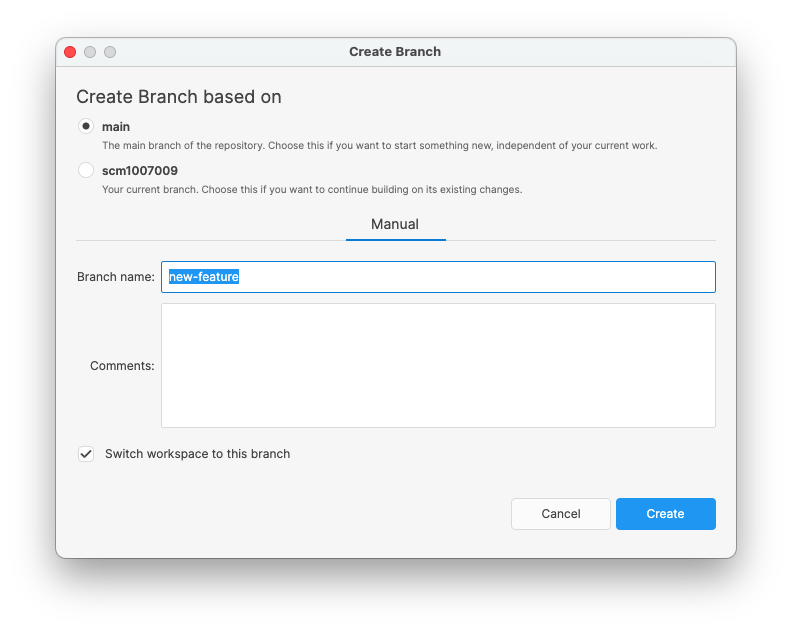
All Platforms - Desktop GUI: Allow selecting the Branch Base when creating new branches
The Create Branch dialog now allows you to choose the base branch when creating a new branch from the quick branch selector (toolbar popup).
If your current branch is not the main branch, you'll see an option to select either the main branch (default) or your current branch as the base. When working from the main branch, this option will be hidden.
Screenshot
Bug
All Platforms - Server
All Platforms - Server: Fixed incorrect lock release in undo/check-in operations across workspaces.
Scenario addressed:
-
Two users, X and Y, and an admin, A.
-
X locks a file and then goes on holiday.
-
Y needs the file and asks the admin to unlock it (either with Release or Remove).
-
Y locks the file and begins working on it.
-
X returns, notices they have the file checked out (but not locked, as Y now holds the lock), and performs an Undo Checkout.
-
This mistakenly removes Y's lock, even though it was acquired in a different workspace.
Now, the check-in and undo operations only update or release locks that were acquired in the same workspace where the operation is executed. Locks from other workspaces are ignored.
All platforms - Desktop GUI
All platforms - Desktop GUI: Fixed global configuration for unified organizations (@unity)
An issue that was preventing the global configuration from syncing correctly when using unified organizations has been resolved. Global configs, such as issue tracker integrations, now download automatically, and the expected folders under are created again, including all global configuration files like ignore.conf. With this fix, both legacy and unified organizations now support global configuration successfully.
AppData/local/plastic4/globalconfigAll platforms - Desktop GUI
All platforms - Desktop GUI: Fixed horizontal scrolling issue on tables
There was a problem when scrolling horizontally and then vertically on tables, where some rows were shown with misaligned cells. This issue is now fixed and scrolling works as expected
All platforms - Plugin for JetBrains IDEs
All platforms - Plugin for JetBrains IDEs: Removed disruptive "Nothing was found to add" dialog
We suppressed a repetitive and hard-to-dismiss notification dialog that gets triggered when no items are detected for certain Add or Checkout operations. While we delivered a set of mitigations in previous releases, some users reported new occurrences of this dialog in certain scenarios where it negatively affects the user experience, offering no extra value.
11.0.16.9637
New
All platforms - Command-line client
All platforms - Command-line client: Personal Access Tokens are now available from the command line for Cloud organizations
Personal Access Tokens (PATs) allow you to authenticate non-interactive workflows (CI/CD, scripts, tools) against our Cloud service without sharing your password or compromising any other credentials.
You can use the command family to manage your tokens. The PATs feature is opt-in, and access is controlled by the organization administrator — more on that later!
cm accesstokenThe process starts by creating a PAT. When using the command line (the feature is not yet available in the Cloud web portal), you must specify a description and a lifetime for the token. In this example, the token will be valid for 30 days:
$ cm accesstoken create "My script PAT" 30d my-org@cloud Id 2023d611-fa69-46c5-b8b4-4e405c780bb7 Description My Script PAT Owner you@your-org.com Created at 8/4/2025 4:10:57PM Expires at 9/3/2025 4:10:57PMLast used at Never
Once the PAT is created, you can reveal it. Revealing the PAT displays the actual token you can later use in your workflows:
$ cm accesstoken reveal 2023d611-fa69-46c5-b8b4-4e405c780bb7 my-org@cloudeyJhbGciOiJkpXVCJ9.eyJzdWIiOiIAyMn0.KMUFsI-QV30$ cm ci -c="This checkin runs in our CI/CD VM" \ --username=you@your-org.com \ --token=eyJhbGciOiJkpXVCJ9.eyJzdWIiOiIAyMn0.KMUFsI-QV30 \ --workingmode=LDAPWorkingMode \ --server=my-org@cloud
Users can audit their own tokens: list them, check when they were last used, and delete them. Organization administrators can audit both their own tokens and the tokens of other users in the organization.
$ cm accesstoken list my-org@cloud// A list with my own PATs$ cm accesstoken admin list-all my-org@cloud// A list with all the PATs in the organization$ cm accesstoken revoke 2023d611-fa69-46c5-b8b4-4e405c780bb7 my-org@cloud// Revoked my own PAT$ cm accesstoken admin revoke 5d08dbec-edaa-4415-b709-25042fa13517 my-org@cloud// Revoked a PAT from a different user in my organization
Organization administrators can also manage who has access to the PATs feature. As mentioned earlier, this is an opt-in feature rather than opt-out. This ensures that only privileged users and groups can grant access to organization data through a PAT.
$ cm accesstoken allowlist show my-org@cloud
To grant access to the feature to all current and future users, add the special user 'all' to the allowlist:
$ cm accesstoken allowlist add --users="all" my-org@cloud
To grant access to all users in a specific group (for example, "QA-hq"), add the group to the allowlist instead. If a user is removed from the group, they lose the privilege. Likewise, users added to the group gain the privilege.
$ cm accesstoken allowlist add --groups="QA-hq" my-org@cloud
The feature is currently available only through the command line client and will soon be available in the Cloud portal. Personal Access Tokens replace the old 's feature named "API Keys", that could be accessed from the "Edit Account" section on the old dashboard.
plasticscm.comIt is worth mentioning that PATs are valid only for the account and organization they were created against, whilst the old API Keys were account-wide and granted access to all the organizations the user was a participant of.
Bug
All platforms - Plugin for JetBrains IDEs
All platforms - Plugin for JetBrains IDEs: Fixed error during startup
<local2> is nullResolved an issue where the plugin for JetBrains IDEs could encounter a error during the startup process. This error was caused by an unhandled exception in the file checker module, which led to the error message being written to the IDE logs and could potentially interfere with plugin initialization in certain environments. The underlying exception handling has been improved to prevent this issue from occurring, ensuring smoother startup and more reliable plugin behavior across all supported JetBrains IDEs.
<local2> is nullAll platforms - Plugin for JetBrains IDEs
All platforms - Plugin for JetBrains IDEs: Fixed unresponsive "Nothing was found to add" dialog
This update completes an earlier fix for the "Nothing was found to add" dialog. In some cases, the dialog could still freeze the plugin and block input. We've now adjusted how dialogs are opened to follow JetBrains' recommendations for threaded processes, ensuring the dialog closes correctly or remains responsive as expected.
All platforms - Desktop GUI
All platforms - Desktop GUI: Fixed initialization of the HtmlRenderer component
Fixed an issue that could cause the desktop application to throw an unexpected error during startup on certain system configurations. The initialization logic has been updated to handle these edge cases gracefully, resulting in more robust application startup and improved reliability for users on all supported platforms.
All Platforms - All clients
All Platforms - All clients: Fixed issue with revert operation failing due to path reused by different items
Previously, the revert operation for a directory would fail if the target revision attempted to load an item (file or directory) using a path already occupied by another item in the workspace.
The operation now successfully unloads the existing workspace item to load the item from the target revision.
11.0.16.9615
Bug
All platforms - Plugin for JetBrains IDEs
All platforms - Plugin for JetBrains IDEs: Fixed unresponsive "Nothing was found to add" dialog
Resolved a condition where the "Nothing was found to add" dialog from the Plastic SCM integration could be displayed in a way that would block the UI thread. The dialog now functions as expected and will no longer cause the application to hang.
All platforms - Desktop GUI
All platforms - Desktop GUI: Fixed null exception in labels view
Fixed a null reference exception that occurred when opening the Labels view while a branch filter was applied in the Changesets view. Previously, this issue could cause the Labels view to fail loading (or refreshing) under these conditions. The Labels view now opens and refreshes correctly regardless of branch filters applied in the Changesets view.
All platforms - Server
All platforms - Server: Fixed array dimensions exceeded supported range error
Fixed an issue in the Branch Explorer where certain migrated Git repositories triggered an "Array dimensions exceeded supported range" error, preventing the graph from being displayed. The root cause was on the server side: some changesets without changes were created with an empty GUID, which led to the error in the Branch Explorer. This has been corrected, and the Branch Explorer now correctly renders graphs for all migrated Git repositories.
11.0.16.9579
New
Windows - All Clients
Windows - All Clients: Improved Path Canonization Performance
We've optimized how clients handle file paths on Windows across all commands.
Path canonization - which resolves symlinks, corrects casing to match the file system, and normalizes paths - now runs 30% faster. While each operation is lightweight, performance gains add up significantly when processing many paths. This improvement boosts overall efficiency in path-heavy workflows.
macOS - Installers
macOS - Installers: Added support for ARM architecture in UVCS installers
ARM installers are now available for macOS UVCS.
This update allows users on Apple Silicon (M1/M2/M3) devices to install and run UVCS natively without relying on Rosetta emulation. This improves performance and compatibility for the latest macOS hardware.
All Platforms - All Clients
All Platforms - All Clients: Enhanced shelveset application
Previously, the "Apply Shelve" operation would fail entirely if it encountered files that could not be checked out due to exclusive checkout rules. No changes were applied, and the operation simply stopped.
Now, the operation has been improved to handle such cases more effectively. It can apply changes directly to the disk for files that cannot be exclusively checked out, without requiring a checkout. At the end of the operation, a report is provided, listing any errors for files that could not be checked out.
This enhancement applies to both partial and regular workspaces.
All Platforms - Command Line Client
All Platforms - Command Line Client: Added the --dontcheckout option to skip checkouts when applying a shelveset.
The "cm shelveset apply" and "cm partial shelveset apply" commands now include a new --dontcheckout option. This allows users to apply shelvesets (saved sets of pending changes) without checking out conflicting files or modified files, leaving them as local changes instead.
This option is particularly useful for avoiding exclusive checkout restrictions when applying a shelveset.
Bug
All Platforms - Plugin for JetBrains IDEs
All Platforms - Plugin for JetBrains IDEs: Supported file operations for ignored files
File operations (create, delete, move, rename) now work on files listed in ignore.conf (the configuration file that specifies which files to exclude from version control). Previously, these actions failed because ignored files were mistakenly treated as part of the VCS.
11.0.16.9546
New
Command-line client
Command-line client: Faster checkout for thousands of files with cm
We recently improved checkout performance when handling large numbers of files. Files are now grouped by their parent directory and processed in batches, reducing overhead and speeding things up. In our tests, checking out 15,000 files from the same directory in the Desktop GUI dropped from 30 seconds to just 3 seconds - a 10x improvement. However, cm was significantly slower due to the need to process the input paths right before running the actual checkout operation.
Additional optimizations were applied to this release, especially improving performance on Windows. Thanks to that, the checkout with cm goes from the original 46 seconds to just 10 seconds - almost an 80% reduction.
- Tested on a modern machine with a 10th-gen Intel i9 CPU and SSD running Windows 11.
All platforms - Plugin for JetBrains IDEs
All platforms - Plugin for JetBrains IDEs: Embed Clone UVCS repository workflow into "Get from Version Control" dialog
To align with recent IntelliJ API changes, we have updated the Clone functionality. Instead of launching a separate dialog wizard, the workflow is now fully embedded within the main "Get from Version Control" dialog. This provides a more seamless and integrated user experience.
Bug
All platforms - Desktop GUI and Gluon
All platforms - Desktop GUI and Gluon: Pending Changes View no longer refreshes unexpectedly
We've resolved an issue introduced in previous version 11.0.16.9523 that caused the Pending Changes view to auto-refresh unexpectedly, even when the Auto-refresh setting was disabled. This could interrupt workflows—such as reviewing a long list of diffs—by jumping back to the top of the list.
The auto-refresh behavior now correctly respects your configuration. Additionally, we now avoid interrupting your work with save/discard prompts while editing files with unsaved changes.
All platforms - Desktop GUI
All platforms - Desktop GUI: Fixed "Switch to" operation didn't refresh current loaded branch/changeset
The "Switch to branch/changeset" operation did not trigger a UI refresh (e.g., topbar, Branch Explorer) upon completion when certain errors were encountered during execution—such as missing Xlink references.
This issue has now been resolved.
All platforms - Desktop GUI
All platforms - Desktop GUI: Pending Changes view is now properly refreshed after merges
Resolved a regression introduced in previous version 11.0.16.9523 where the Pending Changes view did not auto-refresh after completing a merge if auto-refresh was disabled in the pending changes options. Now it's fixed.
All platforms - Desktop GUI
All platforms - Desktop GUI: Fixed launch SemanticMerge as standalone null exception
An error was raised while running the Semantic Merge tool from the command line with unsupported file formats and using the sorted files arguments format.
sortedFiles: <filename1> <filename2> <filename3> <filename4> <fileparamorder>- or -unsortedFiles: <sourceFile> <destinationFile> <baseFile> <resultFile> sourceFile: {-s | --source}=<filename> destinationFile: {-d | --destination}=<filename> baseFile: {-b | --base}=<filename> resultFile: {-r | --result}=<filename>
$ plastic semanticmerge v1\README.md v2\README.md
Now, this mode (sortedFiles) is not failing for unsupported file formats.
All platforms - Plugin for JetBrains IDEs
All platforms - Plugin for JetBrains IDEs: Fixed Create workspace action not available
Now the "Create Plastic SCM workspace..." action under VCS main menu will be only visible for those projects which are not under a UVCS workspace, otherwise it will be hidden.
macOS GUI
macOS GUI: Fixed crash that prevented the application from running on macOS 26 Beta
Whilst we don't provide official support for OS beta releases, we are grateful to the intrepid users who upgrade early and report these kind of bugs!
Linux - Installers
Linux - Installers: Fixed resolution of libicu dependency on Ubuntu 25.04
Some Ubuntu distros were showing an error while installing telling that there is an unmet dependency of that cannot be resolved.
libicuNow it is fixed, since is now set as a valid alias for dependency.
libicu76libicu11.0.16.9523
New
All platforms
All platforms: Faster checkout for thousands of files
We've significantly improved checkout performance when handling large numbers of files. Files are now grouped by their parent directory and processed in batches, reducing overhead and speeding things up.
In our tests, checking out 15,000 files from the same directory in the Desktop GUI dropped from 30 seconds to just 3 seconds—a 10x improvement. (Tested on a modern Windows machine with a 10th-gen Intel i9 CPU and SSD).
All platforms
All platforms: Faster status (pending changes)
Good news: Pending changes status updates are now 3-4 times faster! You'll experience the biggest boost in speed after a machine restart, for the very first calculation on any Unity Version Control client, and with every calculation on the command-line interface (CLI).
This enhancement will especially benefit users running Unreal Engine 5 projects with One File Per Actor (OFPA) enabled, along with those who manage large workspaces that can contain hundreds of thousands of directories.
All platforms - Desktop GUI and Gluon
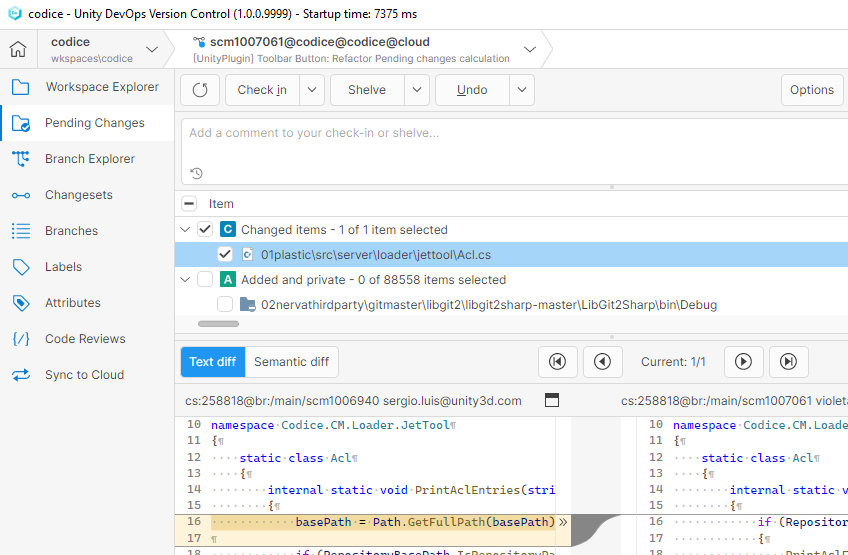
All platforms - Desktop GUI and Gluon: Pending Changes Status in the Top Bar
We've introduced a new mechanism that monitors your pending changes and updates the status overlay in the top bar. The working object icon now clearly displays a blue dot overlay when pending changes are detected, making it easier to track work that needs to be committed.
Screenshot
Bug
All platforms - Server
All platforms - Server: LDAP groups are not always identified as groups
When using an LDAP server, some groups were wrongly identified as users instead. This can happen with some LDAP providers like OpenLDAP.
We fixed that, and now they are properly told apart.
All platforms - Desktop GUI
All platforms - Desktop GUI: LDAP user names weren't shown in the 'Changeset colors' panel
When using LDAP, user SIDs were shown instead of their names in the 'Changeset colors' panel, located in the Branch Explorer.
We changed this to shown the actual name of the user. If you already have some users added there, you can remove the entries and add them again so the display name gets updated.
All platforms - Desktop GUI
All platforms - Desktop GUI: Fixed closing the ephemeral notification banner
The app showed a "A task was cancelled" error after manually closing the notification banner.
All platforms - Desktop GUI
All platforms - Desktop GUI: Branch Explorer runs 'before-merge' trigger when there are incoming changes
When you are not on the head of a branch, refreshing the Branch Explorer used to execute the 'before-merge' triggers. We fixed that: now you have to actually press the 'View' button in the toolbar.
11.0.16.9494
New
Windows - Desktop GUI
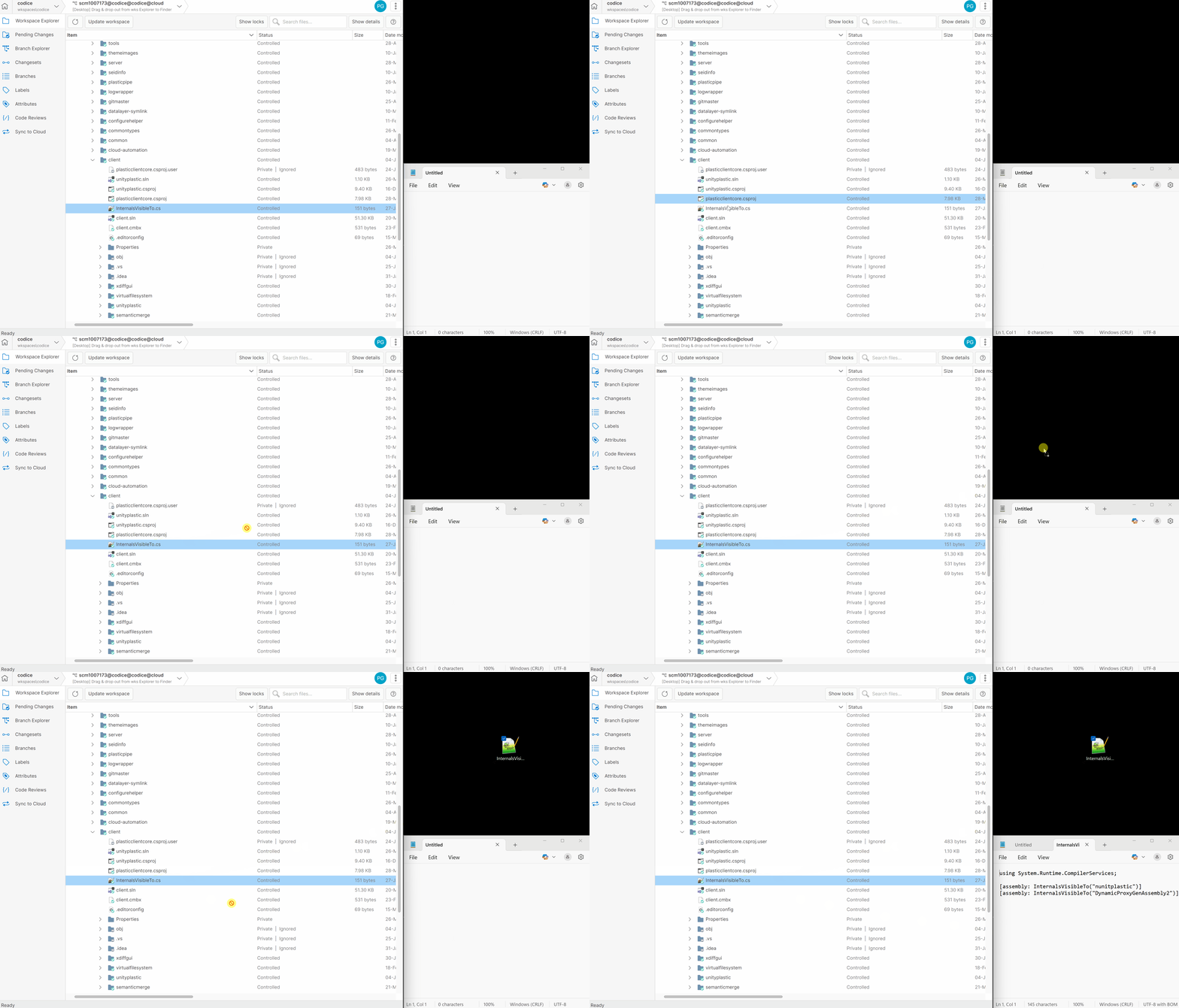
Windows - Desktop GUI: Drag & drop files from Workspace Explorer to external destinations
You can now drag and drop files from the Workspace Explorer tree view to any location on your file system. This also includes the ability to open files directly in external applications (e.g., Notepad).
Screenshot
Bug
All platforms - Desktop GUI
All platforms - Desktop GUI: Fixed broken link to Dynamic Workspaces documentation
The URL for the Dynamic Workspaces documentation has been updated. It now correctly points to:
11.0.16.9478
New
All platforms - Gluon
All platforms - Gluon: Support for custom client messages from OnPremise servers
The customizable banner available for OnPremise servers is now supported by the Gluon client.

Screenshot
Command-line client
Command-line client: New command
cm getconfig organizationThis new command will retrieve the information of a Cloud organization stored in the configuration.
$ cm getconfig organization MyUnityOrg@unityMyUnityOrg unity 123456789012 euwest-01.contoso.com
You can use to change the output:
--format{0} | {orgname} Version Control organization name.{1} | {type} Type of organization ('cloud' or 'unity').{2} | {orgid} Unity Organization ID.{3} | {region} Server location.
If no organization is explicitly passed and the cm is within a workspace, it will return the organization information of the workspace. Otherwise, it will show the information of the default organization.
Bug
Command-line client
Command-line client: Restore checkout as visible in showcommands
Using showcommands hid the command but displayed the deprecated command. This has been corrected.
checkoutundocheckout11.0.16.9466
New
All Platforms - Desktop GUI
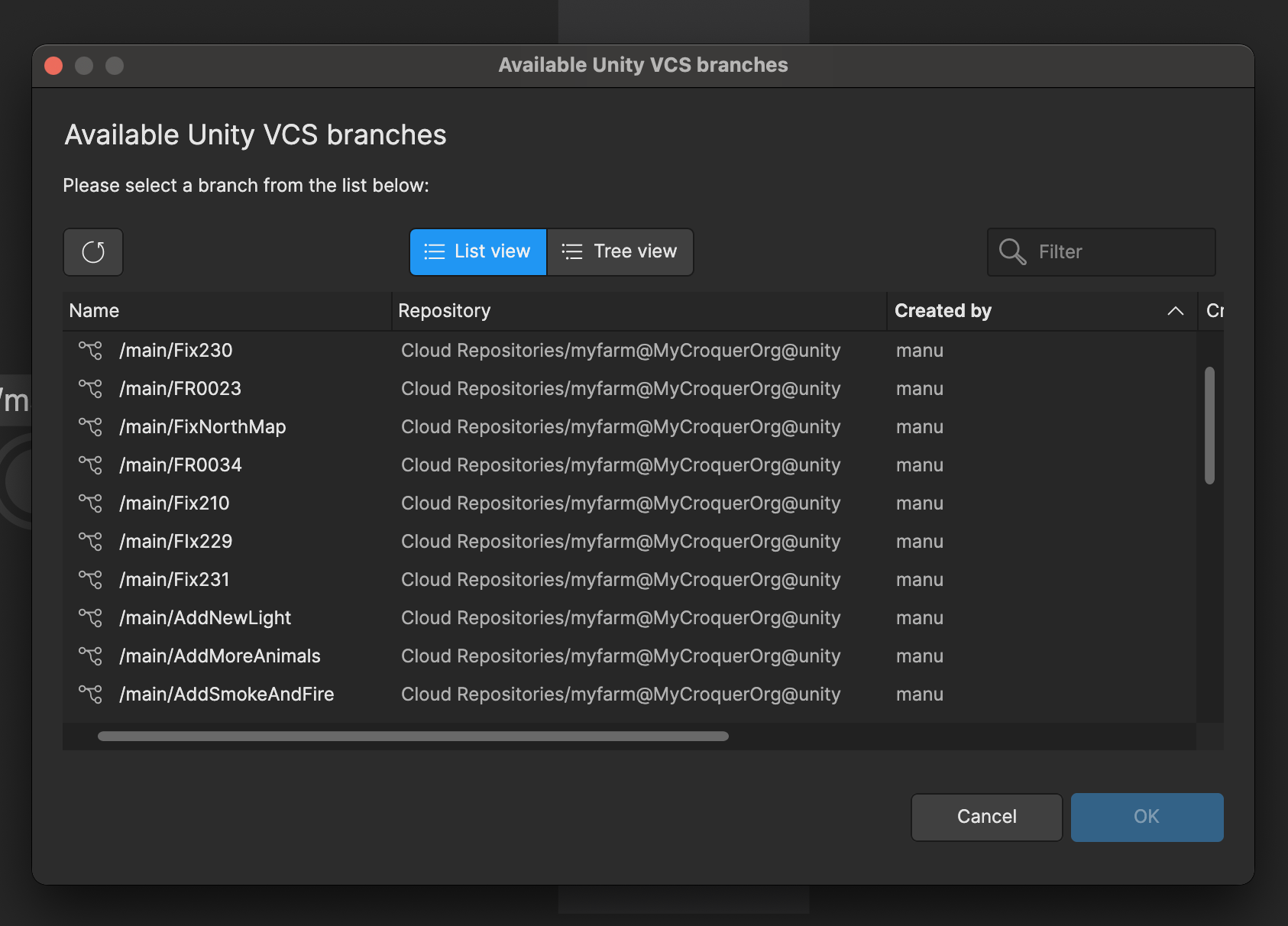
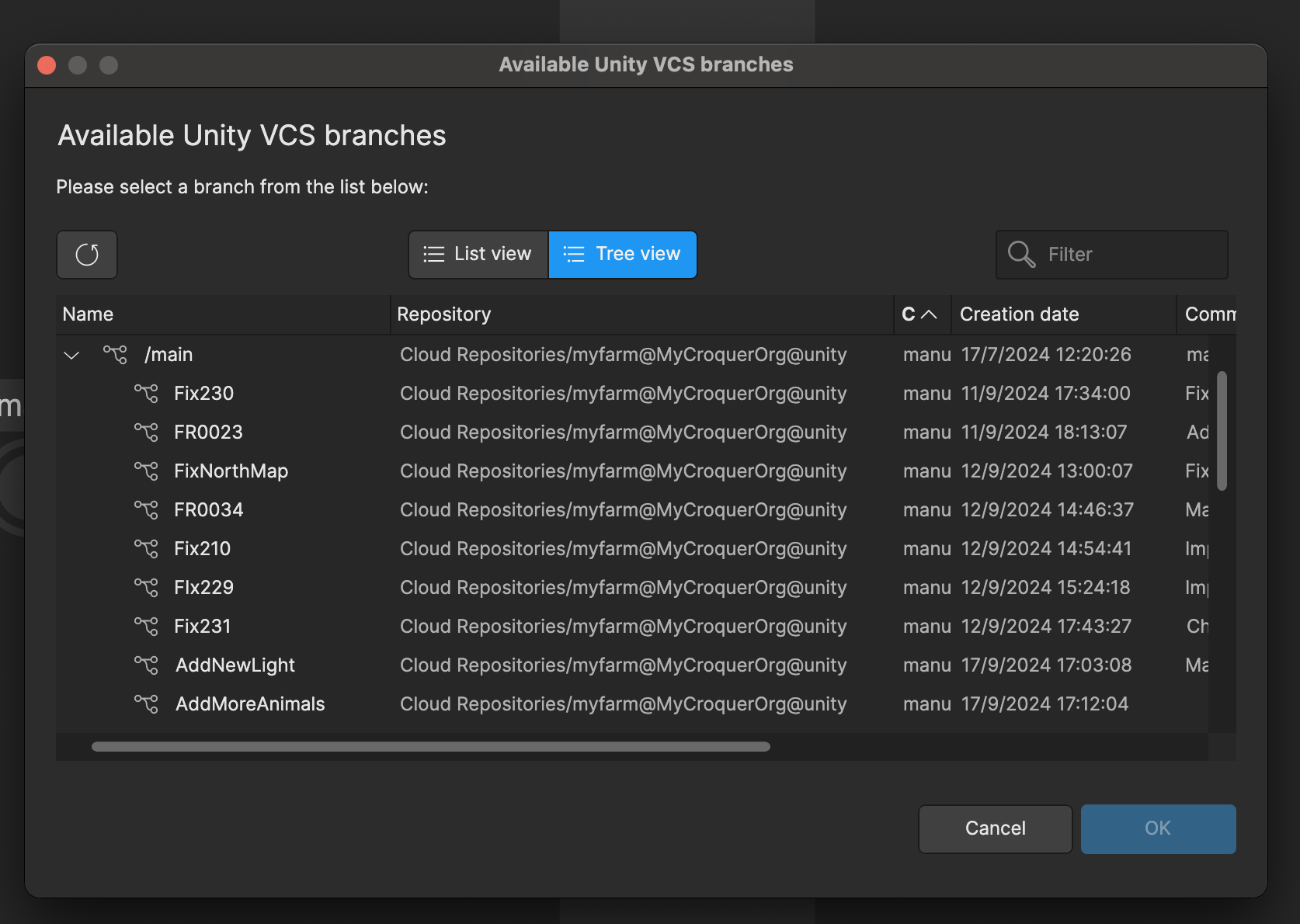
All Platforms - Desktop GUI: Added List/Tree mode switcher to Available branches dialog
It is now possible to visualize the list of available branches as a tree view in the "Available Unity VCS branches" dialog, and switch between 2 modes: list and tree.
Screenshot
Screenshot
All Platforms - Desktop GUI
All Platforms - Desktop GUI: Persistent the tab selection while changing workspace
If a new workspace is loaded in the application, the Workspace view will be displayed. Otherwise, the last opened view will be displayed. Additionally, the latest loaded view will persist when the application is opened.
Linux - Installers
Linux - Installers: Debian and Ubuntu won't fail if 'xdg-mime' tool isn't installed
From now on, if tool (from package) is not installed in the operating system, the installation of package won't fail.
xdg-mimexdg-utilsplasticscm-client-guiInstead, the custom links (code review links, changeset links, etc) won't be recognized and hence won't be shown in the GUI application when clicking on them.
plastic://If this happens, we recommend installing package in the system to ensure the custom links are recognized, by running the following command:
xdg-utilsplastic://xdg-mime default /usr/applications/plasticx.desktop x-scheme-handler/plastic
11.0.16.9453
New
All platforms - Server
All platforms - Server: Support for custom client messages in OnPremise servers
Administrators of OnPremise servers now have the ability to force-display custom messages directly on the client side. Whether you're issuing a critical security alert, rolling out new usage policies, or just want to keep users informed about important updates, this feature puts communication front and center.
== How do I use it? ==
This new functionality is available under the WebAdmin section "Advanced -> Global security settings -> Custom client message", and supports a basic subset of HTML tags.
E.g.
<p style='background-color:#FFCCCB; padding:8px; margin:0; font-size:12px;'> <b>CONFIDENTIAL INFORMATION NOTICE</b> - You are accessing protected content. <b>DO NOT</b> share, copy, or distribute without proper authorization.</p>
Once set, clients connecting to any workspace under the server will display a banner with the configured notice.

Screenshot
== Who can remove the banner? ==
Only administrators can remove it by reseting the "Custom client message" field in the WebAdmin.
== A note on visibility ==
This feature is currently supported by the Unity Version Control desktop client, and will be extended to Gluon in a future release.
Bug
All Platforms - Desktop GUI
All Platforms - Desktop GUI: Fixed opening plastic links for migrated @unity organizations
Previously, plastic links for code reviews or diff would fail to open with the Desktop GUI for newly migrated @unity organization having names in CamelCase. With this fix, it is now possible to open these links.
All Platforms - Desktop GUI
All Platforms - Desktop GUI: Fixed broken onboarding in DVCS edition
The user account sign-in did not work as expected in the Home view for the DVCS edition version. It was because the account was managed as a cloud account instead of an on-premises account.
Now the user can sign in to the local server and obtain the list of repositories for this server.
All Platforms - Server
All Platforms - Server: Merge rules now correctly enforced when using old repository names
Previously, if a client attempted a merge using the repository name that existed before a rename, the server would bypass merge rule validation. This issue has been resolved - merge rules are now correctly applied even when the client refers to the repository by its old name.
11.0.16.9411
New
All Platforms - Desktop GUI
All Platforms - Desktop GUI: Issue trackers - Supported configuration
MULTIPLE_PROJECTSNow, Jira issue tracker extension accepts value for the Project key configuration parameter.
MULTIPLE_PROJECTSThis way, each branch explicitly contains the project key of its related task, instead of defining a global project key for all branches.
Bug
All Platforms - Server
All Platforms - Server: Merge rules are now correctly updated when a repository is renamed.
Previously, renaming a repository caused its associated merge rules to retain the old repository name, resulting in the rules being ignored. With this fix, the repository name in affected merge rules is properly updated upon renaming.
Note: This fix does not apply to merge rules that use wildcard patterns.
All Platforms - Server
All Platforms - Server: Trigger filters now correctly handle repository renames.
Previously, when a repository was renamed, the associated trigger filters retained the old repository name, causing the triggers to be ignored. With this fix, the repository filters in affected triggers are properly updated upon renaming.
More info about trigger filters here.
All platforms - DevOps
All platforms - DevOps: Mergebots now correctly handle repository renames.
Previously, when a repository was renamed, associated mergebots continued referencing the old repository name. This caused them to stop functioning, even after a restart, unless their configuration was manually updated.
With this fix, mergebot configurations are automatically updated when a repository is renamed, allowing them to continue working seamlessly.
It applies to trunkbot & conflictsbot.
Windows - Installers
Windows - Installers: Enterprise Edition installer didn't start the GUI client app
Since the 11.0.16.9243 version, installing the Enterprise Edition of the product didn't automatically run the GUI client app (plastic.exe) at the end of the install process. Now it's fixed and the GUI client app will run after finishing the install/upgrade process, as usual.
11.0.16.9396
Bug
All platforms - Plugin for JetBrains IDEs
All platforms - Plugin for JetBrains IDEs: Fixed diff operation for unity organizations
We fixed an issue provoking the diff panel to fail loading the content of a remote revision under certain conditions.
Server
Server: Restore cm find ability to return parent changesets along with hidden branches
Let's say we have the following changesets:
cs:41 <--- cs:42 <--- cs:43 (/main)
You could retrieve the parent of the changeset 43 with the following command:
cm find changeset "where changesetid = 43 and returnparent = 'true' on repository 'repo@organization@cloud'" --format="{changesetid}"42
However, if you hid any other branch in the repository at some point, the same command would wrongly return the grandparent changeset:
cm find changeset "where changesetid = 43 and returnparent = 'true' on repository 'repo@organization@cloud'" --format="{changesetid}"41
We fixed this error so it works properly no matter what.
11.0.16.9370
New
All Platforms - Desktop GUI
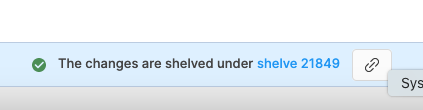
All Platforms - Desktop GUI: Added copy changeset/shelve link to notifications
When performing a check-in or shelve, users can now easily open and copy diff and shelve links directly from the success notifications displayed at the bottom. Notifications also include links to open the recently created changeset or shelve, improving navigation and sharing changes with other users.
Screenshot

Screenshot
All Platforms - Desktop GUI
All Platforms - Desktop GUI: Issue trackers - Supported branch names with description
Before this change, issue trackers only supported branch names with format: .
{branch_prefix}{taskId}Now, users can use different formats of branch names . For example:
{branch_prefix}{taskId}{any_text}-
xxx123456 -
xxx123456MyTask -
xxx123456-my-task -
xxx123456_my-task -
xxx123456 My Task

Screenshot
Bug
Command-line client
Command-line client: Client API now handles modules properly
When using the command, endpoints taking a repository in the route were not properly handling submodules, preventing its use.
cm apiWe fixed it to work as intended. Please remember to escape the repository separator when using submodules on routes!:
# / -> %2Fcurl http://localhost:9090/api/v1/repos/project%2Frepository@MyOrg@cloud
11.0.16.9343
New
DevOps Mergebots
DevOps Mergebots: Jira plug now writes the Release Date field on new version creation
From now on, the Jira integration for Mergebots writes the "Release Date" field on "createrelease" action (new Jira version creation).
Before, just the version name and description were set.
All Platforms - Desktop GUI
All Platforms - Desktop GUI: Improved support for workspace-related actions in Plastic links
When opening a Plastic link, the application now enables workspace-related actions—such as diff, undelete, history, and annotate—in the Diff or Code Review window. It automatically selects the most recent workspace associated with the Plastic link's repository. If no workspace is found, these actions are just disabled (as previously) to ensure a consistent user experience.
All platforms - Desktop GUI and Gluon
All platforms - Desktop GUI and Gluon: Added option to diff the changeset of moved and deleted history items
Before, accessing the changeset diff was only possible for history items that represented new revisions with actual changes.
Now you can quickly open the diff tool in the history view from a moved or deleted item out of convenience.
Bug
Command-line client
Command-line client: Fix for incorrect .plastic renaming issue
Previously, it was possible to delete a file and then use the command to rename another file as the workspace configuration directory ( by default):
cm move.plasticExample of the sequence that causes the problem:
> del foo.c> cm mv foo.c .plasticfoo.c has been moved to .plastic
While the file wasn't actually renamed on disk and the directory remained intact, this behavior was unintended and could cause confusion.
From now on, renaming any file to won't be possible (to prevent reaching an inconsistent workspace status) and will show the following controlled error message instead:
.plasticCan't move. Destination already exists. Overwriting items is not allowed.
Command-line client
Command-line client: Fix 'no such user or group' error when editing the ACLs
When using the command, users and groups were wrongly solved against your default server (the one set up in your client.conf file). This led to errors or unexpected behavior when targeting a different repository.
cm aclCommand-line client
Command-line client: Fix 'no such user or group' error when setting the owner of an object
When using the command, users and groups were wrongly solved against your default server (the one set up in your client.conf file). This led to errors or unexpected behavior when targeting a different repository.
cm setownerCommand-line client
Command-line client: Improved GitHub LFS Syncing
We have fixed an issue when syncing GitHub repositories containing large files (over 2 GB) using the command-line client.
With this fix, the cm sync command now handles pulling files exceeding 2 GB.
All Platforms - Desktop GUI
All Platforms - Desktop GUI: Fixed Branch Explorer Label menu
Fixed an issue where label context menu actions in the Branch Explorer (rename, delete, etc.) worked only the first time, then stopped responding on subsequent attempts. All label menu items now function consistently for multiple operations.
All platforms - Desktop GUI
All platforms - Desktop GUI: Incorrect Error Message
Fixed an issue where an incorrect error message was shown when attempting to apply changes from a shelf.
The error message now correctly describes the issue, providing accurate information about what went wrong.
All Platforms - Desktop GUI
All Platforms - Desktop GUI: Double-clicking a file from a Plastic link causes an error
Previously, double-clicking a file in a Plastic link (e.g., in code reviews or branches) caused a NullReferenceException. This issue has been resolved by ensuring the application verifies whether the diff action is available before executing the double-click operation.
All platforms - Plugin for JetBrains IDEs
All platforms - Plugin for JetBrains IDEs: Branch detection after external switch
Fixed an issue where the IDE failed to detect the current branch correctly after the workspace branch was switched externally.
11.0.16.9293
New
All platforms - Server
All platforms - Server: HTTP request and response buffer sizes are now configurable.
If you use the Unity Version Control WebAdmin tool and/or APIs, you can now configure the HTTP request and response buffer sizes. Bear in mind that this is a server-side configuration, so it can only be customized by on-premise Plastic accounts.
Configuring these buffers' sizes can be useful, for example, to increase throughput in high-latency networks, or, in memory-constrained scenarios, to support more concurrent clients through HTTP.
You can control both settings using the following server.conf configuration keys:
<WebAdminToolMaxRequestBufferSizeInBytes>-1</WebAdminToolMaxRequestBufferSizeInBytes><WebAdminToolMaxResponseBufferSizeInBytes>131072</WebAdminToolMaxResponseBufferSizeInBytes>
Not specifying the new configuration key, or using a value of -1, indicates that the default buffer size (1MB for requests, and 64KB for responses) should be used.
All platforms - Server
All platforms - Server: Enhanced control over audit.log file management
Two new configuration keys have been added to the server.conf, allowing you to control audit log file rotation and retention:
<AuditLogMaxSizeInMB>100</AuditLogMaxSizeInMB><AuditLogMaxFiles>2</AuditLogMaxFiles>
Setting AuditLogMaxSizeInMB enables the automatic rotation of audit.log files. When a log file reaches the specified size, it is renamed with a timestamp, following the pattern:
audit_yyyyMMdd_HHmmss_fff.log
For example:
audit_20250304_103250_657.log
If AuditLogMaxFiles is set, the server will retain the current log file plus the specified number of rotated files.
This update gives you more flexibility in managing log file growth and retention!
Bug
All Platforms - Gluon
All Platforms - Gluon: Security changes now properly update cached changeset trees
Gluon workspaces cache server changeset trees to enhance performance. However, security changes on the server were not properly reflected in the cached trees, potentially leading to outdated visibility information.
Now, Gluon correctly detects security changes on the server and updates the local cache accordingly.
11.0.16.9271
New
All Platforms - Desktop GUI
All Platforms - Desktop GUI: Support for legacy workspaces in upcoming organization migration (more info here, in our dedicated technical documentation)
This update prepares the Desktop GUI for the upcoming migration from legacy cloud organizations to unified Unity organizations. Changes have been implemented to ensure that workspaces created using the legacy format will remain visible in the repositories list, and they will be properly linked to their repositories after the migration.
Users can expect a smooth transition with backward compatibility for existing workspaces when the migration takes place later this year.
Bug
All Platforms - Desktop GUI
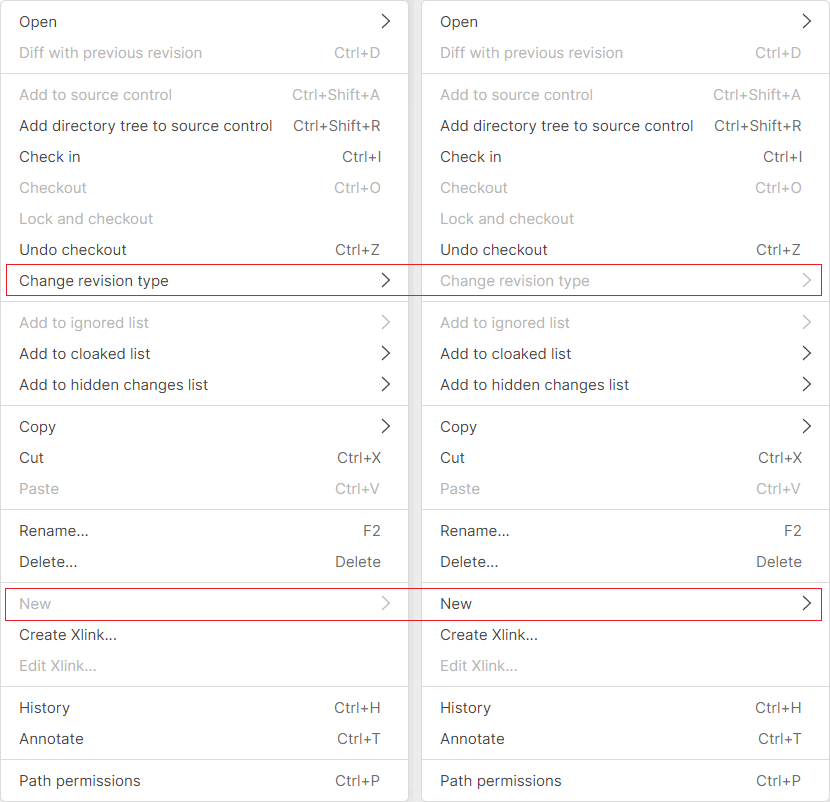
All Platforms - Desktop GUI: Workspace Explorer context menu wrongly updated
The 'New' and 'Change revision type' context menu options were incorrectly computed using the previously right-clicked item instead of the current one.
Right-clicking a directory followed by a file could allow unintended options like "New" to be available. The behavior has been fixed! The context menu now correctly updates based on the currently selected item.
Screenshot
Command-line client
Command-line client: Prevent credentials prompt for @unity organizations when using username/password or token
We've fixed an issue affecting the command line client when determining the datacenter for the new unified organizations ().
name@unity- When running in non-interactive mode, the provided username/password or token will now be correctly used to resolve the datacenter. This prevents the client from stalling due to unnecessary credential prompts.
cm configure
cm configure --language=en --username=your@mail.com --token=eyXYZjdt --server=org@unity --workingmode=SSOWorkingMode
- For all other commands, if credentials are explicitly provided (via username/password or token), they will also be used to resolve the datacenter. This fixes the previous behavior where the command would fail with an error.
cm repository list org@unity --username=your@email.com --token=eyXYZjdt --server=org@unity --workingmode=SSOWorkingModerepo_1@org@unityrepo_2@org@unity
This update ensures a smoother experience when working with organizations by correctly handling authentication in all cases.
@unity11.0.16.9243
New
Windows - Installers
Windows - Installers: Simplified install cycle with less steps
-
Removed redundant "Start Classic GUI or Gluon" question, since the first startup after a fresh install already asks for this choice.
-
Removed component selection window, since it allowed the installation of the Eclipse plugin, which is still possible by copying the bundled plugins .jar files located atdirectory.
$INSTALL_DIR/client/plugins/eclipse
A "README.txt" file can be found in that directory with installation instructions.
Besides that, the "More installers and other Operating Systems" section of https://www.plasticscm.com/download enables downloading a "Plugins zip" file containing all java-based plugins, including eclipse plugin.
All platforms - Command-line client
All platforms - Command-line client: Incoming Changes support for 'cm partial update' command
A new '--incoming' option has been added to the 'cm partial update' command, aligning its behavior with Gluon. This enhancement scans for local workspace changes and applies only those relevant to the operation. Additionally, it will attempt to automatically merge any file conflicts it encounters.
Bug
All platforms - Command-line client
All platforms - Command-line client: Fixed issue when running merge-to outside of a workspace
When trying to run a merge-to operation while the current working directory is not inside a workspace, we were showing an error. Now you can successfully complete the merge-to from any location.
All platforms - Gluon
All platforms - Gluon: Check-in failure when reverting a directory with moved items
Fixed an issue where Gluon failed to check in a directory revert operation if any item had been moved between the workspace revision and the reverted revision. The operation would throw the error: "An item with the same key has already been added." This issue has now been resolved.
All platforms - Gluon
All platforms - Gluon: Fixed checkin success message
After performing a checkin in Gluon, we show a notification at the bottom telling that the operation was completed successfully. This message was notifying of a successful shelve operation, instead of a checkin. We fixed the text of the notification.
All clients
All clients: Incoming Changes may incorrectly flag files as modified despite no actual changes
After resolving a file conflict, the Incoming Changes operation did not update the file's local information. As a result, the file may incorrectly appear as "changed" even when no modifications were made, and this issue could persist even after checking the file in. Fixed.
11.0.16.9213
New
All Platforms - Desktop GUI
All Platforms - Desktop GUI: Next/Previous diff shortcuts
We've restored the Ctrl+N and Ctrl+M (Cmd+N and Cmd+M in macOS) shortcuts to navigate between differences in the Diff Control.
Now you can move to the next/previous/first/last change without using the mouse.
We also improved focus handling, so these shortcuts work immediately when a diff window or code review is opened.
All Platforms - Desktop GUI
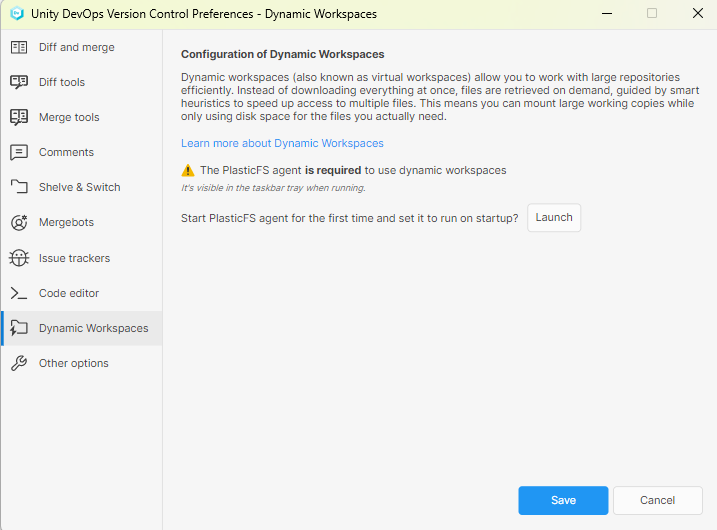
All Platforms - Desktop GUI: Improve PlasticFS (dynamic workspaces) setup
-
The command-line option to start the PlasticFS agent has been renamed from --install to --add-to-startup for better clarity.
-
The EnableCreateDynamicWorkspace GUI configuration key has been removed, as it is no longer needed.
-
The setup panel text has been rewritten to better explain what PlasticFS is.
Screenshot
All platforms - Desktop GUI & Gluon
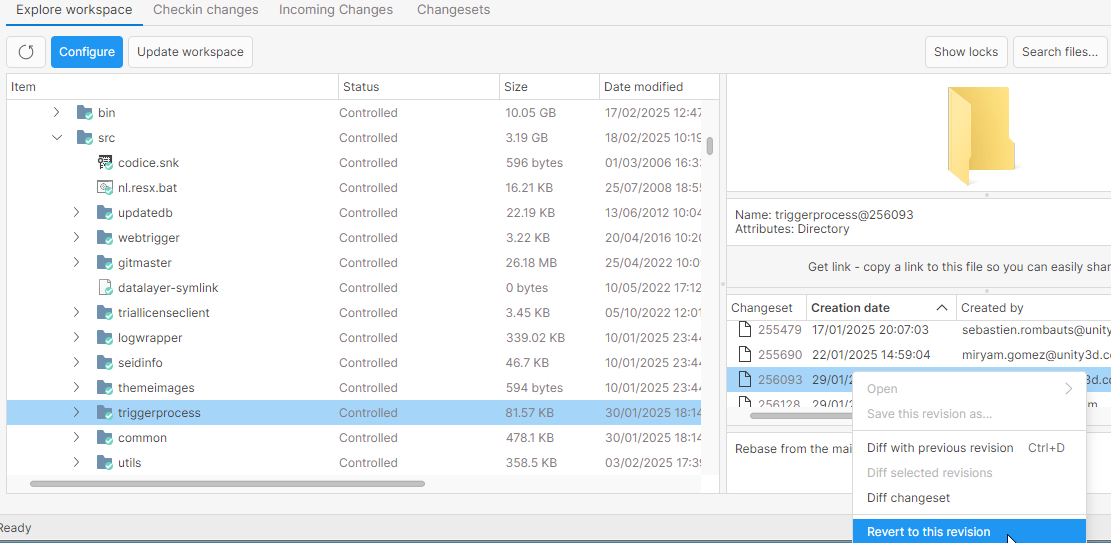
All platforms - Desktop GUI & Gluon: "Revert to this revision" for directories
"Revert to this revision" option is now enabled for directories from the history view.
We've also added the history view menu for directories in Desktop GUI bringing it in line with Gluon for a more consistent experience.
Screenshot
All platforms - Plugin for JetBrains IDEs
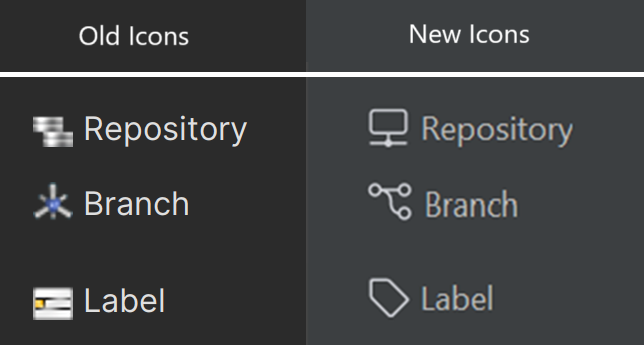
All platforms - Plugin for JetBrains IDEs: Renewed icons in the plugin for the JetBrains IDEs
All the icons have been replaced with new designs used from the rest of the UVCS product suite.
Screenshot
Server - All Platforms
Server - All Platforms: Lock rules now update automatically after renaming a repository
Previously, when a repository was renamed, any associated lock rules had to be updated manually; otherwise, they would no longer apply to the renamed repository.
Now, lock rules are automatically updated, ensuring they remain effective without requiring manual intervention.
Bug
All Platforms - Desktop GUI
All Platforms - Desktop GUI: Fixed wrong file for code review comment
Fixed an issue that placed user comments in the previously selected file rather than the intended file when adding comments after switching files from the "Find in files" results.
All Platforms - Desktop GUI
All Platforms - Desktop GUI: "Find in files" navigation in Diff Window
Navigating between different files in the Diff Window using "Find in files" caused incorrect scrolling and highlighting. Now it's fixed: Scrolling and highlighting correctly follow the chosen file.
All Platforms - Desktop GUI
All Platforms - Desktop GUI: Disable "Add to Source Control" for Controlled Items
Selecting a controlled item together with private files in the Workspace Explorer, triggered an error when using "Add to source control."
Now, the option is only enabled if all selected items are private, preventing unexpected behavior for controlled items.
All Platforms - Desktop GUI
All Platforms - Desktop GUI: Fixed Code Review Comment navigation
Previously, users needed multiple double-clicks to focus on regular code review comments due to a bug. Now, double-clicking a comment works as expected: it automatically centers and highlights the correct line.
All Platforms - Plugin for JetBrains IDEs
All Platforms - Plugin for JetBrains IDEs: Fixed plugin versioning
The project structure was adapted to properly version the plugin.
All Platforms - Plugin for JetBrains IDEs
All Platforms - Plugin for JetBrains IDEs: Fixed error about deprecated
ActionUpdateThread.OLD_EDTSolved an issue present in JetBrains IDEs version 2024 and above, where the system complained about using the deprecated API component .
ActionUpdateThread.OLD_EDTmacOS - Plugin for JetBrains IDEs
macOS - Plugin for JetBrains IDEs: Fixed plugin not exported during installation
We fixed an issue in the mac installer that was preventing the new JetBrains plugin from getting into the installation folder.
11.0.16.9184
New
All platforms - Plugin for JetBrains IDEs
All platforms - Plugin for JetBrains IDEs: IntelliJ SDK upgraded to 2022.3
We have reformulated the plugin structure to make use of the IntelliJ Platform Gradle Plugin.
This change allowed us to securely upgrade our plugin to offer better support for JetBrains IDEs version 2022.3 and above.
The new version of the plugin is now distributed as a zip file under the plastic installation folder "client/plugins/intellij", and you can reuse this file across all your IDEs. We also include a README file with installation instructions alongside the plugin package.
Windows - PlasticFS
Windows - PlasticFS: Relocate the storage into a separate disk
By default, PlasticFS backing storage is located at %LocalAppData%\plastic4\plasticfs-storage. Now you can relocate yours into a different directory or disk.
For that, you can just create a plasticfs.conf file next to your client.conf file, also located by default at %LocalAppData%\plastic4.
Then write something like this inside the file:
storagebasepath=D:\plasticfs-storage
The plasticfs-storage directory contains the PlasticFS shared cache among other things. The size of this subdirectory will grow as PlasticFS downloads file data on demand. If you want to move the shared cache in isolation, you can also do it, like this:
sharedcachebasepath=D:\plasticfs-shared-cache
Now follow these steps:
-
Stop the PlasticFS tray application.
-
If you already have a plasticfs-storage directory, move it to its new location. The same goes for plasticfs-shared-cache if you want to move that one.
-
Restart the PlasticFS tray application, so the configuration file takes effect.
== WARNING ==
If you want to preserve your existing workspaces, but you didn't follow the second step correctly, a brand new storage directory will be created at the new location and you will be prompted with an error by the tray application. Don't panic! This can be fixed by stopping PlasticFS and replacing that new storage directory with the old one.
Bug
All platforms - Plugin for JetBrains IDEs
All platforms - Plugin for JetBrains IDEs: Fixed error updating files with pending changes
The "Update file/directory" feature has been changed to update the whole workspace instead of single items, and renamed to "Update Workspace", as this is how it should work for standard workspaces.
This way the use cases are,
-
Update Workspace with no changes should load all the incoming changes.
-
Update Workspace with changes and no conflicts should load all the incoming changes.
-
Update Workspace with changes and conflicts should NOT load all the incoming changes and show this error message:
"Error:The update operation detected conflicts. The operation cannot continue since it was run with the --dontmerge option."
All platforms - Plugin for JetBrains IDEs
All platforms - Plugin for JetBrains IDEs: Annotate not supported from History revisions
The Annotate operation has been allowed for revisions listed in the History view.
All platforms - Plugin for JetBrains IDEs
All platforms - Plugin for JetBrains IDEs: Fixed java.lang.NoSuchMethodError issue
This error was raised because of the usage of a removed feature from the "com.intellij.util" package (), the usage of this reference has been replaced by , which is still being supported and it's not deprecated.
SystemProperties.getLineSeparator()System.lineSeparator()All platforms - Desktop GUI/Plugin
All platforms - Desktop GUI/Plugin: Ignore.conf is reformatted after adding a new file via the GUI
Fixed an issue where adding new rules caused the , , or files to be reformatted, which could result in the loss of comments.
ignore.confcloaked.confhidden_changes.confNow, comments are retained when updating , , and .
ignore.confcloaked.confhidden_changes.confAll platforms - Desktop GUI
All platforms - Desktop GUI: Show the list of changesets when diffing a hidden branch
When opening the code review of a hidden branch, the list or changesets appeared empty. The same happened when diffing a hidden branch.
Now, the changesets list of the hidden branch is properly shown.
All platforms - Desktop GUI/Gluon
All platforms - Desktop GUI/Gluon: Improved shortcuts handling
We've resolved an issue where using certain keyboard shortcuts without a selection could cause unexpected errors.
For example: In the labels view, pressing Ctrl + D before selecting any label would result in an error.
All Platforms - Desktop GUI
All Platforms - Desktop GUI: Fixed wrong Switcher Window on startup
We fixed an issue where the switcher window always appeared after installing the Enterprise edition over the Cloud edition.
The problem occurred because of the client.conf file was not updating the LastRunningEdition field when certain configurations were empty.
Now, the last used workspace is correctly remembered, and the switcher window only appears when needed.
All Platforms - Desktop GUI
All Platforms - Desktop GUI: Properly show private directory contents
Previously, selecting a private directory in the pending changes view, caused two issues:
-
The directory contents were not displayed in the Content Viewer.
-
An empty side panel remained visible on the left.
Both issues are now resolved.
All Platforms - Desktop GUI
All Platforms - Desktop GUI: TextEditor find popup didn't process keyboard shortcuts properly
Shortcuts like Cut, Paste, Select All, and others were intercepted by the diff view instead of the “Find…” popup. Now, the keyboard commands behave correctly when the “Find…” text field is focused. It also fixes tab navigation to move focus as expected.
Windows - PlasticFS
Windows - PlasticFS: The installer does not honor the PlasticFS configuration on restart
When upgrading to a different version of Unity VCS while using PlasticFS, you are asked to stop the PlasticFS tray application. So far, the installer did restart PlasticFS at the end, but it didn't do it ignoring any special configuration.
Now it will honor the settings that you set in your plasticfs.conf file.
11.0.16.9143
Bug
All platforms - Server
All platforms - Server: Prevent moving a repository inside itself
Previously when you moved a repository under itself (MyProject/MyRep -> MyProject/MyRep/tests) fails with the error "Module can't be created because parent repository doesn't exist." and the repository ends up unreachable.
Now when you try to move a repository under itself the operation fails with a meaningful error "The repository 'MyProject/MyRep' cannot be moved inside itself 'MyProject/MyRep/tests'." and the repository remains with its old name.
All platforms - Desktop GUI
All platforms - Desktop GUI: Focus set to the Search filter text box
When adding users to code reviews through the "Select user or group" dialog, the focus is now automatically placed in the Search filter text box.
All platforms - Desktop GUI
All platforms - Desktop GUI: Ignore.conf is reformatted after adding a new file via the GUI
Fixed an issue where adding new rules caused the , , or files to be reformatted, which could result in the loss of comments.
ignore.confcloaked.confhidden_changes.confNow, comments are retained when updating , , and .
ignore.confcloaked.confhidden_changes.confAll Platforms - Desktop GUI
All Platforms - Desktop GUI: Prevent duplicate key error in Pending Changes
We've fixed an issue where enabling the Tree View mode in the Pending Changes view could cause a "same key already added" error when trying to check-in the files for nested folders.
11.0.16.9132
New
All platforms - Gluon
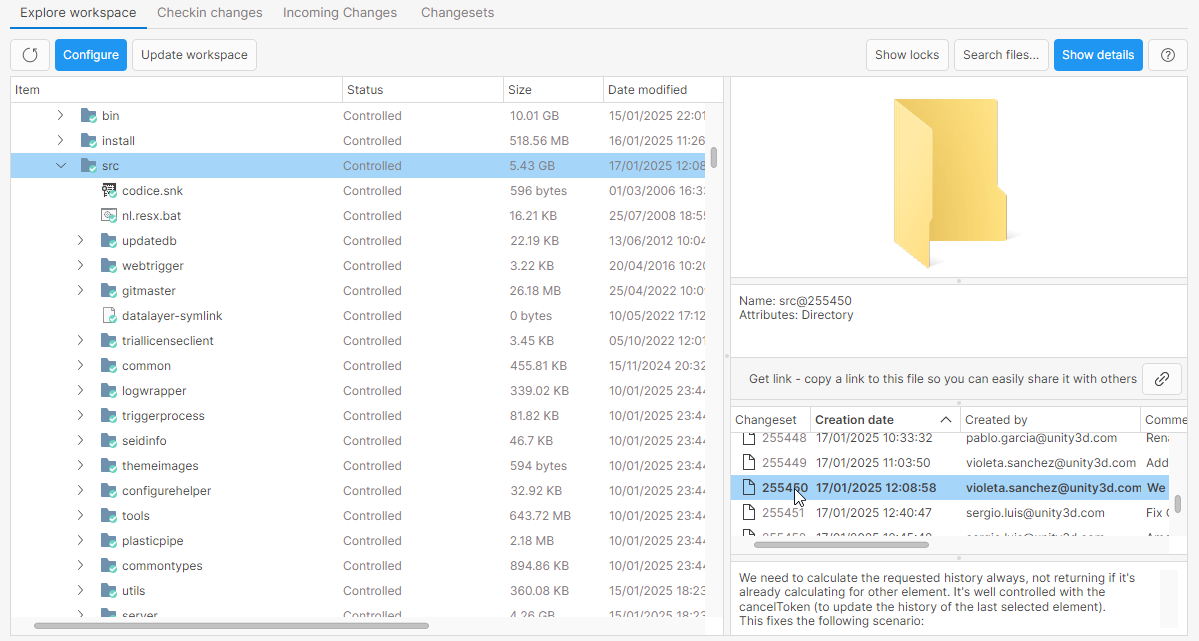
All platforms - Gluon: Folder History Feature Added
We've introduced the ability to view the history of folders in Gluon. This enhancement makes it easier to track changes, access previous versions, and stay informed about updates within directories.
Screenshot
Command-line client
Command-line client: New variables in check-in triggers
Added new environment variables to the check-in triggers:
-
: The repository name where the check-in is run.
PLASTIC_REPOSITORY_NAME -
: The name of the check-in target branch.
PLASTIC_BRANCH_NAME -
: The full name of the check-in target branch.
PLASTIC_FULL_BRANCH_NAME
These variables have been added to all check-in triggers (client & server and before & after). It means: before-clientcheckin, after-clientcheckin, before-checkin and after-checkin.
These variables can be used to easily get the target branch for the current check-in operation inside the trigger code.
Example:
PLASTIC_REPOSITORY_NAME=myrepoPLASTIC_BRANCH_NAME=task001PLASTIC_FULL_BRANCH_NAME=/main/release/task001
Bug
Server - All platforms
Server - All platforms: Fixed login regression when using Active Directory
We fixed an issue introduced back in release 11.0.16.8845 where user login attempts would fail with an "Invalid Credentials" error in certain configurations.
This happened when the server administrator configured the User Display Name Attribute setting in LDAPWorkingMode when working against an Active Directory server.
The system now correctly calculates user details (DN) regardless of this setting, ensuring a correct authentication.
11.0.16.9116
New
All Platforms
All Platforms: Introducing Branch Hiding!
We're excited to announce a long-awaited feature: the ability to hide branches! This new capability lets you focus on what's important by removing unwanted branches from your views.
== How it works? ==
Hiding branches happens at the server level, meaning once a branch is hidden, it disappears from the Branch Explorer, Branches View, and even the Changesets View for all users of the repository. However, the branch and its content still exist in the repository, so you can unhide or use it whenever needed.
== Who can hide or unhide branches? ==
Any user with "change" permission on a specific branch can hide or unhide it. This ensures flexibility while maintaining appropriate access control.
== When to use Branch Hiding? ==
Sometimes, you may ask us to delete branches, but this isn't always possible — e.g., when a branch has been integrated. In these cases, the Desktop GUI will now offer the option to hide those branches instead, helping you keep your workspace organized without permanently removing data.
== A note on visibility ==
While hiding a branch removes it from immediate views, the branch and its content remain intact in the repository. This ensures that no data is lost, and you can retrieve or unhide the branch at any time.
You can hide or unhide branches using either the command line or the Desktop GUI:
== Command Line: How to use Branch Hiding? ==
Use the following commands to hide or unhide branches. For additional details, include the --help option.
cm branch hide /main/task001 /main/task002
cm branch unhide /main/task001 /main/task002
== Desktop GUI: How to use Branch Hiding? ==
A simple and intuitive way to hide/unhide branches is also available directly within the GUI.
From the Branch Explorer or Branches View, there's a new option available to Hide a branch:
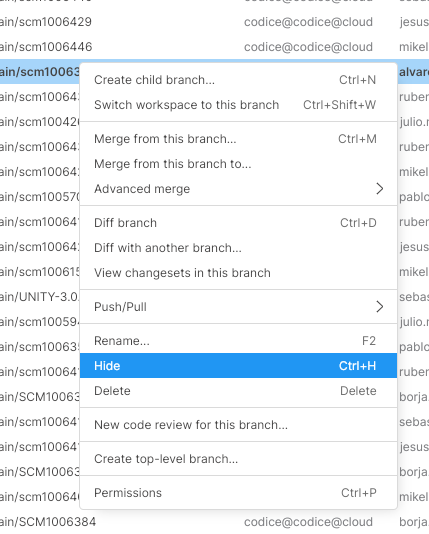
Screenshot
Note you can use "Ctrl-H" as shortcut!
To see all the hidden branches, you can go to the Branches View and click on the new 'Show hidden branches' button:
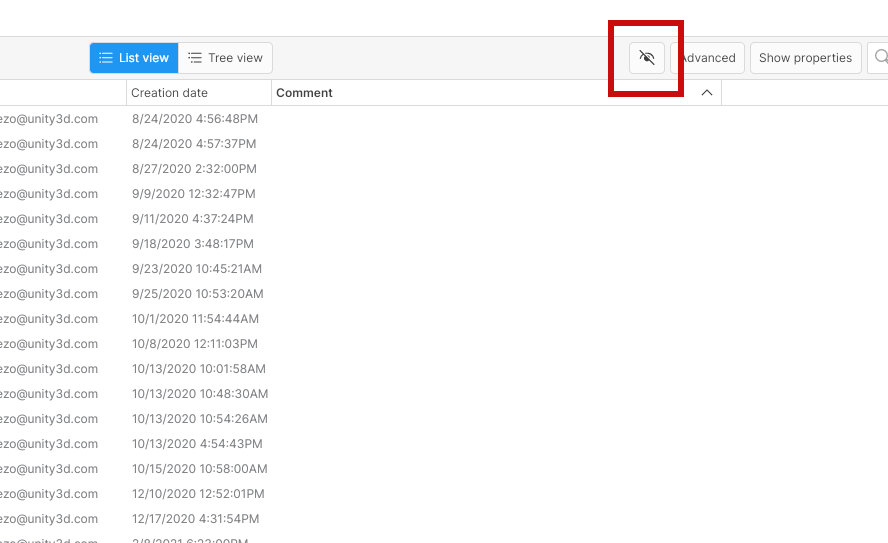
Screenshot
If you use this feature together with display filters, the hidden branches take them into account, making it easier to find the right branch based on your search criteria:
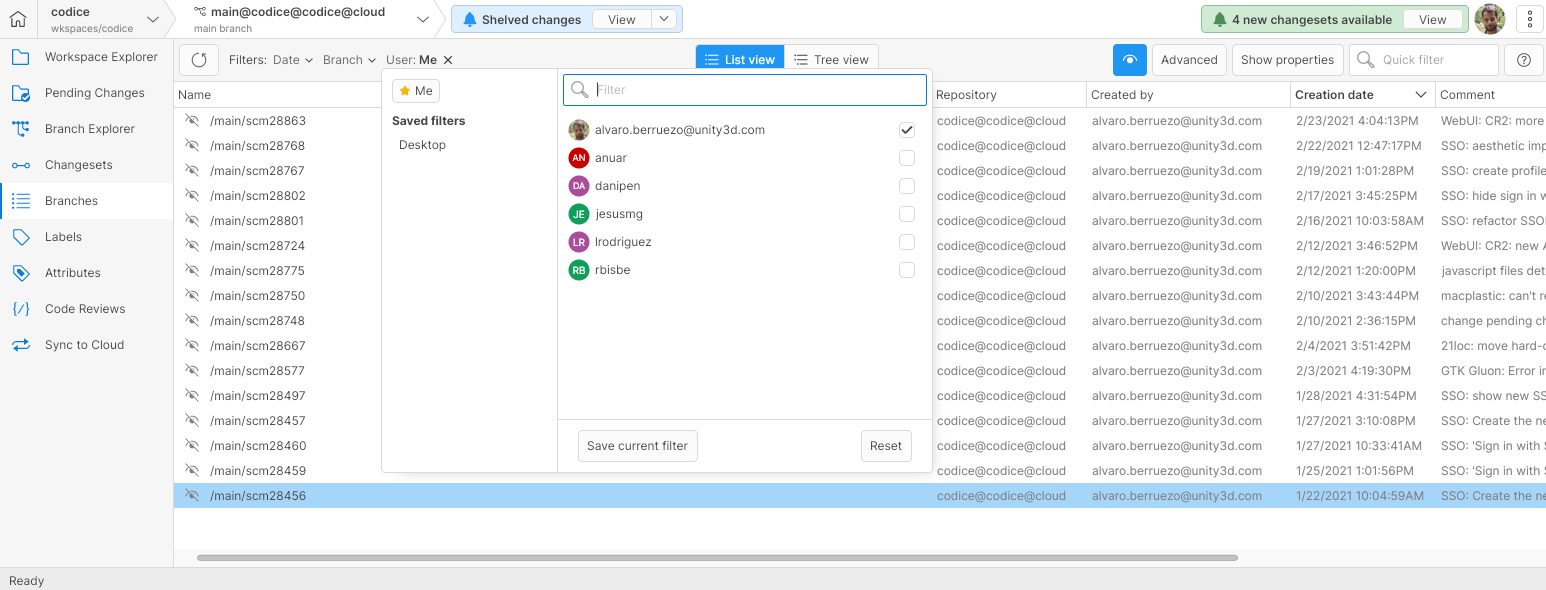
Screenshot
When showing the hidden branches, there's a new option available to Unhide a branch.
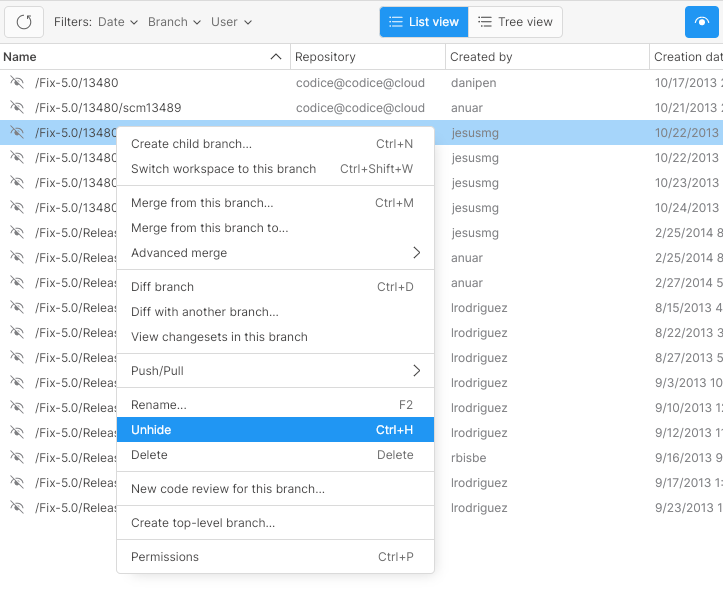
Screenshot
We're confident this feature will make managing your repositories more streamlined and efficient. Try it out and enjoy a clutter-free experience in Plastic SCM!
Windows - Installer Update
Windows - Installer Update: Remove discontinued plugins
We're excited to share an important update! We've optimized the installer by removing discontinued plugins and upgrading older .NET Framework applications to .NET. This change has cut the installer size by more than half, making installation faster and more efficient.
== What’s Changing? ==
We're discontinuing support for the following legacy Unity Version Control (UVCS) plugins:
-
Visual Studio Integration
-
Shell Extension
-
SCC Plugin
-
Microsoft Office Integration
== Why are we making this change? ==
These plugins no longer align with our vision for delivering a streamlined, modern product. By focusing on core improvements, we'll deliver updates faster and enhance the overall user experience.
== What should you do? ==
We strongly recommend upgrading to the latest version of UVCS to enjoy the latest improvements, performance boosts, and bug fixes.
If you rely on the discontinued plugins, you can keep using them by staying on your current UVCS version. However, please note:
-
These plugins will no longer be maintained or supported.
-
Compatibility or functionality issues may arise in the future.
Thank you for your understanding and for being part of our journey to improve Unity Version Control. If you have any questions or concerns, feel free to reach out to our support team—we're here to help!
All platforms
All platforms: GitSync handles the .lfsconfig URL setting
GitSync now takes into account the .lfsconfig configuration file. It looks for the URL setting in order to use the specified URL for the LFS blobs download/upload (instead of always using the default one).
This allows you to import repositories from Git (to UVCS) that used a custom URL for the LFS blobs though the .lfsconfig file.
It only accepts HTTP/HTTPS URLs at the moment:
[lfs]url = https://github.company.com/ruben/lfs-storage.git/info/lfs
Bug
All clients
All clients: Fixed "Unable to cast object" error checking in a file under an Xlink
This error only happened under very specific circumstances:
-
You have a file checked-out under an Xlink with a fs protection set from Linux/macOS.
-
There are new changes only in the root repo, so you need to run an Incoming Changes operation before running the check-in.
-
After that, the check-in operation throws the error: Unable to cast object of type 'Codice.CM.Common.Tree.CheckinItemData' to type 'Codice.Client.Commands.CheckIn.ClientCheckinItemData'.
Now it's fixed.
All platforms - Gluon
All platforms - Gluon: File conflicts not properly detected applying a shelveset
The Gluon shelveset application didn't promote the changes to file conflicts when the file was not modified in the workspace and the workspace revision didn't match with the base revision of the change. This way, it applied directly the shelveset change content to the workspace, losing all the changes introduced later in the file.
Now, it properly detects the file conflict and merges the workspace changes with the shelve changes.