ShowNotification
Show a notification message.
Read time 2 minutesLast updated 4 days ago
Definition
- Type: Method
- Namespace: UnityEditor
- Assembly: UnityEditor.CoreModule
ShowNotification(GUIContent)
Show a notification message.
public void ShowNotification(GUIContent notification)
Parameters
The contents of the notification message.
Remarks
Displays notification message on the window. Unlike message boxes or log messages notification will fade out automatically after some time. Call EditorWindow.RemoveNotification() to remove it immediately.
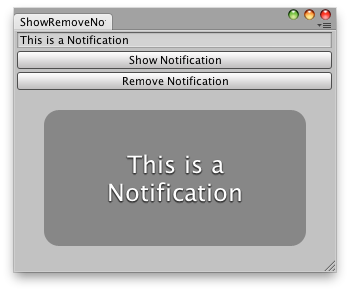
Show a notification in an editor window.
Examples
// Simple example that shows a notification message// that the user has typed.using UnityEditor;using UnityEngine;using UnityEngine.Playables;using UnityEngine.UIElements;public class NotificationWindow : EditorWindow{ string notification = "This is a notification"; [MenuItem("Examples/Notification Window")] public static void ShowExample() { NotificationWindow wnd = GetWindow<NotificationWindow>(); wnd.titleContent = new GUIContent("Notification Window"); } public void CreateGUI() { // Create button to show notification Button showNotification = new Button(); showNotification.text = "Show!"; showNotification.clicked += () => { this.ShowNotification(new GUIContent(notification)); }; rootVisualElement.Add(showNotification); // Create button to remove notification Button removeNotification = new Button(); removeNotification.text = "Remove!"; removeNotification.clicked += () => { this.RemoveNotification(); }; rootVisualElement.Add(removeNotification); }}
ShowNotification(GUIContent, double)
Show a notification message.
public void ShowNotification(GUIContent notification, double fadeoutWait)
Parameters
The contents of the notification message.
The duration the notification is displayed. Measured in seconds.
Remarks
Displays notification message on the window. Unlike message boxes or log messages notification will fade out automatically after some time. Call EditorWindow.RemoveNotification() to remove it immediately.
Show a notification in an editor window.
Examples
// Simple example that shows a notification message// that the user has typed.using UnityEditor;using UnityEngine;using UnityEngine.Playables;using UnityEngine.UIElements;public class NotificationWindow : EditorWindow{ string notification = "This is a notification"; [MenuItem("Examples/Notification Window")] public static void ShowExample() { NotificationWindow wnd = GetWindow<NotificationWindow>(); wnd.titleContent = new GUIContent("Notification Window"); } public void CreateGUI() { // Create button to show notification Button showNotification = new Button(); showNotification.text = "Show!"; showNotification.clicked += () => { this.ShowNotification(new GUIContent(notification)); }; rootVisualElement.Add(showNotification); // Create button to remove notification Button removeNotification = new Button(); removeNotification.text = "Remove!"; removeNotification.clicked += () => { this.RemoveNotification(); }; rootVisualElement.Add(removeNotification); }}