ObjectField
Makes an object field. You can assign objects either by drag and drop objects or by selecting an object using the Object Picker.
Read time 14 minutesLast updated 2 months ago
Definition
- Type: Method
- Namespace: UnityEditor
- Assembly: UnityEditor.CoreModule
ObjectField(Rect, SerializedProperty)
Makes an object field. You can assign objects either by drag and drop objects or by selecting an object using the Object Picker.
public static void ObjectField(Rect position, SerializedProperty property)
Parameters
Rectangle on the screen to use for the field.
The object reference property the field shows.
ObjectField(Rect, SerializedProperty, GUIContent)
Makes an object field. You can assign objects either by drag and drop objects or by selecting an object using the Object Picker.
public static void ObjectField(Rect position, SerializedProperty property, GUIContent label)
Parameters
Rectangle on the screen to use for the field.
The object reference property the field shows.
Optional label to display in front of the field. Pass GUIContent.none to hide the label.
ObjectField(Rect, SerializedProperty, Type)
Makes an object field. You can assign objects either by drag and drop objects or by selecting an object using the Object Picker.
public static void ObjectField(Rect position, SerializedProperty property, Type objType)
Parameters
Rectangle on the screen to use for the field.
The object reference property the field shows.
The type of the objects that can be assigned.
ObjectField(Rect, SerializedProperty, Type, GUIContent)
Makes an object field. You can assign objects either by drag and drop objects or by selecting an object using the Object Picker.
public static void ObjectField(Rect position, SerializedProperty property, Type objType, GUIContent label)
Parameters
Rectangle on the screen to use for the field.
The object reference property the field shows.
The type of the objects that can be assigned.
Optional label to display in front of the field. Pass GUIContent.none to hide the label.
ObjectField(Rect, Object, Type, Object)
Makes an object field. You can assign objects either by drag and drop objects or by selecting an object using the Object Picker.
public static Object ObjectField(Rect position, Object obj, Type objType, Object targetBeingEdited)
Parameters
Returns
Type | Description |
|---|---|
| Object | The object that has been set by the user. |
Remarks
Ensure that the allowSceneObjects parameter is false if the object reference is stored as part of an asset, since assets can't store references to objects in a Scene.
If the ObjectField is part of a custom Editor for a script component, use EditorUtility.IsPersistent() to check if the component is on an asset or a Scene object.
See example in Editor class.
If the ObjectField is part of a custom Editor for a script component, use EditorUtility.IsPersistent() to check if the component is on an asset or a Scene object.
See example in Editor class.
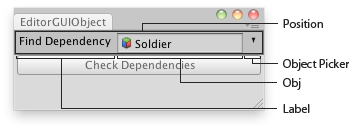
Object field in an Editor Window.
Examples
using UnityEditor;using UnityEngine;using System.Collections;//Select the dependencies of the found GameObjectpublic class EditorGUIObjectField : EditorWindow{ public GameObject obj = null; [MenuItem("Examples/Select Dependencies")] static void Init() { UnityEditor.EditorWindow window = GetWindow(typeof(EditorGUIObjectField)); window.position = new Rect(0, 0, 250, 80); window.Show(); } void OnInspectorUpdate() { Repaint(); } void OnGUI() { obj = (GameObject)EditorGUI.ObjectField(new Rect(3, 3, position.width - 6, 20), "Find Dependency", obj, typeof(GameObject)); if (obj) { if (GUI.Button(new Rect(3, 25, position.width - 6, 20), "Check Dependencies")) { Selection.objects = EditorUtility.CollectDependencies(new GameObject[] {obj}); } else { EditorGUI.LabelField(new Rect(3, 25, position.width - 6, 20), "Missing:", "Select an object first"); } } }}
ObjectField(Rect, Object, Type, bool)
Makes an object field. You can assign objects either by drag and drop objects or by selecting an object using the Object Picker.
public static Object ObjectField(Rect position, Object obj, Type objType, bool allowSceneObjects)
Parameters
Returns
Type | Description |
|---|---|
| Object | The object that has been set by the user. |
Remarks
Ensure that the allowSceneObjects parameter is false if the object reference is stored as part of an asset, since assets can't store references to objects in a Scene.
If the ObjectField is part of a custom Editor for a script component, use EditorUtility.IsPersistent() to check if the component is on an asset or a Scene object.
See example in Editor class.
If the ObjectField is part of a custom Editor for a script component, use EditorUtility.IsPersistent() to check if the component is on an asset or a Scene object.
See example in Editor class.
Object field in an Editor Window.
Examples
using UnityEditor;using UnityEngine;using System.Collections;//Select the dependencies of the found GameObjectpublic class EditorGUIObjectField : EditorWindow{ public GameObject obj = null; [MenuItem("Examples/Select Dependencies")] static void Init() { UnityEditor.EditorWindow window = GetWindow(typeof(EditorGUIObjectField)); window.position = new Rect(0, 0, 250, 80); window.Show(); } void OnInspectorUpdate() { Repaint(); } void OnGUI() { obj = (GameObject)EditorGUI.ObjectField(new Rect(3, 3, position.width - 6, 20), "Find Dependency", obj, typeof(GameObject)); if (obj) { if (GUI.Button(new Rect(3, 25, position.width - 6, 20), "Check Dependencies")) { Selection.objects = EditorUtility.CollectDependencies(new GameObject[] {obj}); } else { EditorGUI.LabelField(new Rect(3, 25, position.width - 6, 20), "Missing:", "Select an object first"); } } }}
ObjectField(Rect, Object, Type)
Makes an object field. You can assign objects either by drag and drop objects or by selecting an object using the Object Picker.
public static Object ObjectField(Rect position, Object obj, Type objType)
Parameters
Returns
Type | Description |
|---|---|
| Object | The object that has been set by the user. |
Remarks
Ensure that the allowSceneObjects parameter is false if the object reference is stored as part of an asset, since assets can't store references to objects in a Scene.
If the ObjectField is part of a custom Editor for a script component, use EditorUtility.IsPersistent() to check if the component is on an asset or a Scene object.
See example in Editor class.
If the ObjectField is part of a custom Editor for a script component, use EditorUtility.IsPersistent() to check if the component is on an asset or a Scene object.
See example in Editor class.
Object field in an Editor Window.
Examples
using UnityEditor;using UnityEngine;using System.Collections;//Select the dependencies of the found GameObjectpublic class EditorGUIObjectField : EditorWindow{ public GameObject obj = null; [MenuItem("Examples/Select Dependencies")] static void Init() { UnityEditor.EditorWindow window = GetWindow(typeof(EditorGUIObjectField)); window.position = new Rect(0, 0, 250, 80); window.Show(); } void OnInspectorUpdate() { Repaint(); } void OnGUI() { obj = (GameObject)EditorGUI.ObjectField(new Rect(3, 3, position.width - 6, 20), "Find Dependency", obj, typeof(GameObject)); if (obj) { if (GUI.Button(new Rect(3, 25, position.width - 6, 20), "Check Dependencies")) { Selection.objects = EditorUtility.CollectDependencies(new GameObject[] {obj}); } else { EditorGUI.LabelField(new Rect(3, 25, position.width - 6, 20), "Missing:", "Select an object first"); } } }}
ObjectField(Rect, string, Object, Type, Object)
Makes an object field. You can assign objects either by drag and drop objects or by selecting an object using the Object Picker.
public static Object ObjectField(Rect position, string label, Object obj, Type objType, Object targetBeingEdited)
Parameters
Returns
Type | Description |
|---|---|
| Object | The object that has been set by the user. |
Remarks
Ensure that the allowSceneObjects parameter is false if the object reference is stored as part of an asset, since assets can't store references to objects in a Scene.
If the ObjectField is part of a custom Editor for a script component, use EditorUtility.IsPersistent() to check if the component is on an asset or a Scene object.
See example in Editor class.
If the ObjectField is part of a custom Editor for a script component, use EditorUtility.IsPersistent() to check if the component is on an asset or a Scene object.
See example in Editor class.
Object field in an Editor Window.
Examples
using UnityEditor;using UnityEngine;using System.Collections;//Select the dependencies of the found GameObjectpublic class EditorGUIObjectField : EditorWindow{ public GameObject obj = null; [MenuItem("Examples/Select Dependencies")] static void Init() { UnityEditor.EditorWindow window = GetWindow(typeof(EditorGUIObjectField)); window.position = new Rect(0, 0, 250, 80); window.Show(); } void OnInspectorUpdate() { Repaint(); } void OnGUI() { obj = (GameObject)EditorGUI.ObjectField(new Rect(3, 3, position.width - 6, 20), "Find Dependency", obj, typeof(GameObject)); if (obj) { if (GUI.Button(new Rect(3, 25, position.width - 6, 20), "Check Dependencies")) { Selection.objects = EditorUtility.CollectDependencies(new GameObject[] {obj}); } else { EditorGUI.LabelField(new Rect(3, 25, position.width - 6, 20), "Missing:", "Select an object first"); } } }}
ObjectField(Rect, string, Object, Type, bool)
Makes an object field. You can assign objects either by drag and drop objects or by selecting an object using the Object Picker.
public static Object ObjectField(Rect position, string label, Object obj, Type objType, bool allowSceneObjects)
Parameters
Returns
Type | Description |
|---|---|
| Object | The object that has been set by the user. |
Remarks
Ensure that the allowSceneObjects parameter is false if the object reference is stored as part of an asset, since assets can't store references to objects in a Scene.
If the ObjectField is part of a custom Editor for a script component, use EditorUtility.IsPersistent() to check if the component is on an asset or a Scene object.
See example in Editor class.
If the ObjectField is part of a custom Editor for a script component, use EditorUtility.IsPersistent() to check if the component is on an asset or a Scene object.
See example in Editor class.
Object field in an Editor Window.
Examples
using UnityEditor;using UnityEngine;using System.Collections;//Select the dependencies of the found GameObjectpublic class EditorGUIObjectField : EditorWindow{ public GameObject obj = null; [MenuItem("Examples/Select Dependencies")] static void Init() { UnityEditor.EditorWindow window = GetWindow(typeof(EditorGUIObjectField)); window.position = new Rect(0, 0, 250, 80); window.Show(); } void OnInspectorUpdate() { Repaint(); } void OnGUI() { obj = (GameObject)EditorGUI.ObjectField(new Rect(3, 3, position.width - 6, 20), "Find Dependency", obj, typeof(GameObject)); if (obj) { if (GUI.Button(new Rect(3, 25, position.width - 6, 20), "Check Dependencies")) { Selection.objects = EditorUtility.CollectDependencies(new GameObject[] {obj}); } else { EditorGUI.LabelField(new Rect(3, 25, position.width - 6, 20), "Missing:", "Select an object first"); } } }}
ObjectField(Rect, string, Object, Type)
Makes an object field. You can assign objects either by drag and drop objects or by selecting an object using the Object Picker.
public static Object ObjectField(Rect position, string label, Object obj, Type objType)
Parameters
Returns
Type | Description |
|---|---|
| Object | The object that has been set by the user. |
Remarks
Ensure that the allowSceneObjects parameter is false if the object reference is stored as part of an asset, since assets can't store references to objects in a Scene.
If the ObjectField is part of a custom Editor for a script component, use EditorUtility.IsPersistent() to check if the component is on an asset or a Scene object.
See example in Editor class.
If the ObjectField is part of a custom Editor for a script component, use EditorUtility.IsPersistent() to check if the component is on an asset or a Scene object.
See example in Editor class.
Object field in an Editor Window.
Examples
using UnityEditor;using UnityEngine;using System.Collections;//Select the dependencies of the found GameObjectpublic class EditorGUIObjectField : EditorWindow{ public GameObject obj = null; [MenuItem("Examples/Select Dependencies")] static void Init() { UnityEditor.EditorWindow window = GetWindow(typeof(EditorGUIObjectField)); window.position = new Rect(0, 0, 250, 80); window.Show(); } void OnInspectorUpdate() { Repaint(); } void OnGUI() { obj = (GameObject)EditorGUI.ObjectField(new Rect(3, 3, position.width - 6, 20), "Find Dependency", obj, typeof(GameObject)); if (obj) { if (GUI.Button(new Rect(3, 25, position.width - 6, 20), "Check Dependencies")) { Selection.objects = EditorUtility.CollectDependencies(new GameObject[] {obj}); } else { EditorGUI.LabelField(new Rect(3, 25, position.width - 6, 20), "Missing:", "Select an object first"); } } }}
ObjectField(Rect, GUIContent, Object, Type, Object)
Makes an object field. You can assign objects either by drag and drop objects or by selecting an object using the Object Picker.
public static Object ObjectField(Rect position, GUIContent label, Object obj, Type objType, Object targetBeingEdited)
Parameters
Rectangle on the screen to use for the field.
Optional label in front of the field.
The object the field shows.
The type of the objects that can be assigned.
Returns
Type | Description |
|---|---|
| Object | The object that has been set by the user. |
Remarks
Ensure that the allowSceneObjects parameter is false if the object reference is stored as part of an asset, since assets can't store references to objects in a Scene.
If the ObjectField is part of a custom Editor for a script component, use EditorUtility.IsPersistent() to check if the component is on an asset or a Scene object.
See example in Editor class.
If the ObjectField is part of a custom Editor for a script component, use EditorUtility.IsPersistent() to check if the component is on an asset or a Scene object.
See example in Editor class.
Object field in an Editor Window.
Examples
using UnityEditor;using UnityEngine;using System.Collections;//Select the dependencies of the found GameObjectpublic class EditorGUIObjectField : EditorWindow{ public GameObject obj = null; [MenuItem("Examples/Select Dependencies")] static void Init() { UnityEditor.EditorWindow window = GetWindow(typeof(EditorGUIObjectField)); window.position = new Rect(0, 0, 250, 80); window.Show(); } void OnInspectorUpdate() { Repaint(); } void OnGUI() { obj = (GameObject)EditorGUI.ObjectField(new Rect(3, 3, position.width - 6, 20), "Find Dependency", obj, typeof(GameObject)); if (obj) { if (GUI.Button(new Rect(3, 25, position.width - 6, 20), "Check Dependencies")) { Selection.objects = EditorUtility.CollectDependencies(new GameObject[] {obj}); } else { EditorGUI.LabelField(new Rect(3, 25, position.width - 6, 20), "Missing:", "Select an object first"); } } }}
ObjectField(Rect, GUIContent, Object, Type, bool)
Makes an object field. You can assign objects either by drag and drop objects or by selecting an object using the Object Picker.
public static Object ObjectField(Rect position, GUIContent label, Object obj, Type objType, bool allowSceneObjects)
Parameters
Rectangle on the screen to use for the field.
Optional label in front of the field.
The object the field shows.
The type of the objects that can be assigned.
Allow assigning Scene objects. See Description for more info.
Returns
Type | Description |
|---|---|
| Object | The object that has been set by the user. |
Remarks
Ensure that the allowSceneObjects parameter is false if the object reference is stored as part of an asset, since assets can't store references to objects in a Scene.
If the ObjectField is part of a custom Editor for a script component, use EditorUtility.IsPersistent() to check if the component is on an asset or a Scene object.
See example in Editor class.
If the ObjectField is part of a custom Editor for a script component, use EditorUtility.IsPersistent() to check if the component is on an asset or a Scene object.
See example in Editor class.
Object field in an Editor Window.
Examples
using UnityEditor;using UnityEngine;using System.Collections;//Select the dependencies of the found GameObjectpublic class EditorGUIObjectField : EditorWindow{ public GameObject obj = null; [MenuItem("Examples/Select Dependencies")] static void Init() { UnityEditor.EditorWindow window = GetWindow(typeof(EditorGUIObjectField)); window.position = new Rect(0, 0, 250, 80); window.Show(); } void OnInspectorUpdate() { Repaint(); } void OnGUI() { obj = (GameObject)EditorGUI.ObjectField(new Rect(3, 3, position.width - 6, 20), "Find Dependency", obj, typeof(GameObject)); if (obj) { if (GUI.Button(new Rect(3, 25, position.width - 6, 20), "Check Dependencies")) { Selection.objects = EditorUtility.CollectDependencies(new GameObject[] {obj}); } else { EditorGUI.LabelField(new Rect(3, 25, position.width - 6, 20), "Missing:", "Select an object first"); } } }}
ObjectField(Rect, GUIContent, Object, Type)
Makes an object field. You can assign objects either by drag and drop objects or by selecting an object using the Object Picker.
public static Object ObjectField(Rect position, GUIContent label, Object obj, Type objType)
Parameters
Rectangle on the screen to use for the field.
Optional label in front of the field.
The object the field shows.
The type of the objects that can be assigned.
Returns
Type | Description |
|---|---|
| Object | The object that has been set by the user. |
Remarks
Ensure that the allowSceneObjects parameter is false if the object reference is stored as part of an asset, since assets can't store references to objects in a Scene.
If the ObjectField is part of a custom Editor for a script component, use EditorUtility.IsPersistent() to check if the component is on an asset or a Scene object.
See example in Editor class.
If the ObjectField is part of a custom Editor for a script component, use EditorUtility.IsPersistent() to check if the component is on an asset or a Scene object.
See example in Editor class.
Object field in an Editor Window.
Examples
using UnityEditor;using UnityEngine;using System.Collections;//Select the dependencies of the found GameObjectpublic class EditorGUIObjectField : EditorWindow{ public GameObject obj = null; [MenuItem("Examples/Select Dependencies")] static void Init() { UnityEditor.EditorWindow window = GetWindow(typeof(EditorGUIObjectField)); window.position = new Rect(0, 0, 250, 80); window.Show(); } void OnInspectorUpdate() { Repaint(); } void OnGUI() { obj = (GameObject)EditorGUI.ObjectField(new Rect(3, 3, position.width - 6, 20), "Find Dependency", obj, typeof(GameObject)); if (obj) { if (GUI.Button(new Rect(3, 25, position.width - 6, 20), "Check Dependencies")) { Selection.objects = EditorUtility.CollectDependencies(new GameObject[] {obj}); } else { EditorGUI.LabelField(new Rect(3, 25, position.width - 6, 20), "Missing:", "Select an object first"); } } }}