Introduction to the Unity web request APIs
Understand the main uses and architecture of Unity's web request APIs.
Read time 2 minutesLast updated 7 days ago
UnityWebRequestCommon uses for the Unity web request system include:
-
Downloading content at runtime, such as:
- AssetBundles from remote servers, when using the regular AssetBundle or Addressables systems.
- Text/JSON for config, localization, and live tuning.
- Images (as Textures) and audio (as AudioClips) for dynamic content.
- Build-time or runtime patching via remote manifests.
-
Uploading data to servers, such as:
- Player metrics.
- Saved game state.
- Error/exception logs and crash reports.
- Custom telemetry and analytics.
-
Integrating with content delivery networks, authentication and security, payment platforms, multiplayer services, diagnostics, and remote build pipelines.
-
Implementing low-traffic, networked multiplayer and turn-based games, such as chess.
Architecture
The Unity web request system consists of two layers:
- A High-Level API (HLAPI) wraps the low-level API and provides a convenient interface for common operations.
- A Low-Level API (LLAPI) provides maximum flexibility for more advanced oeprations.
The system breaks down an HTTP transaction into the following operations:
- Sending data to the server.
- Receiving data from the server.
- HTTP flow control (for example, redirects and error handling).
Each of these operations are managed by a specific type of object, which you can use to customize and control aspects of the transaction:
- An object handles transmission of data to the server.
UploadHandler - A object handles receipt, buffering, and postprocessing of data received from the server.
DownloadHandler - A object manages the other two objects, and also handles HTTP flow control. This object is where custom headers and URLs are defined, and where error and redirect information is stored.
UnityWebRequest
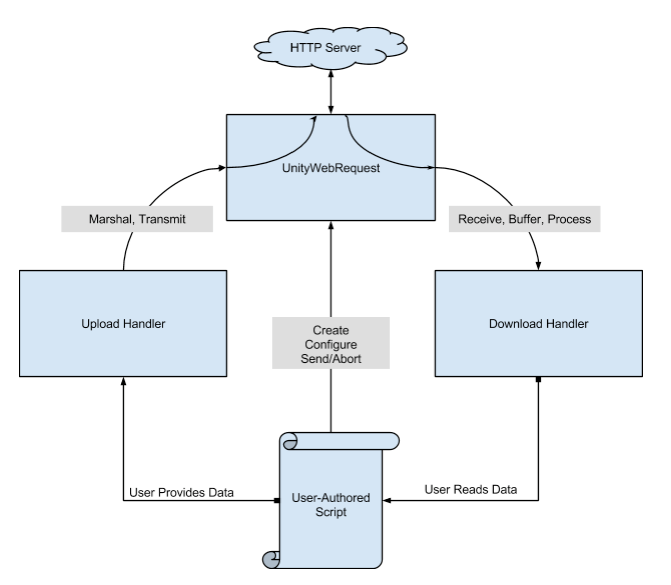
Data sent from user code passes through an UploadHandler and then a UnityWebRequest before reaching the HTTP web server. Data received from the server passes through a UnityWebRequest and then a DownloadHandler before reaching user code.
The following is a high level overview of a HTTP transaction:
-
Create aobject.
UnityWebRequest -
Configure theobject.
UnityWebRequest- Set custom headers.
- Set HTTP verb (such as ,
GET,POST- custom verbs are permitted on all platforms).HEAD - Set URL.
-
(Optional) Create an upload handler and attach it to the web request.
- Provide data to be uploaded.
- Provide an HTTP form to be uploaded.
-
(Optional) Create a download handler and attach it to the web request.
-
Send the web request.
- From a coroutine, you can the result of the
yieldcall to wait for the request to complete.UnityWebRequest.SendRequest
- From a coroutine, you can
-
(Optional) Read received data from the download handler.
-
(Optional) Read error information, HTTP status code, and response headers from theobject.
UnityWebRequest
For a detailed code example that illustrates these steps, refer to the API documentation for .
UploadHandlerRaw