Process to become a Verified Solution
Apply for verification, including compliance guidelines, release readiness criteria, and submission standards.
阅读时间3 分钟最后更新于 4 个月前
The Verified Solutions program exhibits tools and that provide additional functionality for Unity users. These products can, for example, include software development kits (SDKs), plugins, and Editor extensions, among other offerings. The Verified Solutions program is not suitable for third-party products that only provide packs, such as 3D models, audio, and sprites.
services
?
asset
?
To begin the verification process, solutions must fulfill the following requirements.
Compliance with the Asset Store submission guidelines
Before you apply to the Verified Solutions program, familiarize yourself with the Asset Store Submission Guidelines. Use the Asset Store Tools Validator tool to help meet all applicable guidelines.
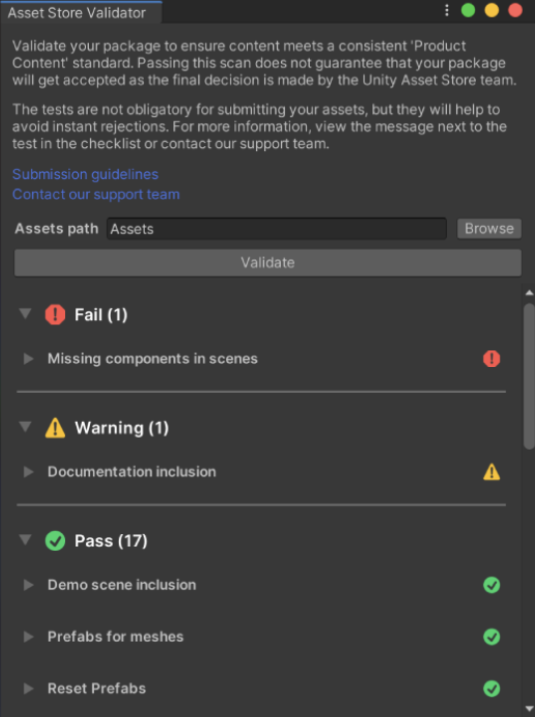
The Asset Store Validator tool scans your solution and provides feedback, which includes detailed errors, warnings, and itemized passed checks.
Release-ready solution
The solution must be release-ready, which means the product meets the following criteria:
- Has passed all internal QA processes.
- Is compliant with Unity's Asset Store guidelines.
- Is in a ready-to-release state.
Ready-to-release includes all aspects of the solution that the users interact with while they use the product. For example, if the solution depends on website interfaces to manage features, such as an administration portal, the associated websites must be ready for consumer use. Any work-in-progress or experimental features must be clearly marked and served separately from core functionality. Users must be able to use all core functionality of the solution independent from experimental features.
Detailed documentation
You must provide detailed and extensive documentation for the solution, which must meet the following requirements:
-
Includes a list of supported Unity streams and platforms.
-
Outlines unsupported graphics pipelines (such as HDRP, URP, or Built-In) and scripting backends (such asorMono
?
).IL2CPP?
-
Documents limitations or unusual setup procedures.
-
Details the integration process and all features available to the user, with examples when possible.
-
Documents all publicly available and intended-for-use APIs with descriptions of passed and returned parameters and all possible exceptions the user might encounter.
-
Provides examples of how to use core APIs.
-
Presents known issues and temporary workarounds.
-
Includes a changelog of product changes.
- A changelog provides insight to customers and helps speed up the Verified Solutions verification process, especially if the solution needs to be re-verified.
- The changelog must include descriptions of newly added and updated features, and any bug fixes that are in each version.
Alongside online documentation, you must bundle the solution with one-page summaries that describe the main features offered by the solution and links to the full online documentation and changelog. You can also provide an offline version of the full documentation and the changelog for the currently installed version of the product.
Clean solution structure
The solution must be in its own folder, which can help customers maintain an organized structure, especially when they use many third-party products. Some solutions might need special folders that require a certain path to work correctly. When a solution requires this file structure, create a folder named after the solution inside the required special folder.
project
?
Clean code
All publicly accessible code must be clean and readable and meet the following requirements:
- Script structure and contents must use a unified style and follow a single naming convention.
- All public-facing APIs must have summaries or comments.
- Titles, descriptions, keywords, and code comments must be in English.
Demos and samples
You must provide demonstrations of features for new users. If possible, bundle the demo with the solution. If doing so significantly increases the size of the product, you can provide the demo separately and refer to it in the documentation.
Some solutions aren't suited to a traditional demo or samples. For example, some Unity Editor extensions might work out of the box without any additional integration. In these cases, you can provide a short video to introduce the product to new users and help speed up the exploration phase of the Verified Solutions verification process.