기술 자료

​
​

Development

User Acquisition

Monetization

산업 분야

Vivox Unreal SDK

Vivox Unreal SDK

이 페이지는 선택한 언어로 제공되지 않습니다.
Vivox
​
​
Vivox Unreal SDK
  • Overview
  • Get started
  • Release notes
  • Developer guide
  • Tutorials
  • Reference
    • Vivox Core Unreal class model overview
    • Vivox Unreal conventions
    • Unreal API Reference Manual
    • Access Token Developer Guide
      • Access token terminology
      • Requests that require access tokens
      • Access token identifiers
      • Access token format
      • Access token examples
      • Generate a token on the client
      • Generate a token on a secure server
      • Key update API
      • Access token error codes
    • Server to Server Web API Reference Guide
    • Third-party license information
  1. Vivox Unreal SDK documentation

Access Token Developer Guide

Navigate access token topics to learn generation, format, and management.
읽는 시간 1분
최근 업데이트: 7달 전

Player access to Vivox resources is controlled through Vivox access tokens. Vivox access tokens contain a payload that defines the privileged operation, are signed by the game server by using a token signing key, and are delivered by the client to the Vivox system when the player wants to perform a privileged operation. A Vivox access token is similar to a JSON Web Token, but instead has an empty access token header.
참고
Vivox Access Tokens are an optional, and advanced, feature for managing player channel access. Unity Authentication tokens are the recommended way to manage players when channel access control isn't required. The Authentication SDK for Unreal Engine is available as part of the Unity Gaming Services SDK plug-in for Unreal Engine.
Access tokens have the following characteristics:
  • You can only use atoken once. After you use a token for the privileged operation, it cannot be reused.
  • Tokens expire even if they are never used. You cannot use a token after the expiration time that is set by the token issuer.
Game clients require access tokens to perform operations in the Vivox system.
  • Game client-generated tokens - use for prototyping or testing purposes
  • Secure game server-generated tokens - use for the secure deployment of a production game and to avoid token errors due to user time settings
Note that before either a client or a server can generate a token, you need a token issuer and a token signing key.
For more information, refer to Where do I find my custom application credentials? in the Unity Support knowledge base.
The following diagram displays a typical interaction between a game client, the game server, and the Vivox system:
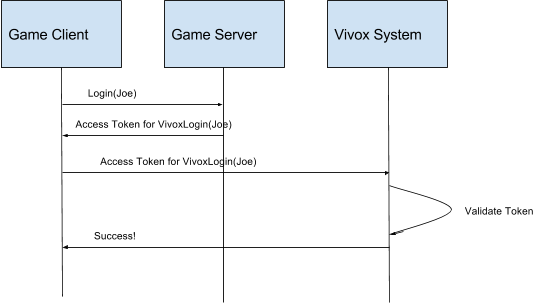
A diagram showing the token flow.

Copyright © 2026 Unity Technologies
법률 정보개인정보 처리방침쿠키Documentation Terms of Use개인 정보 판매 또는 공유 금지개인정보 보호 선택(쿠키 설정)

'Unity', Unity 로고 및 기타 Unity 상표는 미국 및 기타 지역 내 Unity Technologies 또는 그 계열사의 상표 또는 등록상표입니다(자세한 내용은 여기에서 확인하세요). 기타 명칭 또는 브랜드는 해당 소유자의 상표입니다.

일부 페이지는 편의를 위해 기계 번역되었으며 부정확한 내용이 있을 수 있습니다. 정보가 상충되는 경우, 영어 버전을 우선으로 참조하세요.


    이 페이지의 문제 보고