기술 자료

​
​

Development

User Acquisition

Monetization

산업 분야

Unity Studio

Open Unity Studio

Unity Studio

이 페이지는 선택한 언어로 제공되지 않습니다.
​
​
Unity Studio
  • What's new in Unity Studio
  • Introduction to Unity Studio
  • Launch Unity Studio
  • Create your first Unity Studio project
  • Develop with Unity Studio
    • The Unity Studio interface
    • Save your progress
    • GameObjects
    • Assets
    • Materials
    • Scene settings
      • Skybox
      • Scene Settings window reference
    • Logic
    • The UI Creator
    • Animation
    • AI features
  • Collaborate in Unity Studio
  • Export drafts to the Unity Editor
  • Publish and share
  • Troubleshooting Unity Studio issues
  • Report bugs and share feedback
  • Manage your analytics and marketing preferences
  1. Unity Studio
  2. Develop with Unity Studio
  3. Scene settings

Scene Settings window reference

Use the Scene Settings window to change the settings of the skybox.
읽는 시간 1분
최근 업데이트: 6달 전

To access this window, on the Hierarchy panel, select Scene Settings.
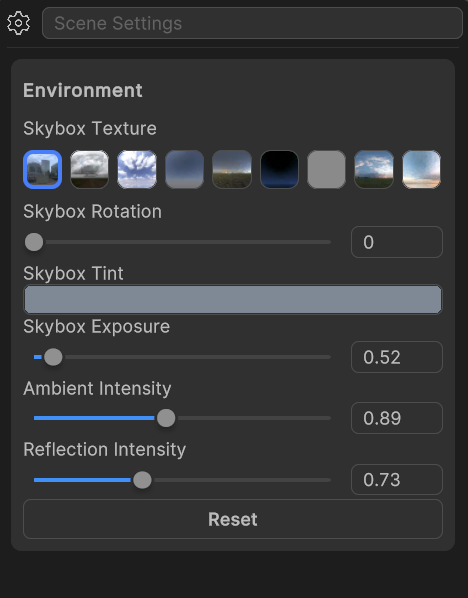
A screenshot of the Scene Settings window and the skybox settings

A screenshot of the Scene Settings window with the skybox settings.

Environment settings

The Environment settings contain the following options for your skybox:

Property

Description

Skybox TextureSelect an image from the group of thumbnails to display on the skybox.
Skybox RotationChange the position of the texture on the skybox.
Skybox TintChange the color of the skybox texture.
Skybox ExposureIncrease or decrease the skybox brightness to match your scene’s lighting.
Ambient IntensityControl how much ambient light the skybox contributes to objects in the scene.
Reflection IntensityAdjust how much the skybox's lighting impacts reflective materials.
ResetChange the skybox settings back to the original settings.

Additional resources

  • Skybox
  • Scene settings

Copyright © 2026 Unity Technologies
법률 정보개인정보 처리방침쿠키Documentation Terms of Use개인 정보 판매 또는 공유 금지개인정보 보호 선택(쿠키 설정)

'Unity', Unity 로고 및 기타 Unity 상표는 미국 및 기타 지역 내 Unity Technologies 또는 그 계열사의 상표 또는 등록상표입니다(자세한 내용은 여기에서 확인하세요). 기타 명칭 또는 브랜드는 해당 소유자의 상표입니다.

일부 페이지는 편의를 위해 기계 번역되었으며 부정확한 내용이 있을 수 있습니다. 정보가 상충되는 경우, 영어 버전을 우선으로 참조하세요.

  • 보고 있는 페이지
    • Environment settings

    • Additional resources


이 페이지의 문제 보고