Documentation

​
​

Development

User Acquisition

Monetization

Industry

Unity Monetization Dashboard

Monetize Manage API

Open Monetization dashboard

Unity Monetization Dashboard

Monetization dashboard
​
​
Monetization finance
  • Introduction to monetization finances
Payment
  • Receiving payment
  • Earnings payouts
  • Payout profiles
    • Complete your payout profile
    • Set up Tipalti two-factor authentication
Revenue transfers
  • Transferring revenue
  • Introduction to User Acquisition Transfers
  • Make a One-time transfer
  • Set up Monthly automatic transfers
Tax information
  • Tax forms
  • Introduction to tax forms
  • Tax form W-8BEN reference
  • Tax form W-8BEN-E reference
  • Tax form W-9 reference
  • Reference for other tax forms
  1. Grow your game
  2. The Unity Monetization Dashboard
  3. Finance

Set up Tipalti two-factor authentication

Set up Tipalti two-factor authentication.
Read time 1 minute
Last updated 2 months ago

To set up your Tipalti TFA for your payout profile, do the following:
  1. Enter a valid phone number that can receive SMS messages
  2. Select Send code.
  3. The specified phone number will receive a 6-digit code via SMS. Enter the code within 60 seconds and select Submit to initialize TFA.
After setting up the TFA, you will be able to proceed to completing your payout profile.
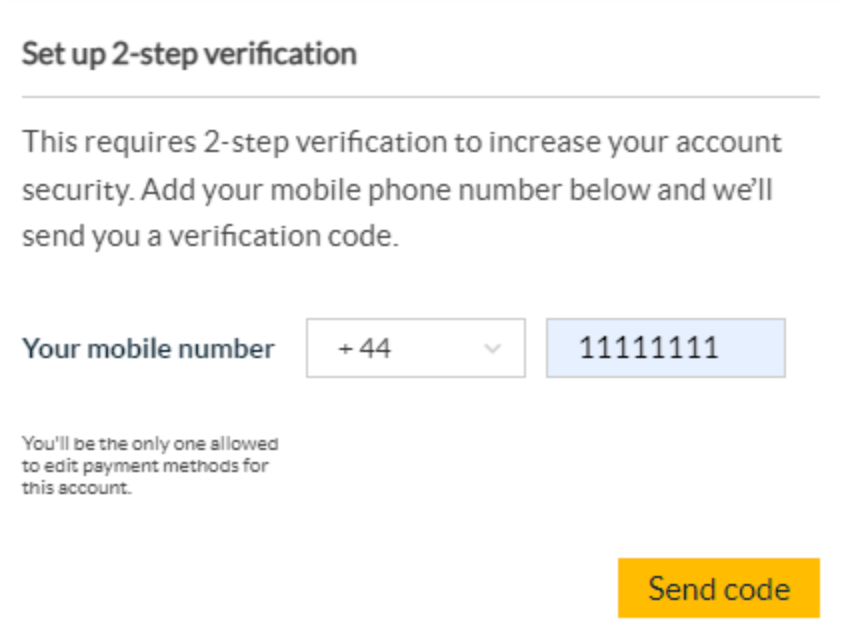
The two-factor authentication setup screen for the payout profile.

Copyright © 2026 Unity Technologies
LegalPrivacy PolicyCookiesDocumentation Terms of UseDo Not Sell or Share My Personal InformationYour Privacy Choices (Cookie Settings)

"Unity", Unity logos, and other Unity trademarks are trademarks or registered trademarks of Unity Technologies or its affiliates in the U.S and elsewhere (more info here). Other names or brands are trademarks of their respective owners.

Some pages are machine-translated for convenience, and may contain inaccuracies. In the event of conflicting information, the English version is authoritative.


    Report a problem with this page