Object base class in Unity
Understand how UnityEngine.Object works as the base class for objects that the Unity Editor can reference, and how its lifetime and null checks differ from regular C# objects.
Read time 4 minutesLast updated 2 days ago
The class acts as a base class for all objects that Unity can reference in the Unity Editor. You can drag classes that inherit from into fields in the Inspector, or select them with the next to an Object field.
UnityEngine.ObjectUnityEngine.ObjectObject Selector
An example of an Object Field in the Inspector window. The Object Selector is the circular icon to the right of the field.
Choose a base class
Rather than inheriting directly from for your own custom classes, it's often better to inherit from a class designed to be more specific to your goal. For example:
Object- Inherit from if you want to write a custom component that you can add to a GameObject, to control what the GameObject does or provide some functionality relating to it.
MonoBehaviour - Inherit from if you want to create custom assets that can store serialized data.
ScriptableObject
Both of these inherit from but provide extra functionality to suit those purposes.
UnityEngine.ObjectThe class provides methods for instantiating and destroying Objects and for finding references to Objects of a specific type. For more information on the API for the Object class, refer to the script reference page for Object.
ObjectSpecial behavior of UnityEngine.Object
UnityEngine.Object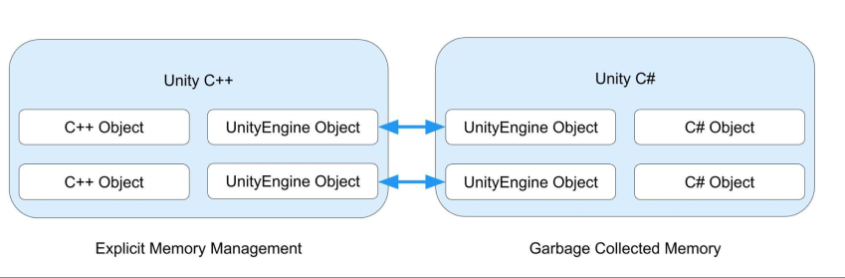
Two containers side-by-side represent the unmanaged and managed layers of the Unity Engine. Each container has its own representation of UnityEngine.Object. Connecting lines between the two layers demonstrate the link between the managed Object instance and its unmanaged counterpart.
Unity doesn't currently support the use of the C# class with instances of . For this reason, you shouldn't use a to reference a loaded asset. Refer to Microsoft's WeakReference documentation for more information on the class.
WeakReferenceUnityEngine.ObjectWeakReferenceWeakReferenceUnity C# and Unity C++ share UnityEngine Objects
When you use a method such as Object.Destroy or Object.DestroyImmediate to destroy an object derived from , Unity destroys (unloads) the C++ counterpart object. You can't destroy the C# object with an explicit call, because the garbage collector manages the memory. Once there are no longer any references to the managed object, the garbage collector collects and destroys it. If your application tries to access the destroyed object again, Unity treats it as null.
UnityEngine.ObjectDestroying an object is different from unloading an asset. When Unity unloads an asset, for example through or , the asset still exists on disk. If your application accesses an unloaded asset through an existing reference, Unity reloads its C++ counterpart from disk for most types. The exceptions are and instances, which Unity doesn't reload through an existing reference.
Resources.UnloadAssetResources.UnloadUnusedAssetsMonoBehaviourScriptableObjectCustom equality operators
For types that inherit from , Unity uses a custom version of the C# equality and inequality operators. This means the null check can evaluate (and conversely can evaluate ) even if technically holds a valid C# object reference. This happens in two cases:
UnityEngine.ObjectmyGameObject == nulltruemyGameObject != nullfalsemyGameObject- The object can be a fake null or placeholder object which Unity uses in the Editor only to populate uninitialized MonoBehaviour fields. These objects store useful debugging information to help you locate the source of these fields if you try to reference them.
- The object can be a managed (C#) object which hasn't yet been garbage collected but that Unity considers null because the unmanaged (C++) counterpart object is destroyed.
Because you can't overload the and operators, they're not compatible with objects that derive from . The operators don't return the same results as the equality and inequality operators when you use them on a destroyed or while the managed object still exists.
???.UnityEngine.ObjectMonoBehaviourScriptableObject