PlayableGraph, its nodes, and output
Describes the PlayableGraph and its main parts including the graph itself, its playable nodes, and playable outputs.
Read time 4 minutesLast updated 22 days ago
Use a to mix, blend, and modify multiple data sources. You can then play the result through a . Each in a PlayableGraph can support animation, audio, or scripts.
PlayableGraphPlayableOutputPlayableThe main parts of a are as follows:
PlayableGraph- The PlayableGraph itself which represents the flow of data and indicates what each node produces and consumes.
- The nodes in the PlayableGraph. Each node is a playable.
- The PlayableOutput which defines the outputs of the PlayableGraph.
PlayableGraph
The PlayableGraph provides a flexible graph with time-based synchronization of multiple data sources. The Unity Engine implements data sources for animation and audio. Use scripting to create custom data sources.
In comparison, the Mecanim animation system includes a state machine graph that you can use to create transitions between animation states. The state machine graph only supports animation.
The PlayableGraph defines a set of playable outputs bound to a GameObject or a component. The PlayableGraph also defines playables and their relationships with each other.

A sample PlayableGraph
The PlayableGraph manages the lifecycle of its playables and their outputs. The following lists a few of the most commonly used PlayableGraph methods:
- Create a new PlayableGraph with the static method.
PlayableGraph.Create() - Play a PlayableGraph with the method.
PlayableGraph.Play() - Stop a playing PlayableGraph with themethod.
PlayableGraph.Stop() - Manually evaluate the state of a PlayableGraph with the method.
PlayableGraph.Evaluate() - Connect two playables together with the method.
PlayableGraph.Connect() - Destroy a PlayableGraph manually with the method. This method automatically destroys all playables and playable outputs created by the PlayableGraph. If you don't destroy a PlayableGraph, Unity issues an error message.
PlayableGraph.Destroy()
For a full list of PlayableGraph methods and for more details, refer to the PlayableGraph struct in the Scripting Reference.
Playable
A playable is a C# struct that implements the interface. A playable is a node that connects to other playables and defines its relationship with other playables.
IPlayable
Core playable types
Unity implements core playable types as C# structs to avoid allocating memory for garbage collection. The class defines a few basic methods and is the base type for all playables. The static class provides most of the methods for interacting with playables.
PlayablePlayableExtensionsBecause is the base type for all playables, you can implicitly cast a playable to it. However, the opposite isn't true. If you explicitly cast a onto an incompatible type, it throws an exception.
PlayablePlayableThe types that inherit from the base type have additional, type specific methods. For example, the type includes specific methods for an animation clip encapsulated in a playable. To access type specific methods, you must cast your playable to the appropriate type.
PlayableAnimationClipPlayableNon-abstract playables have the public static method which creates a playable of the corresponding type. The method always takes a as its first parameter, and that graph owns the new playable. Some playable types might require additional parameters.
Create()Create()PlayableGraphPlayable output
A playable output is a C# struct that implements an . It defines the output of a PlayableGraph.
IPlayableOutput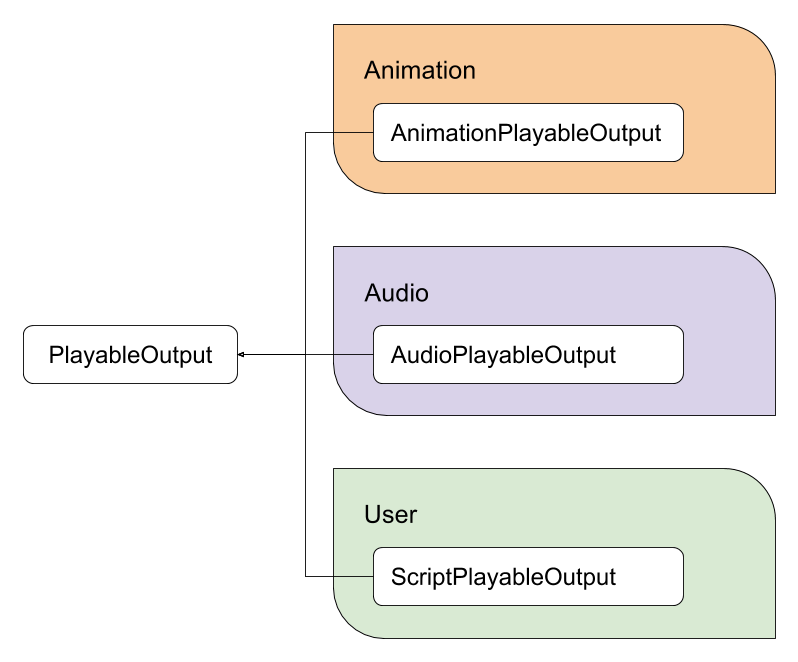
Core playable output types
Unity implements playable output types as C# structs to avoid allocating memory for garbage collection.
The class defines a few basic methods and is the base type for all playable outputs. The static class provides most of the methods for interacting with playable outputs.
PlayableOutputPlayableOutputExtensionsIt's recommended that you link a valid playable output to a playable. If a playable output isn't linked to a playable, the playable output does nothing. To link a playable output to a playable, use the method. The linked playable acts as the root for that specific playable output.
PlayableOutput.SetSourcePlayable()Non-abstract playable outputs have a public static method, , that creates a playable output of the corresponding type. The method always takes a PlayableGraph as its first parameter, and that graph owns the new playable output. Some playable output types might require additional parameters.
Create()Create()