GetCorrespondingObjectFromOriginalSource<TObject>(TObject)
Retrieves the object of origin for the given object.
Read time 2 minutesLast updated a month ago
Definition
- Type: Method
- Namespace: UnityEditor
- Assembly: UnityEditor
GetCorrespondingObjectFromOriginalSource<T>(T)
public static TObject GetCorrespondingObjectFromOriginalSource<TObject>(TObject componentOrGameObject) where TObject : Object
Parameters
Returns
Type | Description |
|---|---|
| T | The corresponding object from the original source or null. |
Remarks
For any object you pass to this method, Unity follows through the chain of corresponding objects until there are no more and returns the last one found.
You can use this method to find the corresponding prefab asset where the input object originated.
For example, in the following diagram, prefab asset A contains a child nested prefab B, which contains a child nested prefab C.
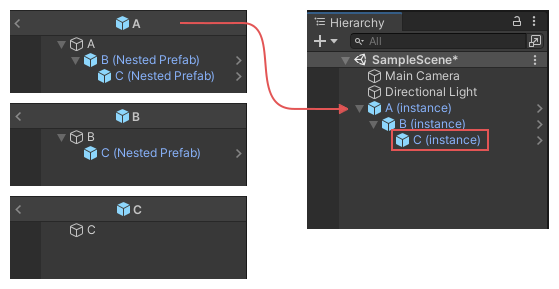
The image shows the nested prefab assets, with B and C nested under A, and C nested under B, and how this structure carries over to their nested instances in the Hierarchy window.
Due to this structure, prefab C exists in both A and B. It was originally added in B, but the last object in the chain is C.
In this example scenario, if you supply the instance of GameObject C as the parameter to , then the method returns the asset C.
componentOrGameObjectGetCorrespondingObjectFromOriginalSourceFor more information about source objects, refer to Introduction to prefabs.
The following example adds a menu item to the Editor, which launches a simple wizard that allows you to test the results of this method.
using UnityEditor;using UnityEngine;public class AssetSourceTestWizard : ScriptableWizard{ public GameObject instance; [MenuItem("Test/Asset Source Test Wizard")] static void CreateWizard() { ScriptableWizard.DisplayWizard<AssetSourceTestWizard>("Asset Source Test Wizard", "Do Test"); } void OnWizardCreate() { var o1 = PrefabUtility.GetCorrespondingObjectFromOriginalSource(instance); Debug.Log("Corresponding object from original source: " + o1.name + " from: " + AssetDatabase.GetAssetPath(o1)); }}
If you need to know the asset where a given GameObject or Component was originally added (not the last object in the chain), use PrefabUtility.GetOriginalSourceRootWhereGameObjectIsAdded.