Unity Production Pipeline architecture
Learn how Unity Production Pipeline connects your tools to Unity data through APIs, compute, and storage services.
阅读时间2 分钟最后更新于 3 个月前
Unity Production Pipeline provides APIs, services, and tools that help you query, modify, version, transform, and deploy Unity content across a wide range of workflows. You no longer need the Unity Editor for every task. Instead, you can use Unity Production Pipeline to let applications, automation systems, AI agents, and external tools interact directly with Unity projects and project data. You also get API-driven access, compute services for transformations and builds, and storage services for source, project, and runtime assets.
Architecture
Unity Production Pipeline consists of four layers that work together to connect your tools with Unity data and services. The application layer includes the Unity Editor, web applications, AI agents, DCC tools, and custom applications. These applications interact with the API layer through REST APIs, the Unity command-line interface (CLI), and local SDKs. The compute layer runs services such as asset transformations, workflow automation, and cloud builds. The storage layer stores source assets, Unity projects, and runtime assets and supports multiple version control backends through a unified abstraction.
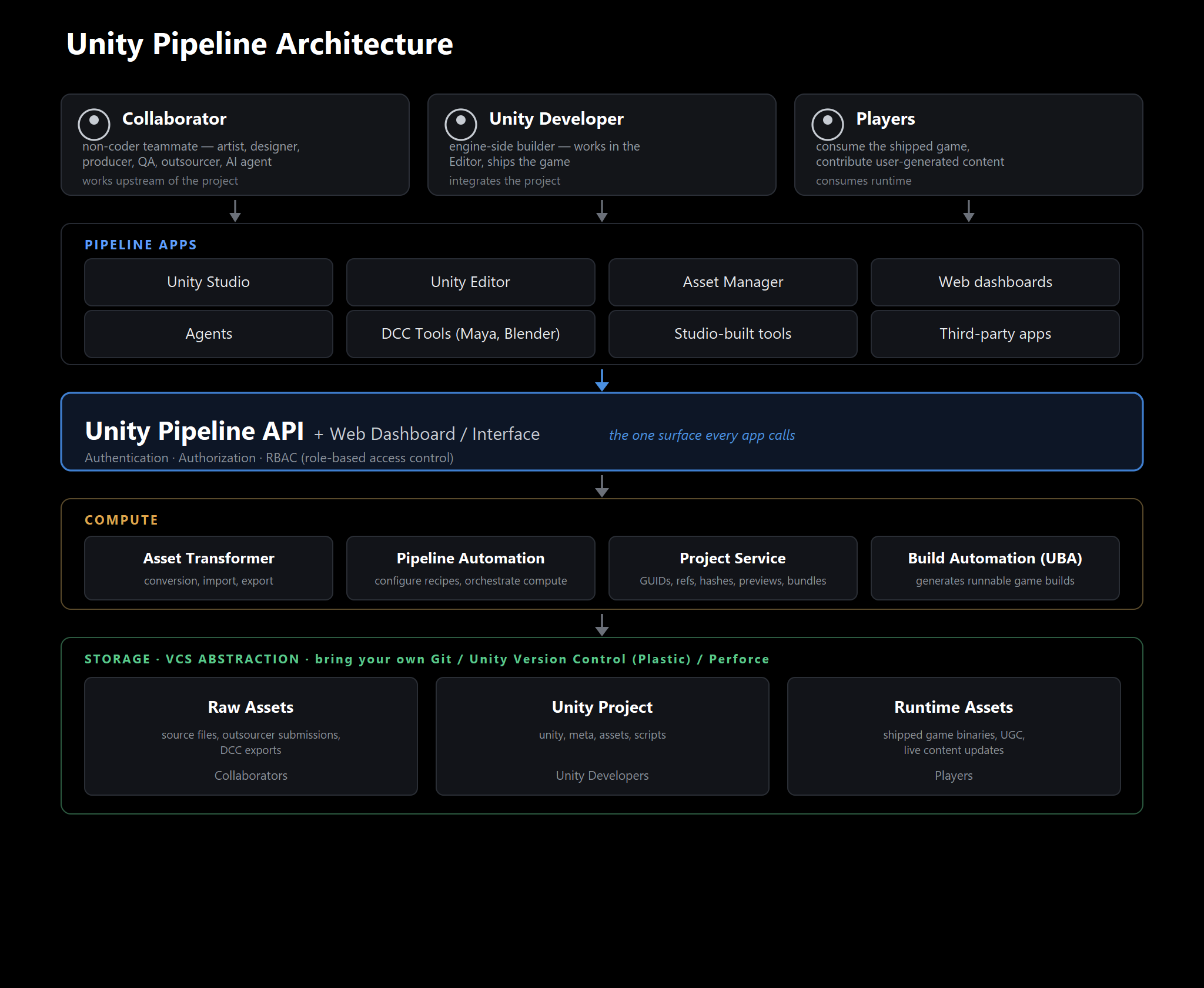
Unity Production Pipeline architecture
Unity Production Pipeline components
The Unity Production Pipeline developer experience has a layered architecture in which REST APIs, services, packages, and the Unity CLI complement each other. Use additional capabilities, such as MCP integrations and agent skills, when building AI-assisted workflows.
Unity Production Pipeline includes products and services that work together to support production workflows:
Unity Production Pipeline component | Use |
|---|---|
| Pipeline APIs | Build integrations, automation workflows, custom applications, or AI-powered tools that interact with Unity services and data through REST APIs. |
| The Unity CLI | Use the Unity command-line interface to manage the Unity Editor and automate workflows from CI/CD systems, developer machines, or AI agents. |
Unity Pipeline package ( | Control the Unity Editor remotely, and execute commands from the Unity CLI to automate builds, testing, and development workflows. |
| Unity Version Control (UVCS) | Store, version, and collaborate on Unity projects. |
| Pipeline Automation | Run scheduled or event-driven workflows across Unity Production Pipeline services. |
| Build Automation | Build and deploy Unity projects in the cloud by using continuous integration (CI) workflows connected to your version control system. |
| Unity Production Pipeline web | Manage Unity projects and assets from a web browser. |
| Deep linking | Open and share specific projects or assets in the Unity Editor or on the web. |