기술 자료

Development

User Acquisition

Monetization

산업 분야

Vivox Core SDK

Vivox Core SDK

이 페이지는 선택한 언어로 제공되지 않습니다.
Vivox
​
​
Vivox Core SDK
  • Overview
  • Before you begin
  • Get started
    • Integration guide
    • Quick start guide
      • Initializing Vivox
      • Logging in
      • Assign a unique username
      • Generate a login access token
      • Submit a login request
      • Joining and leaving channels
      • Generate and submit a join token
      • Process join responses and events
      • Handle join errors
  • Release notes
  • Developer Guide
  • Reference
  • Privacy overview
  1. Vivox Core SDK documentation

Logging in

Overview of the Vivox login workflow
읽는 시간 1분
최근 업데이트: 8달 전

One of the most important steps in utilizing Vivox is to log a user into the Vivox service. Before you begin, decide on when in the game flow the user will be logged in
The following image shows the login workflow:
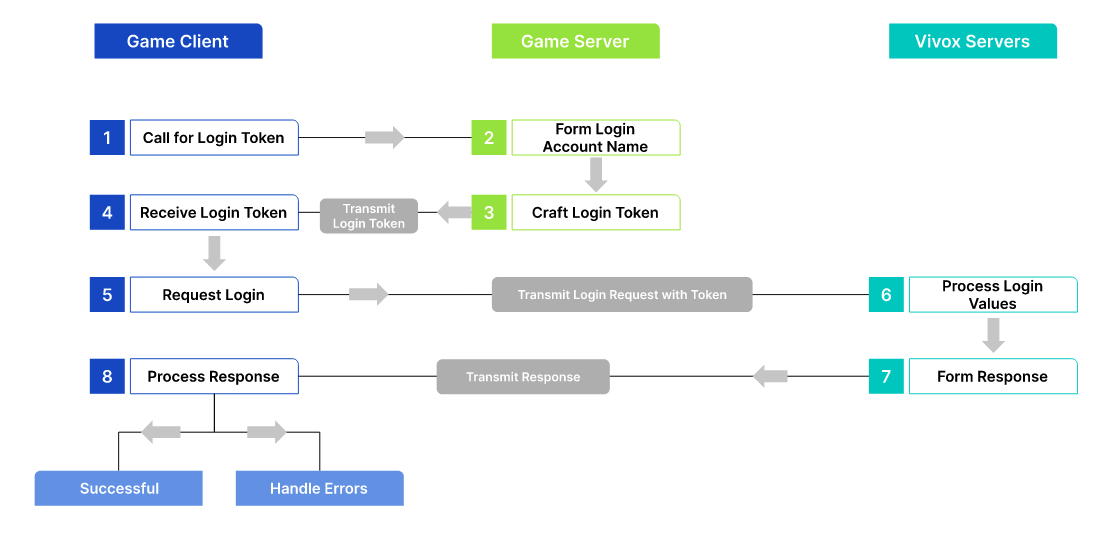
A diagram showing how the Game Client, Game Server, and Vivox Servers interact.
Before you can log a user into the Vivox service you need to:
  1. Assign them a unique username.
  2. Generate a login access token.
  3. Submit a login request.
  4. Prepare for handling responses and events.

Copyright © 2026 Unity Technologies
법률 정보개인정보 처리방침쿠키Documentation Terms of Use개인 정보 판매 또는 공유 금지개인정보 보호 선택(쿠키 설정)

'Unity', Unity 로고 및 기타 Unity 상표는 미국 및 기타 지역 내 Unity Technologies 또는 그 계열사의 상표 또는 등록상표입니다(자세한 내용은 여기에서 확인하세요). 기타 명칭 또는 브랜드는 해당 소유자의 상표입니다.

일부 페이지는 편의를 위해 기계 번역되었으며 부정확한 내용이 있을 수 있습니다. 정보가 상충되는 경우, 영어 버전을 우선으로 참조하세요.


    이 페이지의 문제 보고
    ​
    ​