vpctl architecture and security
Learn about vpctl trust boundaries, three usage modes, and what vpctl touches on the network and in your cluster.
읽는 시간 5분최근 업데이트: 한 달 전
This page helps security teams review vpctl. It describes what vpctl touches on the network, in your cluster, and on disk. It also shows the three usage modes in this guide. Each mode has different trust-boundary implications, you can pick the one that matches your security posture.
What vpctl does (full capability map)
vpctl consists of five phases. Only Render () is required; every other phase is optional and you can replace it with your existing tooling. There's also an optional step that verifies your cluster meets the deployment prerequisites.
release generatecluster checkThe three usage modes that follow are common combinations of these phases.
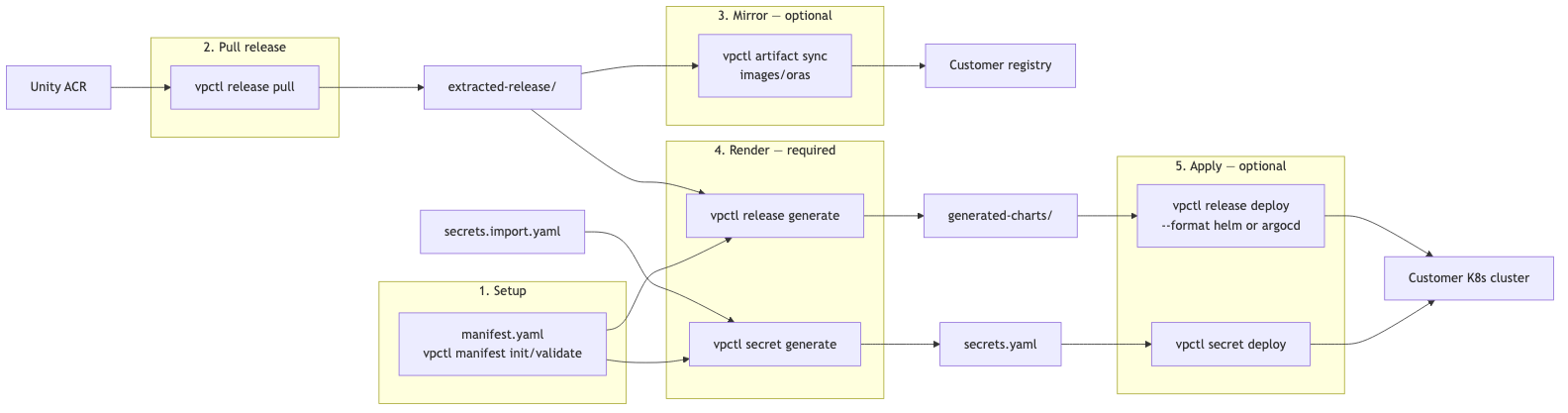
You can run at any point after the Setup phase. It reads from the cluster and doesn't change it, unless you pass , which provisions and deletes temporary test volumes. For more information, refer to vpctl cluster commands.
cluster check--probe-storageThe following are the three usage modes:
- Mode A (recommended) uses every phase.
- Mode B is Mode A with the Mirror phase made explicit for air-gapped deployments.
- Mode C uses only Render and stops there, vpctl hands outputs to the CD tooling you already run.
Mode A — Recommended (CI)
Mode A runs vpctl only in your CI pipeline. It has two variants, depending on what performs the actual workload deployment:
- Mode A (ArgoCD variant) — recommended. vpctl renders ArgoCD app-of-apps charts, commits them to Git, and applies a single bootstrap CRD to the cluster. ArgoCD takes over from there. vpctl never holds a cluster-wide deployment credential — ArgoCD does.
Application - Mode A (Helm variant). vpctl renders Helm charts and runs directly for every chart in the release. There's no Git commit and no ArgoCD. The CI runner needs a cluster-wide kubeconfig, which is a weaker trust boundary. Use this variant only if you don't run ArgoCD.
helm upgrade --install
Mode A (ArgoCD variant)
Your lives in your Git repo, typically the same repo ArgoCD reads from. The pipeline does the following:
manifest.yaml-
Checks out the manifest.
-
Pulls the release from the Unity registry.
-
Optionally mirrors artifacts to your registry.
-
Renders charts and Secret manifests.
-
Commits the rendered charts to Git.
-
Applies a single bootstrap ArgoCDto the cluster.
Application -
ArgoCD pulls charts from your Git repo and deploys workloads.
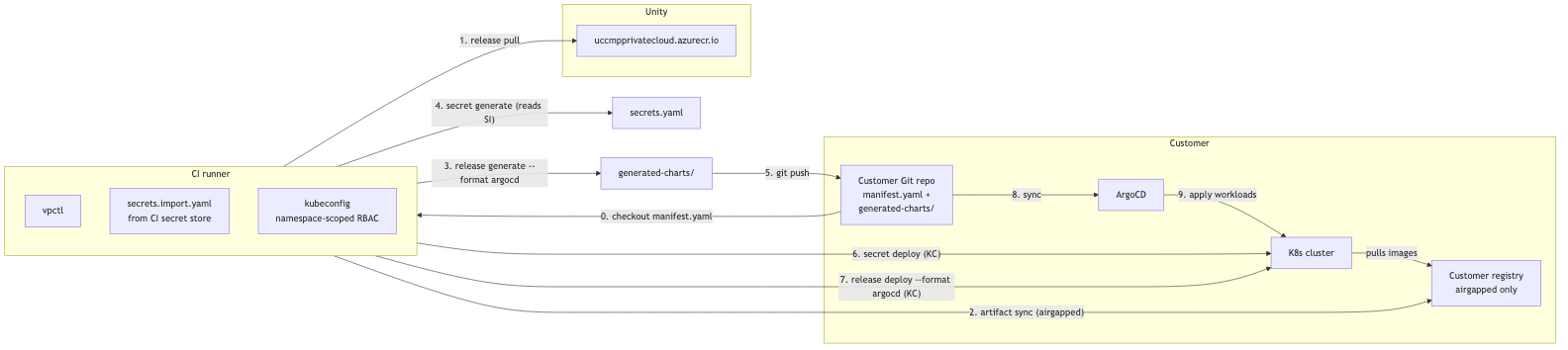
vpctl's cluster touch is limited to two namespace-scoped applies: the Secrets and the bootstrap . All workload deployment after step 7 in the diagram is ArgoCD pulling from Git. ArgoCD holds the cluster-wide deployment credential, not the CI runner.
ApplicationMode A (Helm variant)
If you don't run ArgoCD, vpctl can deploy directly with Helm. Steps 5, 8, and 9 in the diagram from the ArgoCD variant don't apply because there's no Git commit and no ArgoCD reconcile. Step 7 becomes , which runs for every chart in the release.
release deploy --format helmhelm upgrade --install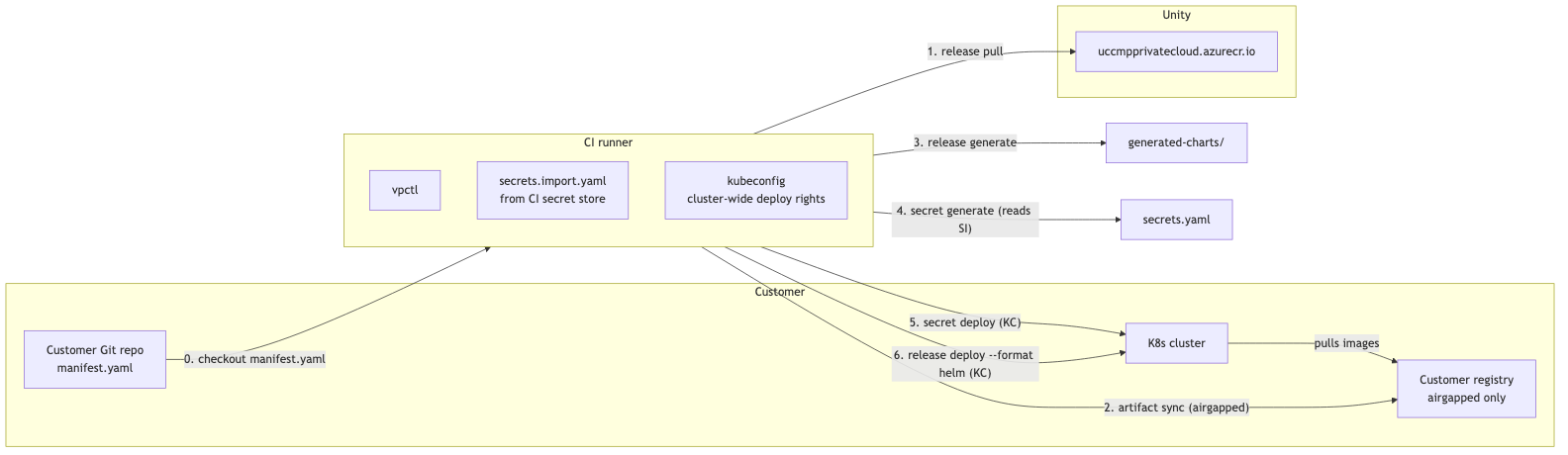
vpctl runs every chart's from CI. The CI runner kubeconfig must have rights to deploy every chart in the release — cluster-wide, not namespace-scoped. ArgoCD is recommended because it keeps that credential out of CI.
helm upgrade --installMode B — Air-gapped mirror
A bastion or staging host, runs vpctl once to mirror Unity release artifacts into your private registry. After the mirror completes, the production cluster, Argo CD, and your Git repository no longer reach the public internet. Image references in the rendered charts are rewritten to your registry at generate time.

Only the bastion contacts the Unity registry, and only during sync time. After the sync completes, the deployment is fully internal. Same choice as Mode A; ArgoCD recommended.
--format helm | argocdMode C — Generate-only (bring your own CD)
vpctl renders Helm chart values and Kubernetes manifests from your and the extracted release package, and then stops. Whatever CD tooling you already use — , , Flux, or custom pipelines can apply and . vpctl never holds a kubeconfig in this mode and never reaches your cluster. This is the minimum viable use of vpctl.
Secretmanifest.yamlhelmkubectlgenerated-charts/secrets.yaml
If you want vpctl to run the Helm deploys itself with , that isn't Mode C — it's the Mode A (Helm variant) flow described previously, because vpctl then needs a kubeconfig with cluster-wide deploy rights. For the deploy flags, refer to the release command reference.
vpctl release deploy --format helmWhat vpctl touches
- Outbound network:
- Unity registry () — required for
uccmpprivatecloud.azurecr.ioand the source side ofrelease pull.artifact sync - Your registry — required for the target side of .
artifact sync - Kubernetes API — used only for ,
secret deploy, andrelease deploy.cluster check - accesses the cluster read-only. It runs
cluster checkagainst nodes, storage classes, namespaces, API services, custom resource definitions, and a cluster-wide pod list. The pod list confirms that the ArgoCD controller is running, and the check is reported as skipped if your credentials don't allow it. The command also attempts to read Karpenter node pools, but only when a node pool has no running node, and it tolerates a failure such as a missing custom resource definition or denied access, because Karpenter is optional. For more information, refer to vpcl cluster command.kubectl get
- Unity registry (
- Credentials read:
- Unity registry credentials, stored under your home directory after .
vpctl configure - Docker credential store () for ORAS and OCI Helm operations.
~/.docker/config.json - kubeconfig (default discovery; override with on
--contextandsecret deploy).release deploy
- Unity registry credentials, stored under your home directory after
- Files written (inside the working directory only):
- — release archive contents.
extracted-release/ - — rendered Helm charts and ArgoCD
generated-charts/manifests.Application - — rendered Kubernetes
secrets.yamlmanifests.Secret - The persist file — created only when you pass to
--persist <path>. You choose the path.secret generate
- What vpctl never does: send telemetry, call back to Unity, auto-update, or modify anything outside the working directory.