レポート /Reporting
Measure campaign performance with metrics such as open rates, application opens, and revenue data.
読み終わるまでの所要時間 1 分最終更新 8ヶ月前
レポートを使用して、Push Notifications のパフォーマンスを確認します。Push Notification の特定の情報を表示するには、Application Opens (アプリケーションを開く操作) や Purchases (購入) などから指標を選択します。送信日付からの期間 (24 時間から 30 日まで) を選択します。
レポートを表示するには、Push Notification を選択し、Reporting (レポート) タブを選択します。
使用可能な指標は以下のとおりです。
指標 | 説明 |
|---|---|
| Application Opens (アプリケーションを開く操作) | キャンペーン対象プレイヤーおよび対象外プレイヤー (カレンダー日付単位)。 |
| Open Rate (開封率) | プレイヤーが開封した通知のパーセンテージ (カレンダー日付単位)。 |
| 購入 /Purchases | キャンペーン対象プレイヤーおよび対象外プレイヤーの購入 (カレンダー日付単位)。 |
| ARPDAU /ARPDAU | キャンペーン対象プレイヤーおよび対象外プレイヤーの 1 日のアクティブユーザーあたりの平均収益 (カレンダー日付単位)。 |
| Push Campaign Summary (プッシュキャンペーンサマリー) | 送信試行回数、開封回数、および失敗回数 (カレンダー日付単位)。 |
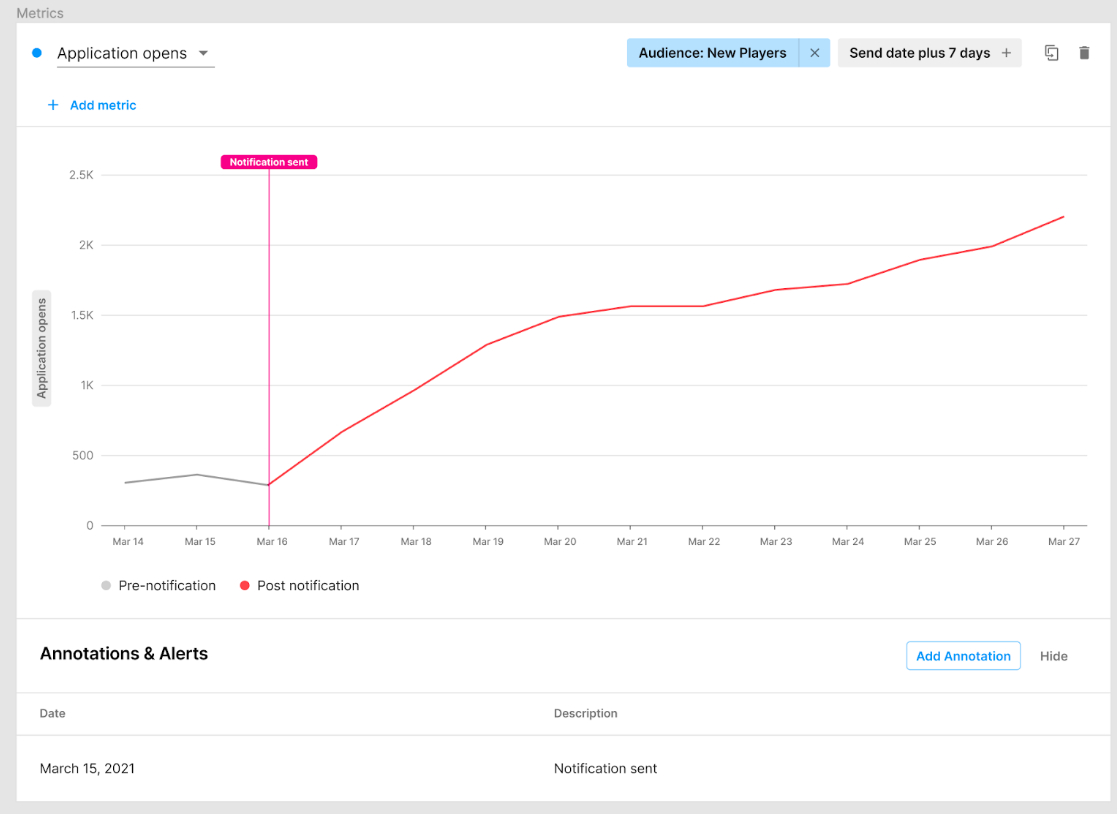
Push Notifications からゲームアプリケーションが開かれた回数。