ShowDetailsOptions
Defines what details are shown in the preview inspector panel for the search view.
Read time 1 minuteLast updated a month ago
Definition
- Type: Enum
- Namespace: UnityEditor.Search
- Assembly: UnityEditor
[Flags]public enum ShowDetailsOptions
Remarks
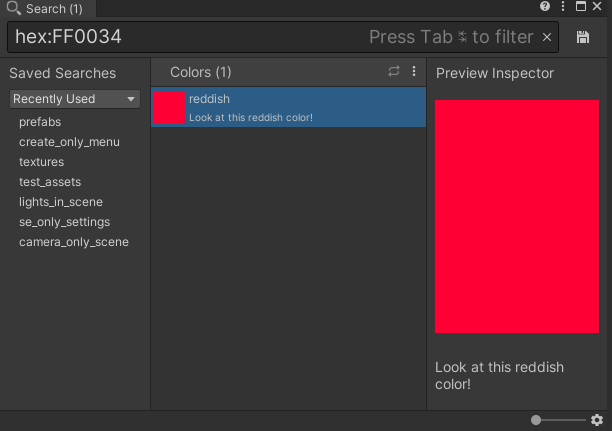
Examples
[SearchItemProvider]internal static SearchProvider CreateProvider(){ return new SearchProvider(id, name) { filterId = "hex:", priority = 99999, // put example provider at a low priority showDetailsOptions = ShowDetailsOptions.Description | ShowDetailsOptions.Preview, fetchItems = (context, items, provider) => FetchItems(context, provider), fetchPreview = (item, context, size, options) => { return CreateTextureFromColor(item.id, (int)size.x, (int)size.y); }, };}
Fields
Value | Description |
|---|---|
| Actions | Shows selected item possible actions. |
| Default | Default set of options used when SearchProvider.showDetails is set to true. |
| DefaultGroup | Indicates that the provider will always be displayed as a group (tab) even if the result set is empty. |
| Description | Show an extended item description. |
| Inspector | Show an embedded inspector for the selected object. |
| InspectorWithoutHeader | Show an embedded inspector for the selected object. Won't show the editor header. |
| ListView | Indicates that this search provider wants to display its items in a list view if possible. |
| None | No options are defined. |
| Preview | Show a large preview. |