Animator Override Controller
Reuse one state machine and swap clips for character-specific animation variants.
Read time 3 minutesLast updated a month ago
Use an Animator Override Controller asset to override the animation clips in an Animator Controller while retaining the structure, parameters, and logic of its state machine. You can use this technique to create many variations of the same Animator Controller.
For example, your game has different characters such as a goblin, ogre, and an elf. Each character uses different animation clips for idling, turning, and jogging but the structure, parameters, and logic of each state machine is the same. In this case, you can create a base Animator Controller for all characters and create an Animator Override Controller asset for each character.
The advantage of creating a base Animator Controller is that you only have to modify one Animator Controller to change the gameplay logic, structure, or parameters for all the characters in your game. Also, if you want to add a new character to your game, you only need to create an additional Animator Override Controller asset.
Set up an Animator Override Controller asset
Before you can use an Animator Override Controller asset, you must first create and define an Animator Controller asset. These steps begin with an already created and defined Animator Controller named .
NPC Animator
The Blend Tree for the NPC Animator Controller
To extend an Animator Controller with an Animator Override Controller, follow these steps:
-
Go to Assets > Create > Animation > Animator Override Controller to create a new Animator Override Controller asset in the Project window. You can also use the Create button in the Project window.
-
In the Project window, select the new Animator Override Controller asset to display its settings in the Inspector window.

An Animator Override Controller with no Animator Controller assigned
-
Rename the Animator Override Controller asset as.
Ogre Animator -
Use the Controller field to choose the Animator Controller asset that you want to override. To do this, perform one of the following actions:
- Select and drag an Animator Controller asset from the Project window into the Controller field.
- Select the Animator Controller picker (⊙) and choose the from the window that displays.
NPC Animator Controller

Drag an Animator Controller asset from the Project window to the Controller field
The Inspector window displays the Animator Override Controller with a two column table. The first column displays the animation clips from the original Animator Controller. The second column displays the overriding clips. By default, each override animation clip is the same as the original animation clip. -
Use the fields in the Override column to choose an override animation clip for each original animation clip. For example, the original animation clips in thecontroller are overridden with Ogre versions.
NPC Animator
The Animator Override Controller with Ogre versions of the original animation clips
In your state machine, you can use seconds or normalized time to set the transition exit time. When you use an Animator Override Controller, make sure the transition exit time is in normalized time.When in seconds, the exit time might be ignored if you specify an override clip shorter than the transition exit time. When the exit time uses normalized time, the clip exits according to the ratio defined by your state machine.
Assign an Animator Override Controller asset
To assign an Animator Override Controller asset to a GameObject, follow these steps:
-
In the Hierarchy window, select the GameObject that will use the Animator Override Controller.
-
In the Inspector window, locate the Animator Controller component associated with the selected GameObject.
-
In the Animator Controller component, selectas its Animator Controller.
Ogre Animator
In this example, the Animator Override Controller asset named uses the same logic, transitions, and blends as the original Animator Controller named . but plays the animation clips specified in the Override Controller asset.
Ogre AnimatorNPC AnimatorOgre Animator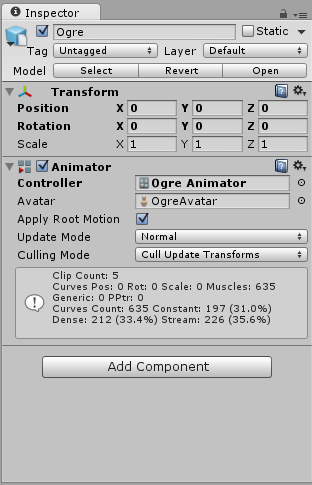
The Ogre character uses an Animator Override Controller asset as its Controller in the Animator Component