Economy Game Overrides with Cloud Code
Learn how to use Game Overrides with Cloud Code to personalize your in-game economy for specific player groups.
Read time 3 minutesLast updated a month ago
With Game Overrides you can personalize your in-game Economy. For example, providing seasonal sales that only exist for a short time, or giving veteran players more rewards in a purchase.
How Game Overrides and config caching work with Economy
Please read Config caching for more information on how to use Config assignment hash with Cloud code and the Economy SDK.
For Economy to know which Overrides to apply for a player, it has to know which Overrides are on the client device. Economy returns as part of the configuration. Passing the to Economy ensures that Economy uses the same configuration that’s on the device and provides a consistent user experience for the player.
configAssignmentHashconfigAssignmentHashEconomy SDK 2.0.0 and above passes to Economy automatically when interacting with the Economy API. To learn how to use Game Overrides in the Economy SDK, see the Economy SDK guide’s Game Overrides.
configAssignmentHashEconomy SDK 1.0.0 and Economy SDK in Cloud Code do not pass to Economy automatically. If Economy does not receive a as a parameter, it has a way to ensure consistency with the client device configuration, but in some unusual cases, this configuration can be inconsistent with what is on the client device.
configAssignmentHashconfigAssignmentHashUsing Economy Game Overrides with Cloud Code
Another way to use Cloud Code to move your game logic away from the client device is to use it to interact with your game economy. When interacting with Economy from Cloud Code, you need to pass to your Cloud Code script and then pass it onto Economy. The SDK has a method of getting on the client device. The full steps are as follows:
configAssignmentHashconfigAssignmentHashCloud Code setup
-
Set up Cloud Code script withas a parameter.
configAssignmentHash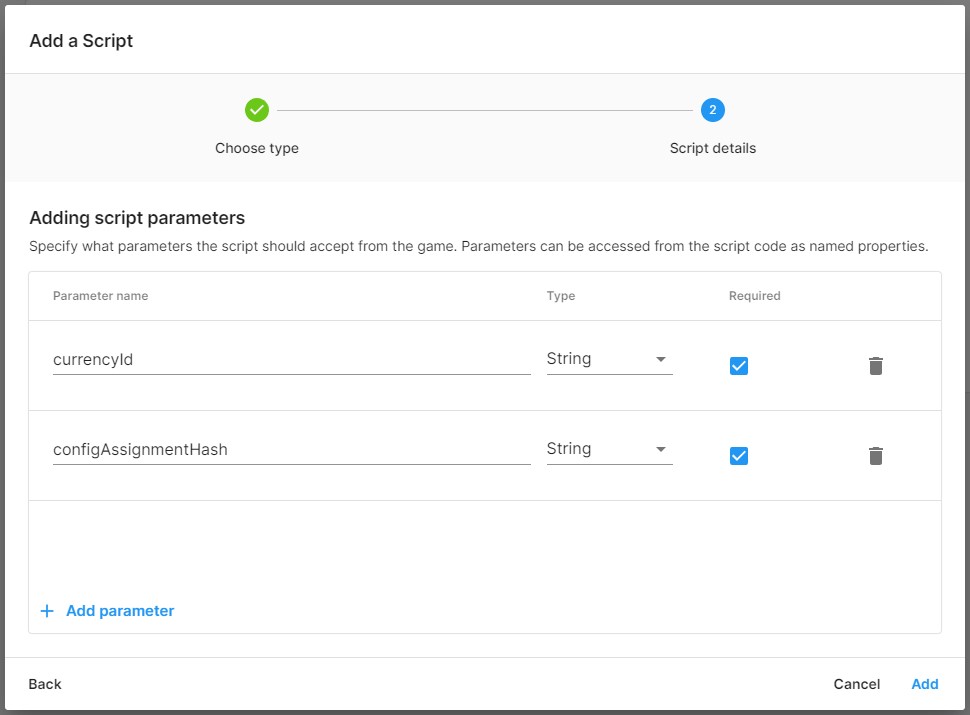
-
Add a script calling Economy in Cloud Code with Economy SDK 2.2 or later./* * -------- Example Cloud Code Script -------- * * Ensure consistency when using Game Overrides with Economy * * -------------------------------------------- */const { CurrenciesApi } = require("@unity-services/economy-2.2");/* * CommonJS wrapper for the script. It receives a single argument, which can be destructured into: * - params: Object containing the parameters provided to the script, accessible as object properties * - context: Object containing the projectId, environmentId, environmentName, playerId and accessToken properties. * - logger: Logging client for the script. Provides debug(), info(), warning() and error() log levels. */module.exports = async ({ params, context, logger }) => { // Log an info message with the parameters provided to the script and the invocation context logger.info("Script parameters: " + JSON.stringify(params)); logger.info("Authenticated within the following context: " + JSON.stringify(context)); const { projectId, playerId, accessToken } = context; const { currencyId, configAssignmentHash } = params; const currencies = new CurrenciesApi({ accessToken }); const increment = await currencies.incrementPlayerCurrencyBalance({ projectId, playerId, currencyId, configAssignmentHash, currencyModifyBalanceRequest: { currencyId, amount: 10 } }); logger.info("Increment data result: " + JSON.stringify(increment.data)); // Return the JSON result to the client return { newBalance: increment.data.balance, };};
Editor setup
-
Get a configuration from Economy SDK 2.0.0 or above.string currencyID = "GOLD";CurrencyDefinition goldCurrencyDefinition = EconomyService.Instance.Configuration.GetCurrency(currencyID);
-
Call:EconomyService.Instance.Configuration.GetConfigAssignmentHash();from the Economy SDK.
-
Passfrom step 2 into Cloud Code.
configAssignmentHashawait CloudCode.CallEndpointAsync<NewBalance>("AddCurrency", new IncrementBalanceParam(currencyId, configAssignmentHash));
Full example
public async Task<int> IncrementCurrency(){ var goldCurrencyId = "GOLD"; EconomyService.Instance.Configuration.GetCurrency(goldCurrencyId); var configAssignemntHash = EconomyService.Instance.Configuration.GetConfigAssignmentHash(); var newBalance = await CallIncrementCurrencyEndpoint(goldCurrencyId, configAssignemntHash); return newBalance;}public async Task<int> CallIncrementCurrencyEndpoint(string currencyId, string configAssignmentHash){ var newBalanceResult = await CloudCode.CallEndpointAsync<NewBalance>( "AddCurrency", new IncrementBalanceParam(currencyId, configAssignmentHash)); return newBalanceResult.newBalance;}public class NewBalance{ public int newBalance;}[Serializable]public class IncrementBalanceParam{ public string currencyId; public string configAssignmentHash; public IncrementBalanceParam(string currencyId, string configAssignmentHash) { this.currencyId = currencyId; this.configAssignmentHash = configAssignmentHash; } public override string ToString() { return $"{{\"currencyId\": @currencyId, \"configAssignmentHash\": @configAssignmentHash }}"; }}