Server-to-server redeem callbacks
Set up server-to-server callbacks to securely validate rewarded ad completions to help prevent fraud and ensure accurate reward distribution.
阅读时间1 分钟最后更新于 2 个月前
Use Server-to-server (S2S) callbacks to detect and prevent cheating when rewarding players.
How it works
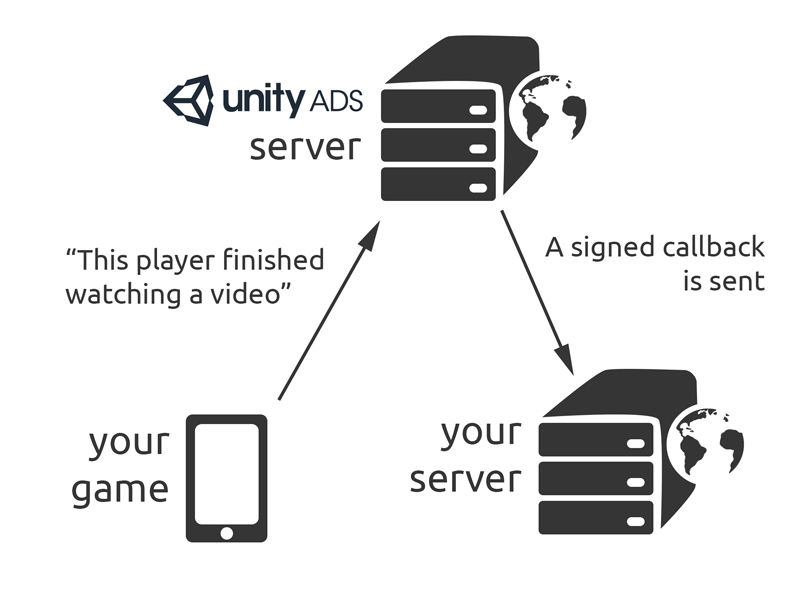
When a player views a video ad in its entirety, the Unity Ads server sends a signed callback to the URL you've specified. This occurs before the actual end of the video, so the game can complete the reward cycle before the player returns to gameplay.
Implementation
To use S2S callbacks, you need to set a Server ID (sid) before showing an ad. S2S redeem callbacks are not available by default. If you want to enable them for your project, contact Unity Ads Support with your Game ID(s) and their respective callback URL(s) in the message. Unity will send you a secret hash used to sign and validate the callbacks.
Examples
To implement a callback in your C# code, set the value to your Server ID, then pass the options object through the method.
ShowOptions.gamerSidShowusing UnityEngine;using System.Collections;using UnityEngine.Advertisements;public class UnityAdsManager : MonoBehaviour{ public string gameId; public string placement = "rewardedVideo" public void ShowAd() { ShowOptions options = new ShowOptions(); // setting the server ID options.gamerSid = "your-side-id"; Advertisement.Show(placementID, options); }}
Callback information
Callback origin
The callback will come from the IP addresses/networks listed in here. The list will be updated on the first of each month. Publishers can safely ignore or block callbacks from anywhere else.
Callback URL format
The request is an HTTP/1.1 request to a URL of the following format:
GET[CALLBACK_URL][SEPARATOR1]sid=[SID][SEPARATOR]oid=[OID][SEPARATOR]hmac=[SIGNATURE]
Refer to the following table for information on query parameters:
Parameter | Content |
|---|---|
| The base URL of the callback URL, for example: To configure this, contact Unity Ads Support |
| If |
| The user ID or any custom data you want to send to your endpoint. |
| |
| The unique Offer ID generated by Unity Ads servers. |
| |
| A HMAC-MD5 hash of a parameter string For example: |
http title="Example callback URL"https://developer.example.com/award.php?productid=1234&sid=1234567890&oid=0987654321&hmac=106ed4300f91145aff6378a355fced73
Sign the Callback URL
The Callback URL request will have a signature attached to the URL parameters. The signature is a HMAC-MD5 hash of a parameter string created by concatenating all the URL parameters in key-value form (except the HMAC) in alphabetical order, separated by commas.
For example, a callback URL with a SID and OID of
https://developer.example.com/award.php?productid=1234&sid=1234567890&oid=0987654321
will have the following parameter string:
oid=0987654321,productid=1234,sid=1234567890
This, hashed with the secret key you'll receive from Support, returns a hash that the award callback will fire to a URL. For example:
https://developer.example.com/award.php?productid=1234&sid=1234567890&oid=0987654321&hmac=106ed4300f91145aff6378a355fced73
Callback response
If the request passes all the checks and user was awarded the item, the URL must reply with a response and include character in the body of the HTTP request. For example:
HTTP/1.1 200 OK1http title="Callback response example"HTTP/1.1 200 OKDate: Wed, 22 Feb 2012 23:59:59 GMTContent-Length: 81
If there's an error (for example, when the OID has already been used, or signature does not match, or any other error where the user does not end up with the promised item), the server should return an HTTP error in the - or the -range with a human readable error. For example:
400500http title="Callback error response example"HTTP/1.1 400 ERRORDate: Wed, 22 Feb 2012 23:59:59 GMTContent-Length: 12Duplicate order
Callbacks in node.js
The following example shows how to verify the signature using node.js + express:
js title="node.js callback example"// NODE.js S2S callback endpoint sample implementation// Unity Adsvar express = require("express");var crypto = require("crypto");var app = express();app.listen(process.env.PORT || 3412);function getHMAC(parameters, secret) { var sortedParameterString = sortParams(parameters); return crypto .createHmac("md5", secret) .update(sortedParameterString) .digest("hex");}function sortParams(parameters) { var params = parameters || {}; return Object.keys(params) .filter((key) => key !== "hmac") .sort() .map((key) => (params[key] === null ? `${key}=` : `${key}=${params[key]}`)) .join(",");}app.get("/", function (req, res) { var sid = req.query.sid; var oid = req.query.oid; var hmac = req.query.hmac; // Save the secret as an environment variable. If none is set, default to xyzKEY var secret = process.env.UNITYADSSECRET || "xyzKEY"; var newHmac = getHMAC(req.query, secret); if (hmac === newHmac) { // Signatures match // Check for duplicate oid here (player already received reward) and return 403 if it exists // If there's no duplicate - give virtual goods to player. Return 500 if it fails. // Save the oid for duplicate checking. Return 500 if it fails. // Callback passed, return 200 and include '1' in the message body res.status(200).send("1"); } else { // no match res.sendStatus(403); }});
Callbacks in PHP
The following example shows how to verify the signature in PHP:
php title="PHP callback example"<?phpfunction generate_hash($params, $secret) { ksort($params); // All parameters are always checked in alphabetical order $s = ''; foreach ($params as $key => $value) { $s .= "$key=$value,"; } $s = substr($s, 0, -1); $hash = hash_hmac('md5', $s, $secret); return $hash;}$hash = $_GET['hmac'];unset($_GET['hmac']);$signature = generate_hash($_GET, 'xyzKEY'); // insert here the secret hash key you received from Unity Ads supporterror_log("req hmac".$hash);error_log("sig hmac".$signature);// check signatureif($hash != $signature) { header('HTTP/1.1 403 Forbidden'); echo "Signature did not match"; exit; }// check duplicate ordersif(check_duplicate_orders($_GET['oid'])) { header('HTTP/1.1 403 Forbidden'); echo "Duplicate order"; exit; }// if not then give the player the item and check that it succeeds.if(!give_item_to_player($_GET['sid'], $_GET['product'])) { header('HTTP/1.1 500 Internal Server Error'); echo "Failed to give item to the player"; exit; }// save the order ID for duplicate checkingif(save_order_number($_GET['oid']) { header('HTTP/1.1 500 Internal Server Error'); echo "Order ID saving failed, user granted item"; exit; }// everything OK, return "1"header('HTTP/1.1 200 OK');echo "1";?>