기술 자료

​
​

Development

User Acquisition

Monetization

산업 분야

Vivox Core SDK

Vivox Core SDK

이 페이지는 선택한 언어로 제공되지 않습니다.
Vivox
​
​
Vivox Core SDK
  • Overview
  • Before you begin
  • Get started
  • Release notes
  • Developer Guide
  • Reference
  • Privacy overview
  1. Vivox Core SDK documentation

Vivox SDK design

Learn about the Vivox Core client software design.
읽는 시간 1분
최근 업데이트: 6달 전

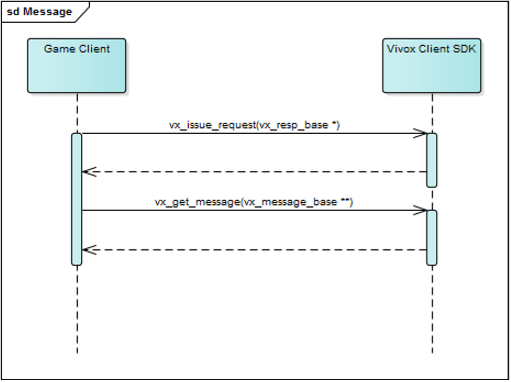
The Vivox SDK interface is based on request, response, and event messages. The game client creates request messages, fills in the fields of those messages, and sends those messages to the Vivox Client SDK by using the
vx_issue_request3()
method.
참고
vx_issue_request3()
is a non-blocking method, and you can safely call it from the game client user interface thread.
When the request completes, or when there is data available for the game client to use, the Vivox SDK makes a response message or an event message available to the game client. The game client gets access to this message by calling the
vx_get_message()
method.
참고
vx_get_message()
is a non-blocking method, and can safely call it from the game client user interface or in the game message processing loop.
After the game client has an even or response, the game client uses the information in those fields to update the game client state.
The following diagram displays how messages are communicated between the game client and the Vivox SDK.
중요
There are dozens of request/response pairs and events that are exposed by the Vivox SDK, although it is rare that the game needs to make use of all of them. For a detailed mapping of individual request and response pairs and events to functional areas, see Request, response, and event mapping to Vivox functionality.

Copyright © 2026 Unity Technologies
법률 정보개인정보 처리방침쿠키Documentation Terms of Use개인 정보 판매 또는 공유 금지개인정보 보호 선택(쿠키 설정)

'Unity', Unity 로고 및 기타 Unity 상표는 미국 및 기타 지역 내 Unity Technologies 또는 그 계열사의 상표 또는 등록상표입니다(자세한 내용은 여기에서 확인하세요). 기타 명칭 또는 브랜드는 해당 소유자의 상표입니다.

일부 페이지는 편의를 위해 기계 번역되었으며 부정확한 내용이 있을 수 있습니다. 정보가 상충되는 경우, 영어 버전을 우선으로 참조하세요.


    이 페이지의 문제 보고