ドキュメント

Development

User Acquisition

Monetization

産業

Vivox Unreal SDK

Vivox Unreal SDK

このページは選択した言語では使用できません。
Vivox
​
​
Vivox Unreal SDK
  • Overview
  • Get started
  • Release notes
  • Developer guide
  • Tutorials
  • Reference
    • Vivox Core Unreal class model overview
    • Vivox Unreal conventions
    • Unreal API Reference Manual
    • Access Token Developer Guide
      • Access token terminology
      • Requests that require access tokens
      • Access token identifiers
      • Access token format
      • Access token examples
      • Generate a token on the client
      • Generate a token on a secure server
      • Key update API
      • Access token error codes
    • Server to Server Web API Reference Guide
    • Third-party license information
  1. Vivox Unreal SDK documentation

Access Token Developer Guide

Navigate access token topics to learn generation, format, and management.
読み終わるまでの所要時間 1 分
最終更新 8ヶ月前

Player access to Vivox resources is controlled through Vivox access tokens. Vivox access tokens contain a payload that defines the privileged operation, are signed by the game server by using a token signing key, and are delivered by the client to the Vivox system when the player wants to perform a privileged operation. A Vivox access token is similar to a JSON Web Token, but instead has an empty access token header.
注
Vivox Access Tokens are an optional, and advanced, feature for managing player channel access. Unity Authentication tokens are the recommended way to manage players when channel access control isn't required. The Authentication SDK for Unreal Engine is available as part of the Unity Gaming Services SDK plug-in for Unreal Engine.
Access tokens have the following characteristics:
  • You can only use atoken once. After you use a token for the privileged operation, it cannot be reused.
  • Tokens expire even if they are never used. You cannot use a token after the expiration time that is set by the token issuer.
Game clients require access tokens to perform operations in the Vivox system.
  • Game client-generated tokens - use for prototyping or testing purposes
  • Secure game server-generated tokens - use for the secure deployment of a production game and to avoid token errors due to user time settings
Note that before either a client or a server can generate a token, you need a token issuer and a token signing key.
For more information, refer to Where do I find my custom application credentials? in the Unity Support knowledge base.
The following diagram displays a typical interaction between a game client, the game server, and the Vivox system:
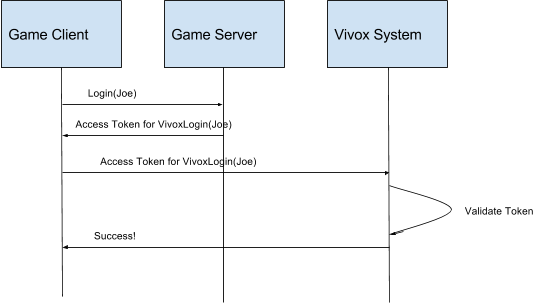
A diagram showing the token flow.

Copyright © 2026 Unity Technologies
法規事項プライバシーポリシークッキーDocumentation Terms of Use私の個人情報を販売または共有しないプライバシーに関する選択 (クッキー設定)

"Unity" の名称、Unity のロゴ、およびその他の Unity の商標は、米国およびその他の国における Unity Technologies またはその関係会社の商標または登録商標です (詳しくはこちら)。その他の名称またはブランドは該当する所有者の商標です。

一部のページは利便性向上のため機械翻訳を使用しており、内容に不正確な表現が含まれる場合があります。内容に齟齬または不一致が生じた場合は、英語版を正本とします。


    このページの問題を報告する
    ​
    ​