7.x release notes for 2019
Review the 2019 release notes for version 7 of Unity Version Control.
Read time 8 minutesLast updated 6 days ago
This page contains the Unity Version Control 7.x releases published in 2019, organized from newest to oldest. For other years, refer to 7.x release notes.
7.0.16.2937
New
Plastic for windows
Plastic for windows: The "confirm ignored filter rules" dialog was too small. Now it's bigger.
Plastic (Windows and Linux) GUIs
Plastic (Windows and Linux) GUIs: Now, the About dialog displays the right Plastic website URLs in the "visit us" and "meet us" information lines, with the "https" protocol.
Bug
Gluon (all platforms)
Gluon (all platforms): A recently added file, still checked-out, displayed 0 bytes in the size column of the Explore workspace tree. Now it's fixed.
Plastic for Windows
Plastic for Windows: After any update operation (e.g. switching to a branch) you're prompted with a dialog that displays the issues reported by operation (if any) so you can "retry update" or "update forced" them. There was a bug that kept the last selected issue in the "Issues" view after you clicked "Update forced" but the "Path" view was cleaned up. Now it's fixed.
Gluon for linux
Gluon for linux: When configuring Gluon in Cloud Edition mode for the first time, the password textbox was not visible. Now it's fixed.
VSPackage
VSPackage: The Plastic Proxy couldn't be configured and used under the VSPackage. Now it's fixed.
7.0.16.2926
New
CLI
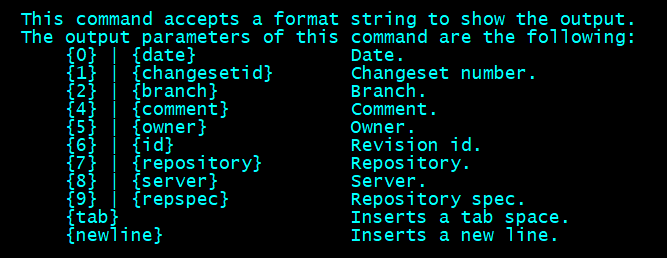
CLI: 'cm hist' command: we added new fields to the output so it is now possible to print the repository name, server, full repository spec (name + server), and then we added format helpers like "tab" and "newline".
-
repository
-
server
-
repspec
-
tab
-
newline
In addition, human-readable parameter names are now accepted. Note that the old parameters based in numbers are still supported:
Screenshot
All GUIs and command line client
All GUIs and command line client: It is now very easy to add ignored files if needed.
So far it was not possible to add an ignored file. You had to un-ignore it, and then add it.
We made two improvements:
-
Now you can select a single ignored file or directory and simply add it.
-
If you add a directory, all the files not explicitly ignored will be added, even if they are in ignored directories.
These changes affect both to the all GUIs and the command line.
A few examples:
Suppose that foo.c is ignored. You can right click on it on the GUI and simply add it. Or you can run cm add foo.c successfully.
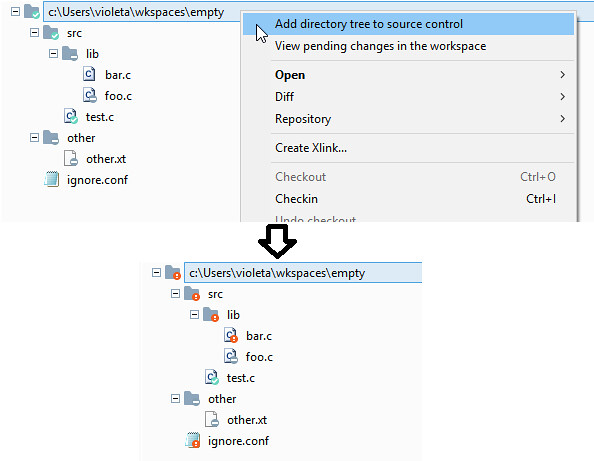
Now, let's consider a more complex scenario. Check the following structure:
src/ src/lib/ - ignored src/lib/bar.c - not ignored src/lib/foo.c - ignored other/ - ignored other/other.txt - ignored
Now suppose you add a recursive add in the root of the workspace ("cm add -R . --addprivateparents" on command line or "add directory tree to source control").
-
Then the non-ignored file "bar.c", and its parent "lib", will be added.
-
The directory "other" will not be added because it does not contain any non-ignored files.
The following figure explains the scenario:
Screenshot
Server
Server: Jet backend. We added detailed logging and additional integrity checks to the Jet backend to ensure its stability and improve traceability.
When the server detects that a Jet file is corrupt, it throws the following error:
"The content of '{filepath}' is not valid. Please contact support@codicesoftware.com for assistance.".
Before, the server tried to use it and failed with an unexpected error like an "End of file".
We also added extra log to monitor the file size and its changes. When every Jet file is used the server logs its size (e.g. "File opened for reading. Length: X bytes. Size: Y bytes.").
{filepath}The server also logs size changes (e.g. "Commit append for . Length X bytes.").
{filepath}We introduced these changes after detecting (and recovering) a corrupt Jet file in one customer after a big power failure in their server.
Bug
CLI
CLI: The cm diff command always displayed "Workspace revision" as symbolic name in both left and right revisions when the diff was launched from the command line using revision specs. Now it's fixed.
WebAdmin
WebAdmin: The migration to Jet failed with the error 'Could not map file' when there was an existing Jet database in the destination database path. Now, we report correctly to the user that the database path must be empty instead of showing a weird error like 'Could not map file'.
Gluon for windows
Gluon for windows: When clicking the button "Scan network" in the preferences dialog, general section, a "missing resource" error was displayed. Now it's fixed.
7.0.16.2918
New
Linux and macOS
Linux and macOS: We changed the workflow of opening workspaces. Now, the switcher window and any opened workspace window will be close when you select a new workspace in the workspaces view and execute the "Open" context action. To keep more than one workspace window opened at the same time, select the "Open in a new window" context action.
Gluon preferences dialog
Gluon now includes a dialog to setup the preferences:
-
Windows GUI: Added a "preferences" button in the bottom right corner.
-
Linux GUI: Added a "preferences" button in the left side bar.
-
macOS GUI: Added a "preferences" menu option in the main application menu. Gluon -> preferences.
Visual Studio Package
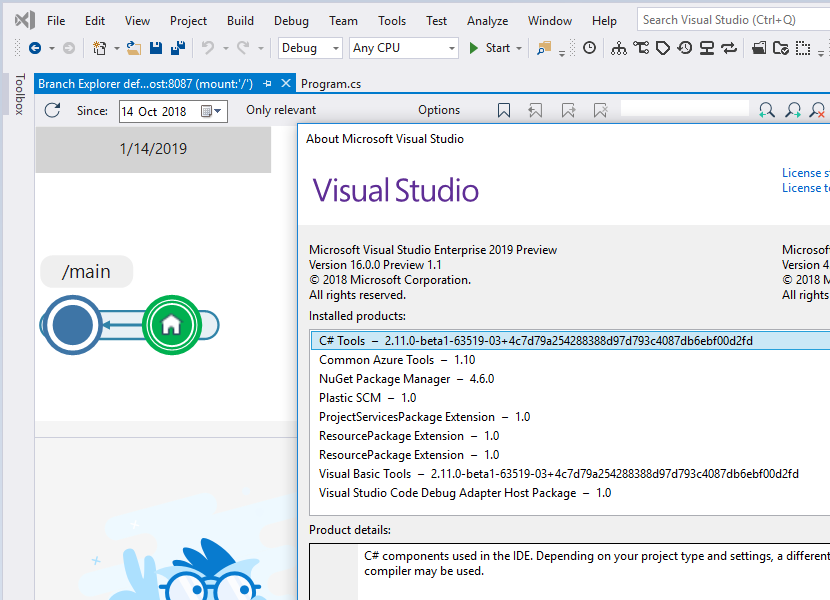
Visual Studio Package: Visual Studio integration is now compatible with Visual Studio 2019 Preview.
Screenshot
Bug
CLI
CLI: The 'clconfigureclient' tool caused some configuration values, present in the client.conf file and not collected by the clconfigureclient tool, to be lost after each execution. Now it's fixed.
Linux and macOS
Linux and macOS: The image preview and image diff features displayed error messages if the image files were corrupted or contained invalid image data. They'll now handle these errors properly and report you that the image format is not supported.
All GUIs and CLI
All GUIs and CLI: Fixed the size check for the objects name like branch or label names according to the database field length: 100 characters.
All GUIs
All GUIs: They failed to diff a changeset that received a merge from a branch without permissions. The same happened running a merge that involved that changeset (or some of its files in the case of Gluon). The error thrown was "You don't have permissions for operation read". Fixed.
7.0.16.2904
New
Command line client
Command line client: Commands which accept the -R or --recursive option will now also accept -r.
We have made the add command a bit more flexible.…
We have made the add command a bit more flexible. Previously it was not possible to add a directory if it contained a controlled item. Now you can run add on a directory containing controlled files and it will add only the private items. It also works recursively.
An example should make this clear. Suppose you have the following in your workspace:
src/client/foo.cs -controlled| |-----/bar.cs -private|--/common/roo.cs -private|--/server/far.cs -controlled |-----/net/goo.cs -private
You can now add all three private files with one command:
cm add src -RThe selected items are about to be added. Please wait ...Item c:/workspace/src/client/bar.cs was correctly addedItem c:/workspace/src/common/ was correctly addedItem c:/workspace/src/common/roo.cs was correctly addedItem c:/workspace/src/server/net/ was correctly addedItem c:/workspace/src/server/net/goo.cs was correctly added
Command line interface
Command line interface: We have add using wildcards much nicer. You can now use wildcards to add files recursively, even if you already have controlled files in the directory tree.
For example, just use "cm add -r *.cs" to recursively add all your .cs files in one go.
Plastic & Gluon GUIs
Plastic & Gluon GUIs: We "bothered" users for years asking to confirm the inclusion of dependencies during the checkin operation when always they wanted them to be included. From now on, we will take care of including the dependencies directly in both, checkin and shelve operations, making life easier for users.
Plastic for Windows
Plastic for Windows: Improved workspace creation usability:
-
After creating a workspace from the repositories view using the "Create workspace for this repository" context menu option, the workspace is automatically opened.
-
After creating a workspace from the workspaces view, now the view scrolls and focus the recently created one.
Bug
Windows GUI
Windows GUI: The root node in the items view was not expanded after refreshing the view the first time the workspace was updated. Now it's fixed.
Windows GUI 2D Version Tree
Windows GUI 2D Version Tree: The "only relevant" button wasn't properly disabling the checkboxes in the "Version tree panel". Fixed.
Linux and macOS GUIs
Linux and macOS GUIs: The value "Check if there are newer changes in the repo" setting in the new Pending Changes Options dialog wasn't loaded correctly. In addition, if the OK button in that dialog was clicked without any changes in settings, the save and refresh operations were launched unnecessarily. Now they are fixed.
Windows Branch Explorer
Windows Branch Explorer: The GUI sometimes displaying errors ('Index out of bounds') that prevented the Branch Explorer from loading. That happened if the user previously opened a 2D Version Tree, selected the "Version tree" option in the Options side panel, closed the GUI and reopened it again. Fixed!
KNOWN ISSUE
KNOWN ISSUE: Due to a minor issue in an internal API, this release won't be friendly-named with a song in the "About" form as usual.