Object
UnityEngine.Object is the base class for all objects the Editor can reference from fields in the Inspector window.
Read time 3 minutesLast updated 2 months ago
The class acts as a base class for all objects that Unity can reference in the Unity Editor. You can drag and drop classes that inherit from into fields in the Inspector, or pick them using the Object Picker next to an Object field.
UnityEngine.ObjectUnityEngine.Object
An example of an Object Field in the Inspector window. The Object Picker is the circular icon to the right of the field.
Rather than inheriting directly from for your own custom classes, it's often better to inherit from a class designed to be more specific to your goal. For example:
Object- Inherit from if you want to write a custom component which you can add to a
MonoBehaviour, to control what theGameObjectdoes or provide some functionality relating to it.GameObject - Inherit from if you want to create custom assets which can store serialized data.
ScriptableObject
Both of these inherit from but provide extra functionality to suit those purposes.
UnityEngine.ObjectThe class provides methods for instantiating and destroying Objects and for finding references to Objects of a specific type. For more information on the API for the Object class, refer to the script reference page for Object.
ObjectSpecial behavior of UnityEngine.Object
UnityEngine.Object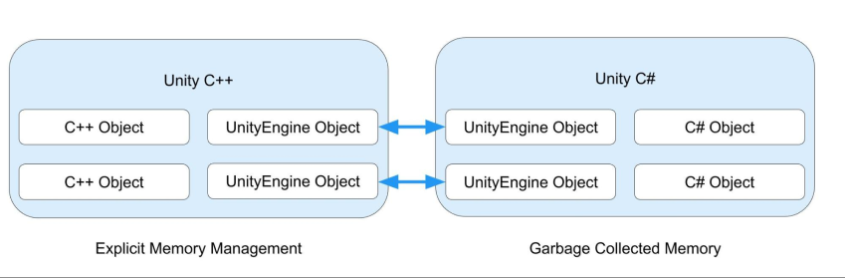
Two containers side-by-side represent the unmanaged and managed layers of the Unity Engine. Each container has its own representation of UnityEngine.Object. Connecting lines between the two layers demonstrate the link between the managed Object instance and its unmanaged counterpart.
Unity doesn't currently support the use of the C# class with instances of . For this reason, you shouldn't use a to reference a loaded asset. Refer to Microsoft's WeakReference documentation for more information on the class.
WeakReferenceUnityEngine.ObjectWeakReferenceWeakReferenceUnity C# and Unity C++ share UnityEngine Objects
When you use a method such as Object.Destroy or Object.DestroyImmediate to destroy an object derived from , Unity destroys (unloads) the C++ counterpart object. You can't destroy the C# object with an explicit call, because the garbage collector manages the memory. Once there are no longer any references to the managed object, the garbage collector collects and destroys it.
UnityEngine.ObjectIf your application tries to access a destroyed again, Unity recreates the native counterpart object for most types. Two exceptions to this recreation behavior are MonoBehaviours and ScriptableObjects: Unity never reloads them once they have been destroyed.
UnityEngine.ObjectCustom equality operators
For types that inherit from UnityEngine.Object, Unity uses a custom version of the C# equality and inequality operators. This means the null check can evaluate (and conversely can evaluate ) even if technically holds a valid C# object reference. This happens in two cases:
myGameObject == nulltruemyGameObject != nullfalsemyGameObject- The object can be a so-called fake null or placeholder object which Unity uses in the Editor only to populate uninitialized MonoBehaviour fields. These objects store useful debugging information to help you locate the source of these fields if you try to reference them.
- The object can be a managed (C#) object which has not yet been garbage collected but which should be considered null because the unmanaged (C++) counterpart object has been destroyed.
Because you can't overload the and operators, they aren't compatible with objects that derive from . The operators don't return the same results as the equality and inequality operators when you use them on a destroyed or while the managed object still exists.
???.UnityEngine.ObjectMonoBehaviourScriptableObject