Tri-planar texturing shader example in the Built-In Render Pipeline
Example of a shader that projects a texture onto an object.
阅读时间1 分钟最后更新于 2 个月前
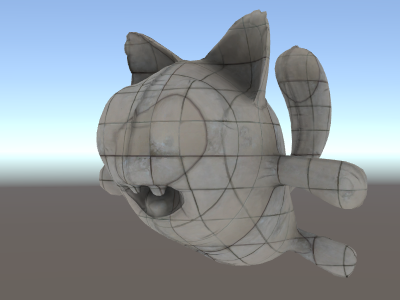
A cat-like character shaded with a grey grid.
For complex or procedural meshes, instead of texturing them using the regular UV coordinates, it is sometimes useful to just "project" texture onto the object from three primary directions. This is called "tri-planar" texturing. The idea is to use surface normal to weight the three texture directions. Here's the shader:
Shader "Unlit/Triplanar"{ Properties { _MainTex ("Texture", 2D) = "white" {} _Tiling ("Tiling", Float) = 1.0 _OcclusionMap("Occlusion", 2D) = "white" {} } SubShader { Pass { HLSLPROGRAM #pragma vertex vert #pragma fragment frag #include "UnityCG.cginc" struct v2f { half3 objNormal : TEXCOORD0; float3 coords : TEXCOORD1; float2 uv : TEXCOORD2; float4 pos : SV_POSITION; }; float _Tiling; v2f vert (float4 pos : POSITION, float3 normal : NORMAL, float2 uv : TEXCOORD0) { v2f o; o.pos = UnityObjectToClipPos(pos); o.coords = pos.xyz * _Tiling; o.objNormal = normal; o.uv = uv; return o; } sampler2D _MainTex; sampler2D _OcclusionMap; half4 frag (v2f i) : SV_Target { // use absolute value of normal as texture weights half3 blend = abs(i.objNormal); // make sure the weights sum up to 1 (divide by sum of x+y+z) blend /= dot(blend,1.0); // read the three texture projections, for x,y,z axes half4 cx = tex2D(_MainTex, i.coords.yz); half4 cy = tex2D(_MainTex, i.coords.xz); half4 cz = tex2D(_MainTex, i.coords.xy); // blend the textures based on weights half4 c = cx * blend.x + cy * blend.y + cz * blend.z; // modulate by regular occlusion map c *= tex2D(_OcclusionMap, i.uv); return c; } ENDHLSL } }}