Viewer
Using the Viewer panel in Asset Transformer Studio
阅读时间1 分钟最后更新于 2 个月前
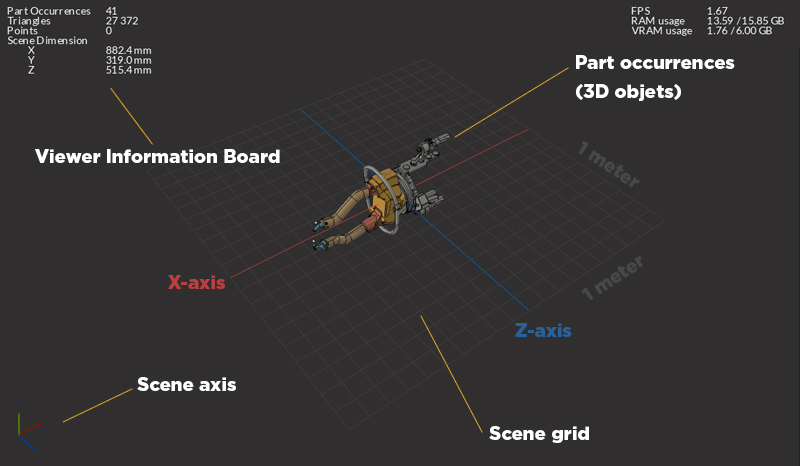
Asset Transformer Studio Viewer panel is where geometries are displayed and can be manipulated (selection, transformation, visibility…):
- Scene axis: Gives information about the scene orientation. Asset Transformer Studio viewer is Y-up oriented, and right-handed. Red is the X-axis, Green is the Y-axis, Blue is the Z-axis ([X,Y,Z] > [R,G,B]).
- Part occurrences (3D objects): are displayed accordingly to the viewer settings defined in the Studio Toolbar, Edit menu and the Preferences (F9)
- Scene grid: brings a visual help to evaluate objects orientation and objects scale. By default, the grid size is 2 meters large.
- Viewer Information Board: displays information regarding the loaded model: occurrences (parts) and triangles (polygons) count. Use the shortcut F3 to quickly show/hide this board.