Trace and manage PSO data collections
Trace a new PSO data collection and manage existing collections.
읽는 시간 3분최근 업데이트: 8일 전
Trace a new PSO data collection and manage existing collections.
PSO tracing means recording which pipeline state objects (PSO) your app uses, and the associated data to be able to prewarm PSOs. Modern graphics APIs compile shaders as part of PSO creation, so they require tracing additional graphics states and the shader variant used.
The GraphicsStateCollection API enables you to trace and prewarm PSOs in your project. Tip: Refer to the GraphicsStateCollection API documentation for more information about the API and for code samples.
GraphicsStateCollectionThe following sections explain how to trace a PSO collection and manage PSO collections in your project.
Requirements for tracing
Tracing with the API is only supported on development builds, not release builds.
GraphicsStateCollectionTrace a new PSO data collection
Trace PSOs in your project and create a GraphicsStateCollection asset (a PSO data collection), which stores information about the combinations of shader variants and graphics state your application uses.
To trace a new PSO data collection, follow these steps:
- In the menu, select Assets > Create, then choose > Graphics State Collection. You can also create a new GraphicsStateCollection in a C# script. This new collection will contain information about traced PSOs from your application or scene.Shader
?
- To begin tracing PSOs into your PSO data collection, call the GraphicsStateCollection.BeginTrace method. You should begin tracing during scene or application startup to avoid missing any PSOs.
- To end tracing, call the GraphicsStateCollection.EndTrace method. End tracing during scene or application end.
Unity can also start tracing PSOs in your application before the first scene loads, and automatically save to an existing or new graphics state collection asset. For more information, refer to Shader loading (Graphics Settings).
Save a collection
Once tracing is complete, save the PSO data collection to disk using GraphicsStateCollection.SaveToFile.
When you save the PSO data collection, the collection saves as a file at the path you provide.
.graphicsstateRetrieve a collection
If you deploy the Player on a different device, you need to manually retrieve the file back to the Editor’s machine. This varies depending on your platform. On Android, use .
.graphicsstateadb pullAlternatively, you can also use GraphicsStateCollection.SendToEditor to save and retrieve the PSO collection using . To use , enable and Autoconnect Profiler in your project’s settings.
PlayerConnectionPlayerConnectionDevelopment Build
?
Build Profile
?
Manage a collection
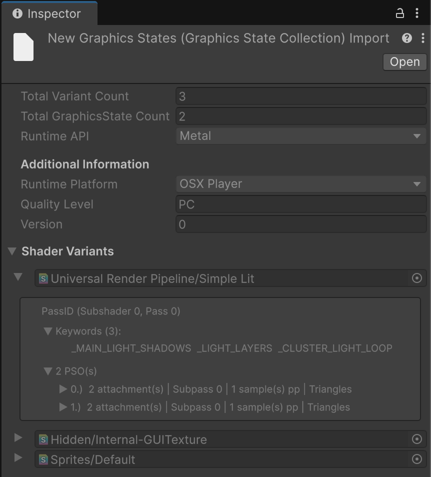
Graphics state collection inspector
When you select a graphics state collection asset in your project, you can view details about its contents in the .
Inspector
?
The API also provides several methods that you can use to manage a collection and the shader variants within it. For more information, refer to the GraphicsStateCollection API documentation.
GraphicsStateCollectionAppend missing PSOs to a collection
If you modify the shaders used by your application or scene, the collection might not contain the new PSO data. To check whether a collection contains a specific shader variant, call ContainsVariant.
To trace missing PSOs, you can use the tracing workflow with the same collection to begin and end a trace around a subset of your scene that uses the missing shader variants. Unity appends any new shader variants encountered during tracing to the existing collection data when it's saved.
You can also enable the traceCacheMisses option when calling a prewarm method to automatically trace any missing PSO data to a separate cacheMissCollection.
To append new PSO data from other collections, call Append on the original collection.