CAD Menu
Asset Transformer Studio CAD menu reference
읽는 시간 1분최근 업데이트: 2달 전
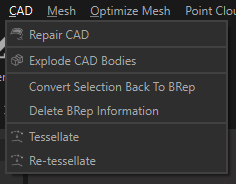
The CAD menu contains the most commonly used CAD data optimization algorithms:
Menu option | Description |
|---|---|
| Repair CAD | Automatically repairs native CAD/BRep geometries: CAD faces assembly and optimization, CAD faces automatic orientation… NOTE: Have a look at this keynote to learn more about the process of repairing and tessellating CAD models |
| Explode CAD Bodies | Explode selected parts by CAD bodies |
| Convert Selection Back To BRep | Converts a selection of parts back to its CAD/BRep representation |
| Delete BRep Information | Deletes all CAD/BRep information on selected parts |
| Tessellate 🌟 | For the selected parts, generates an optimal mesh representation out of their CAD/BRep surfaces. See: About Tessellation NOTE: Asset Transformer Studio's tessellation algorithm has proven to be the most efficient and performant algorithm available in CAD data preparation software! |
| Re-Tessellate | Tessellates again the selected parts with the defined parameters. Models that contain BRep surfaces (CAD models) can be retessellated directly in the scene without having to import the model all over again. Re-Tessellate allows you to fine-tune tessellation quality of entire models or individual parts in the scene. See: Re-Tessellate |