ドキュメント

​
​

Development

User Acquisition

Monetization

産業

Vivox Core SDK

Vivox Core SDK

このページは選択した言語では使用できません。
Vivox
​
​
Vivox Core SDK
  • Overview
  • Before you begin
  • Get started
  • Release notes
  • Developer Guide
  • Reference
  • Privacy overview
  1. Vivox Core SDK documentation

Vivox SDK design

Learn about the Vivox Core client software design.
読み終わるまでの所要時間 1 分
最終更新 6ヶ月前

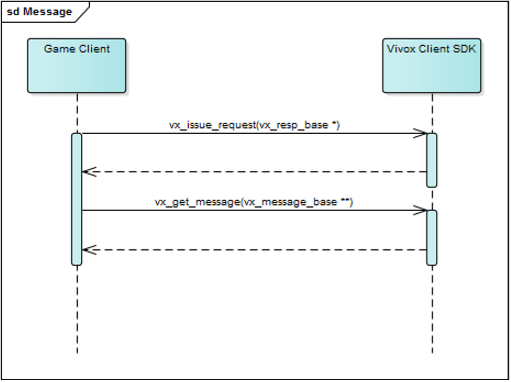
The Vivox SDK interface is based on request, response, and event messages. The game client creates request messages, fills in the fields of those messages, and sends those messages to the Vivox Client SDK by using the
vx_issue_request3()
method.
注
vx_issue_request3()
is a non-blocking method, and you can safely call it from the game client user interface thread.
When the request completes, or when there is data available for the game client to use, the Vivox SDK makes a response message or an event message available to the game client. The game client gets access to this message by calling the
vx_get_message()
method.
注
vx_get_message()
is a non-blocking method, and can safely call it from the game client user interface or in the game message processing loop.
After the game client has an even or response, the game client uses the information in those fields to update the game client state.
The following diagram displays how messages are communicated between the game client and the Vivox SDK.
重要
There are dozens of request/response pairs and events that are exposed by the Vivox SDK, although it is rare that the game needs to make use of all of them. For a detailed mapping of individual request and response pairs and events to functional areas, see Request, response, and event mapping to Vivox functionality.

Copyright © 2026 Unity Technologies
法規事項プライバシーポリシークッキーDocumentation Terms of Use私の個人情報を販売または共有しないプライバシーに関する選択 (クッキー設定)

"Unity" の名称、Unity のロゴ、およびその他の Unity の商標は、米国およびその他の国における Unity Technologies またはその関係会社の商標または登録商標です (詳しくはこちら)。その他の名称またはブランドは該当する所有者の商標です。

一部のページは利便性向上のため機械翻訳を使用しており、内容に不正確な表現が含まれる場合があります。内容に齟齬または不一致が生じた場合は、英語版を正本とします。


    このページの問題を報告する