UVs Menu
Asset Transformer Studio UVs menu reference
読み終わるまでの所要時間 1 分最終更新 2ヶ月前
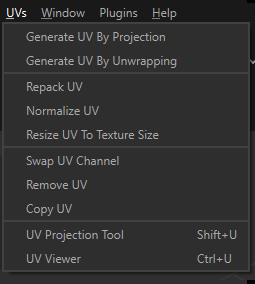
The UV menu contains functions for UVs creation and management.
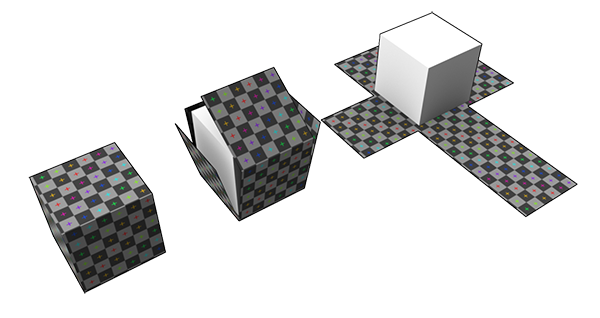
UVs (texture coordinates) is information included in meshes that are used to properly display texture maps over these meshes.
Menu option | Description | Keyboard Shortcut |
|---|---|---|
| Generate UV by Projection | Generates UVs using a projection on the axis-aligned bounding box (AABB) of the selection | |
| Generate UV by Unwrapping | Generates UV fit by automatically cutting and unwrapping meshes | |
| Repack UV | Automatically packs all UV islands in the [0,1] UV space | |
| Normalize UV | Automatically scales UVs to the [0,1] UV space | |
| Resize UV To Texture Size | Resizes the UVs existing on a mesh, so they can be used to display a texture with a specific size in "real world" (scanned textures have a real-world size, expressed in real-size units, not pixels). Give a texture target size (in millimeters), and UVs are automatically resized. This is particularly useful when UVs have been automatically generated (see Continuous UVs from CAD Models). | |
| Swap UV Channel | Inverts UVs from 1 UV channel to another, when multiple UV channels exist on the selected Parts | |
| Remove UV | Cleans UVs from the selected channel on the selected Parts | |
| Copy UV | Copies UVs from 1 UV channel to another, when multiple UV channels exist on the selected Parts | |
| UV Projection Tool | Activates the UV Projection Tool, composed of a 3D manipulator & a control panel to add UVs to a selection of parts, using basic UV projections (Box, Plane, Cylinder…) | SHIFT + U |
| UV Viewer | Opens a UV 2D representation | CTRL + U |