Create Menu
Asset Transformer Studio Create menu reference
読み終わるまでの所要時間 1 分最終更新 2ヶ月前
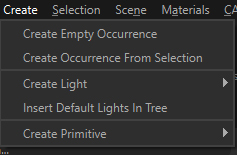
The Create menu contains the actions for adding new objects into the scene:
Menu option | Description | Keyboard Shortcut |
|---|---|---|
| Create Empty Occurrence | Creates one empty occurrence with the name and position defined in the dialog box parameter. NOTE: This functionality works for only one selected occurrence. If multiple occurrences are selected prior to executing the functionality, only one empty occurrence will be created, child to the first occurrence found in the current selection. | |
| Create Occurrence From Selection | Creates a new occurrence parenting the occurrences being selected, in order to group them. | |
| Create Light | Actions to add a new Light (or Light occurrence) of different type to the Product Structure. | |
| Insert Default Lights In Tree | Adds the 4 Default Lights, used to light the scene when the lighting mode using the Environment Map is disabled, in the Product Structure, allowing to tune them. Deleting these 4 Default Lights will recreate them out of the Product Structure with their default values. | |
| Create Primitive | Actions to insert simple primitives in the scene (visible in the Viewer and listed in the Product Structure). |